1. పరిచయం
Thank you for choosing the KAIWEETS KM601 Smart Multimeter. This device is a high-performance, intelligent digital multimeter designed for precise and reliable electrical measurements. It is suitable for a wide range of applications, from household electrical troubleshooting to industrial and automotive diagnostics.
This manual provides essential information for the safe and effective operation, maintenance, and troubleshooting of your KM601 multimeter. Please read it thoroughly before use and keep it for future reference.
1.1 ప్యాకేజీ విషయాలు
- 1 x KAIWEETS KM601 Smart Multimeter
- 1 x Kaiweets Tool Bag
- 1 x Test Lead Set
- 6 x AAA బ్యాటరీలు
- 1 x వినియోగదారు మాన్యువల్

Image: The KAIWEETS KM601 Smart Multimeter shown with its carrying case, test leads, and AAA batteries.
2. భద్రతా సమాచారం
Your safety is paramount. Please observe all safety warnings and operating instructions to ensure safe use and to prevent damage to the device or injury to yourself.
2.1 సాధారణ భద్రతా మార్గదర్శకాలు
- Always ensure the multimeter is in good working condition before use.
- Do not use the multimeter if it appears damaged or if the test leads are compromised.
- Never exceed the maximum input values for any function.
- వాల్యూమ్తో పనిచేసేటప్పుడు జాగ్రత్తగా ఉండండిtag30V AC RMS, 42V పీక్ లేదా 60V DC కంటే ఎక్కువ. ఈ వాల్యూమ్లుtagషాక్ ప్రమాదాన్ని కలిగిస్తుంది.
- Always disconnect power to the circuit under test before connecting or disconnecting test leads.
- Use the correct terminals, function, and range for your measurements.
- Keep fingers behind the finger guards on the test leads during measurements.
- Replace batteries as soon as the low battery indicator appears to ensure accurate readings.
2.2 Certifications and Protection
The KAIWEETS KM601 multimeter is CE and RoHS certified. Its design and manufacturing strictly adhere to safety standards IEC61010-1 CAT III 1000 V, CAT IV 600 V, and pollution level 2. It features two ceramic fuses for anti-burn and overload protection, effectively safeguarding the device. The robust silicone casing provides protection against wear and electrical shocks.
3. ఉత్పత్తి ముగిసిందిview
The KM601 is designed for ease of use and versatility, offering a wide array of measurement capabilities in a compact form factor.
3.1 Multimeter Components

Image: Labeled diagram illustrating the key components and controls of the KM601 Multimeter, including the display, function buttons, input jacks, NCV sensor, and flashlight.
- ప్రదర్శన: Large LED backlit screen for clear readings.
- AUTO FUNC Button: Activates Smart Mode or cycles through automatic functions.
- RANGE బటన్: Toggles between auto-ranging and manual ranging.
- REL HOLD Button: Data Hold function and Relative Value measurement.
- MAX MIN బటన్: Records maximum and minimum values.
- SEL బటన్: Selects different measurement modes within a function (e.g., AC/DC).
- ఇన్పుట్ జాక్స్: Dedicated ports for test leads (COM, VHz%C/T, mA, 10A).
- NCV సెన్సార్: సంపర్కం కాని సంtagఇ డిటెక్షన్.
- ఫ్లాష్లైట్: Integrated light for illuminating dark work areas.
- పవర్ బటన్: పరికరాన్ని ఆన్/ఆఫ్ చేస్తుంది.
3.2 ముఖ్య లక్షణాలు
- స్మార్ట్ మోడ్: Automatically identifies and measures voltage, resistance, and continuity.
- నిజమైన RMS: నాన్-సైనోసోయిడల్ తరంగ రూపాలకు ఖచ్చితమైన రీడింగ్లను అందిస్తుంది.
- 10,000 గణనల ప్రదర్శన: High resolution for precise measurements.
- బహుళ-ఫంక్షనల్: కొలతలు AC/DC వాల్యూమ్tage, AC/DC Current, Resistance, Capacitance, Frequency, Duty Cycle, Diode, Temperature, Continuity, NCV, and Live Wire.
- స్వీయ-పరిధి: Simplifies operation by automatically selecting the correct measurement range.
- Backlit LED Display: Ensures visibility in various lighting conditions.
- డేటా హోల్డ్: డిస్ప్లేపై ప్రస్తుత రీడింగ్ను స్తంభింపజేస్తుంది.
- ఆటో-ఆఫ్: Conserves battery life by automatically powering down after inactivity.

Image: The KM601 Multimeter's display surrounded by icons representing its professional and multifunctional capabilities, such as voltage, నిరోధకత, కెపాసిటెన్స్, ఫ్రీక్వెన్సీ మరియు ఉష్ణోగ్రత కొలతలు.
4. సెటప్
4.1 బ్యాటరీ ఇన్స్టాలేషన్
The KM601 multimeter requires 3 AAA batteries for operation. To install or replace batteries:
- మల్టీమీటర్ ఆపివేయబడిందని నిర్ధారించుకోండి మరియు అన్ని పరీక్ష లీడ్లను డిస్కనెక్ట్ చేయండి.
- పరికరం వెనుక భాగంలో బ్యాటరీ కంపార్ట్మెంట్ కవర్ను గుర్తించండి.
- కవర్ను భద్రపరిచే స్క్రూ(లు)ను విప్పడానికి స్క్రూడ్రైవర్ను ఉపయోగించండి.
- Remove the cover and insert the 3 AAA batteries, observing the correct polarity (+/-) as indicated inside the compartment.
- బ్యాటరీ కంపార్ట్మెంట్ కవర్ను మార్చండి మరియు స్క్రూ(లు) బిగించండి.
4.2 టెస్ట్ లీడ్లను కనెక్ట్ చేయడం
ఎల్లప్పుడూ బ్లాక్ టెస్ట్ లీడ్ను దీనికి కనెక్ట్ చేయండి COM (Common) input jack. Connect the red test lead to the appropriate input jack based on the measurement you intend to perform:
- VHz%C/T: వాల్యూమ్ కోసంtage, Frequency, Duty Cycle, Capacitance, and Temperature measurements.
- mA: For milliampప్రస్తుత కొలతలు.
- 10A: 10 కోసం Ampప్రస్తుత కొలతలు.
గమనిక: Ensure test leads are securely inserted into the correct jacks before taking any measurements.
5. ఆపరేటింగ్ సూచనలు
The KAIWEETS KM601 offers various measurement modes. The Smart Mode simplifies common tasks, while other functions can be selected manually.
5.1 Smart Mode (AUTO FUNC)
Upon powering on, the multimeter defaults to Smart Mode. In this mode, the device automatically detects and measures AC/DC voltage, resistance, and continuity, providing the best resolution without manual range selection.

Image: The KM601 Multimeter's display showing 'AUTO Smart Mode' with icons for voltage, resistance, and continuity, indicating its automatic detection capabilities.
5.2 నిర్దిష్ట కొలత విధులు
To access other functions, press the AUTO FUNC button repeatedly to cycle through available modes, or use the SEL button to switch between AC/DC or other sub-functions.
- వాల్యూమ్tagఇ కొలత (AC/DC):
Connect test leads to COM and VHz%C/T jacks. Select Voltage mode. The multimeter will automatically detect AC or DC voltage in Smart Mode. For manual selection, press SEL. - నిరోధక కొలత:
Connect test leads to COM and VHz%C/T jacks. Select Resistance mode. Ensure the circuit is de-energized before measuring resistance. - కంటిన్యూటీ టెస్ట్:
Connect test leads to COM and VHz%C/T jacks. Select Continuity mode. The multimeter will emit an audible beep if continuity is detected (resistance below a certain threshold). - కెపాసిటెన్స్ కొలత:
Connect test leads to COM and VHz%C/T jacks. Select Capacitance mode. Discharge capacitors before testing. - ఫ్రీక్వెన్సీ కొలత:
Connect test leads to COM and VHz%C/T jacks. Select Frequency mode. - డయోడ్ పరీక్ష:
Connect test leads to COM and VHz%C/T jacks. Select Diode mode. - ఉష్ణోగ్రత కొలత:
Connect the included K-type thermocouple to the VHz%C/T and COM jacks. Select Temperature mode. - NCV (నాన్-కాంటాక్ట్ వాల్యూమ్tage) Detection:
Hold the top of the multimeter near a live wire or outlet. The NCV sensor will detect AC voltage without direct contact, indicated by an audible alarm and visual indicator. - Current Measurement (AC/DC, 10A):
హెచ్చరిక: Ensure the circuit is open before connecting the multimeter in series for current measurement. Connect the black test lead to COM and the red test lead to either the mA or 10A jack, depending on the expected current. Select the appropriate Current mode.
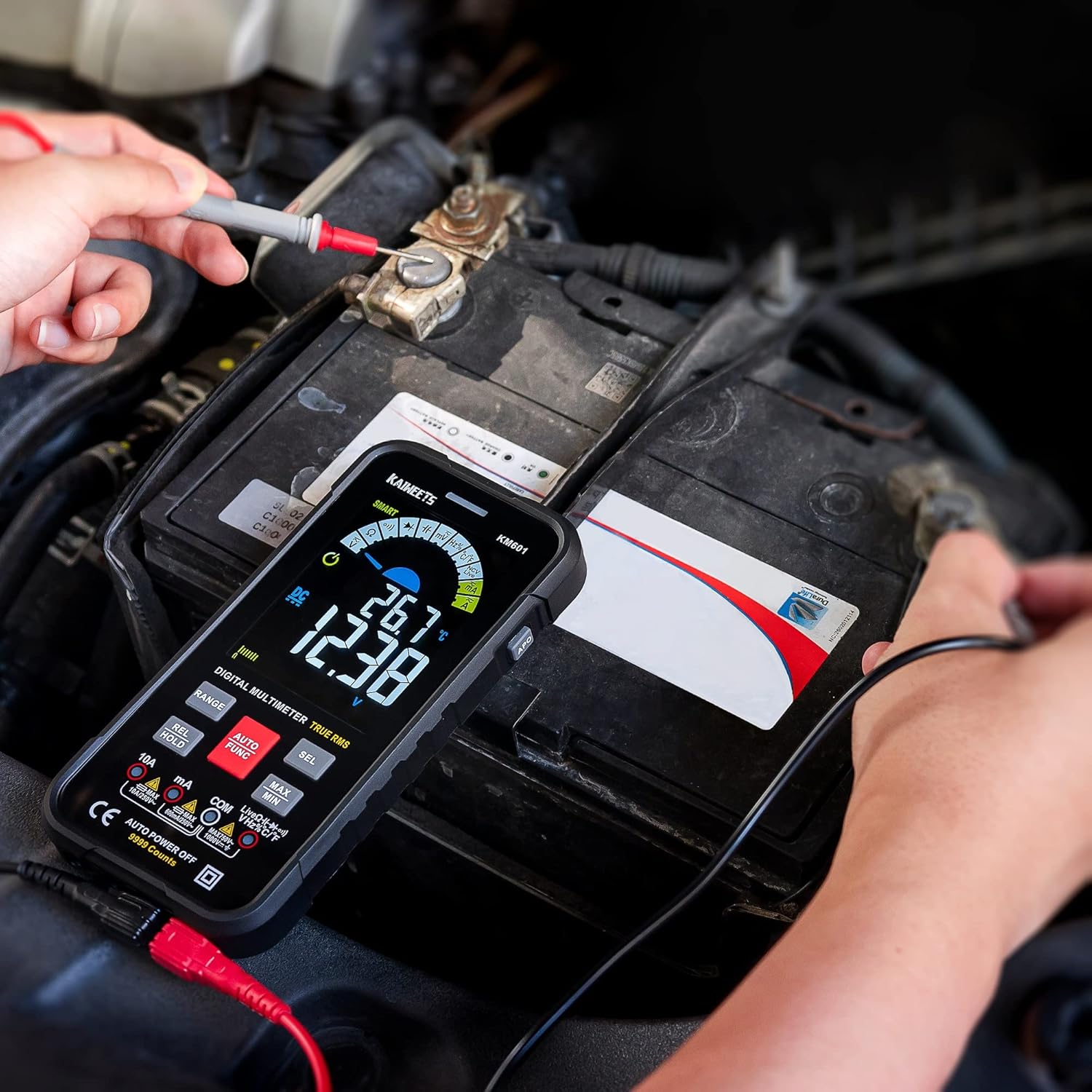
Image: The KM601 Multimeter in use, measuring the voltage of a car battery, demonstrating its practical application.
5.3 అదనపు విధులు
- Data Hold (REL HOLD button): Press briefly to freeze the current reading on the display. Press again to release.
- Relative Value (REL HOLD button): Press and hold to enter relative measurement mode. This displays the difference between the current reading and a stored reference value.
- MAX/MIN (MAX MIN button): Press to display the maximum or minimum reading recorded since the function was activated.
- ఫ్లాష్లైట్: Press the flashlight button on the side to turn the integrated LED light on or off.
6. నిర్వహణ
Proper maintenance ensures the longevity and accuracy of your KAIWEETS KM601 multimeter.
6.1 శుభ్రపరచడం
ప్రకటనతో కేసును తుడిచివేయండిamp cloth and mild detergent. Do not use abrasives or solvents. Keep the input jacks free of dust and debris.
6.2 బ్యాటరీ భర్తీ
డిస్ప్లేలో తక్కువ బ్యాటరీ సూచిక కనిపించినప్పుడు, కొలత ఖచ్చితత్వాన్ని నిర్వహించడానికి బ్యాటరీలను వెంటనే మార్చండి. బ్యాటరీ ఇన్స్టాలేషన్ సూచనల కోసం విభాగం 4.1 చూడండి.
6.3 నిల్వ
If the multimeter is not used for an extended period, remove the batteries to prevent leakage. Store the device in a cool, dry place, away from direct sunlight and extreme temperatures.
7. ట్రబుల్షూటింగ్
If you encounter issues with your KM601 multimeter, refer to the following common problems and solutions:
- No Display/Power On:
- బ్యాటరీలు సరిగ్గా ఇన్స్టాల్ చేయబడ్డాయో లేదో మరియు తగినంత ఛార్జ్ ఉందో లేదో తనిఖీ చేయండి. అవసరమైతే మార్చండి.
- పవర్ బటన్ గట్టిగా నొక్కినట్లు నిర్ధారించుకోండి.
- సరికాని రీడింగ్లు:
- టెస్ట్ లీడ్లు సరైన ఇన్పుట్ జాక్లకు సురక్షితంగా కనెక్ట్ చేయబడ్డాయని ధృవీకరించండి.
- Ensure the correct function and range are selected for the measurement.
- బ్యాటరీ స్థాయిని తనిఖీ చేయండి; తక్కువ బ్యాటరీలు ఖచ్చితత్వాన్ని ప్రభావితం చేస్తాయి.
- Ensure the circuit under test is properly isolated or de-energized if required for the measurement (e.g., resistance).
- Continuity Test Not Beeping:
- సర్క్యూట్ డి-ఎనర్జైజ్ చేయబడిందని నిర్ధారించుకోండి.
- Check if the resistance is too high for continuity detection.
- Verify test leads are not damaged.
- NCV గుర్తించడం లేదు:
- Ensure the NCV sensor is placed close enough to the AC voltagఇ మూలం.
- The NCV function is for detection, not precise measurement.
If the problem persists after attempting these solutions, please contact KAIWEETS customer support for assistance.
8. స్పెసిఫికేషన్లు
| ఫీచర్ | స్పెసిఫికేషన్ |
|---|---|
| బ్రాండ్ | కైవీట్స్ |
| మోడల్ సంఖ్య | KM601 |
| ప్రదర్శన గణనలు | 10,000 గణనలు |
| ఉత్పత్తి కొలతలు (L x W x H) | 16.5 x 8.5 x 2.5 సెం.మీ |
| బరువు | 265 గ్రాములు |
| శక్తి మూలం | 3 x AAA బ్యాటరీలు (తప్పనిసరి) |
| భద్రతా ప్రమాణాలు | CE, RoHS, IEC61010-1 CAT III 1000 V, CAT IV 600 V, Pollution Level 2 |
| గరిష్ట ఉష్ణోగ్రత రేటింగ్ | 85 డిగ్రీల సెల్సియస్ |
| రంగు | నలుపు |
9. వారంటీ మరియు మద్దతు
KAIWEETS is committed to providing high-quality products and excellent customer service.
Your KAIWEETS KM601 Smart Multimeter comes with a 36 నెలల అమ్మకాల తర్వాత సేవ మరియు జీవితకాల సాంకేతిక మద్దతు.
If you have any questions, concerns, or require technical assistance, please do not hesitate to contact KAIWEETS customer support. Refer to the contact information provided in your product packaging or on the official KAIWEETS webసైట్.


