1. పరిచయం
ధన్యవాదాలు, ధన్యవాదాలు.asing the beFree Sound BFS-855 5.1 Channel Surround Sound Bluetooth Speaker System. This manual provides essential information for the safe and efficient operation of your new audio system. Please read these instructions thoroughly before use and retain them for future reference.
2. భద్రతా సూచనలు
- శక్తి మూలం: విద్యుత్ సరఫరా వాల్యూమ్ నిర్ధారించుకోండిtage matches the requirements specified on the unit (110V/60Hz).
- వెంటిలేషన్: వెంటిలేషన్ ఓపెనింగ్లను బ్లాక్ చేయవద్దు. సరైన గాలి ప్రసరణ కోసం యూనిట్ చుట్టూ తగినంత స్థలాన్ని నిర్వహించండి.
- నీరు మరియు తేమ: యూనిట్ను వర్షం, తేమ లేదా చినుకులు/స్ప్లాషింగ్ ద్రవాలకు గురిచేయవద్దు. కుండీల వంటి ద్రవాలతో నిండిన వస్తువులను యూనిట్పై ఉంచవద్దు.
- వేడి: రేడియేటర్లు, హీట్ రిజిస్టర్లు, స్టవ్లు లేదా ఇతర ఉపకరణాలు (సహా) వంటి ఉష్ణ వనరుల నుండి యూనిట్ను దూరంగా ఉంచండి. ampలిఫైయర్లు) వేడిని ఉత్పత్తి చేస్తాయి.
- శుభ్రపరచడం: శుభ్రం చేయడానికి ముందు యూనిట్ను పవర్ అవుట్లెట్ నుండి అన్ప్లగ్ చేయండి. మృదువైన, పొడి వస్త్రాన్ని ఉపయోగించండి. లిక్విడ్ క్లీనర్లను లేదా ఏరోసోల్ క్లీనర్లను ఉపయోగించవద్దు.
- సర్వీసింగ్: ఈ ఉత్పత్తిని మీరే సేవ చేయడానికి ప్రయత్నించవద్దు. అర్హత కలిగిన సేవా సిబ్బందికి అన్ని సర్వీసులను చూడండి.
3. ప్యాకేజీ విషయాలు
క్రింద జాబితా చేయబడిన అన్ని వస్తువులు మీ ప్యాకేజీలో చేర్చబడ్డాయని ధృవీకరించండి:
- 1 x సబ్ వూఫర్
- 5 x శాటిలైట్ స్పీకర్లు
- 4 x ఆడియో కేబుల్స్
- 1 x FM యాంటెన్నా
- 1 x రిమోట్ కంట్రోల్
- 1 x యూజర్ మాన్యువల్ (ఈ పత్రం)

Image: Various audio cables and an FM antenna included with the system.
4. ఉత్పత్తి ముగిసిందిview
Familiarize yourself with the components of your beFree Sound BFS-855 system.
4.1. Subwoofer Unit

చిత్రం: ముందు మరియు పక్క view of the main subwoofer unit, featuring the beFree logo and a sleek black finish.

చిత్రం: వైపు view of the subwoofer, showing the USB port, SD card slot, and auxiliary input jacks.

Image: Rear panel of the subwoofer, detailing the optical input, coaxial input, AUX audio input, FM antenna port, DVD audio input, LED power, audio output for satellite speakers, and power switch.
4.2. Satellite Speakers
The system includes five satellite speakers: a center speaker, two front speakers, and two rear speakers.

Image: A compact satellite speaker, typically used for front or rear channels.

Image: The horizontal center channel speaker, designed for clear dialogue.
4.3. రిమోట్ కంట్రోల్

Image: The remote control unit, featuring buttons for input selection, volume, channel tuning, and various audio adjustments.
5. సెటప్
5.1. స్పీకర్ ప్లేస్మెంట్
- subwoofer: Place the subwoofer on the floor, preferably near the front of your listening area.
- సెంటర్ స్పీకర్: Position the center speaker directly above or below your television/monitor.
- ముందు స్పీకర్లు: Place the front left and right speakers equidistant from your listening position, to the left and right of your television/monitor.
- వెనుక స్పీకర్లు: Position the rear left and right speakers behind your listening position, facing towards you.
5.2. స్పీకర్లను కనెక్ట్ చేస్తోంది
Connect the satellite speakers to the corresponding output jacks on the rear panel of the subwoofer. Ensure correct polarity (red to red, black to black) for optimal sound quality.
5.3. ఆడియో మూలాలను కనెక్ట్ చేయడం
Your system supports multiple audio input options:
- బ్లూటూత్: For wireless connection from compatible devices.
- AUX ఇన్పుట్: Use the provided audio cables to connect devices with a 3.5mm or RCA audio output.
- ఆప్టికల్ ఇన్పుట్: For high-quality digital audio from TVs, game consoles, or DVD/Blu-ray players.
- ఏకాక్షక ఇన్పుట్: Another option for digital audio connection.
- USB/SD కార్డ్: Insert a USB drive or SD card into the designated slots on the subwoofer for direct media playback.
- FM యాంటెన్నా: Connect the included FM antenna to the FM ANT port for radio reception.
5.4. పవర్ కనెక్షన్
After all audio connections are made, connect the power cord to the subwoofer and then plug it into a standard 110V/60Hz electrical outlet. Turn on the power switch located on the rear panel of the subwoofer.
6. ఆపరేటింగ్ సూచనలు
6.1. పవర్ ఆన్/ఆఫ్
Press the 'POWER' button on the remote control or the power switch on the rear of the subwoofer to turn the system on or off.
6.2. ఇన్పుట్ ఎంపిక
Press the 'INPUT' button on the remote control to cycle through available input sources: Bluetooth, AUX, Optical, Coaxial, USB, SD, FM.
6.3. వాల్యూమ్ నియంత్రణ
Use the 'VOL+' and 'VOL-' buttons on the remote control to adjust the master volume. Individual channel volumes (FL, FR, CEN, SL, SR, SW) can also be adjusted using their respective buttons on the remote.
6.4. బ్లూటూత్ పెయిరింగ్
- Select 'Bluetooth' as the input source. The display will indicate 'BT'.
- మీ మొబైల్ పరికరం లేదా కంప్యూటర్లో బ్లూటూత్ను ప్రారంభించండి.
- కోసం వెతకండి 'BFS-855' in the list of available devices.
- Select 'BFS-855' to pair. Once connected, a confirmation sound will play.
6.5. FM రేడియో ఆపరేషన్
- Select 'FM' as the input source.
- Press the 'AUTO' button on the remote to automatically scan and save available FM stations.
- Use 'CH+' and 'CH-' buttons to navigate through saved stations.
- Use 'TUNE+' and 'TUNE-' buttons for manual frequency adjustment.
6.6. USB/SD కార్డ్ ప్లేబ్యాక్
- Insert a USB drive or SD card into the corresponding slot.
- The system will automatically switch to USB/SD input and begin playback. If not, select 'USB' or 'SD' input manually.
- Use the 'PLAY/PAUSE', 'PREV', and 'NEXT' buttons on the remote for media control.
7. నిర్వహణ
To ensure the longevity and optimal performance of your speaker system, follow these maintenance guidelines:
- శుభ్రపరచడం: Regularly wipe the surfaces of the speakers and subwoofer with a soft, dry, lint-free cloth. Avoid using abrasive cleaners, waxes, or solvents.
- దుమ్ము: Keep the ventilation openings free from dust accumulation. Use a soft brush or vacuum cleaner with a brush attachment to gently remove dust.
- నిల్వ: If storing the system for an extended period, unplug it from the power outlet and store it in a cool, dry place, away from direct sunlight and extreme temperatures.
8. ట్రబుల్షూటింగ్
మీ స్పీకర్ సిస్టమ్తో మీకు సమస్యలు ఎదురైతే, ఈ క్రింది సాధారణ సమస్యలు మరియు పరిష్కారాలను చూడండి:
| సమస్య | సాధ్యమైన కారణం | పరిష్కారం |
|---|---|---|
| శక్తి లేదు | పవర్ కార్డ్ కనెక్ట్ కాలేదు; పవర్ స్విచ్ ఆఫ్; అవుట్లెట్ పనిచేయకపోవడం | Ensure power cord is securely plugged in; Turn on power switch; Test outlet with another device. |
| శబ్దం లేదు | Incorrect input selected; Volume too low; Speaker cables loose; Mute function active | Select correct input source; Increase master volume; Check all speaker connections; Press 'MUTE' on remote. |
| బ్లూటూత్ కనెక్ట్ కావడం లేదు | Speaker not in Bluetooth mode; Device not discoverable; Already connected to another device | Ensure 'BT' input is selected; Make sure device Bluetooth is on and searching; Disconnect from other devices. |
| FM రిసెప్షన్ పేలవంగా ఉంది | FM antenna not connected or poorly positioned | Connect FM antenna securely; Adjust antenna position for better signal. |
9. స్పెసిఫికేషన్లు
- మోడల్ పేరు: BFS-855
- స్పీకర్ రకం: సరౌండ్ సౌండ్ సిస్టమ్
- సరౌండ్ సౌండ్ ఛానెల్ కాన్ఫిగరేషన్: 5.1
- అవుట్పుట్ పవర్: 50W (Subwoofer) + 15W x 5 (Satellites) = 125 Watts Total
- సబ్ వూఫర్ వ్యాసం: 8 అంగుళాలు
- ఉపగ్రహ స్పీకర్ పరిమాణం: 3.5 అంగుళాలు (x5)
- ఫ్రీక్వెన్సీ రెస్పాన్స్: 40 హెర్ట్జ్ - 20 కిలోహెర్ట్జ్
- విభజన: >50dB
- S/N నిష్పత్తి: >75dB
- శక్తి మూలం: Corded Electric (110V/60Hz)
- కనెక్టివిటీ టెక్నాలజీ: Bluetooth, USB, SD Card, Optical, Coaxial, AUX (RCA)
- నియంత్రణ పద్ధతి: రిమోట్ కంట్రోల్
- Product Dimensions (Subwoofer): 21"డి x 11"వా x 21"హ
- వస్తువు బరువు: 33 పౌండ్లు
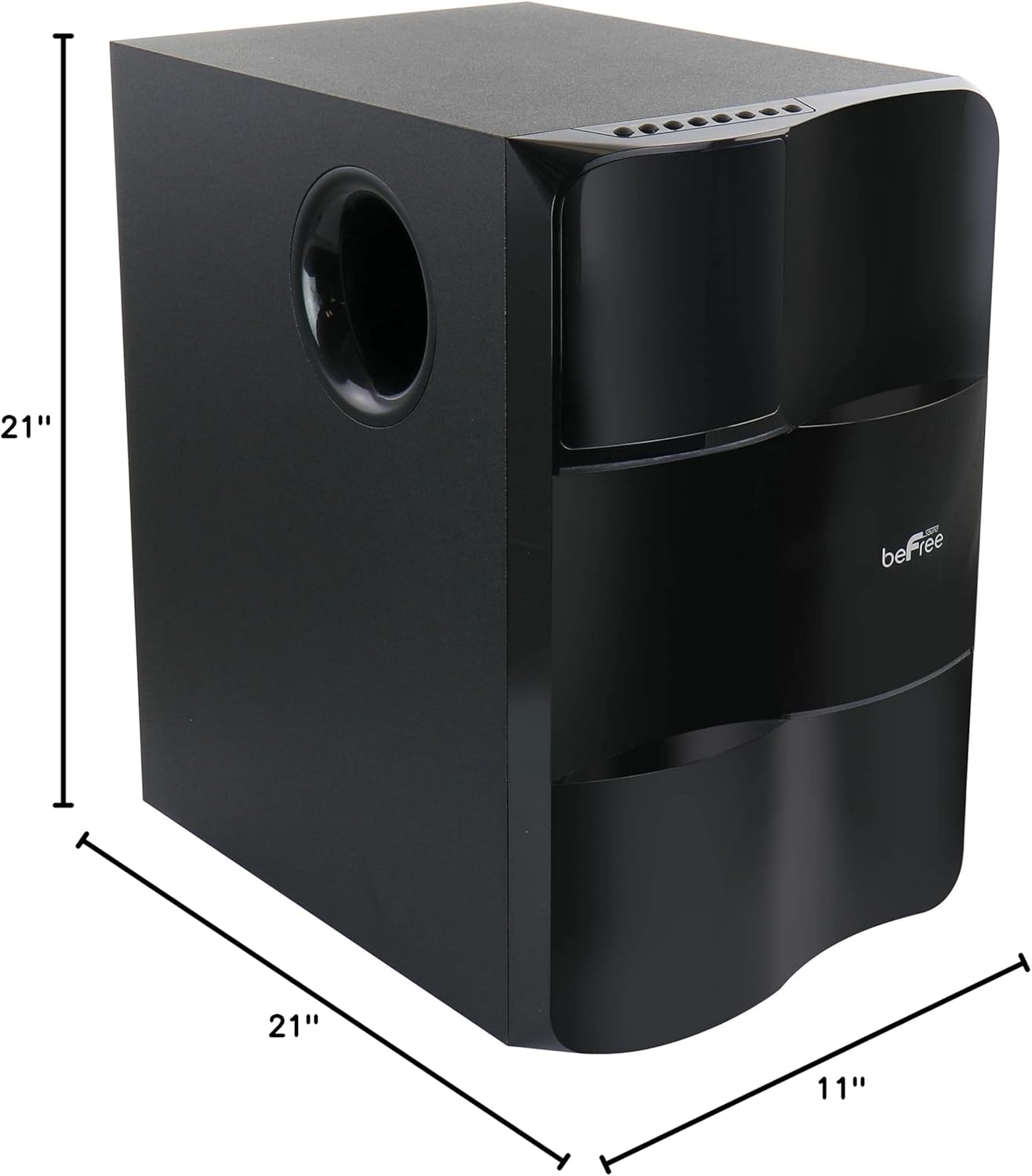
Image: Diagram illustrating the dimensions of the subwoofer unit (21"D x 11"W x 21"H).
10. వారంటీ మరియు మద్దతు
This product comes with a limited warranty. For specific details regarding warranty coverage and duration, please refer to the warranty card included in your package or contact your retailer. For technical support or service inquiries, please reach out to the point of purchase or the manufacturer's customer service channels.


