1. పరిచయం
This manual provides detailed instructions for the installation, operation, and maintenance of your Dexnor Protective Case for the Samsung Galaxy S20 5G. Please read this manual thoroughly to ensure proper use and to maximize the protective features of your case.
2. ఉత్పత్తి ముగిసిందిview
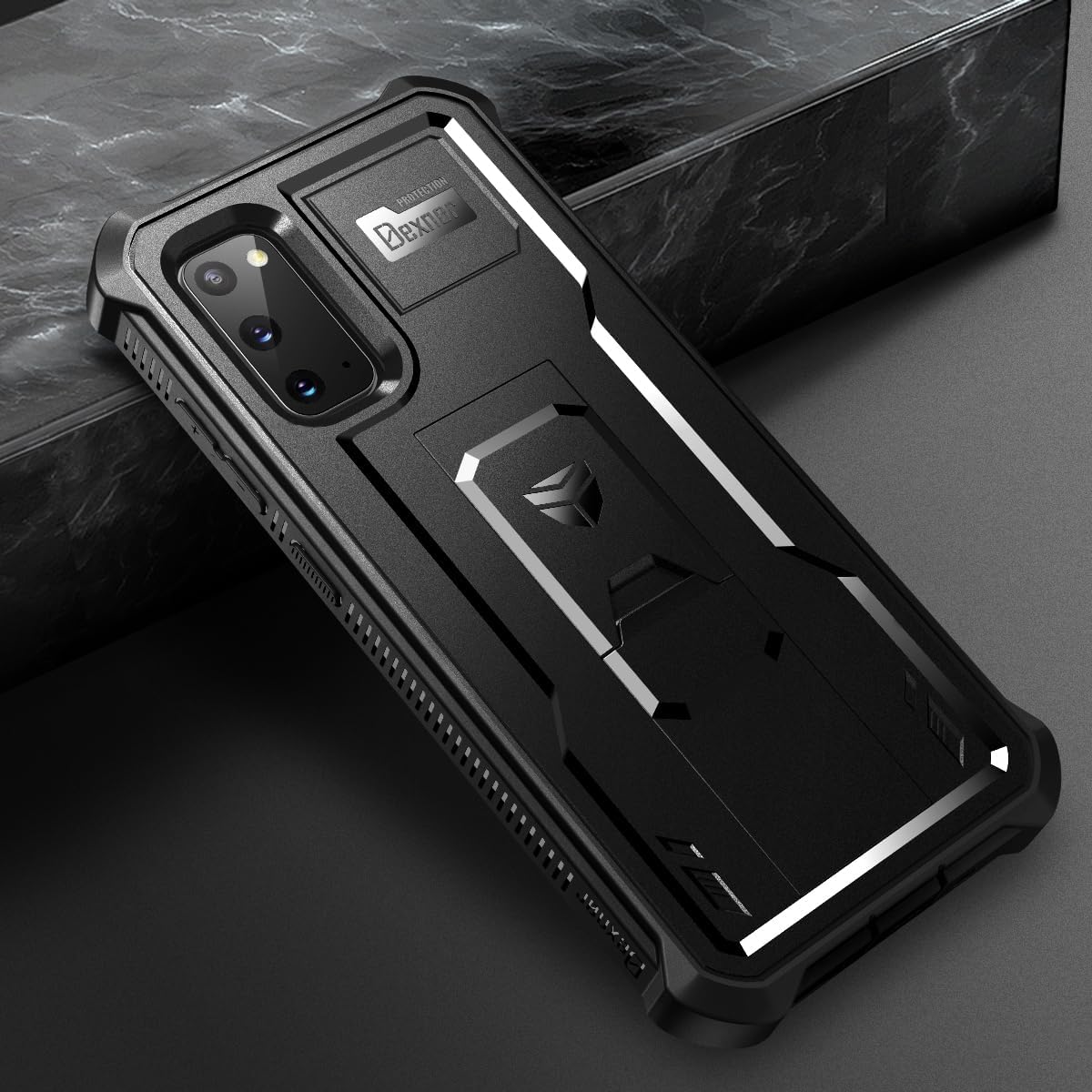
The Dexnor Protective Case is designed to offer robust protection for your Samsung Galaxy S20 5G. It features a multi-layer design including a built-in screen protector and a versatile kickstand.
ముఖ్య లక్షణాలు:
- 360° హెవీ డ్యూటీ ప్రొటెక్షన్: Full-body coverage with reinforced corners and raised edges for camera and screen.
- Built-in Screen Protector: Touch-sensitive, scratch-resistant, and smudge-resistant.
- Multifunctional Kickstand: Retractable for hands-free viewing in portrait or landscape mode, also functions as a finger loop.
- వైర్లెస్ ఛార్జింగ్ అనుకూలమైనది: Designed not to interfere with wireless charging functionality.
- మన్నికైన పదార్థాలు: Constructed from Polycarbonate and Thermoplastic Polyurethane for enhanced shock absorption.

3. అనుకూలత
This Dexnor Protective Case is specifically designed for the Samsung Galaxy S20 5G (6.2 inches). It is not compatible with other Samsung Galaxy S20 models such as the S20 FE (6.5 inches), S20 Plus (6.7 inches), or S20 Ultra (6.9 inches).

4. ఇన్స్టాలేషన్ గైడ్
Follow these steps to properly install your Dexnor Protective Case:
- కేసును వేరు చేయండి: Gently pry apart the front frame and the back cover of the case. The case is designed to fit snugly, so a firm but careful separation is required.

- మీ ఫోన్ను చొప్పించండి: Place your Samsung Galaxy S20 5G into the front frame of the case, ensuring it sits securely and the built-in screen protector aligns correctly with your phone's screen.

- కేసును మళ్లీ సమీకరించండి: Align the back cover with the front frame and press them together firmly around all edges until you hear a click, indicating the case is securely sealed. Ensure all ports and buttons are correctly aligned and accessible.
5. ఆపరేటింగ్ సూచనలు
5.1 కిక్స్టాండ్ని ఉపయోగించడం
ఇంటిగ్రేటెడ్ కిక్స్టాండ్ సౌకర్యవంతమైన హ్యాండ్స్-ఫ్రీని అనుమతిస్తుంది viewing. To use, gently pull out the kickstand from the back of the case. It can be positioned to support your phone in both portrait and landscape orientations. When not in use, push the kickstand back into its recess until it clicks securely.

5.2 వైర్లెస్ ఛార్జింగ్
The Dexnor case is designed to be compatible with most wireless charging pads. You can charge your Samsung Galaxy S20 5G wirelessly without removing the case.
5.3 Built-in Screen Protector
The case includes a touch-sensitive screen protector. Ensure your phone's screen is clean before installation to prevent dust or debris from being trapped underneath. The protector is designed for smooth typing and gaming without lag.

6. నిర్వహణ
To maintain the appearance and functionality of your Dexnor Protective Case:
- Clean the case regularly with a soft, damp గుడ్డ.
- Avoid using harsh chemicals or abrasive cleaners, as these can damage the case material or screen protector.
- Ensure the screen protector is free of dust and smudges for optimal touch response.
7. ట్రబుల్షూటింగ్
7.1 Fingerprint Sensor Issues
Some users may experience reduced fingerprint sensor functionality with the built-in screen protector. If you encounter this, try the following:
- Ensure the fingerprint area on the screen protector is clean and free of dust or moisture.
- Re-register your fingerprints after installing the case. Go to your phone's settings, remove existing fingerprints, and add new ones with the case installed. This allows the phone to learn your fingerprint through the protector.
- Increase touch sensitivity in your phone's display settings if available.
7.2 Kickstand Durability
The kickstand is designed for regular use, but excessive force or improper handling can cause damage. If the kickstand becomes loose or breaks:
- Ensure it is fully retracted when not in use to prevent accidental damage.
- Avoid applying excessive weight or pressure to the kickstand.
- If the kickstand is damaged, contact customer support for assistance.
8. ఉత్పత్తి లక్షణాలు
| ఫీచర్ | వివరాలు |
|---|---|
| ఉత్పత్తి కొలతలు | 6.34 x 3.03 x 0.55 అంగుళాలు |
| వస్తువు బరువు | 1.6 ఔన్సులు |
| అంశం మోడల్ సంఖ్య | SM-G980 |
| అనుకూల ఫోన్ మోడల్లు | Samsung Galaxy S20 (6.2 inches) |
| మెటీరియల్ | పాలికార్బోనేట్, థర్మోప్లాస్టిక్ పాలియురేతేన్ |
| రంగు | నలుపు |
| తయారీదారు | డెక్స్నోర్ |
| మొదటి తేదీ అందుబాటులో ఉంది | అక్టోబర్ 14, 2021 |
9. వారంటీ సమాచారం
Dexnor offers a 10 సంవత్సరాల వారంటీ on its phone and tablet cases. This warranty covers manufacturing defects and ensures the quality of your product. For warranty claims or further details, please refer to the official Dexnor webసైట్ లేదా కస్టమర్ సపోర్ట్ని సంప్రదించండి.
10. కస్టమర్ మద్దతు
For any questions, concerns, or support needs regarding your Dexnor Protective Case, please visit the official Dexnor store or contact our customer service team. We are committed to providing assistance and ensuring your satisfaction.


