1. పరిచయం
This manual provides essential information for the proper use and maintenance of your Gateway 15.6-inch FHD Ultra Slim Laptop, Model GTW15G. This device is equipped with an AMD Ryzen 5 3450U Mobile Processor, 8GB of DDR4 RAM, and a 256GB Solid State Drive (SSD). It features a 15.6-inch Full HD (1920x1080) IPS display, a built-in fingerprint scanner, and runs on Windows 10, with an available free upgrade to Windows 11.
Please read this manual thoroughly before operating your laptop to ensure optimal performance and longevity.
2. సెటప్
2.1 అన్ప్యాకింగ్ మరియు ప్రారంభ తనిఖీ
Carefully remove the laptop and all accessories from the packaging. Verify that all components are present and undamaged. The package should include the laptop, power adapter, and this user manual.
2.2 పవర్ అడాప్టర్ను కనెక్ట్ చేస్తోంది
Before first use, connect the power adapter to the laptop's charging port and then to a power outlet. Allow the battery to charge for at least 30 minutes before powering on for the first time.

Figure 2.1: Gateway 15.6-inch Ultra Slim Laptop overview.
2.3 మొదటి పవర్ ఆన్ మరియు విండోస్ సెటప్
Press the power button located on the keyboard. The laptop will boot up and guide you through the Windows 10 initial setup process. Follow the on-screen instructions to configure your region, language, network connection, and user account.
2.4 Fingerprint Scanner Setup (Windows Hello)
During or after the initial Windows setup, you can configure the built-in fingerprint scanner for secure login using Windows Hello. Navigate to సెట్టింగ్లు > ఖాతాలు > సైన్-ఇన్ ఎంపికలు and follow the prompts to set up your fingerprint.
3. ఆపరేటింగ్ సూచనలు
3.1 పవర్ ఆన్/ఆఫ్ మరియు స్లీప్ మోడ్
- పవర్ ఆన్: పవర్ బటన్ను నొక్కండి.
- షట్ డౌన్: క్లిక్ చేయండి ప్రారంభించండి బటన్, ఆపై Power > Shut down.
- స్లీప్ మోడ్: Close the lid or click the ప్రారంభించండి బటన్, ఆపై శక్తి > నిద్ర.
3.2 Using the Precision Touchpad
The laptop features a precision touchpad for navigation. It supports multi-touch gestures for scrolling, zooming, and other functions. Refer to Windows settings for customizing touchpad gestures.
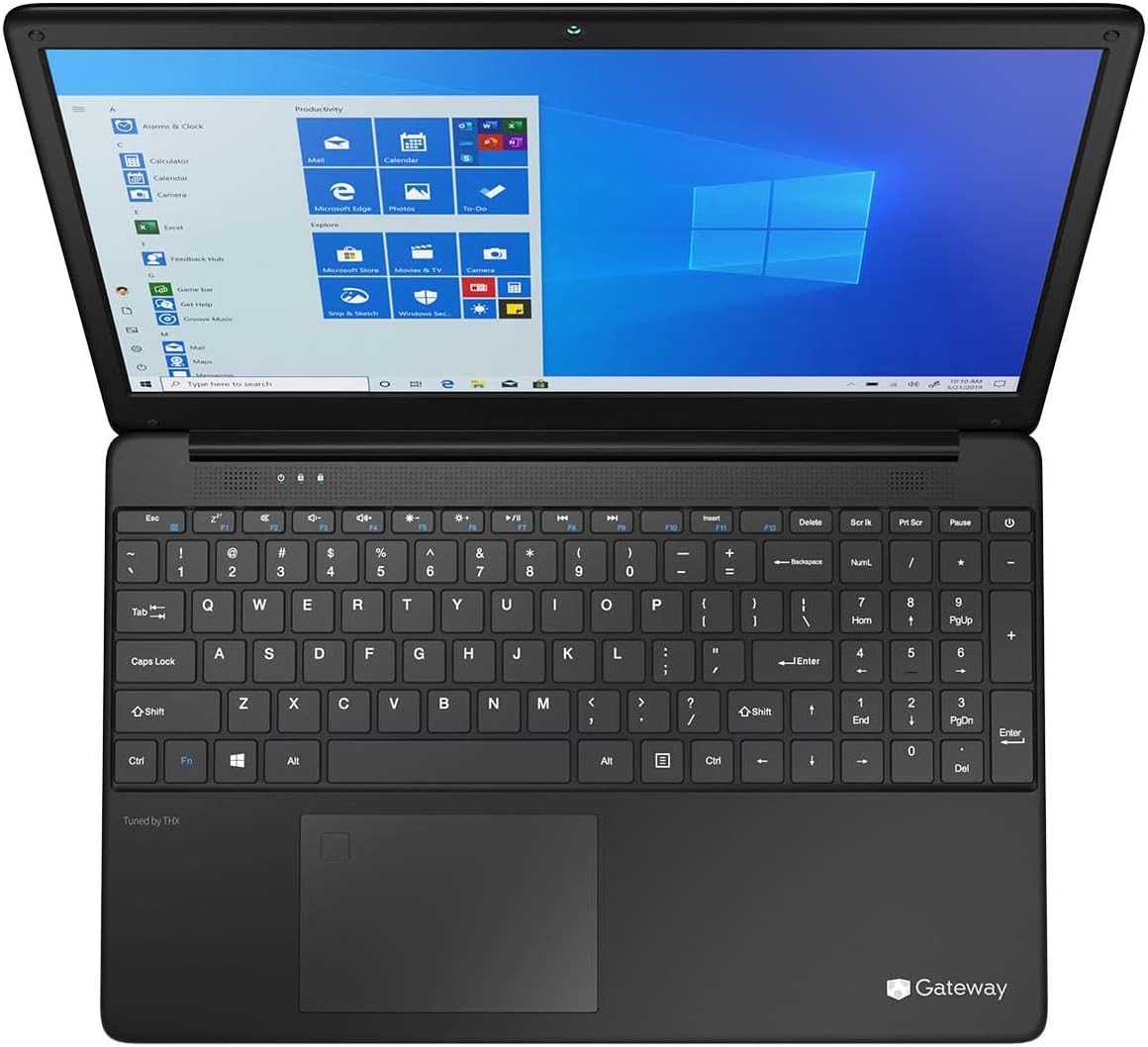
Figure 3.1: Keyboard and Precision Touchpad layout.
3.3 బాహ్య పరికరాలను కనెక్ట్ చేయడం
పెరిఫెరల్స్ కనెక్ట్ చేయడానికి ల్యాప్టాప్ వివిధ పోర్ట్లను అందిస్తుంది:
- USB 3.0 పోర్ట్లు (x2): బాహ్య హార్డ్ డ్రైవ్లు, ఎలుకలు లేదా కీబోర్డ్లు వంటి USB పరికరాలను కనెక్ట్ చేయడానికి.
- USB టైప్-సి పోర్ట్ (x1): Supports both charging and data transfer.
- HDMI Output (x1): బాహ్య మానిటర్ లేదా టీవీకి కనెక్ట్ చేయండి.
- Micro SD Slot (x1): Supports Micro SD cards up to 512 GB for expanded storage.
- కెన్సింగ్టన్ లాక్: భౌతిక భద్రత కోసం.
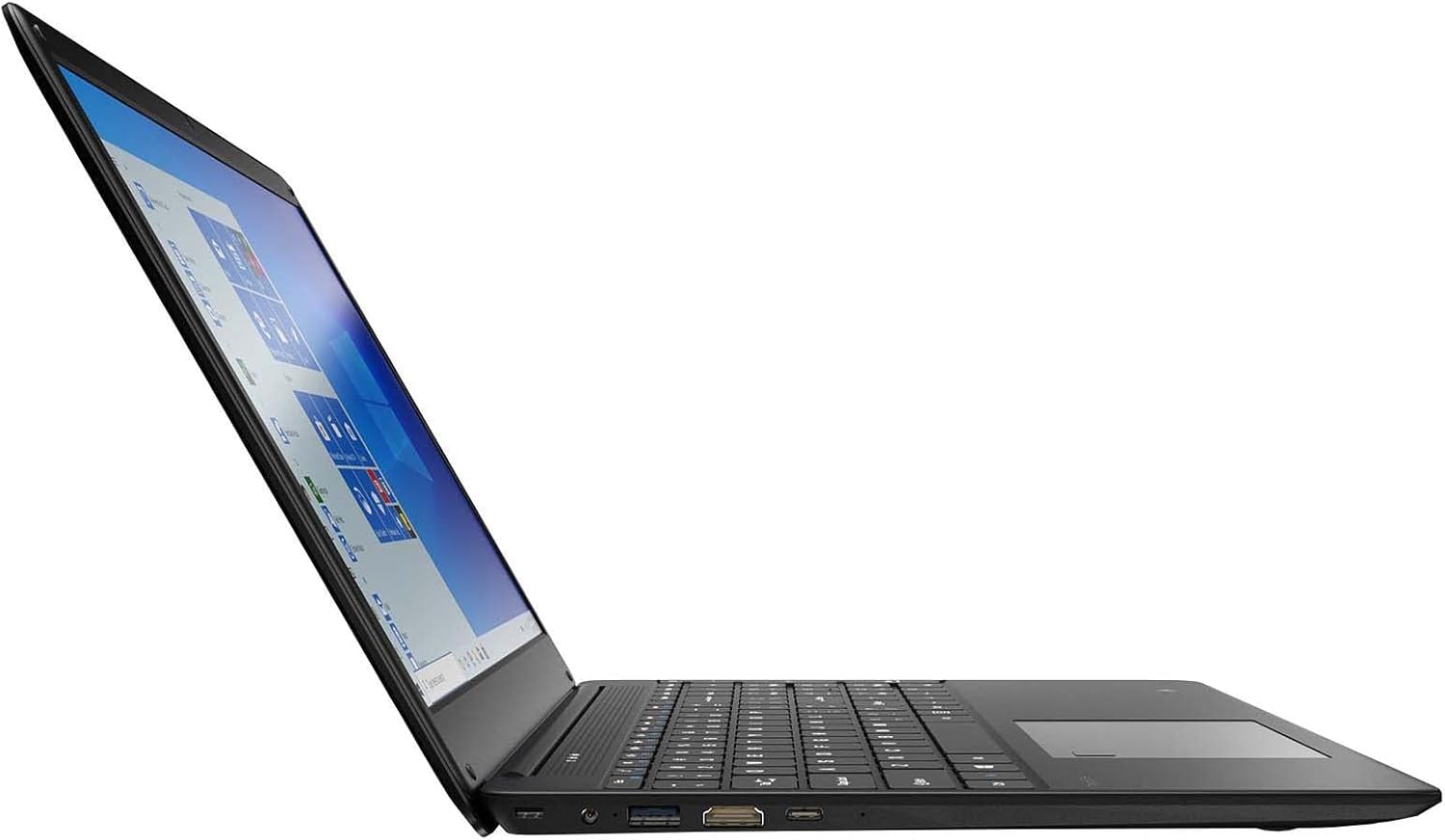
Figure 3.2: Left side ports (USB, HDMI, USB Type-C).
3.4 వైర్లెస్ కనెక్టివిటీ
The laptop supports Wi-Fi and Bluetooth 5.1 for wireless connections. Access network settings via the Windows taskbar or సెట్టింగ్లు> నెట్వర్క్ & ఇంటర్నెట్ to connect to Wi-Fi networks or pair Bluetooth devices.
3.5 ఆడియో ఫీచర్లు
The built-in stereo speakers are tuned by THX Audio, providing enhanced sound quality. Adjust volume using the function keys on the keyboard or through Windows sound settings.
4. నిర్వహణ
4.1 ల్యాప్టాప్ను శుభ్రపరచడం
- స్క్రీన్: కొద్దిగా మెత్తని, మెత్తని బట్టను ఉపయోగించండి dampనీరు లేదా స్క్రీన్ క్లీనర్తో నింపబడి ఉండాలి. స్క్రీన్పై నేరుగా ద్రవాన్ని పిచికారీ చేయవద్దు.
- చాసిస్ మరియు కీబోర్డ్: మృదువైన, పొడి వస్త్రాన్ని ఉపయోగించండి. మొండి ధూళి కోసం, కొద్దిగా damp వస్త్రాన్ని ఉపయోగించవచ్చు. కఠినమైన రసాయనాలను నివారించండి.
- వెంట్స్: Periodically clean the ventilation openings with compressed air to prevent dust buildup, which can affect cooling.
4.2 బ్యాటరీ సంరక్షణ
బ్యాటరీ జీవితకాలం మరియు దీర్ఘాయువును పెంచడానికి:
- బ్యాటరీని తరచుగా పూర్తిగా డిశ్చార్జ్ చేయడాన్ని నివారించండి.
- ల్యాప్టాప్ను తీవ్రమైన ఉష్ణోగ్రతలకు బహిర్గతం చేయవద్దు.
- ల్యాప్టాప్ను ఎక్కువ కాలం నిల్వ ఉంచినట్లయితే, బ్యాటరీ దాదాపు 50-70% వరకు ఛార్జ్ అయ్యేలా చూసుకోండి.
- Optimize power settings in Windows to conserve battery power.
4.3 సాఫ్ట్వేర్ నవీకరణలు
Regularly check for and install Windows updates to ensure your system has the latest security patches and performance improvements. Navigate to సెట్టింగులు > నవీకరణ & భద్రత > విండోస్ నవీకరణ.
4.4 డేటా బ్యాకప్
డేటా నష్టాన్ని నివారించడానికి మీ ముఖ్యమైన డేటాను బాహ్య డ్రైవ్ లేదా క్లౌడ్ నిల్వకు క్రమం తప్పకుండా బ్యాకప్ చేయండి.
5. ట్రబుల్షూటింగ్
ఈ విభాగం మీ ల్యాప్టాప్తో మీరు ఎదుర్కొనే సాధారణ సమస్యలను పరిష్కరిస్తుంది.
5.1 ల్యాప్టాప్ పవర్ ఆన్ అవ్వడం లేదు
- పవర్ అడాప్టర్ ల్యాప్టాప్ మరియు పనిచేసే పవర్ అవుట్లెట్ రెండింటికీ సురక్షితంగా కనెక్ట్ చేయబడిందని నిర్ధారించుకోండి.
- మరొక పరికరాన్ని ప్లగ్ చేయడం ద్వారా పవర్ అవుట్లెట్ పనిచేస్తుందో లేదో ధృవీకరించండి.
- Allow the laptop to charge for some time before attempting to power it on again.
5.2 Wi-Fi కనెక్టివిటీ సమస్యలు
- విండోస్ సెట్టింగ్లలో Wi-Fi ప్రారంభించబడిందో లేదో తనిఖీ చేయండి.
- మీ రౌటర్ మరియు మోడెమ్ను పునఃప్రారంభించండి.
- Ensure you are within range of the Wi-Fi network and have entered the correct password.
- విండోస్ నెట్వర్క్ ట్రబుల్షూటర్ను అమలు చేయండి (సెట్టింగ్లు > నెట్వర్క్ & ఇంటర్నెట్ > స్థితి > నెట్వర్క్ ట్రబుల్షూటర్).
5.3 నెమ్మది పనితీరు
- నేపథ్యంలో నడుస్తున్న అనవసరమైన అప్లికేషన్లను మూసివేయండి.
- ఏవైనా పెండింగ్ విండోస్ అప్డేట్ల కోసం తనిఖీ చేసి, ఇన్స్టాల్ చేయండి.
- Ensure there is sufficient free space on your SSD.
- మాల్వేర్ లేదా వైరస్ల కోసం స్కాన్ చేయండి.
5.4 వేడెక్కడం
If the laptop feels excessively warm, ensure that the ventilation vents are not blocked. Operate the laptop on a hard, flat surface to allow for proper airflow. Avoid using it on soft surfaces like beds or couches that can obstruct vents.
5.5 ఇతర సమస్యలు
For issues not covered here, refer to the Windows help documentation or contact Gateway customer support.
6. స్పెసిఫికేషన్లు
| ఫీచర్ | స్పెసిఫికేషన్ |
|---|---|
| మోడల్ పేరు | Gateway GWTN156 (GTW15G) |
| ప్రదర్శన పరిమాణం | 15.6 అంగుళాలు |
| స్క్రీన్ రిజల్యూషన్ | 1920 x 1080 పిక్సెల్స్ (FHD) |
| ప్రాసెసర్ | AMD రైజెన్ 5 3450U (2.1 GHz, 3.50 GHz వరకు) |
| RAM | 8 GB DDR4 |
| నిల్వ | 256 GB SSD |
| గ్రాఫిక్స్ కోప్రాసెసర్ | AMD రేడియన్ వేగా 8 గ్రాఫిక్స్ |
| ఆపరేటింగ్ సిస్టమ్ | Windows 10 (Free Upgrade to Windows 11) |
| వైర్లెస్ రకం | Wi-Fi, బ్లూటూత్ 5.1 |
| ఓడరేవులు | 1x HDMI, 1x USB Type-C (Charge + Data), 2x USB 3.0, 1x Micro SD Slot (Up to 512 GB) |
| ప్రత్యేక లక్షణాలు | Built-in Fingerprint Scanner (Windows Hello), Stereo Speakers Tuned by THX Audio, HD Webకెమెరా |
| వస్తువు బరువు | 5.5 పౌండ్లు |
| ప్యాకేజీ కొలతలు | 16.65 x 11.73 x 2.8 అంగుళాలు |
7. వారంటీ మరియు మద్దతు
For warranty information and technical support, please refer to the official Gateway website or contact Gateway customer service directly. Keep your proof of purchase for warranty claims.
This product may be eligible for separate protection plans. Details regarding these plans are available from your retailer at the time of purchase.


