పరిచయం
The Festool Cordless VECTURO Oscillating Multi-Tool is designed for versatile cutting, sanding, and scraping applications. This manual provides essential information for the safe and efficient operation, maintenance, and care of your tool.
The VECTURO OSC 18 HPC 4,0 EI-Set features a StarlockMax® holding system for quick blade changes, a brushless EC-TEC motor for durability, and vibration isolation for user comfort. It operates on an 18V lithium-ion battery system.
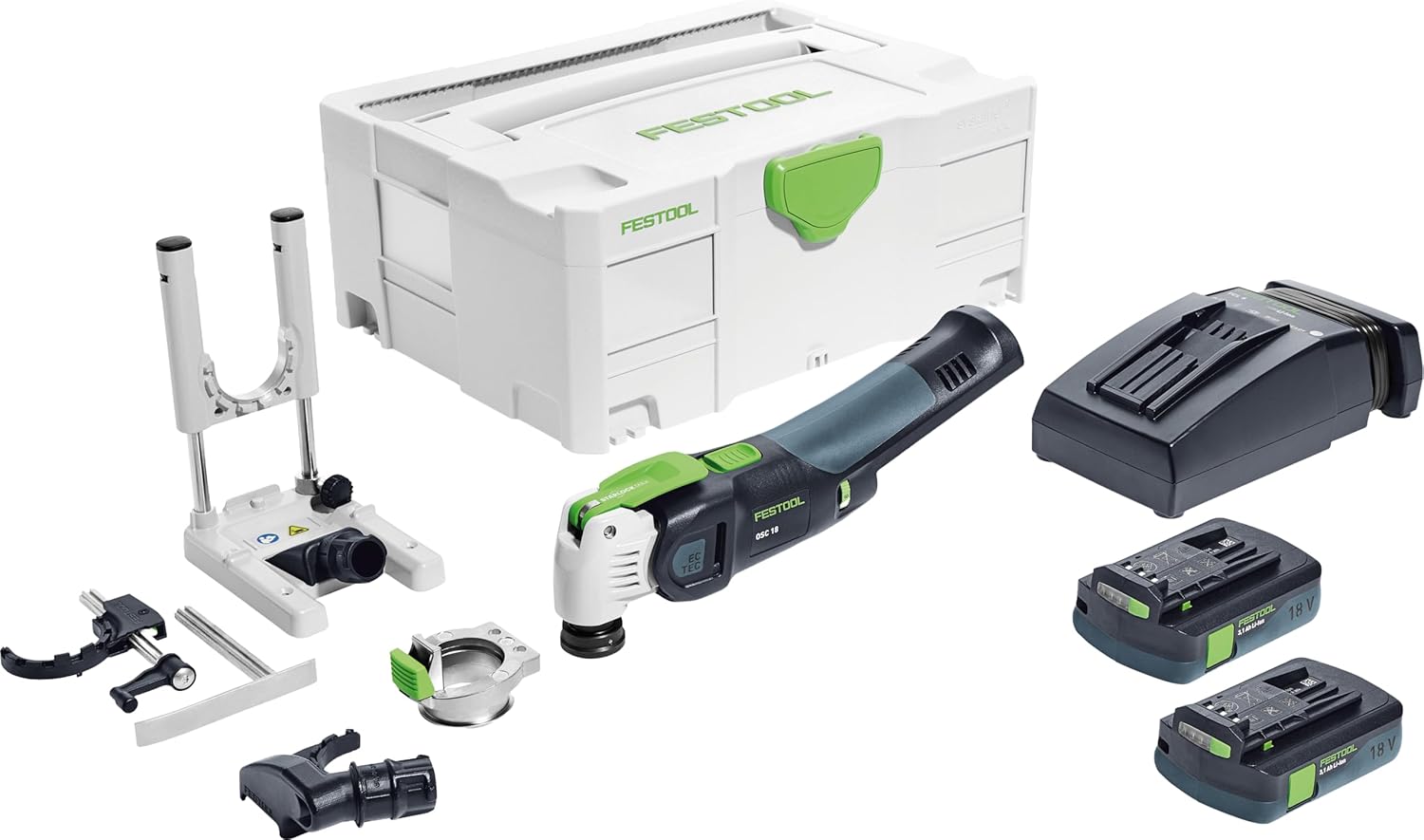
మూర్తి 1: The Festool VECTURO OSC 18 HPC 4,0 EI-Set, including the multi-tool, two 18V battery packs, a rapid charger, various accessories, and a Systainer SYS3 M 187 for storage and transport.
భద్రతా సమాచారం
Always observe general power tool safety guidelines. Read all safety warnings, instructions, illustrations, and specifications provided with this power tool. Failure to follow all instructions listed below may result in electric shock, fire, and/or serious injury.
- భద్రతా గ్లాసెస్, వినికిడి రక్షణ మరియు చేతి తొడుగులు వంటి తగిన వ్యక్తిగత రక్షణ పరికరాలను (PPE) ధరించండి.
- ఆపరేషన్ ముందు వర్క్పీస్ సురక్షితంగా బిగించబడిందని నిర్ధారించుకోండి.
- Keep hands and body parts away from the oscillating blade during operation.
- ఏవైనా సర్దుబాట్లు చేయడానికి, ఉపకరణాలను మార్చడానికి లేదా సాధనాన్ని నిల్వ చేయడానికి ముందు బ్యాటరీ ప్యాక్ను డిస్కనెక్ట్ చేయండి.
- Use only Festool-approved accessories and replacement parts.
చేర్చబడిన భాగాలు
The Festool VECTURO OSC 18 HPC 4,0 EI-Set includes the following items:
- Vecturo Multi-Tool
- Two BP 18 Li 4.0 Ah HPC-ASI Battery Packs
- TCL 6 Rapid Charger
- OSC-A Adapter
- OSC-AH Position Aid
- OSC-AV Dust Extraction Device
- OSC-TA Depth Stop
- USB 78/32/Bi/OSC Universal Saw Blade
- USB 50/35/Bi/OSC Universal Saw Blade
- HSB 100/Bi/OSC Wood Saw Blade
- Systainer SYS3 M 187
సెటప్
1. బ్యాటరీ ఛార్జింగ్ మరియు ఇన్స్టాలేషన్
- Insert the battery pack into the TCL 6 Rapid Charger. The charger's indicator light will show the charging status.
- పూర్తిగా ఛార్జ్ అయిన తర్వాత, ఛార్జర్ నుండి బ్యాటరీని తీసివేయండి.
- Align the charged battery pack with the battery slot on the VECTURO Multi-Tool and slide it in until it clicks securely into place.
2. Blade Installation (StarlockMax System)
The VECTURO features a keyless StarlockMax® quick-change system for fast and easy blade replacement.
- సాధనం నుండి బ్యాటరీ తీసివేయబడిందని నిర్ధారించుకోండి.
- Press the green lever on the tool head to release the blade holder.
- Align the desired StarlockMax blade with the holder and press it firmly until it clicks into place.
- Verify the blade is securely attached before use.
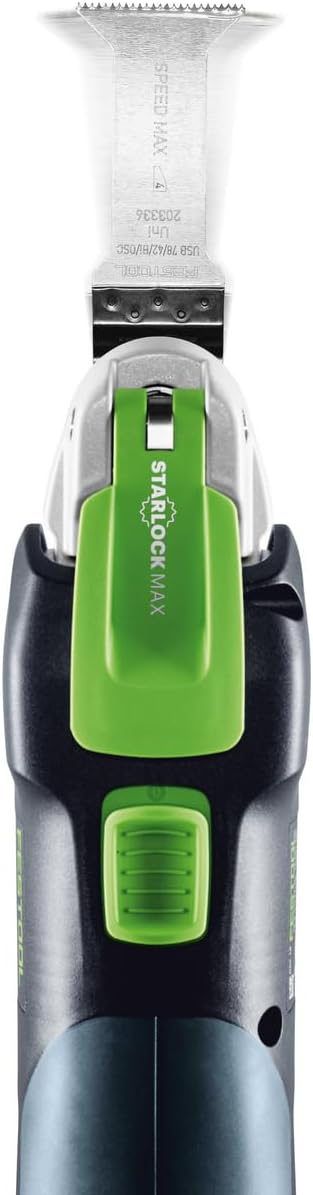
మూర్తి 2: టాప్ view of the tool demonstrating the StarlockMax blade attachment mechanism.
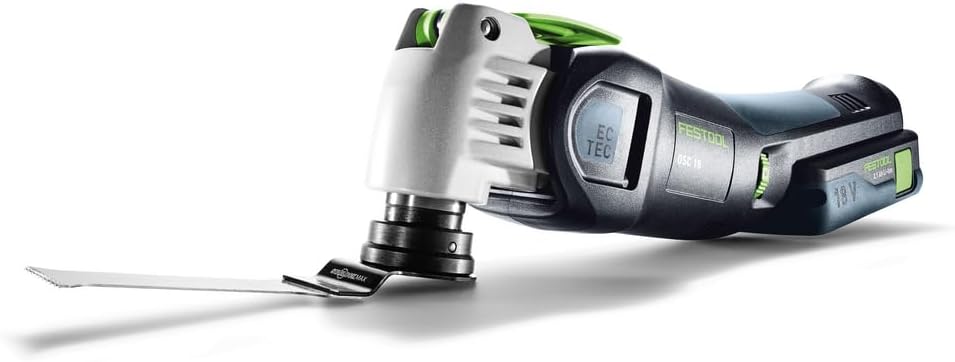
మూర్తి 3: The VECTURO Multi-Tool with a saw blade securely installed.
3. Accessory Attachment (Dust Extraction, Depth Stop, Position Aid)
Attach optional accessories as needed for specific applications.
- OSC-AV Dust Extraction Device: Slide the dust extraction device onto the tool head until it locks into place. Connect a compatible dust extractor hose for dust-free operation.
- OSC-TA Depth Stop: Attach the depth stop for controlled plunge cuts. Adjust the depth setting according to your requirements.
- OSC-AH Position Aid: Use the position aid for precise guidance during cuts, especially for delicate or intricate work.
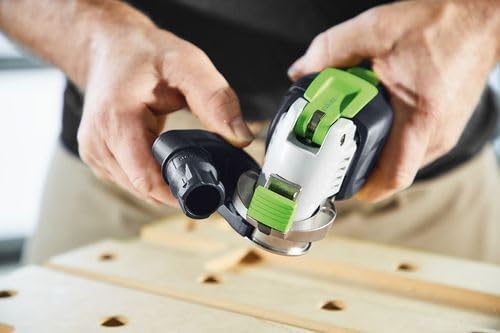
మూర్తి 4: Attaching the OSC-AV Dust Extraction Device to the VECTURO Multi-Tool.
ఆపరేటింగ్ సూచనలు
1. పవర్ ఆన్/ఆఫ్ మరియు వేగ నియంత్రణ
- To turn the tool on, press the power switch.
- To turn the tool off, release the power switch.
- The brushless EC-TEC motor features variable speed control. Adjust the speed dial to match the material and application for optimal results.
2. Making Cuts
Always ensure the workpiece is stable and secured. Apply gentle, consistent pressure. The tool's vibration isolation system enhances comfort during extended use.
- ప్లంజ్ కట్స్: For precise plunge cuts, use the OSC-TA Depth Stop. Position the blade over the desired cutting area and slowly lower the tool into the material.
- సాధారణ కట్టింగ్: Guide the tool along the cutting line, allowing the blade to do the work. Avoid forcing the tool, which can lead to overheating or damage.

మూర్తి 5: Demonstrating a controlled plunge cut with the VECTURO Multi-Tool.

మూర్తి 6: The VECTURO Multi-Tool performing a cut with the OSC-TA Depth Stop attached for accuracy.
నిర్వహణ
1. శుభ్రపరచడం
- After each use, disconnect the battery and clean the tool with a dry cloth.
- Remove any dust or debris from the ventilation openings to prevent overheating.
- Periodically clean the blade holder mechanism to ensure smooth operation.
2. బ్లేడ్ భర్తీ
Replace blades when they become dull or damaged to maintain cutting efficiency and safety. Refer to the "Blade Installation" section for detailed steps.
3. బ్యాటరీ సంరక్షణ
- బ్యాటరీ ప్యాక్లను ప్రత్యక్ష సూర్యకాంతి మరియు తీవ్రమైన ఉష్ణోగ్రతలకు దూరంగా చల్లని, పొడి ప్రదేశంలో నిల్వ చేయండి.
- Do not allow battery packs to fully discharge for extended periods. Recharge them regularly.
- If a battery pack is damaged, discontinue use and replace it with an authorized Festool battery.
ట్రబుల్షూటింగ్
This section addresses common issues you might encounter with your Festool VECTURO Multi-Tool.
| సమస్య | సాధ్యమైన కారణం | పరిష్కారం |
|---|---|---|
| సాధనం ప్రారంభం కాదు | బ్యాటరీ ఛార్జ్ చేయబడలేదు లేదా సరిగ్గా ఇన్స్టాల్ చేయబడలేదు. | బ్యాటరీ పూర్తిగా ఛార్జ్ చేయబడిందని మరియు సురక్షితంగా చొప్పించబడిందని నిర్ధారించుకోండి. |
| పేలవమైన కట్టింగ్ పనితీరు | Dull or incorrect blade. Incorrect speed setting. | Replace blade. Select appropriate speed for the material. |
| అధిక కంపనం లేదా శబ్దం | Blade not properly secured. Damaged blade. | బ్లేడ్ ఇన్స్టాలేషన్ను తనిఖీ చేయండి. దెబ్బతిన్న బ్లేడ్ను మార్చండి. |
| సాధనం వేడెక్కుతుంది | Blocked ventilation. Overloading the tool. | Clean ventilation openings. Reduce pressure and allow tool to cool. |
If you encounter issues not listed here or if solutions do not resolve the problem, contact Festool customer support.
స్పెసిఫికేషన్లు
| ఫీచర్ | వివరాలు |
|---|---|
| బ్రాండ్ | ఫెస్టూల్ |
| మోడల్ సంఖ్య | 576590 |
| శక్తి మూలం | బ్యాటరీ ఆధారితమైనది |
| వాల్యూమ్tage | 18 వోల్ట్లు |
| బ్యాటరీ రకం | లిథియం అయాన్ (2 చేర్చబడింది) |
| మోటార్ రకం | Brushless EC-TEC |
| Blade Holder System | StarlockMax® |
| వస్తువు బరువు | 13.58 pounds (with packaging) |
| ఉత్పత్తి కొలతలు | 15.59 x 11.65 x 7.36 అంగుళాలు |
| హ్యాండిల్ మెటీరియల్ | Thermoplastic Elastomers or Plastic |
| ఉపరితల సిఫార్సు | Wood (compatible with various materials depending on blade) |
| రంగు | Dark Gray Or Black |
వారంటీ మరియు మద్దతు
వారంటీ సమాచారం
All Festool power tools, including the VECTURO OSC 18 HPC 4,0 EI-Set, come with a comprehensive 3-year wear-and-tear warranty. This warranty also includes a 2-day standard repair time మరియు ఎ 1 నెలల సంతృప్తి హామీ.
For detailed warranty terms and conditions, please refer to the official Festool webసైట్ లేదా కస్టమర్ సపోర్ట్ని సంప్రదించండి.
కస్టమర్ మద్దతు
For technical assistance, service, or warranty claims, please contact Festool customer support through their official channels. Visit the Festool Store on Amazon లేదా వారి అధికారి webసంప్రదింపు సమాచారం కోసం సైట్.


