PPLEE Extra Loud Vibrating Alarm Clock with Bed Shaker
Model: CR1018I
1. ఉత్పత్తి ముగిసిందిview
The PPLEE Extra Loud Vibrating Alarm Clock is designed to provide effective wake-up solutions for deep sleepers, individuals with hearing impairment, and the deaf. It features multiple wake-up modes, a large digital display, dual alarm settings, and convenient charging capabilities.

Image 1.1: The PPLEE Extra Loud Vibrating Alarm Clock with its bed shaker accessory.
ముఖ్య లక్షణాలు:
- Strong Bed Shaker & Loud Alarm Buzzer: Offers three wake-up modes: loud buzzer, strong bed shaker, or a combination of both.
- 8.7" Large Mirror LED Display: Provides clear time visibility and can also function as a makeup mirror.
- Dual Alarms with Snooze Function: Allows setting two independent alarms with a 9-minute snooze option.
- Adjustable Brightness & Volume: Features 8 levels of display brightness and 7 levels of alarm volume.
- USB ఛార్జింగ్ పోర్ట్: Conveniently charge your mobile devices directly from the clock.
- బ్యాటరీ బ్యాకప్: Maintains time and alarm settings during power outages (CR2032 battery included).
- 12/24H Mode & DST Function: Supports both 12-hour and 24-hour time formats, along with Daylight Saving Time adjustment.
2. ప్యాకేజీ విషయాలు
దయచేసి ఈ క్రింది అంశాల కోసం పెట్టెను ఎంచుకోండి:
- 1 x PPLEE Mirror Alarm Clock
- 1 x Bed Shaker
- 1 x Power Plug with USB Cable
- 1 x ఇన్స్ట్రక్షన్ మాన్యువల్
- 1 x CR2032 Cell Coin Battery (pre-installed or separate)

చిత్రం 2.1: ఉత్పత్తి ప్యాకేజీలో చేర్చబడిన అన్ని భాగాలు.
3. సెటప్ గైడ్
3.1 పవర్ కనెక్షన్
- Connect the USB cable to the alarm clock's power input port.
- Plug the power adapter into a standard electrical outlet. The clock display will illuminate.
- Ensure the CR2032 backup battery is installed in its compartment. This battery preserves time and alarm settings during power interruptions.

చిత్రం 3.1: వెనుక view of the alarm clock showing the AC power input and backup battery compartment.
3.2 Bed Shaker Placement
The bed shaker provides a strong vibration to assist in waking. For optimal effectiveness, place the bed shaker in one of the following locations:
- Under your pillow.
- Under your fitted sheet.
- Between your mattress and box spring.

Image 3.2: Recommended placements for the bed shaker to maximize vibration effectiveness.
4. ఆపరేటింగ్ సూచనలు
4.1 సమయాన్ని సెట్ చేయడం
- నొక్కండి మరియు పట్టుకోండి టైమ్ సెట్ గంట అంకెలు ఫ్లాష్ అవ్వడం ప్రారంభించే వరకు బటన్.
- ఉపయోగించండి గంట మరియు నిమిషం సమయాన్ని సర్దుబాటు చేయడానికి బటన్లు.
- నొక్కండి టైమ్ సెట్ మళ్ళీ నిర్ధారించి సమయ సెట్టింగ్ మోడ్ నుండి నిష్క్రమించడానికి.
4.2 అలారాలను సెట్ చేయడం (అలారం 1 & అలారం 2)
The clock supports two independent alarms.
- నొక్కండి మరియు పట్టుకోండి అలారం 1 or అలారం 2 అలారం సమయ అంకెలు మెరిసే వరకు బటన్.
- ఉపయోగించండి గంట మరియు నిమిషం కావలసిన అలారం సమయాన్ని సెట్ చేయడానికి బటన్లు.
- నొక్కండి అలారం 1 or అలారం 2 మళ్ళీ అలారం సమయాన్ని నిర్ధారించడానికి.
- To activate or deactivate an alarm, short press the corresponding అలారం 1 or అలారం 2 బటన్. డిస్ప్లేపై అలారం ఐకాన్ కనిపిస్తుంది/అదృశ్యమవుతుంది.

Image 4.1: The dual alarm feature allows setting two separate wake-up times.
4.3 స్నూజ్ ఫంక్షన్
అలారం మోగినప్పుడు, నొక్కండి స్నూజ్ button to temporarily silence the alarm for 9 minutes. The alarm will sound again after the snooze period.
4.4 Turning Off Alarms
- Temporary Turn Off: నొక్కండి అలారం ఆఫ్ button once when the alarm is sounding to stop it for the current day. It will reactivate the next day.
- Permanent Turn Off: నొక్కండి మరియు పట్టుకోండి అలారం ఆఫ్ button to deactivate the alarm permanently. The alarm icon will disappear from the display.
4.5 డిస్ప్లే ప్రకాశాన్ని సర్దుబాటు చేయడం
The display has 8 levels of brightness. Short press the మసకబారిన button repeatedly to cycle through the brightness levels (OFF, Level 1-7). When in 'OFF' mode, the red indicator on top will remain on.
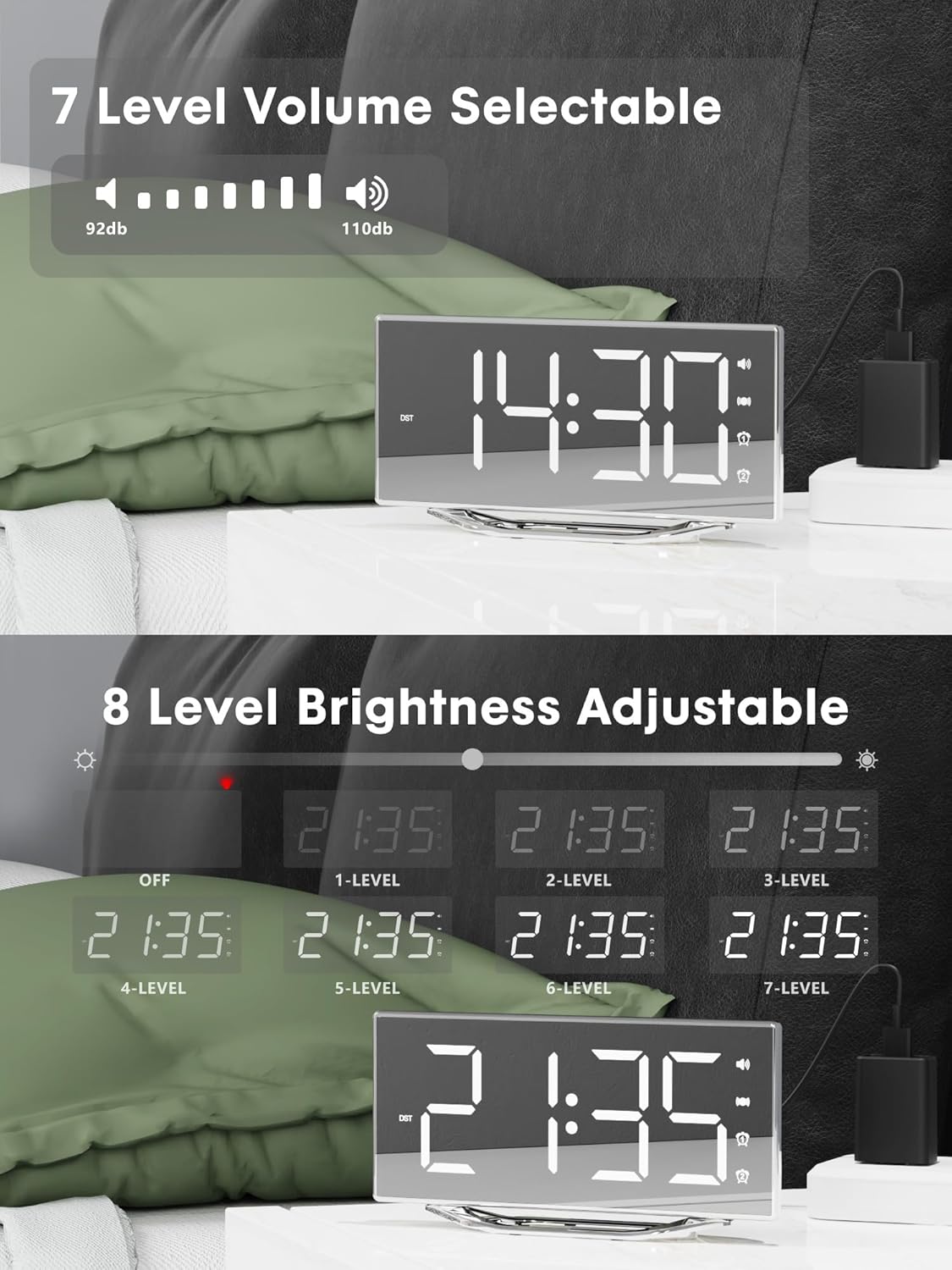
Image 4.2: Visual representation of the 8-level brightness adjustment for the LED display.
4.6 అలారం వాల్యూమ్ను సర్దుబాటు చేయడం
The alarm buzzer has 7 adjustable volume levels. Short press the వాల్యూమ్ button repeatedly to cycle through the volume levels.

Image 4.3: The alarm volume can be adjusted across 7 levels, from 92dB to 110dB.
4.7 Selecting Wake-Up Mode
నొక్కండి BUZZ/VIB button to select your preferred wake-up method:
- Loud Buzzer only
- Strong Bed Shaker only
- Both Buzzer and Shaker

Image 4.4: The alarm clock offers three distinct wake-up modes for personalized use.
4.8 12/24 Hour Format & DST
- 12/24 గంటల ఫార్మాట్: షార్ట్ ప్రెస్ ది 12/24H button to switch between 12-hour and 24-hour time display.
- DST ఫంక్షన్: షార్ట్ ప్రెస్ ది DST button to activate or deactivate Daylight Saving Time.

Image 4.5: The clock supports both 12-hour and 24-hour time formats, and features a USB charging port.
4.9 USB ఛార్జింగ్ పోర్ట్
The integrated USB charging port allows you to charge your smartphone or other USB-powered devices directly from the alarm clock. Simply connect your device's USB charging cable to the port on the clock.
5. నిర్వహణ
- Clean the clock surface with a soft, dry cloth. Avoid using abrasive cleaners or solvents.
- Keep the clock away from water and high humidity.
- Do not expose the clock to direct sunlight or extreme temperatures.
- If the clock will not be used for an extended period, consider removing the backup battery to prevent leakage.
6. ట్రబుల్షూటింగ్
| సమస్య | సాధ్యమైన కారణం | పరిష్కారం |
|---|---|---|
| గడియార ప్రదర్శన ఆఫ్లో ఉంది. | No power supply; power cable loose. | Ensure the power adapter is securely plugged into the clock and a working outlet. Check if the dimmer is set to 'OFF'. |
| Alarm does not sound/vibrate. | Alarm not activated; volume too low; bed shaker not connected or placed incorrectly. | Verify alarm is activated (icon visible). Increase alarm volume. Ensure bed shaker is securely plugged in and properly placed. |
| పవర్ OU తర్వాత సమయం/సెట్టింగ్లు రీసెట్ చేయబడతాయిtage. | Backup battery is dead or not installed. | Replace the CR2032 backup battery. Ensure it is installed correctly. |
| USB ఛార్జింగ్ పనిచేయడం లేదు. | Device not compatible; cable faulty; clock not powered. | Ensure the clock is powered. Try a different USB cable. Verify your device is compatible with standard USB charging. |
7. స్పెసిఫికేషన్లు
| ఫీచర్ | వివరాలు |
|---|---|
| బ్రాండ్ | PPLEE |
| మోడల్ సంఖ్య | CR1018I |
| రంగు | Silver Surface (with Bed Shaker) |
| ప్రదర్శన రకం | డిజిటల్ LED |
| ఉత్పత్తి కొలతలు | 8.7"W x 8.7"H (Display size) |
| శక్తి మూలం | కార్డెడ్ ఎలక్ట్రిక్ |
| బ్యాకప్ బ్యాటరీ | 1 x CR2032 (చేర్చబడింది) |
| మెటీరియల్ | ప్లాస్టిక్ |
| వస్తువు బరువు | 7 ఔన్సులు (0.2 కిలోగ్రాములు) |
| అలారం మోడ్లు | Buzzer, Vibration, Buzzer + Vibration |
| ప్రకాశాన్ని ప్రదర్శించు | 8 Levels (including OFF) |
| అలారం వాల్యూమ్ | 7 స్థాయిలు |
| సమయ ఆకృతి | 12H/24H ఎంచుకోదగినది |
| ప్రత్యేక లక్షణాలు | Dual Alarms, Snooze, USB Charging Port, DST Function, Mirror Surface |
8. వారంటీ మరియు మద్దతు
PPLEE is committed to providing high-quality products and customer satisfaction.
- 1-సంవత్సరం వారంటీ: The product is covered by a 1-year warranty from the date of purchase against manufacturing defects.
- 90-రోజుల మనీ-బ్యాక్ గ్యారెంటీ: If you are unsatisfied with the product, you may be eligible for a full refund within 90 days of purchase.
- Lifetime Free Support: PPLEE offers free lifetime user support for any questions or concerns regarding the product.
- 24-Hour Response Service: For any inquiries, please contact us via Amazon. We aim to respond within 24 hours.

Image 8.1: Summary of warranty and support offerings.


