పరిచయం
The Instant Pot Pro 10-in-1 is a versatile multi-cooker designed to simplify your cooking experience. It combines the functions of a pressure cooker, slow cooker, rice/grain cooker, steamer, sauté pan, sous vide, yogurt maker, sterilizer, and food warmer. This manual provides essential information for safe and effective operation, maintenance, and troubleshooting of your Instant Pot Pro and its accompanying tempered glass lid.

Image: The Instant Pot Pro 10-in-1 multi-cooker shown alongside its tempered glass lid.
ముఖ్యమైన రక్షణలు
When using electrical appliances, basic safety precautions should always be followed. Read all instructions before using the Instant Pot Pro.
- వేడి ఉపరితలాలను తాకవద్దు. హ్యాండిల్స్ లేదా నాబ్లను ఉపయోగించండి.
- విద్యుత్ షాక్ నుండి రక్షించడానికి, త్రాడు, ప్లగ్లు లేదా ఉపకరణాన్ని నీటిలో లేదా ఇతర ద్రవంలో ముంచవద్దు.
- ఏదైనా ఉపకరణాన్ని పిల్లలు లేదా సమీపంలో ఉపయోగించినప్పుడు నిశిత పర్యవేక్షణ అవసరం.
- ఉపయోగంలో లేనప్పుడు మరియు శుభ్రపరిచే ముందు అవుట్లెట్ నుండి అన్ప్లగ్ చేయండి. భాగాలను ఉంచడానికి లేదా తీయడానికి ముందు చల్లబరచడానికి అనుమతించండి.
- పాడైపోయిన త్రాడు లేదా ప్లగ్తో లేదా ఉపకరణం పనిచేయకపోవడం లేదా ఏ పద్ధతిలో పాడైపోయిన తర్వాత ఏ పరికరాన్ని ఆపరేట్ చేయవద్దు.
- ఉపకరణాల తయారీదారు సిఫార్సు చేయని అనుబంధ జోడింపులను ఉపయోగించడం వల్ల గాయాలు సంభవించవచ్చు.
- ఆరుబయట ఉపయోగించవద్దు.
- టేబుల్ లేదా కౌంటర్ అంచుపై త్రాడు వేలాడదీయవద్దు లేదా వేడి ఉపరితలాలను తాకవద్దు.
- వేడి గ్యాస్ లేదా ఎలక్ట్రిక్ బర్నర్ లేదా వేడిచేసిన ఓవెన్లో ఉంచవద్దు.
- వేడి నూనె లేదా ఇతర వేడి ద్రవాలు ఉన్న ఉపకరణాన్ని తరలించేటప్పుడు చాలా జాగ్రత్తగా ఉండాలి.
- ఎల్లప్పుడూ ముందుగా ఉపకరణానికి ప్లగ్ను అటాచ్ చేయండి, తర్వాత గోడ అవుట్లెట్లోకి త్రాడును ప్లగ్ చేయండి. డిస్కనెక్ట్ చేయడానికి, ఏదైనా నియంత్రణను "ఆఫ్"కి తిప్పండి, ఆపై గోడ అవుట్లెట్ నుండి ప్లగ్ను తీసివేయండి.
- ఉపకరణాన్ని ఉద్దేశించిన వినియోగానికి కాకుండా ఇతర వాటికి ఉపయోగించవద్దు.
- ఈ ఉపకరణం ఒత్తిడికి లోనవుతుంది. సరికాని వాడకం వల్ల మంట గాయమవుతుంది. పని చేయడానికి ముందు నిర్దిష్ట యూనిట్ సరిగ్గా మూసివేయబడిందని నిర్ధారించుకోండి.
- Do not fill the inner pot above the MAX PC (Pressure Cooking) line.
- Do not deep fry or pressure fry in this appliance.
- ఈ ఉపకరణం గృహ వినియోగం కోసం మాత్రమే.
ఉత్పత్తి ముగిసిందిview
Instant Pot Pro Components
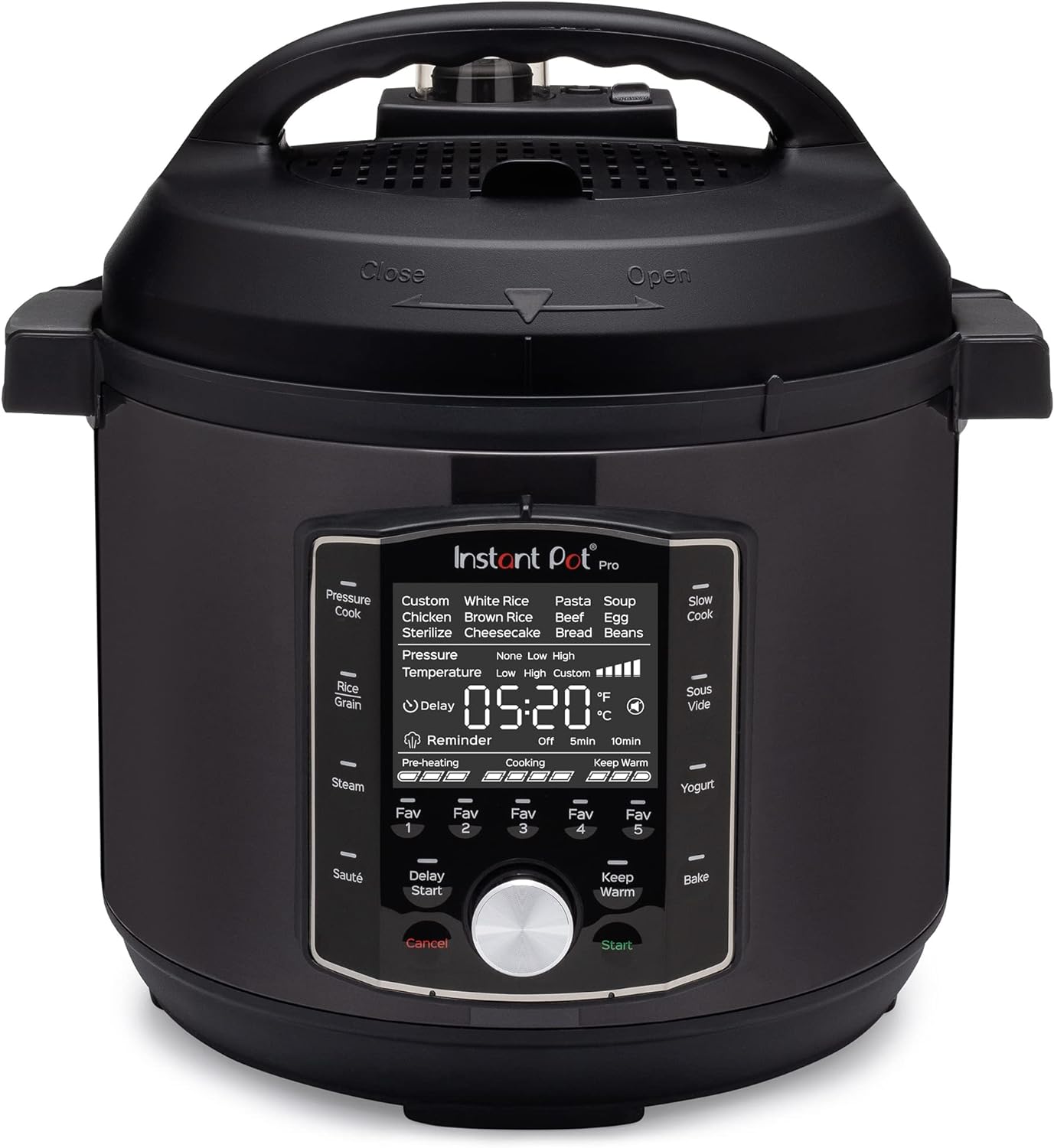
చిత్రం: ముందు భాగం view of the Instant Pot Pro, highlighting the control panel and display.
The Instant Pot Pro features an intuitive control panel with a large LCD display for easy readability. Key components include:
- ప్రధాన యూనిట్: Houses the heating element and control board.
- లోపలి కుండ: Stainless steel cooking pot with Easy Grip handles.
- Pressure Cooking Lid: Auto-sealing lid with a diffusing cover for quieter steam release.
- నియంత్రణ ప్యానెల్: Features program buttons, a central dial, and a digital display.
- ఆవిరి విడుదల వాల్వ్: Controls pressure release.
- ఫ్లోట్ వాల్వ్: Indicates when pressure is built up inside the cooker.
టెంపర్డ్ గ్లాస్ మూత

చిత్రం: క్లోజప్ view of the Instant Pot tempered glass lid with its stainless steel rim and handle.
The tempered glass lid is designed for use with the Instant Pot Multi-Use Programmable Pressure Cooker, specifically for modes like "Keep-Warm", "Sauté", and "Slow Cook". It features a steam vent and a stainless steel rim and handle. It is oven-safe with the inner cooking pot up to 428°F (220°C) and is dishwasher safe.
సెటప్ మరియు మొదటి ఉపయోగం
అన్ప్యాకింగ్ మరియు ప్రారంభ శుభ్రపరచడం
- Remove all packaging materials from and around the cooker.
- Wash the inner pot, sealing ring, and steam release valve with warm soapy water. Rinse thoroughly and dry all parts.
- కుక్కర్ బేస్ యొక్క బాహ్య భాగాన్ని ప్రకటనతో తుడవండి.amp cloth. Do not immerse the cooker base in water.
Water Test (Initial Run)
Performing a water test helps you familiarize yourself with the Instant Pot's operation and ensures it is functioning correctly.
- లోపలి కుండను కుక్కర్ బేస్లో ఉంచండి.
- Add 3 cups (750 mL) of water to the inner pot.
- Place the pressure cooking lid on the cooker base and turn it clockwise until it locks. Ensure the steam release handle is in the "Sealing" position.
- Plug the power cord into a grounded 120V wall outlet.
- Select the "Pressure Cook" program. Adjust the cooking time to 5 minutes.
- The cooker will begin pre-heating. Once pressure is reached, the float valve will rise, and the cooking countdown will begin.
- After 5 minutes, the cooker will beep and switch to "Keep Warm" mode.
- Carefully turn the steam release handle to the "Venting" position to quick release the pressure. Once the float valve drops, the lid can be opened.
- Unplug the cooker and allow it to cool before cleaning.
ఆపరేటింగ్ సూచనలు
The Instant Pot Pro offers 10-in-1 functionality with 28 smart cooking programs and 5 new Favorite program settings. Below are general instructions for common functions.

Image: Visual representation of the Instant Pot Pro's 10-in-1 functionality, including Pressure Cook, Slow Cook, Rice, Steam, Sauté, Mini Oven, Make Yogurt, Warm, Sous Vide, and Sterilize.
ప్రెషర్ వంట
- Add ingredients and liquid to the inner pot. Do not exceed the MAX PC line.
- Secure the pressure cooking lid, ensuring the steam release handle is set to "Sealing".
- Select the "Pressure Cook" program. Use the central dial to adjust cooking time and pressure level (High/Low).
- Press "Start". The cooker will pre-heat and then begin the pressure cooking cycle.
- Once cooking is complete, allow for natural release of pressure or use quick release as per recipe instructions.
నెమ్మదిగా వంట
- లోపలి కుండలో పదార్థాలను జోడించండి.
- Place the tempered glass lid on the inner pot.
- Select the "Slow Cook" program. Adjust cooking time and temperature (Low/Normal/High).
- "ప్రారంభించు" నొక్కండి.
సౌటింగ్
- లోపలి కుండను కుక్కర్ బేస్లో ఉంచండి.
- Select the "Sauté" program. Adjust temperature (Less/Normal/More).
- Add oil or butter to the hot inner pot.
- Add ingredients and stir as needed.
- Press "Cancel" when done. The tempered glass lid can be used to cover the pot during sautéing if desired.
పెరుగు తయారీ
- Add milk to the inner pot.
- Select the "Yogurt" program. Choose "Boil" to pasteurize the milk.
- Allow milk to cool to desired temperature (typically 105-115°F / 40-46°C).
- Add yogurt starter culture and stir.
- Select "Yogurt" again and choose "Ferment". Set the fermentation time.
- Place the tempered glass lid on the inner pot during fermentation.

Image: The Instant Pot Pro in a kitchen setting, demonstrating its use for preparing meals quickly.
నిర్వహణ మరియు శుభ్రపరచడం
Regular cleaning and maintenance will ensure the longevity and optimal performance of your Instant Pot Pro.
Cleaning the Cooker Base
- కుక్కర్ను ఎల్లప్పుడూ అన్ప్లగ్ చేసి, శుభ్రపరిచే ముందు పూర్తిగా చల్లబరచడానికి అనుమతించండి.
- Wipe the exterior of the cooker base with a clean, damp గుడ్డ.
- కుక్కర్ బేస్ను ఎప్పుడూ నీటిలో లేదా మరే ఇతర ద్రవంలో ముంచవద్దు.
Cleaning the Inner Pot and Lids
- The stainless steel inner pot, pressure cooking lid, and tempered glass lid are all dishwasher safe.
- చేతులు కడుక్కోవడానికి, వెచ్చని సబ్బు నీరు మరియు రాపిడి లేని స్పాంజిని ఉపయోగించండి.
- Remove the sealing ring from the pressure cooking lid for thorough cleaning. Ensure it is properly re-inserted before next use.
- Clean the steam release valve and float valve regularly to prevent blockages.
ట్రబుల్షూటింగ్
If you encounter issues with your Instant Pot Pro, refer to the common problems and solutions below.
| సమస్య | సాధ్యమైన కారణం | పరిష్కారం |
|---|---|---|
| Lid won't close/lock | Sealing ring not properly installed; food debris blocking lid. | Check sealing ring position; clean lid and rim. |
| మూత నుండి ఆవిరి కారుతోంది | Sealing ring damaged or not in place; steam release handle not in "Sealing" position. | Inspect/reposition sealing ring; turn steam release handle to "Sealing". |
| ఫ్లోట్ వాల్వ్ పైకి లేవడం లేదు | Not enough liquid; steam release handle not in "Sealing" position. | Add more liquid; ensure steam release handle is set correctly. |
| ఆహారం సరిగా ఉడకదు | వంట సమయం/ఒత్తిడి తప్పు; తగినంత ద్రవం లేదు. | Adjust settings according to recipe; ensure minimum liquid requirements are met. |
| ప్రదర్శనలో లోపం కోడ్లు | నిర్దిష్ట అంతర్గత సమస్య. | Refer to the full user manual (link provided in product details) for specific error code meanings and solutions. |
స్పెసిఫికేషన్లు
- బ్రాండ్: తక్షణం
- మోడల్: Instant Pot Pro 6 Quart
- సామర్థ్యం: 6 క్వార్ట్స్
- మెటీరియల్: Stainless steel (inner pot), Tempered Glass (lid), Plastic/Metal (exterior)
- రంగు: నలుపు
- ముగించు రకం: మాట్టే
- ప్రత్యేక లక్షణాలు: Dishwasher Safe parts, Keep Warm Setting, Easy Grip handles, Diffusing Cover for steam release.
- నియంత్రణ పద్ధతి: Touch, Push Button, Dial
- ఆపరేషన్ మోడ్: ఆటోమేటిక్
- వాల్యూమ్tage: 120 వోల్ట్లు (AC)
- ASIN: B09L4YYGVF
- మొదటి తేదీ అందుబాటులో ఉంది: నవంబర్ 5, 2021
వారంటీ మరియు మద్దతు
Instant Brands provides a limited warranty for the Instant Pot Pro. For detailed warranty information, product registration, and customer support, please visit the official Instant Brands webసైట్ లేదా మీ ఉత్పత్తితో అందించబడిన పూర్తి యూజర్ మాన్యువల్ని చూడండి.
You can also find the official User Manual (PDF) at: Instant Pot Pro User Manual PDF
For further assistance, contact Instant Brands customer service.


