1. పరిచయం
This manual provides detailed instructions for the safe and effective operation of your POCOCO DJ Disco Stage Party Light. This versatile lighting unit features a combination of laser and LED effects, sound activation, and multiple operating modes, suitable for various indoor and outdoor entertainment settings. It is powered by a built-in rechargeable battery or via USB.

Figure 1.1: POCOCO Disco Light highlighting its battery and USB power capabilities, along with key features such as 60 patterns, remote control, sound control, built-in battery, USB charging, and timer function.
2. భద్రతా సమాచారం
ఈ ఉత్పత్తిని ఉపయోగించే ముందు దయచేసి అన్ని భద్రతా హెచ్చరికలు మరియు సూచనలను జాగ్రత్తగా చదవండి. ఈ సూచనలను పాటించడంలో విఫలమైతే విద్యుత్ షాక్, అగ్ని ప్రమాదం లేదా తీవ్రమైన గాయం సంభవించవచ్చు.
- This product contains a laser. DO NOT LOOK DIRECTLY INTO THE LASER APERTURE. Direct exposure to the laser beam may cause eye damage.
- పరికరాన్ని నీరు, తేమ మరియు అధిక తేమ నుండి దూరంగా ఉంచండి.
- Do not operate the device if it has been damaged or dropped.
- సరైన వెంటిలేషన్ ఉండేలా చూసుకోండి. వెంటిలేషన్ ఓపెనింగ్లను బ్లాక్ చేయవద్దు.
- Use only the provided USB cable and a compatible 5V power adapter for charging.
- పిల్లలకు దూరంగా వుంచండి. ఇది బొమ్మ కాదు.
- పరికరాన్ని విడదీయడానికి లేదా సవరించడానికి ప్రయత్నించవద్దు. అన్ని సర్వీసింగ్లను అర్హత కలిగిన సిబ్బందికి సూచించండి.
- పరికరాన్ని అధిక ఉష్ణోగ్రతలు లేదా ప్రత్యక్ష సూర్యకాంతికి ఎక్కువ కాలం బహిర్గతం చేయకుండా ఉండండి.
3. ప్యాకేజీ విషయాలు
క్రింద జాబితా చేయబడిన అన్ని వస్తువులు మీ ప్యాకేజీలో చేర్చబడ్డాయని ధృవీకరించండి:
- POCOCO DJ Disco Stage Party Light (DQ-R50)
- రిమోట్ కంట్రోల్
- USB ఛార్జింగ్ కేబుల్
- మౌంటు బ్రాకెట్
- మౌంటు స్క్రూలు (2)
- వినియోగదారు మాన్యువల్ (ఈ పత్రం)

Figure 3.1: The POCOCO Disco Light unit and its accompanying remote control.
4. ఉత్పత్తి ముగిసిందిview
Familiarize yourself with the components of your POCOCO Disco Stage Party Light and its remote control.
4.1 పరికర భాగాలు

Figure 4.1: Labeled diagram of the POCOCO Disco Light, indicating the LED light, remote sensor, play mode indicator, red laser light, green laser light, cooling fan, sound active sensor, DC 5V power input, and power switch.
- LED లైట్: Projects various patterns and colors.
- Remote Sensor (IR): రిమోట్ కంట్రోల్ నుండి సంకేతాలను అందుకుంటుంది.
- Play Mode Indicator: Shows the current operating mode.
- Red Laser Light: Projects red laser patterns.
- Green Laser Light: Projects green laser patterns.
- కూలింగ్ ఫ్యాన్: Dissipates heat during operation.
- Sound Active Sensor (MIC): Detects ambient sound for sound-activated mode.
- పవర్ ఇన్పుట్ (DC 5V): Connects to the USB charging cable.
- పవర్ స్విచ్ (ఆన్/ఆఫ్): పరికరాన్ని ఆన్ లేదా ఆఫ్ చేస్తుంది.
4.2 రిమోట్ కంట్రోల్ విధులు
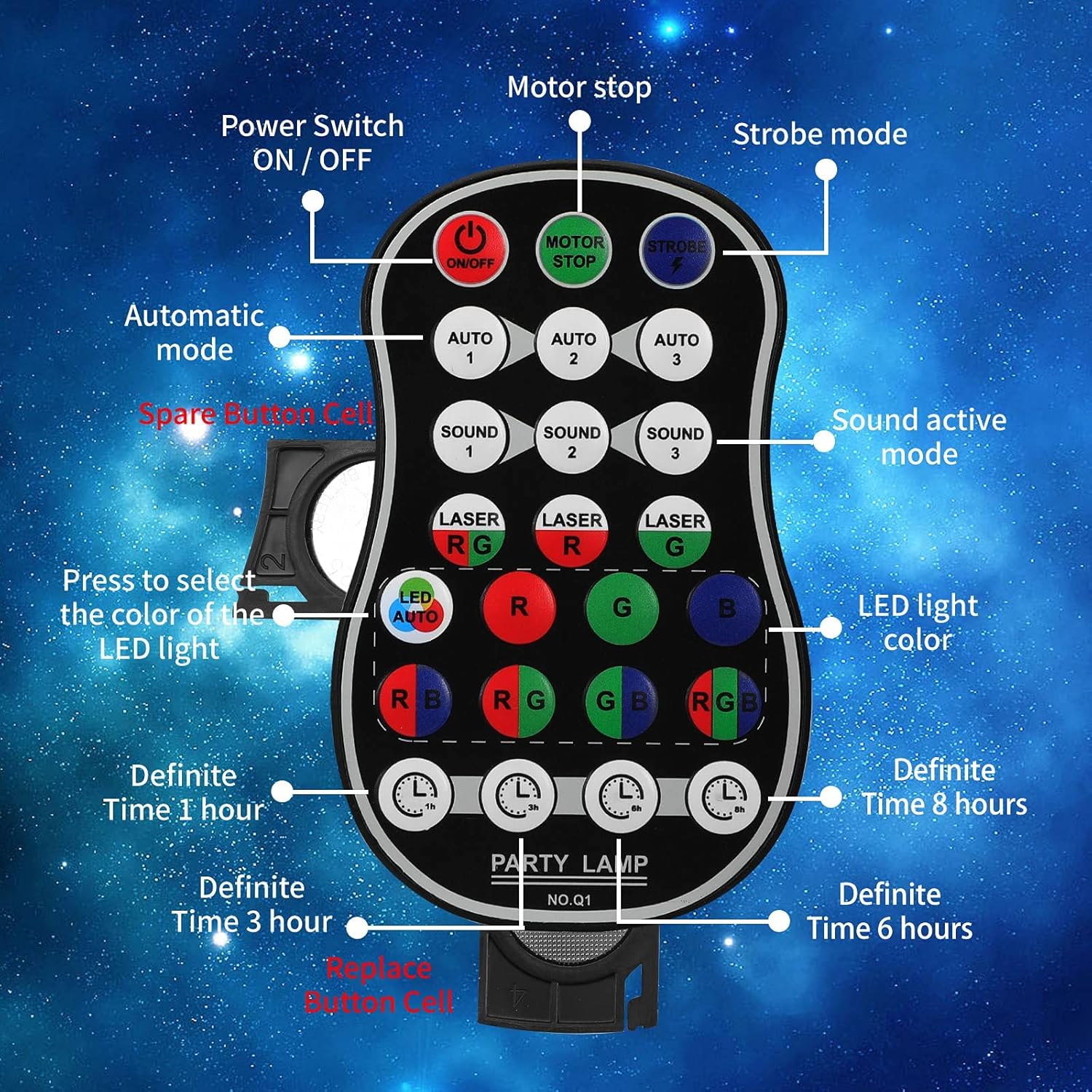
Figure 4.2: Labeled diagram of the remote control, showing buttons for Power ON/OFF, Motor Stop, Strobe Mode, Automatic Modes (Auto 1, 2, 3), Sound Active Modes (Sound 1, 2, 3), Laser Color Selection (RG, R, G), LED Light Color Selection (LED Auto, R, G, B, RB, RG, GB, RGB), and Definite Time settings (1h, 3h, 6h, 8h).
- ఆన్/ఆఫ్: పవర్ స్విచ్.
- MOTOR STOP: Stops the motor movement of patterns.
- స్ట్రోబ్: Activates strobe effect.
- AUTO 1/2/3: Selects different automatic light color and pattern change modes.
- SOUND 1/2/3: Activates sound-controlled modes with varying sensitivities.
- LASER RG/R/G: Selects laser color combinations (Red & Green, Red only, Green only).
- LED AUTO/R/G/B/RB/RG/GB/RGB: Selects LED light colors or automatic color cycling.
- 1h/3h/6h/8h: Sets a timer for automatic shutdown after the selected duration.
5. సెటప్
5.1 పరికరాన్ని ఛార్జ్ చేస్తోంది
The device comes with a built-in 3000 mAh battery, providing up to 5 hours of operation on a full charge.
- Connect the small end of the provided USB charging cable to the DC 5V power input port on the back of the light.
- Connect the standard USB end of the cable to a USB power adapter (not included), a computer USB port, or a power bank.
- ఛార్జింగ్ ఇండికేటర్ లైట్ ఛార్జింగ్ సమయంలో వెలుగుతుంది మరియు పూర్తిగా ఛార్జ్ అయిన తర్వాత ఆపివేయబడుతుంది.
5.2 మౌంటు ఐచ్ఛికాలు
The POCOCO Disco Light is designed for flexible placement, including on a table, on the ground, or mounted on a ceiling or wall.
- Table/Ground Placement: Simply place the unit on a flat, stable surface. Adjust the angle of the light using the integrated bracket.
- సీలింగ్/వాల్ మౌంటు: Use the provided mounting bracket and screws. Secure the bracket to the desired surface, then attach the light unit to the bracket. The bracket allows for 180-degree manual rotation to adjust the projection angle.
6. ఆపరేటింగ్ సూచనలు
After setup, use the remote control to operate the light.
- పవర్ ఆన్/ఆఫ్: నొక్కండి ఆన్/ఆఫ్ button on the remote control or use the physical switch on the device.
- ఆపరేటింగ్ మోడ్ని ఎంచుకోండి:
- ఆటో మోడ్: నొక్కండి ఆటో 1, ఆటో 2, లేదా ఆటో 3 for automatic color and pattern changes, creating a relaxed atmosphere.
- స్ట్రోబ్ మోడ్: నొక్కండి స్ట్రోబ్ button for rapid flashing effects.
- సౌండ్ కంట్రోల్ మోడ్: నొక్కండి శబ్దం 1, శబ్దం 2, లేదా శబ్దం 3. The lights will change colors and patterns according to the rhythm of surrounding music or sounds.
- Adjust Laser Colors: ఉపయోగించండి LASER RG, LASER R, లేదా LASER G buttons to select desired laser colors.
- Adjust LED Colors: ఉపయోగించండి LED ఆటో, R, G, B, RB, RG, GB, లేదా RGB buttons to select specific LED colors or automatic cycling.
- Stop Motor Movement: నొక్కండి మోటార్ స్టాప్ button to pause the pattern movement while keeping the lights on.
- టైమర్ సెట్ చేయండి: నొక్కండి 1h, 3h, 6h, లేదా 8h to set the light to automatically turn off after the specified time.
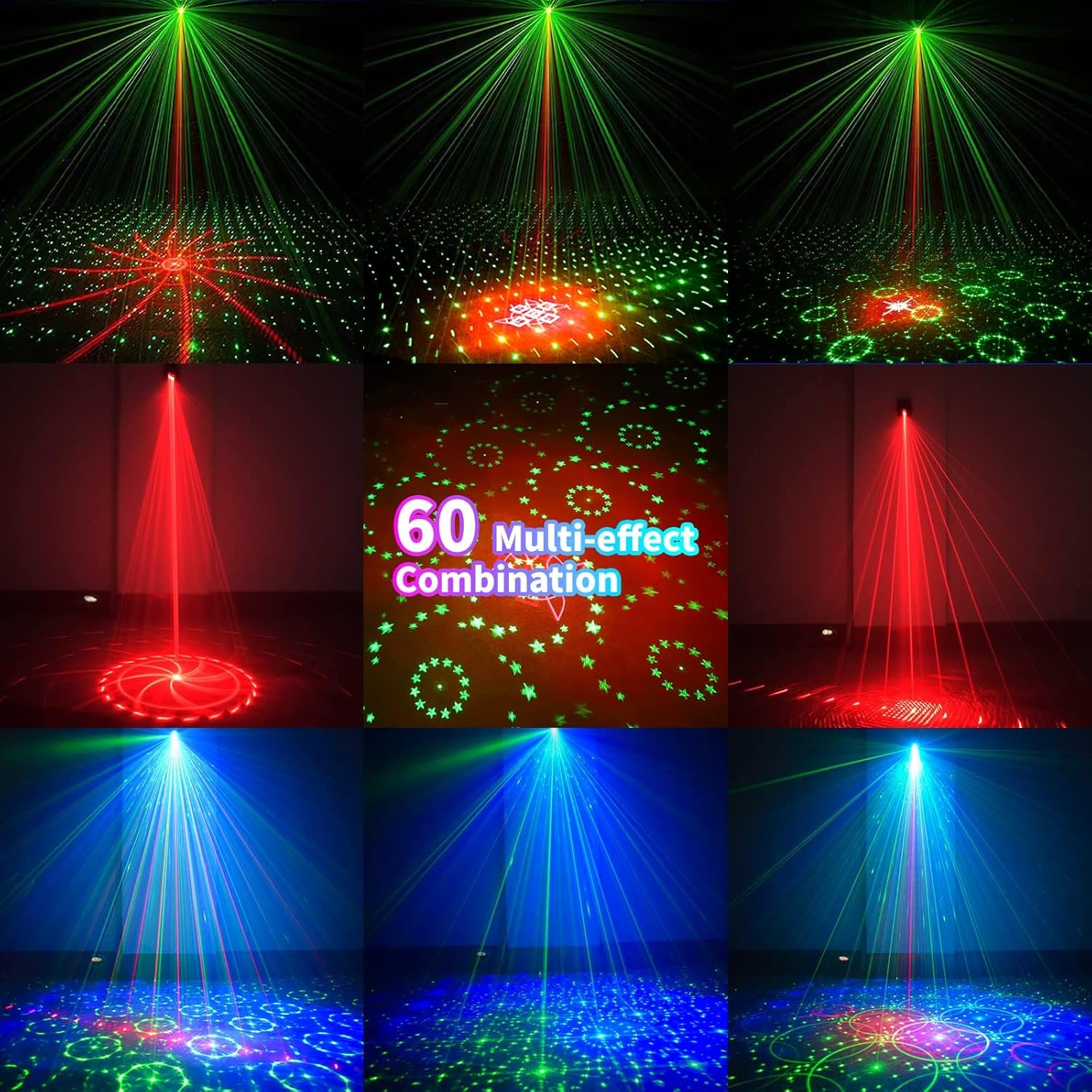
చిత్రం 6.1: ఉదాamples of the 60 multi-effect combinations produced by the POCOCO Disco Light, showcasing various laser and LED patterns in different colors.
7. నిర్వహణ
సరైన నిర్వహణ మీ పరికరం యొక్క దీర్ఘాయువు మరియు సరైన పనితీరును నిర్ధారిస్తుంది.
- శుభ్రపరచడం: Use a soft, dry cloth to clean the exterior of the device. Do not use abrasive cleaners or solvents. Ensure the laser aperture and LED lens are free of dust and smudges for clear projection.
- నిల్వ: ఎక్కువసేపు ఉపయోగంలో లేనప్పుడు, పరికరాన్ని చల్లని, పొడి ప్రదేశంలో, ప్రత్యక్ష సూర్యకాంతి మరియు తీవ్రమైన ఉష్ణోగ్రతలకు దూరంగా నిల్వ చేయండి.
- బ్యాటరీ సంరక్షణ: To maintain battery health, charge the device fully before long-term storage and recharge it every 3-6 months if not in regular use.
8. ట్రబుల్షూటింగ్
If you encounter issues with your POCOCO Disco Light, refer to the following common problems and solutions:
| సమస్య | సాధ్యమైన కారణం | పరిష్కారం |
|---|---|---|
| పరికరం ఆన్ చేయదు. | బ్యాటరీ క్షీణించింది. పవర్ స్విచ్ ఆఫ్ చేయబడింది. రిమోట్ కంట్రోల్ బ్యాటరీ చనిపోయింది. | USB కేబుల్ ఉపయోగించి పరికరాన్ని ఛార్జ్ చేయండి. Ensure the physical power switch is in the ON position. రిమోట్ కంట్రోల్లో బ్యాటరీని మార్చండి. |
| No laser or LED projection. | Lens is obstructed. తప్పు మోడ్ ఎంచుకోబడింది. | Clean the lens and aperture. Ensure a projection mode (Auto, Sound, Strobe) is active. |
| Sound control not working. | Microphone is obstructed. Ambient sound is too low. Incorrect sound mode selected. | Ensure the microphone opening is clear. Increase the volume of the music or sound source. Try different SOUND modes (SOUND 1, 2, 3). |
| రిమోట్ కంట్రోల్ స్పందించడం లేదు. | రిమోట్ బ్యాటరీ అయిపోయింది. Obstruction between remote and sensor. Remote is too far from the device. | రిమోట్ కంట్రోల్ బ్యాటరీని భర్తీ చేయండి. Ensure a clear line of sight to the IR sensor on the device. పరికరానికి దగ్గరగా వెళ్లండి. |
| Patterns are static (not moving). | MOTOR STOP button pressed. | Press the MOTOR STOP button again to resume movement. |
If the problem persists after trying these solutions, please contact POCOCO customer support.
9. స్పెసిఫికేషన్లు
| ఫీచర్ | స్పెసిఫికేషన్ |
|---|---|
| మోడల్ సంఖ్య | DQ-R50 |
| కొలతలు (L x W x H) | 2.91" x 2.79" x 2.83" (7.39 సెం.మీ x 7.09 సెం.మీ x 7.19 సెం.మీ) |
| వస్తువు బరువు | 13.1 ఔన్సులు (371 గ్రాములు) |
| శక్తి మూలం | Battery Powered (Built-in Lithium Ion) / USB Powered |
| బ్యాటరీ కెపాసిటీ | 3000 mAh |
| ఆపరేటింగ్ వాల్యూమ్tage | 5 వోల్ట్లు |
| కాంతి మూలం రకం | Light Emitting Diode (LED) / Laser |
| మెటీరియల్ | అల్యూమినియం మిశ్రమం |
| నియంత్రణ పద్ధతి | Remote Control / Sound Activated |
| రంగు | నలుపు |
| UPC | 704078007977 |
10. వారంటీ మరియు మద్దతు
For warranty information and customer support, please refer to the documentation provided at the time of purchase or contact the seller directly. You can also visit the official POCOCO store for more information:


