పరిచయం
ధన్యవాదాలు, ధన్యవాదాలు.asing the Pyle Portable Bluetooth PA Speaker. This manual provides important safety instructions, operational guidelines, and maintenance procedures for your device. Please read it thoroughly before using the product to ensure proper operation and to prevent damage.

Image: The Pyle Portable Bluetooth PA Speaker, showcasing its tall, black design with dual 10-inch woofers and top-mounted tweeters. Included accessories like the wireless microphone, remote control, and power adapter are displayed alongside the speaker.
భద్రతా సూచనలు
- Ensure the power supply matches the speaker's requirements (110/240V switchable).
- అగ్ని లేదా విద్యుత్ షాక్ను నివారించడానికి యూనిట్ను వర్షం లేదా తేమకు గురిచేయవద్దు.
- స్పీకర్ను వేడి వనరుల దగ్గర లేదా ప్రత్యక్ష సూర్యకాంతిలో ఉంచకుండా ఉండండి.
- వెంటిలేషన్ ఓపెనింగ్స్ను నిరోధించవద్దు.
- తయారీదారు పేర్కొన్న జోడింపులు/యాక్సెసరీలను మాత్రమే ఉపయోగించండి.
- మెరుపు తుఫానుల సమయంలో లేదా ఎక్కువ కాలం ఉపయోగించనప్పుడు యూనిట్ను అన్ప్లగ్ చేయండి.
- అన్ని సేవలను అర్హత కలిగిన సేవా సిబ్బందికి సూచించండి.
- Turn off the power with the ON/OFF switch when not in use to prevent battery damage.
ఫీచర్లు
The Pyle Portable Bluetooth PA Speaker is an all-in-one karaoke entertainment system designed for both indoor and outdoor use. Key features include:
- High-Powered Active Speaker Tower with Dual 10'' Woofers + 3'' Tweeters.
- 600 Watt MAX Power Output.
- Multi-Colored DJ Flashing LED Lights.
- Bluetooth 5.0 for Wireless Music Streaming (32'+ Feet range).
- USB Flash & SD Memory Card Readers for Digital Audio File మద్దతు.
- FM Radio with Auto Station Scan.
- (2) 1/4'' Microphone Inputs and Aux (3.5mm) Input.
- Treble, Bass, Echo, and Volume Controls.
- Convenient Carry Handles & Rolling Wheels for portability.
- Built-in 12V (4.5A) lead acid rechargeable battery.
- Microphone Priority Function.

Image: An illustration highlighting the various connectivity options of the Pyle PA Speaker, including Bluetooth 5.0, Microphone Input, USB, AUX In, and FM Radio, demonstrating its versatility.
పెట్టెలో ఏముంది
అన్ప్యాక్ చేసిన తర్వాత, దయచేసి క్రింద జాబితా చేయబడిన అన్ని అంశాలు ఉన్నాయని నిర్ధారించుకోండి:
- యాక్టివ్ స్పీకర్ టవర్
- వైర్లెస్ మైక్రోఫోన్
- రిమోట్ కంట్రోల్
- పవర్ అడాప్టర్
సెటప్
ప్రారంభ ఛార్జింగ్
Before first use, fully charge the speaker's built-in 12V (4.5A) lead acid battery using the provided power adapter. Connect the power adapter to the speaker's power input and plug it into a standard electrical outlet. The charging indicator will illuminate.
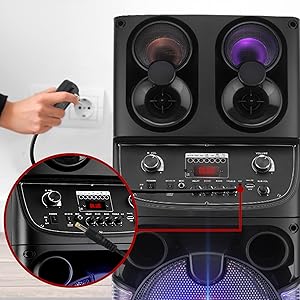
చిత్రం: క్లోజప్ view of a hand plugging the power adapter into the speaker's power input, illustrating the charging process.
Microphone and Remote Batteries
The wireless microphone requires (2) 'AA' batteries (not included). The remote control requires (2) 'AAA' batteries (not included). Insert batteries according to polarity markings.
ఆపరేటింగ్ సూచనలు
పవర్ ఆన్/ఆఫ్
Locate the ON/OFF switch on the speaker's control panel. Flip the switch to 'ON' to power on the unit. Flip to 'OFF' to power off. Always power off the unit when not in use to preserve battery life.
బ్లూటూత్ పెయిరింగ్
- స్పీకర్ను ఆన్ చేయండి.
- మీ పరికరంలో బ్లూటూత్ని యాక్టివేట్ చేయండి (స్మార్ట్ఫోన్, టాబ్లెట్, మొదలైనవి).
- కోసం వెతకండి the Bluetooth network name 'PYLEUSA' in your device's Bluetooth settings.
- Select 'PYLEUSA' to connect. A confirmation sound will indicate successful pairing.
- You can now stream music wirelessly from your device.
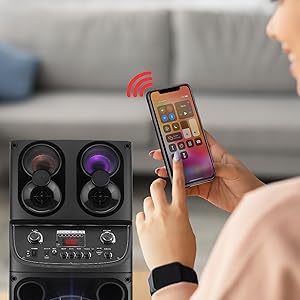
Image: A person's hand holding a smartphone, demonstrating the wireless control and music streaming capabilities via Bluetooth connection to the Pyle speaker.
USB/SD కార్డ్ ప్లేబ్యాక్
Insert a USB flash drive or SD memory card (up to 32GB) into the respective slot on the control panel. The speaker will automatically detect and begin playing compatible audio files (MP3). Use the control panel or remote to navigate tracks and adjust volume.
AUX ఇన్పుట్
Connect external audio devices (e.g., MP3 players, laptops) to the 3.5mm AUX input using an audio cable (not included). The speaker will switch to AUX mode, allowing audio playback from the connected device.
మైక్రోఫోన్ వినియోగం
Connect the wireless microphone or other 1/4'' wired microphones to the microphone inputs. Adjust the microphone volume, treble, bass, and echo controls on the speaker's panel for desired sound. The Microphone Priority Function allows the microphone audio to take precedence over music playback.

Image: A mother and child enjoying karaoke with the Pyle speaker, demonstrating the microphone priority function and the speaker's use in a home entertainment setting.
FM రేడియో
Switch to FM mode. Use the auto station scan function to find available radio stations. Adjust volume and navigate stations using the controls on the speaker or remote.
LED లైట్లు
The speaker features multi-colored DJ flashing LED lights. These lights can be turned on or off, or their mode changed, using the dedicated button on the control panel or remote control.

Image: A display of multiple Pyle PA speakers showcasing their vibrant multi-color flashing LED party lights, illustrating the dynamic visual effect they create for events.
నిర్వహణ
- శుభ్రపరచడం: స్పీకర్ బాహ్య భాగాన్ని శుభ్రం చేయడానికి మృదువైన, పొడి వస్త్రాన్ని ఉపయోగించండి. లిక్విడ్ క్లీనర్లు లేదా ఏరోసోల్లను ఉపయోగించవద్దు.
- నిల్వ: When not in use for extended periods, store the speaker in a cool, dry place. Ensure the battery is fully charged before storage and recharge it every few months to maintain battery health.
- బ్యాటరీ సంరక్షణ: To prevent battery damage, always turn off the power with the ON/OFF switch when the speaker is not in use.
ట్రబుల్షూటింగ్
| సమస్య | సాధ్యమైన కారణం | పరిష్కారం |
|---|---|---|
| శక్తి లేదు | Battery drained; Power adapter not connected; Power switch off. | Charge the battery; Ensure power adapter is securely connected; Turn power switch to ON. |
| శబ్దం లేదు | వాల్యూమ్ చాలా తక్కువగా ఉంది; తప్పు ఇన్పుట్ మోడ్; పరికరం సరిగ్గా కనెక్ట్ కాలేదు. | Increase volume; Select correct input mode (Bluetooth, USB, AUX, FM); Reconnect device. |
| బ్లూటూత్ కనెక్ట్ కావడం లేదు | స్పీకర్ జత చేసే మోడ్లో లేదు; పరికరం బ్లూటూత్ ఆఫ్లో ఉంది; స్పీకర్ నుండి చాలా దూరంలో ఉంది. | Ensure speaker is in Bluetooth mode; Turn on device Bluetooth; Move device closer (within 32'+ feet). |
| మైక్రోఫోన్ పని చేయడం లేదు | Microphone batteries low/dead; Microphone not paired (wireless); Volume too low. | Replace microphone batteries; Ensure wireless mic is paired; Increase microphone volume. |
స్పెసిఫికేషన్లు
| ఫీచర్ | వివరాలు |
|---|---|
| MAX పవర్ అవుట్పుట్ | 600 వాట్ |
| సౌండ్ సిస్టమ్ | Dual 10'' Woofers + 3'' Tweeters |
| ఫ్రీక్వెన్సీ రెస్పాన్స్ | 45Hz-20kHz |
| Sensitivity (1k 0db) | 500mv |
| ఇంపెడెన్స్ | 3 ఓం |
| విద్యుత్ సరఫరా | 110/240V Switchable (15V/2A Power Adapter) |
| PA Speaker Rechargeable Battery | 12V (4.5A) lead acid battery |
| రిమోట్ బ్యాటరీ అవసరం | 1.5V (2) x 'AAA' Batteries (not included) |
| మైక్ నామినల్ కరెంట్ డ్రెయిన్ | <100 ఎంఏహెచ్ |
| మైక్రోఫోన్ బ్యాటరీ అవసరం | (2) x 'AA' Batteries (each, not included) |
| Maximum USB Flash / SD Memory Card Support | 32GB |
| ఉత్పత్తి కొలతలు (L x W x H) | 12.6'' x 12.2'' x 43.7'' అంగుళాలు |
| వస్తువు బరువు | 35.6 పౌండ్లు |
| బ్లూటూత్ వెర్షన్ | 5.0 |
| బ్లూటూత్ వైర్లెస్ రేంజ్ | 32'+ అడుగులు |
| మోడల్ సంఖ్య | పిపిహెచ్పి 2109 బి |
| UPC | 842893142739 |
వారంటీ మరియు మద్దతు
వారంటీ సమాచారం లేదా సాంకేతిక మద్దతు కోసం, దయచేసి అధికారిక పైల్ను చూడండి. website or contact Pyle customer service. A digital copy of this user manual and a Certificate of Compliance are available for download:


