1. పరిచయం
This manual provides essential instructions for the safe and efficient operation of your Crosley CR6252A-YS Portfolio 3-Speed Bluetooth Turntable. Please read this manual thoroughly before using the product and retain it for future reference.
The Crosley Portfolio turntable is designed to play vinyl records at three speeds and features built-in speakers, Bluetooth connectivity for wireless audio streaming, and a moving magnetic cartridge for audio reproduction.

Figure 1.1: Crosley CR6252A-YS Portfolio Turntable (Open View)
2. భద్రతా సూచనలు
- ఉపయోగం ముందు అన్ని సూచనలను చదవండి.
- ఉత్పత్తిని నీరు లేదా తేమ నుండి దూరంగా ఉంచండి.
- Do not place near heat sources such as radiators, heat registers, stoves, or other apparatus that produce heat.
- పొడి గుడ్డతో మాత్రమే శుభ్రం చేయండి.
- తయారీదారు పేర్కొన్న జోడింపులు/యాక్సెసరీలను మాత్రమే ఉపయోగించండి.
- మెరుపు తుఫానుల సమయంలో లేదా ఎక్కువ కాలం ఉపయోగించనప్పుడు ఈ ఉపకరణాన్ని అన్ప్లగ్ చేయండి.
- అన్ని సేవలను అర్హత కలిగిన సేవా సిబ్బందికి సూచించండి. విద్యుత్ సరఫరా త్రాడు లేదా ప్లగ్ పాడైపోయినప్పుడు, ద్రవం చిందినప్పుడు లేదా ఉపకరణంలో వస్తువులు పడిపోయినప్పుడు, ఉపకరణం వర్షం లేదా తేమకు గురైనప్పుడు, సాధారణంగా పని చేయనప్పుడు, ఉపకరణం ఏదైనా విధంగా దెబ్బతిన్నప్పుడు సర్వీసింగ్ అవసరం. , లేదా తొలగించబడింది.
3. ప్యాకేజీ విషయాలు
క్రింద జాబితా చేయబడిన అన్ని వస్తువులు మీ ప్యాకేజీలో చేర్చబడ్డాయని ధృవీకరించండి:
- Crosley CR6252A-YS Portfolio Turntable
- పవర్ అడాప్టర్
- వినియోగదారు మాన్యువల్ (ఈ పత్రం)
4. ఉత్పత్తి లక్షణాలు మరియు భాగాలు
The Crosley CR6252A-YS Portfolio Turntable includes the following key features and components:
- 3-స్పీడ్ టర్న్ టేబుల్: 33 1/3, 45, మరియు 78 RPM రికార్డులకు మద్దతు ఇస్తుంది.
- Built-in Bluetooth Receiver: అనుకూల పరికరాల నుండి వైర్లెస్ స్ట్రీమింగ్ను అనుమతిస్తుంది.
- Adjustable Pitch Control: Fine-tune record speed.
- Moving Magnetic Cartridge: Pre-mounted for optimal sound.
- సహాయక ఇన్పుట్: బాహ్య ఆడియో మూలాలను కనెక్ట్ చేయండి.
- USB Enabled: For PC connection.
- అంతర్నిర్మిత స్పీకర్లు: ఇంటిగ్రేటెడ్ ఆడియో అవుట్పుట్.

Figure 4.1: Turntable Mechanism and Controls
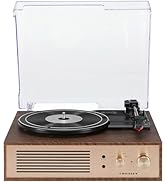
Figure 4.2: Control Panel Detail

చిత్రం 4.3: వెనుక ప్యానెల్ కనెక్షన్లు
5. సెటప్
5.1 ప్రారంభ నియామకం
టర్న్ టేబుల్ను ప్రత్యక్ష సూర్యకాంతి, ఉష్ణ వనరులు మరియు అధిక దుమ్ము లేదా కంపనాలకు దూరంగా చదునైన, స్థిరమైన ఉపరితలంపై ఉంచండి.
5.2 పవర్ కనెక్షన్
- Connect the power adapter to the DC 12V input jack on the rear of the turntable.
- పవర్ అడాప్టర్ను తగిన వాల్ అవుట్లెట్లోకి ప్లగ్ చేయండి.
5.3 Turntable Preparation
- Carefully remove any protective packaging materials from the turntable platter and tonearm.
- టోన్ఆర్మ్ దాని విశ్రాంతి నుండి అన్లాక్ చేయబడిందని నిర్ధారించుకోండి.
6. ఆపరేటింగ్ సూచనలు
6.1 Playing Records
- తిరగండి ఆన్/ఆఫ్ యూనిట్ను ఆన్ చేయడానికి సవ్యదిశలో నాబ్ను నొక్కి ఉంచండి.
- Select the desired speed (33 1/3, 45, or 78 RPM) using the speed selector switch. Note: A 78 RPM stylus (not included) is required for 78 RPM records.
- Place a record on the turntable platter. If playing a 45 RPM single, place the 45 RPM adapter (if included) over the spindle.
- Lift the tonearm using the cueing lever and position it over the desired track on the record.
- Lower the tonearm slowly onto the record using the cueing lever. The record will begin to play.
- ఉపయోగించి వాల్యూమ్ను సర్దుబాటు చేయండి వాల్యూమ్ నాబ్.
- ఉపయోగించండి పిచ్ control knob to fine-tune the playback speed if necessary.
- To stop playing, lift the tonearm, return it to its rest, and turn the ఆన్/ఆఫ్ అపసవ్య దిశలో నాబ్.
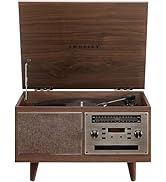
Figure 6.1: Stylus on Record
6.2 బ్లూటూత్ ఆపరేషన్
- తిరగండి ఆన్/ఆఫ్ యూనిట్ను ఆన్ చేయడానికి సవ్యదిశలో నాబ్ను నొక్కి ఉంచండి.
- ఫంక్షన్ స్విచ్ను బ్లూటూత్ position. The indicator light will flash, indicating pairing mode.
- Enable Bluetooth on your external device (e.g., smartphone, tablet) and search for "Crosley Portfolio".
- Select "Crosley Portfolio" from the list of available devices to pair. Once paired, the indicator light will stop flashing and remain solid.
- You can now stream audio wirelessly from your device to the turntable's built-in speakers.
- ఉపయోగించి వాల్యూమ్ను సర్దుబాటు చేయండి వాల్యూమ్ టర్న్ టేబుల్ మరియు/లేదా మీ బాహ్య పరికరంపై నాబ్.
6.3 సహాయక ఇన్పుట్ (AUX IN)
- తిరగండి ఆన్/ఆఫ్ యూనిట్ను ఆన్ చేయడానికి సవ్యదిశలో నాబ్ను నొక్కి ఉంచండి.
- బాహ్య ఆడియో పరికరాన్ని (ఉదా. MP3 ప్లేయర్, CD ప్లేయర్) కనెక్ట్ చేయండి AUX IN port using a 3.5mm audio cable (not included).
- టర్న్ టేబుల్ స్వయంచాలకంగా AUX IN మోడ్కి మారుతుంది.
- ఉపయోగించి వాల్యూమ్ను సర్దుబాటు చేయండి వాల్యూమ్ టర్న్ టేబుల్ మరియు/లేదా మీ బాహ్య పరికరంపై నాబ్.
6.4 USB కనెక్టివిటీ
The turntable features a PC-USB port for connecting to a computer. This allows for digital conversion of your vinyl records using appropriate software (not included). Refer to your chosen software's instructions for recording procedures.
7. నిర్వహణ
7.1 టర్న్ టేబుల్ శుభ్రపరచడం
- శుభ్రపరిచే ముందు ఎల్లప్పుడూ పవర్ అవుట్లెట్ నుండి టర్న్ టేబుల్ను అన్ప్లగ్ చేయండి.
- బయటి ఉపరితలాలను తుడవడానికి మృదువైన, పొడి వస్త్రాన్ని ఉపయోగించండి. రాపిడి క్లీనర్లు లేదా ద్రావకాలను ఉపయోగించవద్దు.
- Gently brush the stylus with a soft brush designed for stylus cleaning, moving from back to front.
7.2 స్టైలస్ భర్తీ
The stylus (needle) is a consumable part and will wear out over time. A worn stylus can damage your records and degrade sound quality. Replace the stylus after approximately 200-300 hours of playback. Consult your retailer or Crosley support for compatible replacement styli.
8. ట్రబుల్షూటింగ్
| సమస్య | సాధ్యమైన కారణం | పరిష్కారం |
|---|---|---|
| శక్తి లేదు | పవర్ అడాప్టర్ కనెక్ట్ కాలేదు లేదా అవుట్లెట్ తప్పుగా ఉంది. | పవర్ అడాప్టర్ సురక్షితంగా కనెక్ట్ చేయబడిందని మరియు అవుట్లెట్ పనిచేస్తుందని నిర్ధారించుకోండి. |
| స్పీకర్ల నుండి శబ్దం లేదు | Volume too low; function switch in wrong position; Bluetooth not paired. | Increase volume; ensure function switch is set to PHONO or Bluetooth is correctly paired. |
| రికార్డ్ దాటవేయడం | Record is dirty or damaged; stylus is worn; turntable not level. | Clean record; replace stylus; ensure turntable is on a level surface. |
| బ్లూటూత్ పరికరం జత కావడం లేదు | Turntable not in pairing mode; device too far; device already paired to another unit. | Ensure turntable is in Bluetooth pairing mode; move device closer; disconnect from other Bluetooth devices. |
9. స్పెసిఫికేషన్లు
- ఉత్పత్తి కొలతలు: 12.4 x 15.28 x 6.5 అంగుళాలు
- వస్తువు బరువు: 13 పౌండ్లు
- అంశం మోడల్ సంఖ్య: CR6252A-YS
- బ్రాండ్: క్రాస్లీ
- చేర్చబడిన భాగాలు: CR6252A-YS Portfolio Turntable
- శైలి: విన్tage
- రంగు: Yellow Submarine
- సిగ్నల్ ఫార్మాట్: అనలాగ్
- శక్తి మూలం: కార్డెడ్ ఎలక్ట్రిక్
- UPC: 710244246569
10. వారంటీ మరియు మద్దతు
For warranty information and technical support, please refer to the warranty card included with your product or visit the official Crosley webసైట్. ఏవైనా వారంటీ క్లెయిమ్లకు కొనుగోలు రుజువుగా మీ కొనుగోలు రసీదును ఉంచండి.
తయారీదారు: క్రాస్లీ
మొదటి తేదీ అందుబాటులో ఉంది: నవంబర్ 30, 2021


