1. పరిచయం
The Xiaomi Mesh System AX3000 (Pack of 2) is designed to provide comprehensive Wi-Fi 6 coverage for complex home layouts, extending up to 370 m². This system comes pre-configured from the factory, ensuring a straightforward setup process and immediate readiness for use.
2. భద్రతా సమాచారం
- వేడెక్కకుండా నిరోధించడానికి పరికరం బాగా వెంటిలేషన్ చేయబడిన ప్రదేశంలో ఉంచబడిందని నిర్ధారించుకోండి.
- పరికరంతో పాటు అందించబడిన అసలు పవర్ అడాప్టర్ను మాత్రమే ఉపయోగించండి.
- పరికరాన్ని నీరు, నిప్పు మరియు అధిక ఉష్ణోగ్రతల నుండి దూరంగా ఉంచండి.
- పరికరాన్ని మీరే విడదీయడానికి లేదా మరమ్మతు చేయడానికి ప్రయత్నించవద్దు. సహాయం కోసం అర్హత కలిగిన సేవా సిబ్బందిని సంప్రదించండి.
- బలమైన విద్యుదయస్కాంత క్షేత్రాల దగ్గర పరికరాన్ని ఉంచకుండా ఉండండి.
3. ప్యాకేజీ విషయాలు
మీ ప్యాకేజీలో అన్ని అంశాలు ఉన్నాయని ధృవీకరించండి:
- 2 x Xiaomi Mesh System AX3000 Base Units
- 2 x పవర్ ఎడాప్టర్లు
- 1 x ఈథర్నెట్ కేబుల్
- 1 x వినియోగదారు గైడ్
4. ఉత్పత్తి ముగిసిందిview
4.1. Device Appearance
The Xiaomi Mesh System AX3000 units feature a sleek, minimalist design. Each unit is equipped with status indicators and essential ports for connectivity.

ముందు view of the two Xiaomi Mesh System AX3000 units included in the pack.
4.2. పోర్ట్లు మరియు సూచికలు
Each unit includes multiple Ethernet ports, a power input, and a reset button. The front panel features an LED indicator to show the device's status.
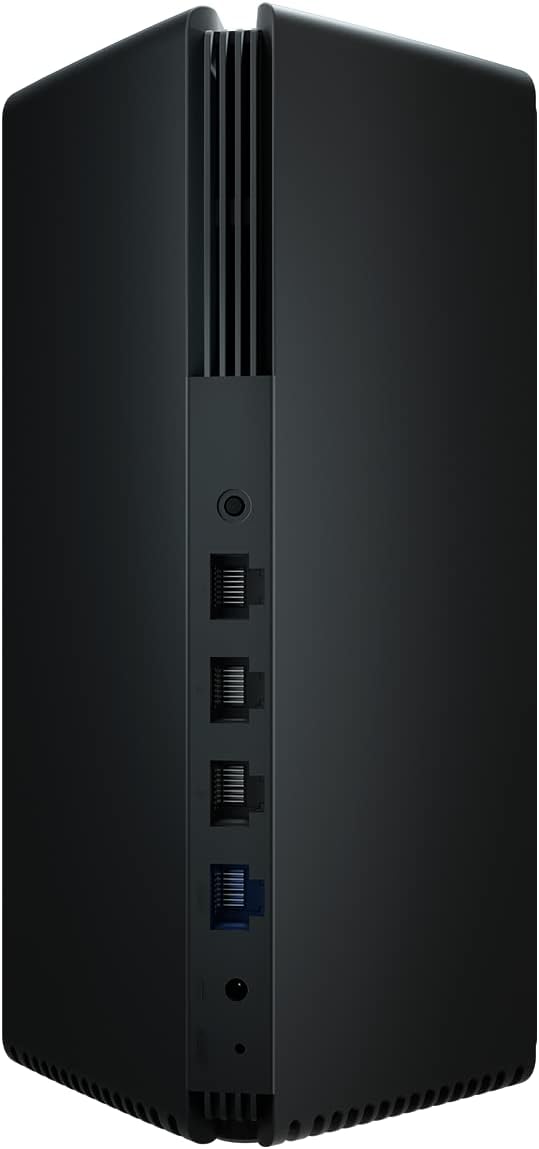
Detail of the rear panel of a Xiaomi Mesh System AX3000 unit, highlighting the Ethernet ports, power connector, and reset button.
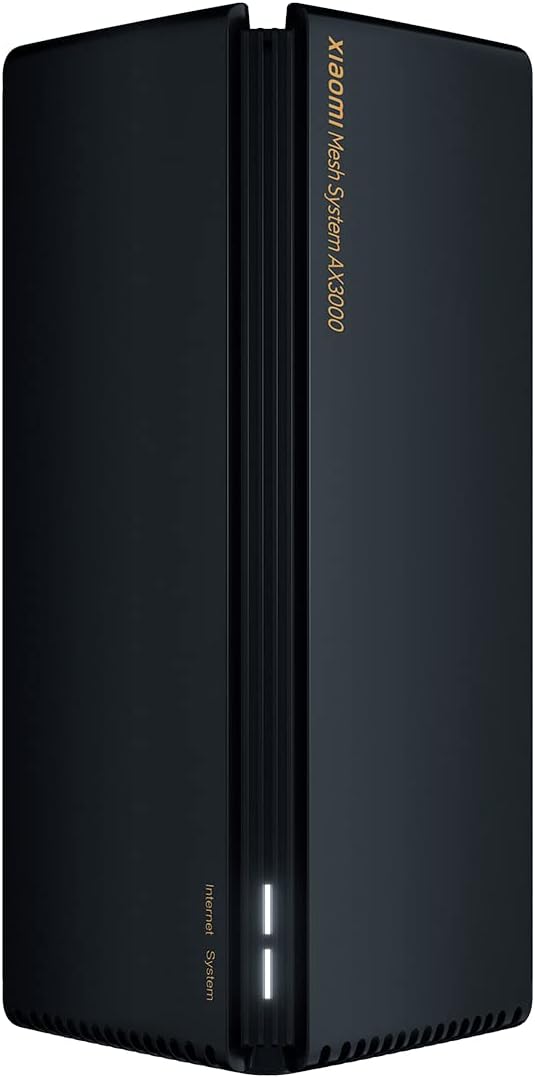
A single Xiaomi Mesh System AX3000 unit, showcasing its sleek design and front status indicator.
5. సెటప్ సూచనలు
5.1. ప్రారంభ సెటప్ (ప్రధాన యూనిట్)
- ప్రధాన యూనిట్ను కనెక్ట్ చేయండి: Connect one of the Mesh System units to your internet modem or router using the provided Ethernet cable. Plug one end into the WAN port (usually blue) of the Mesh unit and the other end into a LAN port on your modem/router.
- పవర్ ఆన్: Connect the power adapter to the main Mesh unit and plug it into a power outlet. Wait for the unit to power on and the indicator light to turn solid white (or blue, depending on the model, indicating a stable connection).
- అనువర్తనాన్ని డౌన్లోడ్ చేయండి: Download the Xiaomi Home or Mi Home app from your smartphone's app store.
- Configure via App: Open the app, create an account if you don't have one, and follow the on-screen instructions to add your new Mesh System. The app will guide you through setting up your Wi-Fi network name (SSID) and password.
5.2. Mesh Network Setup (Secondary Unit)
- ప్లేస్మెంట్: Place the second Mesh unit in an area where you need extended Wi-Fi coverage, ideally within range of the main unit. Avoid obstructions like thick walls or large metal objects.
- పవర్ ఆన్: Connect the power adapter to the secondary Mesh unit and plug it into a power outlet.
- స్వయంచాలక జత చేయడం: The secondary unit will automatically detect and pair with the main unit. The indicator light will change to reflect a successful mesh connection (e.g., solid white/blue). This process typically takes a few minutes.
- కనెక్షన్ని ధృవీకరించండి: Use the Xiaomi Home/Mi Home app to verify that both units are connected and functioning correctly within the mesh network.

The Xiaomi Home/Mi Home application interface on a smartphone, used for managing the Mesh System AX3000 network and connected devices.
6. ఆపరేటింగ్ సూచనలు
6.1. పరికరాలను కనెక్ట్ చేస్తోంది
Once your Mesh System is set up, devices can connect to the Wi-Fi network using the SSID and password you configured. The mesh system ensures seamless roaming between units, providing a consistent signal throughout your coverage area.
6.2. Network Management via App
The Xiaomi Home/Mi Home app allows you to:
- View కనెక్ట్ చేయబడిన పరికరాలు మరియు వాటి నెట్వర్క్ వినియోగం.
- Change Wi-Fi settings (SSID, password, security type).
- ఫర్మ్వేర్ నవీకరణలను అమలు చేయండి.
- తల్లిదండ్రుల నియంత్రణలు లేదా అతిథి నెట్వర్క్లను సెటప్ చేయండి.
- Monitor network status and troubleshoot issues.
6.3. అధునాతన ఫీచర్లు
- OFDMA Transmission: This technology enables high-efficiency data transmission, allowing the system to process data streams from multiple devices simultaneously, improving overall network performance.
- లక్ష్య మేల్కొలుపు సమయం (TWT): TWT allows devices to negotiate when and how often they will wake up to send or receive data. This reduces power consumption for connected devices, especially IoT devices, by keeping them in standby mode until a transmission signal is received.
7. నిర్వహణ
- ఫర్మ్వేర్ నవీకరణలు: Regularly check for and install firmware updates via the Xiaomi Home/Mi Home app to ensure optimal performance, security, and access to new features.
- శుభ్రపరచడం: Gently wipe the exterior of the units with a soft, dry cloth. Do not use liquid cleaners or abrasive materials. Ensure ventilation slots are free from dust.
- సరైన ప్లేస్మెంట్: క్రమానుగతంగా రీview the placement of your mesh units to ensure they are in central locations, away from major obstructions, and not too close to other electronic devices that might cause interference.
8. ట్రబుల్షూటింగ్
8.1. సాధారణ సమస్యలు మరియు పరిష్కారాలు
- ఇంటర్నెట్ కనెక్షన్ లేదు:
- Check if your modem/router is working correctly.
- Ensure the Ethernet cable between the main Mesh unit and your modem is securely connected.
- Restart both your modem/router and the Mesh System units.
- బలహీనమైన Wi-Fi సిగ్నల్:
- Relocate the secondary Mesh unit closer to the main unit or to a more central location.
- Ensure there are no major physical obstructions (e.g., concrete walls, large appliances) between the units.
- జోక్యం యొక్క మూలాల కోసం తనిఖీ చేయండి (ఉదా., మైక్రోవేవ్లు, కార్డ్లెస్ ఫోన్లు).
- Wi-Fiకి కనెక్ట్ చేయడం సాధ్యపడదు:
- Verify that you are using the correct Wi-Fi network name (SSID) and password.
- Restart your device (smartphone, laptop, etc.).
- Try connecting to a different Wi-Fi network to rule out device-specific issues.
8.2. ఫ్యాక్టరీ రీసెట్
If you encounter persistent issues, you may need to perform a factory reset. Locate the reset button on the rear of the unit (often a small pinhole). With the unit powered on, use a paperclip to press and hold the reset button for approximately 5-10 seconds until the indicator light changes, then release. The unit will restart with factory default settings, requiring re-configuration.
9. స్పెసిఫికేషన్లు
| ఫీచర్ | స్పెసిఫికేషన్ |
|---|---|
| బ్రాండ్ | XIAOMI |
| మోడల్ పేరు | XIAOMI Mesh System AX3000 (2-pack) |
| అంశం మోడల్ సంఖ్య | 33592 |
| వైర్లెస్ కమ్యూనికేషన్ స్టాండర్డ్ | 802.11ac, 802.11ax, 802.11n (Wi-Fi 6) |
| ఫ్రీక్వెన్సీ బ్యాండ్ క్లాస్ | ద్వంద్వ-బ్యాండ్ |
| కనెక్టివిటీ టెక్నాలజీ | ఈథర్నెట్, Wi-Fi |
| ప్రత్యేక ఫీచర్ | WPS (Wi-Fi రక్షిత సెటప్) |
| అనుకూల పరికరాలు | Compatible with any type of internet box or router |
| సిఫార్సు చేసిన ఉపయోగాలు | హోమ్ |
| చేర్చబడిన భాగాలు | 2x Xiaomi Mesh System AX3000 Base, Power Adapter, Ethernet Cable, User Guide |
| తయారీదారు | XIAOMI |
10. వారంటీ మరియు మద్దతు
10.1. తయారీదారు వారంటీ
ఈ ఉత్పత్తి a ద్వారా కవర్ చేయబడింది 24 నెలల తయారీదారు వారంటీ కొనుగోలు తేదీ నుండి. వారంటీ క్లెయిమ్ల కోసం దయచేసి మీ కొనుగోలు రుజువును ఉంచుకోండి.
10.2. సాఫ్ట్వేర్ నవీకరణలు
Software updates for this device are guaranteed until ఏప్రిల్ 13, 2030. Ensure your device is connected to the internet and check the Xiaomi Home/Mi Home app regularly for available updates.
10.3. కస్టమర్ మద్దతు
For technical assistance, troubleshooting beyond this manual, or warranty inquiries, please visit the official Xiaomi support website or contact their customer service. Refer to the packaging or official webమీ ప్రాంతంలోని నిర్దిష్ట సంప్రదింపు వివరాల కోసం సైట్ను సందర్శించండి.


