1. పరిచయం
ది బ్లాక్view A70 Pro is an economical smartphone designed to offer an elegant look and robust features for everyday use. This updated version of the A70 model features optimized hardware and software to enhance the user experience. Key highlights include a large 6.51-inch HD+ display, ample memory with 4GB RAM and 32GB ROM (expandable up to 256GB), a powerful 5380mAh battery, and a versatile camera system.

చిత్రం: ముందు మరియు వెనుక view నల్లజాతికి చెందినview A70 Pro Smartphone, showcasing its sleek design and triple camera setup on the rear.
2. సెటప్
2.1 ప్యాకేజీ విషయాలు
మీరు ప్రారంభించడానికి ముందు, అన్ని అంశాలు ప్యాకేజీలో ఉన్నాయని నిర్ధారించుకోండి:
- నలుపుview A70 ప్రో స్మార్ట్ఫోన్
- ఛార్జర్
- USB కేబుల్ (మైక్రో USB)
- వినియోగదారు మాన్యువల్ (ఈ పత్రం)
- Silicone Protective Case (pre-applied screen protector)

Image: Contents of the Blackview A70 Pro retail package, showing the smartphone, charger, USB cable, and documentation.
2.2 సిమ్ కార్డులు మరియు మైక్రో SD కార్డ్ చొప్పించడం
ది బ్లాక్view A70 Pro supports dual SIM cards (1 Nano SIM + 1 Micro SIM) and a MicroSD card for expandable storage up to 256GB. To insert the cards:
- పరికరాన్ని పవర్ ఆఫ్ చేయండి.
- ఫోన్ వెనుక కవర్ను జాగ్రత్తగా తెరవండి.
- Locate the SIM and MicroSD card slots.
- Insert your Nano SIM, Micro SIM, and MicroSD card into their respective slots, ensuring correct orientation.
- వెనుక కవర్ను సురక్షితంగా మూసివేయండి.
- పరికరాన్ని ఆన్ చేయండి. ముఖ్యమైన: The smartphone does not support hot-swapping of SIM cards. After inserting the SIM card(s), restart the smartphone to ensure they are recognized properly.

Image: A diagram illustrating the internal layout of the Blackview A70 Pro, highlighting the slots for Nano SIM, Micro SIM, and MicroSD cards.
2.3 ప్రారంభ ఛార్జింగ్
Before first use, it is recommended to fully charge your Blackview A70 Pro. Use the provided charger and USB cable.
- Connect the Micro USB end of the cable to the phone's charging port.
- Connect the USB-A end to the power adapter.
- పవర్ అడాప్టర్ను వాల్ అవుట్లెట్లోకి ప్లగ్ చేయండి.
- ఛార్జింగ్ సూచిక తెరపై కనిపిస్తుంది.
The device features a 5380mAh battery, providing extended usage times. It also supports OTG (On-The-Go) functionality, allowing it to act as a power bank to charge other compatible devices using an OTG cable (sold separately).

Image: The Blackview A70 Pro display showing the battery charging icon and indicating its massive 5380mAh capacity.
2.4 First Boot and Setup Assistant
Upon first power-on, the device will guide you through the initial setup process. This includes selecting your language, connecting to Wi-Fi, and setting up your Google account. The Installation Assistant can help you securely transfer data from an old device to your new Blackview A70 Pro.
3. మీ స్మార్ట్ఫోన్ను ఆపరేట్ చేయడం
3.1 డిస్ప్లే మరియు యూజర్ ఇంటర్ఫేస్
ది బ్లాక్view A70 Pro features a 6.51-inch HD+ IPS display with a 20:9 aspect ratio and 720x1600 resolution, offering vivid details and an immersive viewing experience. The device runs on Doke OS 2.0, based on Android 11, which enhances aesthetics, interaction, and overall efficiency.
- అనుకూల ప్రకాశం: This feature automatically adjusts screen brightness based on ambient light, preventing eye strain and optimizing power consumption.
- నైట్ లైట్ మోడ్: Reduces blue light emission, making the screen more comfortable to view in low-light conditions and potentially aiding sleep.

Image: The Blackview A70 Pro's 6.51-inch HD+ display, highlighting its 720x1600 resolution, 87.6% screen-to-body ratio, and 20:9 aspect ratio.

Image: Screenshots of the Blackview A70 Pro's Doke OS 2.0 interface, demonstrating features like System Manager, Freezer, and Game Mode.
3.2 Performance and System Features
Powered by the Unisoc T310 quad-core processor clocked at up to 2.0 GHz, combined with 4GB of RAM and 32GB of internal storage, the A70 Pro delivers high processing performance and efficient power consumption. It ensures smooth operation and seamless app switching.
- System Manager: An all-in-one tool for optimizing your phone, including junk cleaning and battery management.
- ఫ్రీజర్: Allows you to block apps from running in the background, saving memory and improving performance.
- గేమ్ మోడ్: Optimizes gaming by cleaning RAM and blocking pop-ups, providing an uninterrupted and immersive gaming experience.

Image: Visual representation of the Unisoc T310 Quad-core 4G Chip, alongside indicators for 4GB RAM, 32GB ROM, and 256GB expandable storage.
3.3 కెమెరా ఫీచర్లు
Capture life's moments with the Blackview A70 Pro's camera system:
- వెనుక కెమెరా: 13MP main camera for sharp and detailed photos.
- ముందు కెమెరా: 5MP camera for clear selfies and video calls.
Both cameras feature a BSI sensor, which helps capture more light, significantly improving performance in low-light conditions.
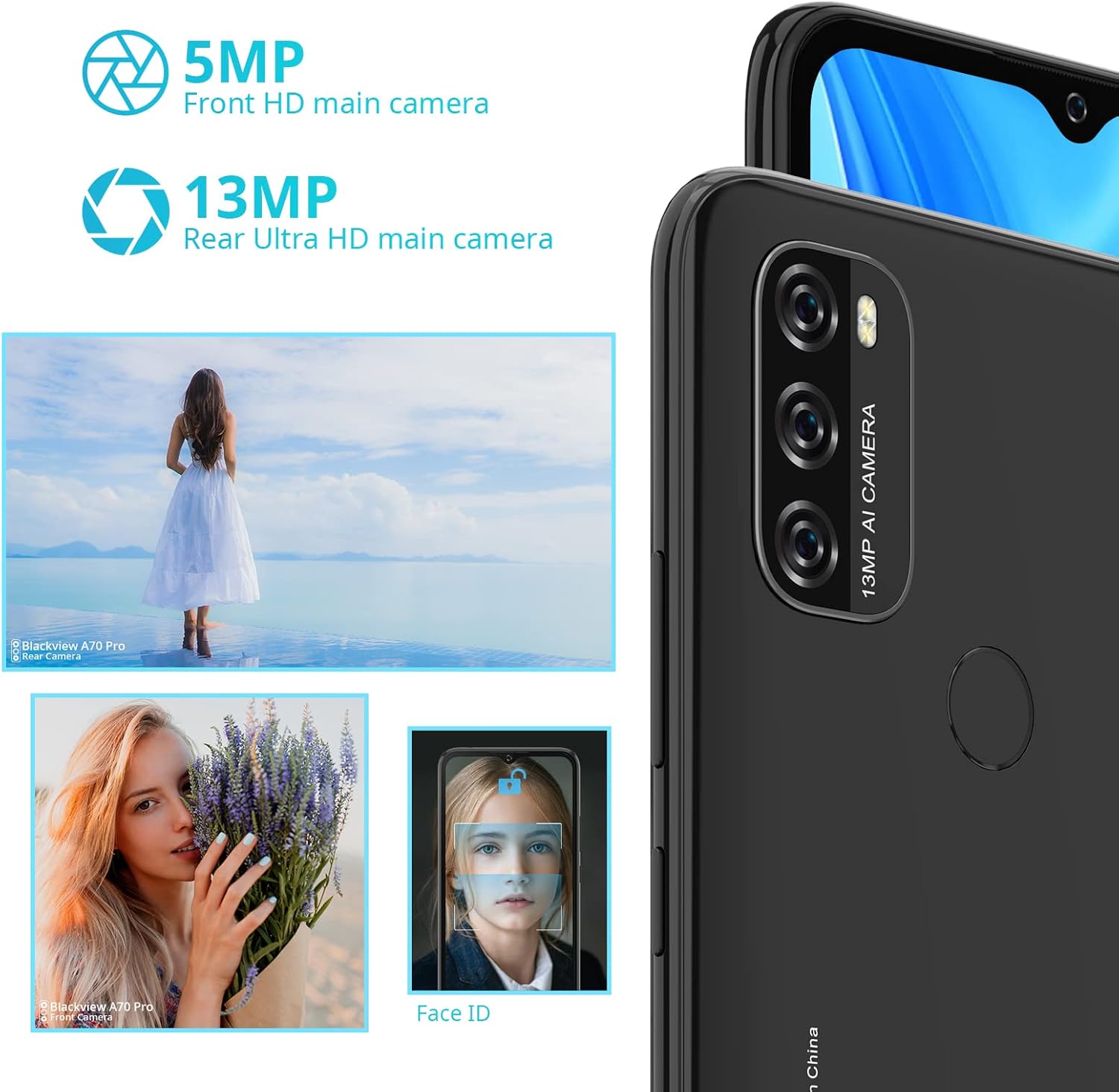
చిత్రం: ఒక ఓవర్view నల్లజాతికి చెందినview A70 Pro's camera capabilities, featuring the 5MP front and 13MP rear cameras, along with sample images and a depiction of Face ID functionality.
3.4 Security and Connectivity
The A70 Pro offers multiple ways to secure and connect your device:
- వేలిముద్ర సెన్సార్: Located on the back, allows for quick and secure unlocking with a touch.
- ఫేస్ ID: Unlock your phone with a glance using facial recognition.
- 4G LTE: Ensures reliable and fast data transmission.
- Dual-band Wi-Fi (2.4G & 5G): Provides stable and fast internet connectivity.
- బ్లూటూత్ 5.0: For efficient wireless connection to accessories.
- GPS, GLONASS, BeiDou: Multiple satellite navigation systems for accurate and fast positioning.
3.5 Gestures and Shortcuts
ది బ్లాక్view A70 Pro supports convenient gestures for enhanced usability:
- మూడు వేళ్ల స్క్రీన్షాట్: Swipe down with three fingers to quickly capture a screenshot.
- Long Screenshot: Capture extended content on a single screen.
- Screenshots can be shared immediately after capture.
4. నిర్వహణ
4.1 బ్యాటరీ సంరక్షణ
To maximize the lifespan and performance of your 5380mAh battery:
- Avoid extreme temperatures (very hot or very cold).
- బ్యాటరీ తరచుగా పూర్తిగా ఖాళీ అవ్వనివ్వకండి.
- సరైన ఛార్జింగ్ కోసం ఒరిజినల్ ఛార్జర్ మరియు కేబుల్ని ఉపయోగించండి.
- If the phone will not be used for an extended period, charge it to about 50% before storing.
Expected battery life on a full charge:
- Up to 7 hours of gaming
- Up to 8 hours of video playback
- 9.5 గంటల వరకు web బ్రౌజింగ్
- Up to 29 hours of call time
- 45 గంటల వరకు మ్యూజిక్ ప్లేబ్యాక్
4.2 System Optimization
Regularly use the built-in System Manager to keep your device running smoothly. This includes:
- Cleaning junk files.
- Managing battery usage.
- Using the "Freezer" feature to stop background app activity for memory saving.
Ensure your device's software is up to date by checking for system updates in the settings menu.
5. ట్రబుల్షూటింగ్
This section addresses common issues you might encounter with your Blackview A70 Pro.
| సమస్య | సాధ్యమైన పరిష్కారం |
|---|---|
| SIM కార్డ్ గుర్తించబడలేదు | Ensure the SIM card is correctly inserted. Power off the phone, re-insert the SIM card, and then restart the device. |
| Poor 4G connection | Check your network settings. If issues persist, try switching to 3G mode in your phone's network settings as a temporary solution. Ensure you are in an area with good network coverage. |
| ఫోన్ నెమ్మదిగా ఉంది లేదా పని చేయడం లేదు | Use the System Manager to clean junk files and optimize memory. Utilize the "Freezer" feature to stop unnecessary background apps. Restart the phone. |
| No sound during calls (unless on speakerphone) | Check the volume settings during a call. Ensure the earpiece is not blocked. If the issue persists, a factory reset might be necessary after backing up your data. |
| Camera quality is not as expected | Ensure the camera lens is clean. Check lighting conditions. While the camera is functional, it may not offer professional-grade photo quality. |
| పరికరం ఛార్జ్ చేయడం లేదు | Verify that the charger and cable are securely connected. Try a different power outlet. Ensure the charging port is free of debris. |
For issues not covered here, please refer to the official Blackview మద్దతు webసైట్ లేదా కస్టమర్ సేవను సంప్రదించండి.
6. స్పెసిఫికేషన్లు
| ఫీచర్ | వివరాలు |
|---|---|
| మోడల్ పేరు | నలుపుview A70 ప్రో |
| కొలతలు | 16.52 x 7.7 x 0.96 సెం.మీ |
| బరువు | 205 గ్రాములు |
| ప్రదర్శన పరిమాణం | 6.51 inches HD+ IPS |
| డిస్ప్లే రిజల్యూషన్ | 720 x 1600 pixels (20:9 aspect ratio) |
| ఆపరేటింగ్ సిస్టమ్ | Android 11 + Doke OS 2.0 |
| ప్రాసెసర్ | Unisoc T310 Quad-core, 2.0 GHz |
| RAM | 4GB |
| అంతర్గత నిల్వ | 32GB |
| విస్తరించదగిన నిల్వ | Up to 256GB via MicroSD card (not included) |
| వెనుక కెమెరా | 13MP |
| ఫ్రంట్ కెమెరా | 5MP |
| బ్యాటరీ కెపాసిటీ | 5380mAh (Non-removable Lithium-ion) |
| సిమ్ కార్డ్ మద్దతు | Dual SIM (1 Nano SIM + 1 Micro SIM) + 1 MicroSD slot |
| సెల్యులార్ టెక్నాలజీ | 4G LTE |
| వైర్లెస్ కనెక్టివిటీ | Wi-Fi (2.4G & 5G dual-band), Bluetooth 5.0 |
| నావిగేషన్ | GPS, GLONASS, BeiDou |
| భద్రతా లక్షణాలు | Fingerprint Sensor, Face ID |
7. వారంటీ మరియు మద్దతు
For warranty information, please refer to the warranty card included with your product or visit the official Blackview website. For technical support, troubleshooting assistance, or service inquiries, please contact Blackview customer support through their official channels. You may also contact the retailer where you purchased the device for assistance.
Official Blackview స్టోర్: నలుపుview Amazonలో స్టోర్ చేయండి


