1. పరిచయం
This manual provides essential information for the safe and efficient use of your BSEED WiFi Smart EU Socket with Energy Monitoring. Please read these instructions carefully before installation and operation, and retain them for future reference.
The BSEED WiFi Smart EU Socket is designed for modern interiors, offering both functionality and an aesthetic appearance. It integrates seamlessly into various home styles and provides smart control and energy consumption monitoring capabilities.
2. భద్రతా సమాచారం
- విద్యుత్ భద్రత: Installation should only be performed by a qualified electrician or in accordance with local electrical codes. Ensure power is disconnected before installation or maintenance.
- పిల్లల భద్రత: The product features a child safety design to prevent electric shock.
- అనుకూలత: This socket insert is designed for use exclusively with BSEED brand glass frames. Do not attempt to use it with frames from other manufacturers.
- ఇండోర్ ఉపయోగం మాత్రమే: This product is intended for indoor use in dry environments.
- గరిష్ట లోడ్: Do not exceed the maximum current rating of 16A. Overloading can cause damage or fire.
- నష్టం: Do not use the product if it appears damaged. Contact customer support for assistance.
3. ఉత్పత్తి ముగిసిందిview
The BSEED WiFi Smart EU Socket provides a convenient way to control connected devices and monitor their energy usage via a smartphone application. It features a sleek design and robust construction.

చిత్రం 3.1: ముందు view of the BSEED WiFi Smart EU Socket. This image shows the black socket with two round openings for the EU plug, and two small indicators at the top, one being a button.

చిత్రం 3.2: The BSEED WiFi Smart EU Socket shown with the BSEED logo and a WiFi icon. A crucial note indicates that BSEED panels and functions are exclusively compatible with other BSEED articles, emphasizing the need for brand-specific accessories.
ముఖ్య లక్షణాలు:
- వైఫై కనెక్టివిటీ: Connects to your home WiFi network (2.4GHz b/g/n) for remote control.
- శక్తి పర్యవేక్షణ: Tracks and displays real-time energy consumption of connected devices.
- స్మార్ట్ కంట్రోల్: Compatible with smart home platforms like Smart Life, Tuya, Amazon Alexa, and Google Assistant.
- పిల్లల రక్షణ: Integrated safety mechanism to prevent accidental electric shock.
- ఆధునిక డిజైన్: 86mm x 86mm form factor, designed to complement contemporary interiors.
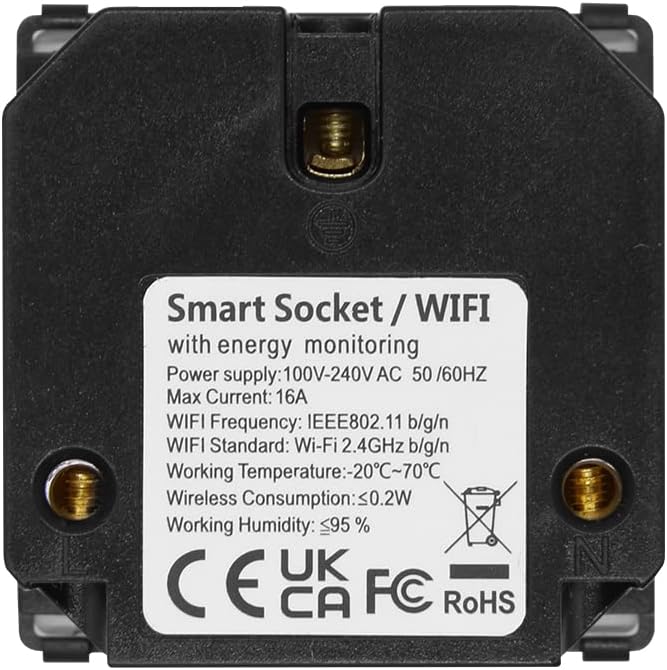
చిత్రం 3.3: వెనుకకు view of the BSEED WiFi Smart EU Socket. The label displays technical specifications including power supply (100-240V AC, 50/60Hz), max current (16A), WiFi frequency (IEEE802.11 b/g/n, 2.4GHz), working temperature (-20°C~70°C), wireless consumption (≤0.2W), and working humidity (≤95%). CE, UKCA, FC, and RoHS certifications are also visible.
4. స్పెసిఫికేషన్లు
| ఫీచర్ | వివరాలు |
|---|---|
| మోడల్ సంఖ్య | FK86EUSKIM1BEU |
| కొలతలు (L x W x H) | 8.6 x 8.6 x 2.5 సెం.మీ |
| బరువు | 180 గ్రా |
| రంగు | Black (WiFi EU Socket with Consumption Meter) |
| మెటీరియల్ | పాలికార్బోనేట్ |
| శక్తి మూలం | AC |
| వాల్యూమ్tage | 100-240V AC, 50/60Hz |
| మాక్స్ కరెంట్ | 16A |
| WiFi ప్రమాణం | IEEE802.11 b/g/n, 2.4GHz |
| పని ఉష్ణోగ్రత | -20°C నుండి 70°C |
| పని తేమ | ≤95% |
| చేర్చబడిన భాగాలు | స్క్రూ |

చిత్రం 4.1: Dimensional diagram of the BSEED WiFi Smart EU Socket, indicating measurements of 86mm x 86mm for the front panel and 50mm x 50mm for the internal module, with a depth of 32mm.
5. సెటప్ మరియు ఇన్స్టాలేషన్
ముఖ్యమైన: Installation must be carried out by a qualified professional and in compliance with all local electrical regulations. Ensure the main power supply is switched off before beginning installation.
- వైరింగ్ సిద్ధం చేయండి: Ensure the electrical box has the necessary live (L) and neutral (N) wires.
- కనెక్ట్ వైర్లు: Connect the live and neutral wires from your electrical system to the corresponding terminals on the back of the BSEED WiFi Smart EU Socket. Refer to the wiring diagram if provided with the physical product.
- Mount the Socket: Secure the socket module into the wall box using the provided screws.
- Install Glass Frame: Attach the BSEED compatible glass frame (sold separately) over the socket module. Ensure it clicks securely into place.
- శక్తిని పునరుద్ధరించండి: Once installation is complete and secure, restore power at the main circuit breaker.
- ప్రారంభ పవర్-ఆన్: The socket's indicator light should illuminate, indicating it is powered on.
App Pairing (Smart Life/Tuya):
- అనువర్తనాన్ని డౌన్లోడ్ చేయండి: మీ స్మార్ట్ఫోన్ యాప్ స్టోర్ నుండి "స్మార్ట్ లైఫ్" లేదా "తుయా స్మార్ట్" యాప్ను డౌన్లోడ్ చేసుకోండి.
- నమోదు/లాగిన్: ఖాతాను సృష్టించండి లేదా యాప్కి లాగిన్ చేయండి.
- పరికరాన్ని జోడించండి: In the app, tap "+" to add a new device. Select "Electrical Outlet" or "Socket (Wi-Fi)".
- WiFi వివరాలను నమోదు చేయండి: Ensure your phone is connected to a 2.4GHz WiFi network. Enter your WiFi network password in the app.
- జత చేసే మోడ్: Follow the app's instructions to put the socket into pairing mode. This usually involves pressing and holding the button on the socket for a few seconds until the indicator light blinks rapidly.
- పూర్తి జత చేయడం: The app will detect and connect to the socket. Once connected, you can rename the device and begin using its smart features.

చిత్రం 5.1: This image illustrates the compatibility of the smart socket with popular smart home platforms such as Smart Life, Tuya, Amazon Alexa, and Google Assistant, highlighting its integration capabilities.
6. ఆపరేటింగ్ సూచనలు
మాన్యువల్ కంట్రోల్:
- పవర్ ఆన్/ఆఫ్: Press the physical button on the socket to manually toggle power to the connected device.
యాప్ నియంత్రణ:
- రిమోట్ ఆన్/ఆఫ్: Use the Smart Life/Tuya app to turn the socket on or off from anywhere with an internet connection.
- షెడ్యూల్ చేయడం: Set schedules or timers for the socket to automatically turn on or off at specific times.
- శక్తి పర్యవేక్షణ: View real-time and historical energy consumption data for devices plugged into the smart socket within the app. This feature helps track and manage electricity usage.
- Scenes/Automations: Create custom scenes or automations within the app to control the socket based on various conditions (e.g., turn on when you arrive home, turn off when leaving).
Voice Control (via Alexa/Google Assistant):
- లింక్ ఖాతా: Enable the "Smart Life" or "Tuya Smart" skill in your Amazon Alexa or Google Home app and link your account.
- పరికరాలను కనుగొనండి: Ask Alexa or Google Assistant to discover new devices.
- వాయిస్ ఆదేశాలు: Use voice commands such as "Alexa, turn on [Socket Name]" or "Hey Google, turn off [Socket Name]".
7. నిర్వహణ
- శుభ్రపరచడం: శుభ్రపరిచే ముందు విద్యుత్తును డిస్కనెక్ట్ చేయండి. ఉపరితలాన్ని మృదువైన, పొడి గుడ్డతో తుడవండి. రాపిడి క్లీనర్లను లేదా ద్రావకాలను ఉపయోగించవద్దు.
- సాధారణ తనిఖీలు: Periodically check the socket for any signs of damage or loose connections.
- ఫర్మ్వేర్ నవీకరణలు: Keep the Smart Life/Tuya app updated to ensure you receive the latest firmware for your socket, which may include performance improvements and security enhancements.
8. ట్రబుల్షూటింగ్
| సమస్య | సాధ్యమైన కారణం | పరిష్కారం |
|---|---|---|
| Socket not responding/no power | No power supply; loose wiring; circuit breaker tripped. | Check main power supply. Verify wiring connections (with power off). Reset circuit breaker. |
| యాప్తో జత చేయడం సాధ్యం కాదు | Incorrect WiFi password; 5GHz WiFi network; socket not in pairing mode; weak WiFi signal. | Ensure correct 2.4GHz WiFi network and password. Put socket into pairing mode (rapid blinking indicator). Move router closer or use a WiFi extender. |
| App shows "Offline" | No internet connection; WiFi router off; socket lost connection. | Check internet connection and router. Restart the socket by turning off/on power at the breaker. Re-pair if necessary. |
| Energy monitoring inaccurate | Temporary software glitch; device not fully compatible. | Restart the socket. Ensure the app is updated. If issues persist, contact support. |
9. వారంటీ మరియు మద్దతు
BSEED products are designed for quality and reliability. For warranty information, please refer to the specific terms provided at the point of purchase or on the official BSEED website. Typically, a standard manufacturer's warranty covers defects in materials and workmanship.
If you encounter any issues or require technical assistance, please contact BSEED customer support through their official channels. When contacting support, please have your product model number (FK86EUSKIM1BEU) and purchase details ready.
For more information and support, visit the official BSEED webసైట్ లేదా మీ రిటైలర్ను సంప్రదించండి.


