1. పరిచయం
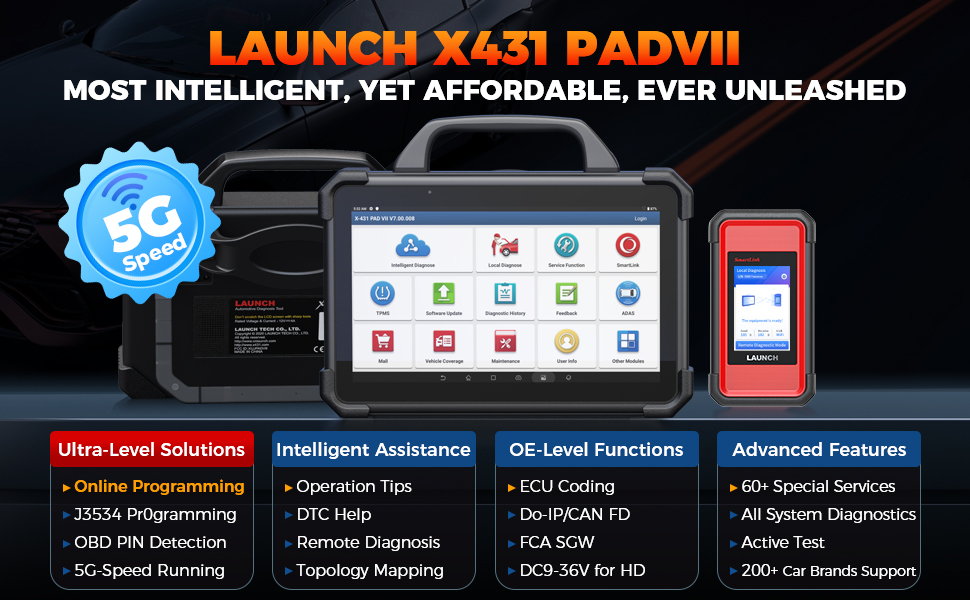
ఈ మాన్యువల్ LAUNCH X431 PADVII ఎలైట్ డయాగ్నస్టిక్ స్కానర్ కోసం వివరణాత్మక సూచనలను అందిస్తుంది. ఇది సరైన పనితీరు మరియు ప్రభావవంతమైన వాహన డయాగ్నస్టిక్లను నిర్ధారించడానికి పరికరం యొక్క లక్షణాలు, సెటప్ విధానాలు, కార్యాచరణ మార్గదర్శకాలు, నిర్వహణ చిట్కాలు మరియు ట్రబుల్షూటింగ్ సమాచారాన్ని కవర్ చేస్తుంది.

చిత్రం 1.1: LAUNCH X431 PADVII ఎలైట్ డయాగ్నస్టిక్ టాబ్లెట్ మరియు SmartLink C VCI.
2. సెటప్
2.1 అన్బాక్సింగ్ మరియు భాగాలు
LAUNCH X431 PADVII Elite ని జాగ్రత్తగా అన్ప్యాక్ చేయండి. అన్ని భాగాలు ఉన్నాయని ధృవీకరించండి:
- 13.3-అంగుళాల హై-డెఫినిషన్ డిస్ప్లే టాబ్లెట్
- స్మార్ట్ లింక్ సి వెహికల్ కమ్యూనికేషన్ ఇంటర్ఫేస్ (VCI)
- MINI-HDMI నుండి HDMI లైన్
- పవర్ అడాప్టర్
- టైప్-ఎ నుండి టైప్-సి USB కేబుల్
- OBD I అడాప్టర్ బాక్స్ బదిలీ లైన్
2.2 పవర్ ఆన్ మరియు ప్రారంభ ఛార్జ్
పవర్ అడాప్టర్ను టాబ్లెట్కు మరియు పవర్ అవుట్లెట్కు కనెక్ట్ చేయండి. మొదటిసారి ఉపయోగించే ముందు పరికరాన్ని పూర్తిగా ఛార్జ్ చేయడానికి అనుమతించండి. టాబ్లెట్ 9360mAh బ్యాటరీని కలిగి ఉంది, ఇది పూర్తిగా ఛార్జ్ చేయబడినప్పుడు 20 గంటలకు పైగా ఆపరేషన్ను అందిస్తుంది.
2.3 ప్రారంభ కాన్ఫిగరేషన్
మొదటిసారి ప్రారంభించిన తర్వాత, Android 9.0 ఆపరేటింగ్ సిస్టమ్ను కాన్ఫిగర్ చేయడానికి ఆన్-స్క్రీన్ ప్రాంప్ట్లను అనుసరించండి. ఇందులో సాఫ్ట్వేర్ నవీకరణలు మరియు ఆన్లైన్ ఫంక్షన్లకు అవసరమైన Wi-Fi కనెక్టివిటీని సెటప్ చేయడం కూడా ఉంటుంది.
3. ఆపరేటింగ్ సూచనలు
3.1 వాహనానికి కనెక్ట్ చేయడం
వాహనం యొక్క OBD-II డయాగ్నస్టిక్ పోర్ట్ను గుర్తించండి, ఇది సాధారణంగా డాష్బోర్డ్ కింద కనిపిస్తుంది. SmartLink C VCIని OBD-II పోర్ట్కు కనెక్ట్ చేయండి, ఆపై SmartLink Cని Wi-Fi ద్వారా వైర్లెస్గా LAUNCH X431 PADVII ఎలైట్ టాబ్లెట్కు కనెక్ట్ చేయండి. ఈ పరికరం విస్తృత వాహన అనుకూలత కోసం J2534, Do-IP మరియు CANFDతో సహా వివిధ కమ్యూనికేషన్ ప్రోటోకాల్లకు మద్దతు ఇస్తుంది (1987-2024 మోడల్లు, 12V/24V ప్యాసింజర్ మరియు వాణిజ్య వాహనాలు).
చిత్రం 3.1: స్మార్ట్లింక్ సి విసిఐని వాహనానికి కనెక్ట్ చేయడం.
3.2 ఇంటెలిజెంట్ డయాగ్నస్టిక్స్
X431 PADVII ఎలైట్ అధునాతన డయాగ్నస్టిక్ లక్షణాలను అందిస్తుంది:
- టోపోలాజీ మ్యాపింగ్: రంగు-కోడెడ్ టోపోలాజీ మ్యాప్లో అన్ని సిస్టమ్ సంబంధాలను మరియు డయాగ్నస్టిక్ ట్రబుల్ కోడ్లను (DTCలు) దృశ్యమానంగా ప్రదర్శిస్తుంది, ఇది లోపభూయిష్ట భాగాలను త్వరగా గుర్తించడానికి అనుమతిస్తుంది.
- పిన్ డిటెక్షన్: DLC (డేటా లింక్ కనెక్టర్) పిన్ వాల్యూమ్ను గుర్తిస్తుందిtage మరియు DLC పోర్ట్తో సమస్యలను పరిష్కరించడానికి ప్రోటోకాల్ రకాలను గుర్తిస్తుంది.
- మార్గదర్శక విధులు: ఖచ్చితమైన డయాగ్నస్టిక్స్ కోసం ఆన్-స్క్రీన్ ప్రాంప్ట్లను అందిస్తుంది, ముఖ్యంగా VAG వాహనాలకు ఉపయోగపడుతుంది, సంక్లిష్ట విధానాలను సులభతరం చేస్తుంది.
- మరమ్మతు చిట్కాలు మరియు DTC విశ్లేషణ: మరమ్మతు సామర్థ్యాన్ని పెంచడానికి డయాగ్నస్టిక్ ప్లాన్లు, మరమ్మతు సహాయ సమాచారం, భాగాల కొలత మార్గదర్శకత్వం మరియు సంబంధిత కేస్ స్టడీలను అందిస్తుంది.

చిత్రం 3.2: దృశ్య విశ్లేషణ కోసం టోపోలాజీ మ్యాపింగ్ లక్షణం.
3.3 ECU ప్రోగ్రామింగ్ మరియు కోడింగ్
ఈ పరికరం 30 కి పైగా వాహన బ్రాండ్లకు సమగ్ర ECU ప్రోగ్రామింగ్ మరియు కోడింగ్కు మద్దతు ఇస్తుంది:
- ఆన్లైన్ ప్రోగ్రామింగ్: ఇప్పటికే ఉన్న సాఫ్ట్వేర్/ఫర్మ్వేర్లను భర్తీ చేయడం మరియు కొత్త ECUలను ప్రోగ్రామింగ్ చేయడంతో సహా ECU మాడ్యూల్లను తిరిగి ప్రోగ్రామ్ చేస్తుంది. అసలు ECUల కోసం డేటా బ్యాకప్ మరియు పునరుద్ధరణ సామర్థ్యాలను కలిగి ఉంటుంది.
- ECU కోడింగ్: ECU డేటాను రీకోడ్ చేయడానికి, వ్యక్తిగతీకరణకు మరియు ఇతర అధునాతన కోడింగ్ ఫంక్షన్లకు అనుమతిస్తుంది.
- J2534 రీప్రోగ్రామింగ్: తయారీదారు-నిర్దిష్ట సాఫ్ట్వేర్తో ప్రోగ్రామింగ్ కోసం SmartLink Cని స్థానిక J2534 PassThru పరికరంగా ఉపయోగిస్తుంది.
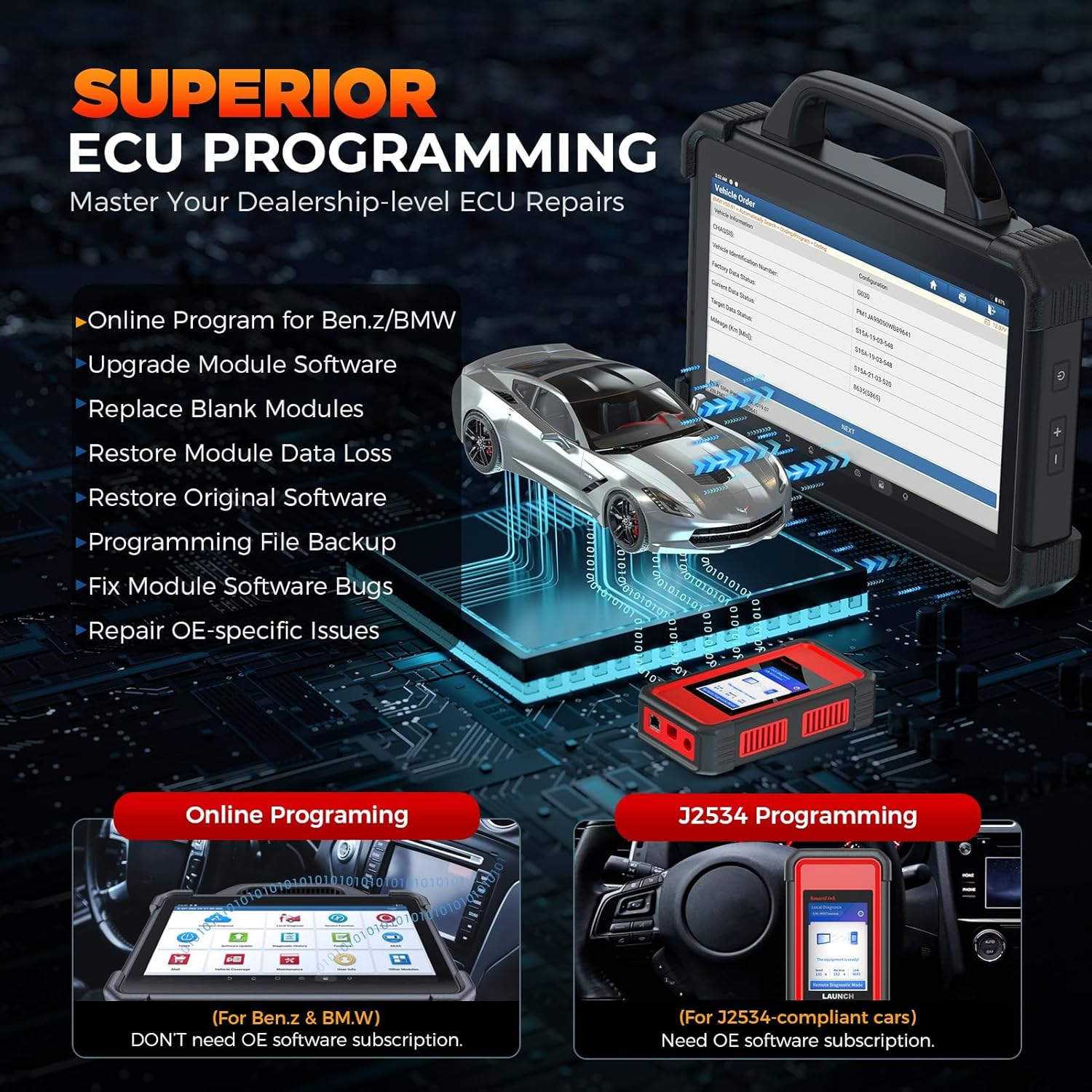
చిత్రం 3.3: ECU ప్రోగ్రామింగ్ సామర్థ్యాలు.
3.4 ప్రత్యేక విధులు మరియు ద్వి దిశాత్మక నియంత్రణ
X431 PADVII ఎలైట్ 60 కి పైగా రీసెట్ ఫంక్షన్లు మరియు ద్వి దిశాత్మక నియంత్రణ సామర్థ్యాలను కలిగి ఉంది:
- ఫంక్షన్లను రీసెట్ చేయండి: ఆయిల్ రీసెట్, ఎలక్ట్రానిక్ పార్కింగ్ బ్రేక్ (EPB) రీసెట్, స్టీరింగ్ యాంగిల్ సెన్సార్ (SAS) క్రమాంకనం, పవర్ బ్యాలెన్స్, ఐడిల్ రీలెర్న్, ABS/విండో ఇనిషియలైజేషన్ మరియు HVAC క్రమాంకనం వంటి సేవలను నిర్వహించండి.
- ద్వి దిశాత్మక నియంత్రణ: వాహన భాగాలను ఆదేశించడానికి క్రియాశీల పరీక్షలను నిర్వహించండి, అంటే EVAP పరీక్షలు, A/C క్లచ్ పరీక్షలు, లేన్ కీపింగ్ అసిస్ట్ సిస్టమ్ పరీక్షలు మరియు విండో/డోర్/సన్రూఫ్ పరీక్షలు వంటివి, త్వరగా లోపాలను గుర్తించడం.

చిత్రం 3.4: ముగిసిందిview ప్రత్యేక విధులు మరియు ద్వి దిశాత్మక నియంత్రణ.
3.5 యాడ్-ఆన్ మాడ్యూల్స్
X431 PADVII ఎలైట్ విస్తరించిన డయాగ్నస్టిక్ మరియు తనిఖీ సామర్థ్యాల కోసం వివిధ ఐచ్ఛిక యాడ్-ఆన్ మాడ్యూల్లకు (విడిగా విక్రయించబడింది) మద్దతు ఇస్తుంది, వీటిలో ఓసిల్లోగ్రాఫ్లు, సెన్సార్లు, బ్యాటరీ టెస్టర్లు, ఎండోస్కోప్లు, Wi-Fi ప్రింటర్లు మరియు TPMS ఫంక్షన్ల కోసం TSGUN ఉన్నాయి.
4. నిర్వహణ
4.1 సాఫ్ట్వేర్ నవీకరణలు
తాజా వాహన కవరేజ్, డయాగ్నస్టిక్ ఫంక్షన్లు మరియు పనితీరు ఆప్టిమైజేషన్లకు ప్రాప్యతను నిర్ధారించడానికి పరికర సాఫ్ట్వేర్ను క్రమం తప్పకుండా నవీకరించండి. టాబ్లెట్ను స్థిరమైన Wi-Fi నెట్వర్క్కు కనెక్ట్ చేయండి మరియు అందుబాటులో ఉన్న నవీకరణలను తనిఖీ చేయడానికి మరియు ఇన్స్టాల్ చేయడానికి ప్రధాన మెనూలోని 'సాఫ్ట్వేర్ అప్డేట్' విభాగానికి నావిగేట్ చేయండి.
4.2 పరికర సంరక్షణ
టాబ్లెట్ మరియు VCI ని శుభ్రంగా మరియు దుమ్ము మరియు చెత్త లేకుండా ఉంచండి. పరికరాన్ని చల్లని, పొడి ప్రదేశంలో నిల్వ చేయండి. టాబ్లెట్ నీరు మరియు షాక్ నిరోధకత కోసం IP65 రేటింగ్ను కలిగి ఉంది, కానీ ఇది పూర్తిగా జలనిరోధకం కాదు మరియు అధిక తేమ నుండి రక్షించబడాలి.
5. ట్రబుల్షూటింగ్
5.1 కనెక్షన్ సమస్యలు
పరికరం వాహనానికి కనెక్ట్ అవ్వకపోతే, వాల్యూమ్ను ధృవీకరించడానికి 'పిన్ డిటెక్షన్' ఫీచర్ని ఉపయోగించండి.tagDLC పోర్ట్ వద్ద e మరియు ప్రోటోకాల్ రకాలు. SmartLink C VCI OBD-II పోర్ట్కు సురక్షితంగా కనెక్ట్ చేయబడిందని మరియు Wi-Fi ద్వారా టాబ్లెట్తో సరిగ్గా జత చేయబడిందని నిర్ధారించుకోండి.
5.2 సాఫ్ట్వేర్ లేదా పనితీరు సమస్యలు
మీరు నెమ్మదిగా పనితీరు లేదా సాఫ్ట్వేర్ లోపాలను ఎదుర్కొంటే, పరికరంలో తాజా సాఫ్ట్వేర్ అప్డేట్లు ఇన్స్టాల్ చేయబడిందని నిర్ధారించుకోండి. టాబ్లెట్ను పునఃప్రారంభించడం వల్ల తరచుగా చిన్న సమస్యలు పరిష్కరించబడతాయి. నిరంతర సమస్యల కోసం, మద్దతు విభాగాన్ని చూడండి.
6. స్పెసిఫికేషన్లు
| ఫీచర్ | స్పెసిఫికేషన్ |
|---|---|
| మోడల్ | X431 PADVII ని ప్రారంభించండి |
| ఆపరేటింగ్ సిస్టమ్ | ఆండ్రాయిడ్ 9.0 |
| ప్రాసెసర్ | 8-కోర్ కార్టెక్స్-A53 (2GHz) |
| ప్రదర్శించు | 13.3-అంగుళాల టచ్స్క్రీన్, 1920*1080 రిజల్యూషన్ |
| జ్ఞాపకశక్తి | 8GB RAM + 256GB నిల్వ (విస్తరించదగినది) |
| బ్యాటరీ | 9360mAh (20+ గంటల ఆపరేషన్) |
| కనెక్టివిటీ | 5G డ్యూయల్ వై-ఫై |
| మన్నిక | IP65 వాటర్ & షాక్ ప్రూఫ్ |
| వాహన అనుకూలత | యూనివర్సల్ ఫిట్, 200+ కార్ బ్రాండ్లు (1987-2024), 12V/24V ప్యాసింజర్ & వాణిజ్య వాహనాలు |
| ప్రోటోకాల్స్ మద్దతు | J2534, డూ-ఐపీ, CANFD |
| వస్తువు బరువు | 30.1 పౌండ్లు |
| ప్యాకేజీ కొలతలు | 27 x 19.5 x 8.5 అంగుళాలు |
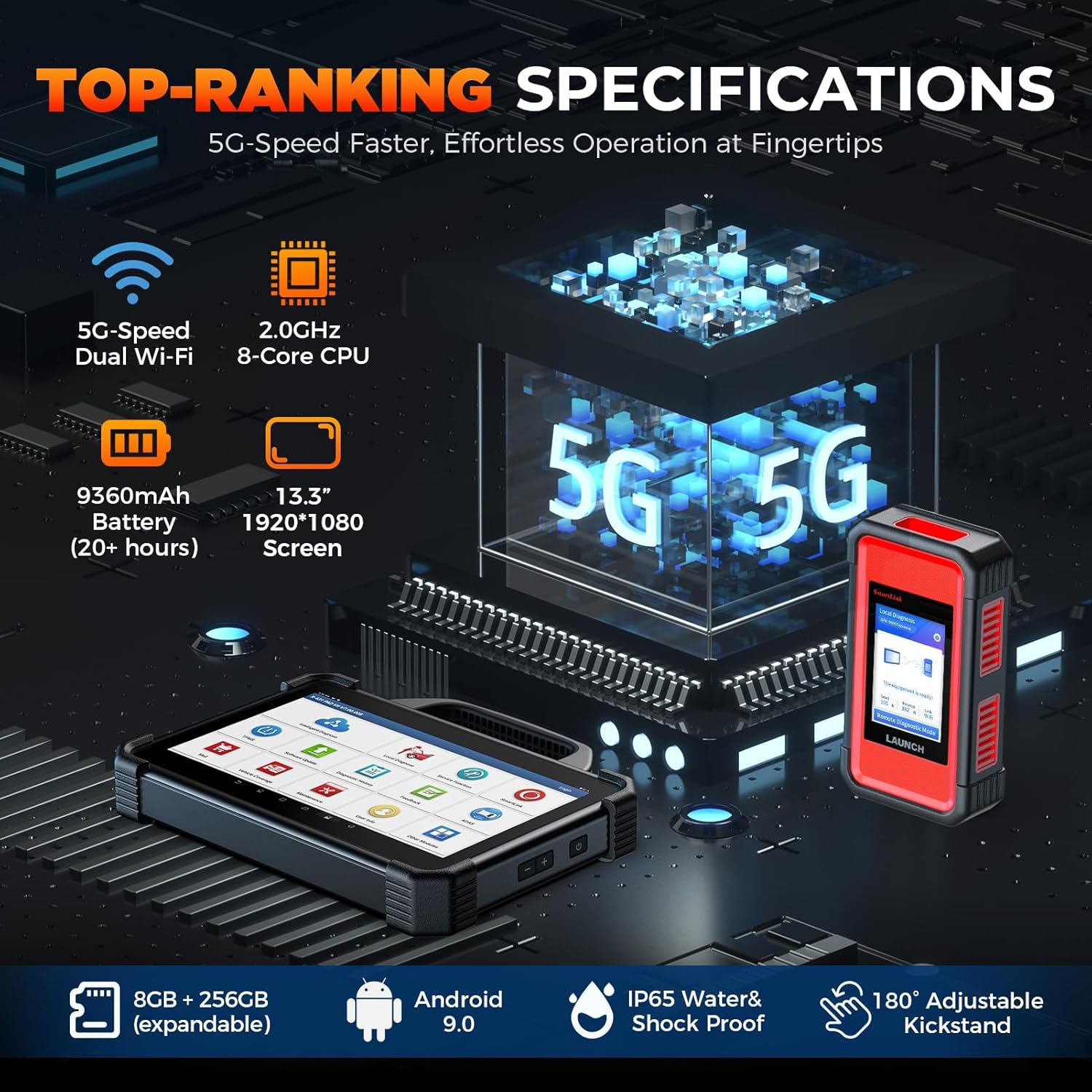
చిత్రం 6.1: X431 PADVII ఎలైట్ యొక్క కీలక హార్డ్వేర్ స్పెసిఫికేషన్లు.
7. వారంటీ మరియు మద్దతు
7.1 సాంకేతిక మద్దతు
సాంకేతిక సహాయం, ఉత్పత్తి ఆపరేషన్కు సంబంధించిన ప్రశ్నలు లేదా సంక్లిష్ట సమస్యలను పరిష్కరించడం కోసం, దయచేసి LAUNCH కస్టమర్ సపోర్ట్ను సంప్రదించండి:
- ఫోన్: 1-888-756-2936
- గంటలు: సోమవారం - శుక్రవారం, ఉదయం 9 - సాయంత్రం 6 EST
"LAUNCH X431 PADVII ఆన్లైన్ ప్రోగ్రామింగ్ యాక్టివేషన్ పద్ధతి" గురించి సమాచారం మరియు అదనపు వాహన నమూనాల (USలో Benz & BMW దాటి) ఆన్లైన్ ప్రోగ్రామింగ్ ఫీచర్లను యాక్సెస్ చేయడానికి IP పరిమితులను దాటవేయడానికి VPNని ఉపయోగించడం గురించి సూచనలు మద్దతు నుండి అభ్యర్థనపై అందుబాటులో ఉన్నాయి.

చిత్రం 7.1: పరికరంలో వినియోగదారు సమాచారం మరియు మద్దతు వనరులను యాక్సెస్ చేయడం.
7.2 వారంటీ సమాచారం
కొనుగోలు సమయంలో నిర్దిష్ట వారంటీ వివరాలు అందించబడతాయి. వారంటీ క్లెయిమ్ల కోసం దయచేసి మీ కొనుగోలు రుజువును ఉంచుకోండి. ఏవైనా వారంటీ సంబంధిత విచారణల కోసం, LAUNCH కస్టమర్ సపోర్ట్ను సంప్రదించండి.


