ఉత్పత్తి ముగిసిందిview
The blurams A31 Indoor Wi-Fi Camera is a versatile security solution designed for indoor monitoring. It offers high-resolution video, comprehensive coverage, and smart detection features to keep your home secure and connected.

The blurams A31 camera, shown next to a smartphone displaying its live feed, highlights its compact design and monitoring capabilities.

ఒక ఓవర్view of the blurams Wi-Fi Camera's key features, including dual-band Wi-Fi, AI detection, 2K resolution, pan/tilt functionality, and various security options.
ముఖ్య లక్షణాలు:
- 360 ° పనోరమిక్ View & 2K High-Quality Video: Captures clear video day and night with up to 7 meters night vision. Offers 360° horizontal and 95° vertical rotation for full room coverage.
- Intelligent AI Detection & Instant Alerts: Automatically tracks movement and sends instant alerts for human, motion, or abnormal sound detection. Records alert videos to the cloud.
- స్మార్ట్ ఇంటిగ్రేషన్: Compatible with Amazon Alexa, Google Assistant, and IFTTT for voice control and smart home automation.
- Enhanced blurams App: ప్రత్యక్ష ప్రసారం అనుమతిస్తుంది viewing of up to four cameras simultaneously, video sharing with family members, and two-way audio communication.
- Flexible Storage & Privacy Protection: Supports 24/7 CVR cloud recording and up to 128 GB local storage via microSD card (not included). Features a privacy mode to disable recording.
ప్యాకేజీ విషయాలు
దయచేసి ప్యాకేజీలో అన్ని భాగాలు ఉన్నాయని ధృవీకరించండి:
- blurams A31 Indoor Wi-Fi Camera
- పవర్ కేబుల్
- ఛార్జింగ్ హెడ్ (పవర్ అడాప్టర్)
- వినియోగదారు మాన్యువల్ (ఈ పత్రం)
- మౌంటు కిట్
సెటప్ గైడ్
1. కెమెరాను ఆన్ చేయడం
- Connect the provided power cable to the camera's power port.
- Plug the charging head into a standard electrical outlet.
- Wait for the camera's indicator light to show a stable status, indicating it is ready for setup.
2. Downloading and Installing the blurams App
The blurams app is essential for controlling and managing your camera. It is available for both iOS and Android devices.


కోసం వెతకండి "blurams" in your device's app store and follow the installation prompts.
3. Wi-Fiకి కనెక్ట్ చేస్తోంది
- Open the blurams app and create an account or log in.
- కొత్త పరికరాన్ని జోడించడానికి "+" చిహ్నాన్ని నొక్కండి.
- Follow the on-screen instructions to connect your camera to your home Wi-Fi network. The camera supports both 2.4GHz and 5GHz Wi-Fi bands.
- Ensure your Wi-Fi signal is strong in the camera's intended location for optimal performance.
ఆపరేటింగ్ సూచనలు
1. లైవ్ View మరియు పాన్/టిల్ట్ కంట్రోల్
Access the live video feed and control the camera's movement directly from the blurams app.
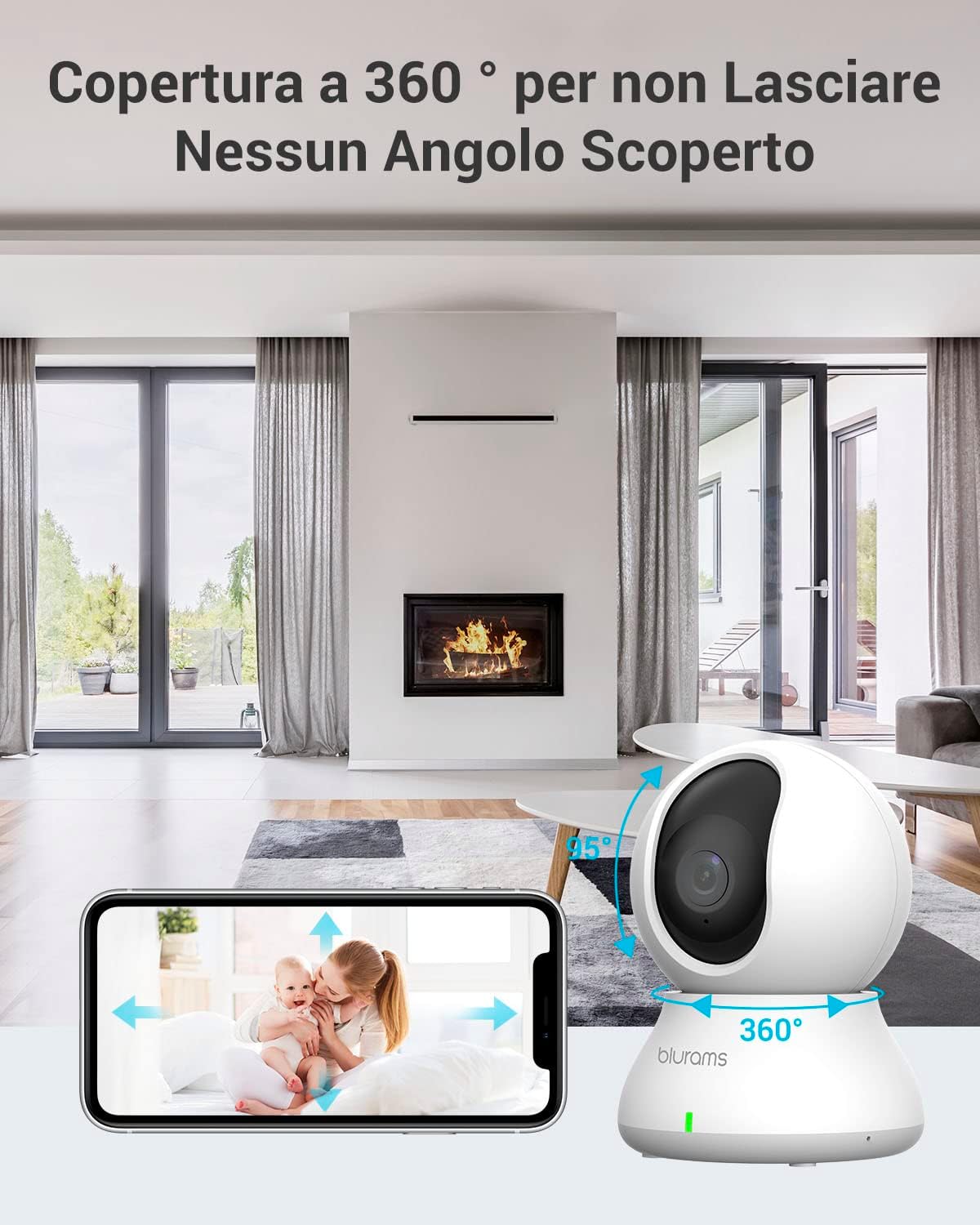
The camera offers 360° horizontal and 95° vertical rotation, allowing comprehensive coverage of your indoor space, controllable via the app.
- Open the blurams app and select your camera from the device list.
- The live feed will appear. Use the on-screen joystick or swipe gestures to pan (horizontal) and tilt (vertical) the camera lens.
- మీరు చెయ్యగలరు view up to 4 cameras simultaneously within the app.
2. టూ-వే ఆడియో
Communicate with people or pets in the camera's vicinity using the two-way audio feature.

The two-way audio function allows you to speak and listen through the camera, providing real-time communication.
- లైవ్లో ఉండగా view, కెమెరా ద్వారా మాట్లాడటానికి మైక్రోఫోన్ చిహ్నాన్ని నొక్కండి.
- Tap the speaker icon to listen to audio from the camera's environment.
3. మోషన్ డిటెక్షన్ మరియు హెచ్చరికలు
The camera can detect various types of motion and send instant notifications to your phone.

The camera's intelligent AI can differentiate between human and animal motion, sending specific alerts to your device.
- AI గుర్తింపు: The camera can identify human movement, general motion, and abnormal sounds.
- మోషన్ ట్రాకింగ్: When motion is detected, the camera can automatically track the moving object.
- తక్షణ హెచ్చరికలు: Receive push notifications on your smartphone when an event is detected.
- Custom Activity Zones: కెమెరాలోని నిర్దిష్ట ప్రాంతాలను నిర్వచించండి view to focus detection and reduce false alarms. Adjust sensitivity levels (Low, Normal, High) as needed.

Customize activity zones to monitor specific areas and adjust sensitivity to prevent unnecessary alerts.
4. రికార్డింగ్ మరియు నిల్వ
The blurams camera offers flexible recording and storage options.

Choose between secure cloud storage or local storage via a microSD card to keep your recordings safe.
- క్లౌడ్ నిల్వ: Supports 24/7 Continuous Video Recording (CVR) to the cloud. This prevents loss of footage due to physical damage to a memory card.
- స్థానిక నిల్వ: Supports up to a 128 GB microSD card (not included) for local recording.
- Recordings can be easily searched by time, event type, or camera name within the app.
5. గోప్యతా మోడ్
Activate privacy mode to temporarily stop recording and disable the camera's lens.

The privacy mode allows you to physically retract the camera lens or disable it via the app, ensuring your privacy when needed.
- You can activate privacy mode through the blurams app.
- Alternatively, you can manually move the lens upwards to interrupt recording.
నిర్వహణ
Proper maintenance ensures the longevity and optimal performance of your blurams camera.
- శుభ్రపరచడం: కెమెరా లెన్స్ మరియు బాడీని శుభ్రం చేయడానికి మృదువైన, పొడి వస్త్రాన్ని ఉపయోగించండి. ఉపరితలాన్ని దెబ్బతీసే ద్రవ క్లీనర్లు లేదా రాపిడి పదార్థాలను ఉపయోగించకుండా ఉండండి.
- ప్లేస్మెంట్: Ensure the camera is placed in a stable location, away from direct sunlight, excessive heat, or moisture.
- సాఫ్ట్వేర్ అప్డేట్లు: Regularly check the blurams app for firmware updates. Keeping your camera's software up-to-date ensures access to the latest features and security enhancements.
- నిల్వ నిర్వహణ: If using a microSD card, periodically check its status and format it if necessary to maintain recording efficiency. Back up important footage ఫార్మాట్ చేయడానికి ముందు.
ట్రబుల్షూటింగ్
If you encounter issues with your blurams camera, refer to the following common solutions:
| సమస్య | సాధ్యమైన కారణం | పరిష్కారం |
|---|---|---|
| కెమెరా ఆఫ్లైన్లో ఉంది/Wi-Fi కి కనెక్ట్ కాలేదు | Weak Wi-Fi signal, incorrect Wi-Fi password, router issues, camera too far from router. |
|
| పేలవమైన వీడియో నాణ్యత | Insufficient lighting, dirty lens, weak internet connection. |
|
| చలన గుర్తింపు హెచ్చరికలు లేవు | Detection settings disabled, sensitivity too low, activity zones not configured correctly. |
|
| రెండు-మార్గం ఆడియో పని చేయడం లేదు | Microphone/speaker disabled in app, volume too low, network latency. |
|
స్పెసిఫికేషన్లు
| ఫీచర్ | వివరాలు |
|---|---|
| మోడల్ సంఖ్య | A31 |
| వినియోగ పర్యావరణం | ఇండోర్ |
| వీడియో క్యాప్చర్ రిజల్యూషన్ | 1440p (2K) |
| ప్రభావవంతమైన వీడియో రిజల్యూషన్ | 1440 |
| ఫ్రేమ్ రేట్ | 15 fps |
| Viewing యాంగిల్ | 360 డిగ్రీలు (పాన్/టిల్ట్) |
| నైట్ విజన్ రేంజ్ | 7 మీటర్లు |
| కనెక్టివిటీ ప్రోటోకాల్ | వై-ఫై (2.4GHz/5GHz) |
| శక్తి మూలం | కార్డెడ్ ఎలక్ట్రిక్ (5 వోల్ట్లు, 7 వాట్స్) |
| అనుకూల పరికరాలు | Tablets, Smartphones, Laptops, Televisions |
| కంట్రోలర్ రకం | IFTTT, అమెజాన్ అలెక్సా |
| మౌంటు రకం | Ceiling, Freestanding |
| రంగు | తెలుపు |
| మెటీరియల్ | ప్లాస్టిక్ |
| అంశం కొలతలు (LxWxH) | 22.4 x 22.4 x 41.1 cm (Product: 22.35 x 22.35 x 41.15 cm) |
| వస్తువు బరువు | 340 గ్రా |
వారంటీ మరియు మద్దతు
వారంటీ సమాచారం
Specific warranty details for the blurams A31 Indoor Wi-Fi Camera are typically provided with your purchase documentation. Please refer to the warranty card or information included in your product packaging for terms and conditions.
కస్టమర్ మద్దతు
For technical assistance, troubleshooting, or any product-related inquiries, please contact blurams customer support. You can find contact information on the official blurams website or through the blurams app.
blurams is committed to providing high-quality products and attentive service, and they are pleased to resolve any issues you may encounter.


