పరిచయం
This manual provides detailed instructions for the setup, operation, and maintenance of your Pyle PDA69BU Stereo Amplifier Audio Receiver. Please read this manual thoroughly before using the device to ensure proper function and to maximize your audio experience. Keep this manual for future reference.
ఉత్పత్తి ముగిసిందిview
The Pyle PDA69BU is a versatile 2.0 channel stereo amplifier designed for home audio systems. It features Bluetooth streaming, MP3/USB/SD card playback, FM radio, and multiple input options including RCA and Aux. It also includes microphone and headphone jacks, along with adjustable bass, treble, delay, and reverb controls.

Figure 1: Pyle PDA69BU Stereo Ampలైఫైయర్ మరియు రిమోట్ కంట్రోల్.
ఈ చిత్రం ముందు భాగాన్ని ప్రదర్శిస్తుంది view of the Pyle PDA69BU stereo ampలైఫైయర్, షోక్asing its control panel, digital display, and various input ports. The included remote control is also visible, highlighting the comprehensive control options available to the user.
ఫ్రంట్ ప్యానెల్ ఫీచర్లు

చిత్రం 2: ముందు మరియు వెనుక ప్యానెల్ ఓవర్view.
This diagram illustrates the key features of both the front and rear panels of the PDA69BU amplifier. The front panel includes USB and SD card slots, microphone inputs, a headphone output, and various control knobs. The rear panel shows the FM antenna connection, speaker outputs, RCA audio inputs/outputs, and an auxiliary input.
- పవర్ ఆన్ / ఆఫ్ స్విచ్: Toggles the unit's power.
- డిజిటల్ LED డిస్ప్లే: ప్రస్తుత మోడ్, ట్రాక్ సమాచారం మరియు సెట్టింగ్లను చూపుతుంది.
- USB/SD కార్డ్ స్లాట్లు: డిజిటల్ ఆడియో ప్లే చేయడానికి files (MP3, WAV, WMA, APE).
- MIC1/MIC2 ఇన్పుట్లు: మైక్రోఫోన్లను కనెక్ట్ చేయడానికి 1/4'' జాక్లు.
- MIC VOL, DELAY, REVERB Controls: Adjust microphone volume and effects.
- BASS/TREBLE Controls: Adjust low and high frequency response.
- బ్యాలెన్స్ నియంత్రణ: Adjusts left/right channel balance.
- హెడ్ఫోన్ జాక్: 1/4'' output for private listening.
- ఇన్పుట్ సెలెక్టర్: Rotary knob to select audio source (DVD, CD, AUX, BT/FM/USB/SD).
- MASTER VOL Control: Adjusts overall output volume.
- FOLDER/TRACK Knob: Navigates folders and tracks for USB/SD playback.
వెనుక ప్యానెల్ ఫీచర్లు
- FM యాంటెన్నా: చేర్చబడిన FM యాంటెన్నా కోసం కనెక్షన్.
- AUDIO INPUT (DVD, CD, LINE): RCA stereo inputs for external audio sources.
- ఆడియో అవుట్పుట్: RCA stereo output for connecting to another ampజీవితకాలం లేదా రికార్డింగ్ పరికరం.
- AUX ఇన్పుట్ (3.5mm): Stereo mini-jack input for portable devices.
- స్పీకర్ల అవుట్పుట్: Screw-type banana plug speaker jacks for connecting passive speakers (4-8 Ohm impedance).
- BT ANT.: బ్లూటూత్ యాంటెన్నా.
- VOLTAGE CONVERSION POWER INPUT: Selectable AC115V/60Hz or AC230V/50Hz power input.
సెటప్ సూచనలు
Follow these steps to properly set up your Pyle PDA69BU ampజీవితకాలం.
1 స్పీకర్ కనెక్షన్
- నిర్ధారించండి amplifier is powered off and unplugged from the wall outlet.
- మీ నిష్క్రియ స్పీకర్లను దీనికి కనెక్ట్ చేయండి స్పీకర్ల అవుట్పుట్ వెనుక ప్యానెల్లోని టెర్మినల్స్. యొక్క పాజిటివ్ (+) టెర్మినల్ను సరిపోల్చండి amplifier to the positive (+) terminal of the speaker, and the negative (-) to the negative (-). Ensure a secure connection for optimal sound quality. The amplifier supports speakers with an impedance of 4-8 Ohms.
2. ఆడియో సోర్స్ కనెక్షన్
Connect your desired audio sources using the appropriate inputs:
- RCA Inputs (DVD, CD, LINE): Use RCA cables to connect devices like DVD players, CD players, or other audio components to the corresponding RCA input jacks on the rear panel.
- AUX ఇన్పుట్ (3.5mm): Use a 3.5mm audio cable to connect portable devices such as smartphones or tablets to the AUX input on the rear panel.
- USB/SD కార్డ్: Insert a USB flash drive or SD card into the respective slots on the front panel for digital media playback.
- మైక్రోఫోన్లు: Connect up to two 1/4'' microphones to the MIC1 మరియు MIC2 ముందు ప్యానెల్లో ఇన్పుట్లు.
3. FM Antenna Connection
చేర్చబడిన FM యాంటెన్నాను కనెక్ట్ చేయండి FM ఆంటెన్నా terminal on the rear panel for improved FM radio reception.
4. పవర్ కనెక్షన్
- ధృవీకరించండి VOLTAGE CONVERSION POWER INPUT వెనుక ప్యానెల్లోని స్విచ్ సరైన వాల్యూమ్కు సెట్ చేయబడిందిtage for your region (AC115V/60Hz or AC230V/50Hz).
- పవర్ కార్డ్ను గోడ అవుట్లెట్లోకి ప్లగ్ చేయండి.
ఆపరేటింగ్ సూచనలు
పవర్ ఆన్/ఆఫ్
నొక్కండి పవర్ ఆన్/ఆఫ్ switch on the front panel to turn the unit on or off.
ఆడియో మూలాన్ని ఎంచుకోవడం
తిప్పండి ఇన్పుట్ సెలెక్టర్ knob on the front panel or use the "MODE" button on the remote control to choose your desired audio source: DVD, CD, AUX, or BT/FM/USB/SD.
వాల్యూమ్ మరియు టోన్ నియంత్రణ
- ఉపయోగించి మొత్తం ధ్వని స్థాయిని సర్దుబాటు చేయండి మాస్టర్ వోల్ నాబ్.
- Fine-tune the low frequencies with the BASS control and high frequencies with the ట్రబుల్ నియంత్రణ.
- ఉపయోగించండి బ్యాలెన్స్ control to adjust the relative volume between the left and right speakers.

Figure 3: Front Panel Precision Controls.
This image highlights the independent control knobs for Delay, Reverb, Bass, and Treble on the front panel, allowing users to precisely adjust audio characteristics.
బ్లూటూత్ స్ట్రీమింగ్
- Select "BT" mode using the Input Selector or remote. The digital display will show "BLUE".
- On your Bluetooth-enabled device (smartphone, tablet, etc.), search for "Pyle Audio" or "PDA69BU" in the Bluetooth settings.
- Pair with the device. Once connected, you can stream audio wirelessly.
- The wireless range is approximately 45 feet.

Figure 4: Wireless Bluetooth Streaming.
ఈ చిత్రం ప్రదర్శిస్తుంది amplifier's Bluetooth streaming capability, showing a smartphone connected wirelessly to the PDA69BU, with music playing through connected speakers. It highlights the convenience of wireless audio playback.
USB/SD కార్డ్ ప్లేబ్యాక్
- Insert a USB flash drive or SD card containing MP3, WAV, WMA, or APE audio fileసంబంధిత స్లాట్లోకి లు.
- యూనిట్ స్వయంచాలకంగా USB/SD మోడ్కి మారి ప్లేబ్యాక్ను ప్రారంభిస్తుంది.
- ఉపయోగించండి FOLDER/TRACK knob to navigate through folders and tracks. The remote control also provides playback controls (play/pause, next/previous track).
FM రేడియో ఆపరేషన్
- Select "FM" mode using the Input Selector or remote.
- Press the "AUTO" button on the remote control to automatically scan and store available FM stations.
- Use the "CH-" or "CH+" buttons on the remote to navigate through stored stations.
మైక్రోఫోన్ మరియు కరోకే విధులు

Figure 5: Microphone Inputs for Karaoke.
This image highlights the dual microphone inputs (MIC1 and MIC2) on the front panel, along with the MIC VOL control, indicating the amplifier's karaoke capabilities. It shows two individuals using microphones with the ampజీవితకాలం.
- మైక్రోఫోన్లను దీనికి కనెక్ట్ చేయండి MIC1 or MIC2 ఇన్పుట్లు.
- ఉపయోగించి మైక్రోఫోన్ వాల్యూమ్ను సర్దుబాటు చేయండి MIC VOL నాబ్.
- Apply echo effects using the ఆలస్యం మరియు రెవెర్బ్ controls to enhance vocal performance.
హెడ్ఫోన్ వాడకం
Plug 1/4'' headphones into the హెడ్ఫోన్ jack for private listening. Connecting headphones will mute the main speaker outputs.
నిర్వహణ
- శుభ్రపరచడం: యూనిట్ వెలుపలి భాగాన్ని శుభ్రం చేయడానికి మృదువైన, పొడి వస్త్రాన్ని ఉపయోగించండి. ద్రవ క్లీనర్లు లేదా ద్రావకాలను ఉపయోగించవద్దు.
- వెంటిలేషన్: చుట్టూ తగినంత వెంటిలేషన్ ఉండేలా చూసుకోండి amplifier to prevent overheating. Do not block ventilation openings.
- నిల్వ: యూనిట్ను ఎక్కువ కాలం నిల్వ ఉంచినట్లయితే, దానిని పవర్ అవుట్లెట్ నుండి అన్ప్లగ్ చేసి, చల్లని, పొడి ప్రదేశంలో నిల్వ చేయండి.
- పవర్ కార్డ్: ఏదైనా నష్టం జరిగిందా అని పవర్ కార్డ్ను క్రమం తప్పకుండా తనిఖీ చేయండి. దెబ్బతిన్నట్లయితే, వాడకాన్ని ఆపివేసి, కస్టమర్ సపోర్ట్ను సంప్రదించండి.
ట్రబుల్షూటింగ్
| సమస్య | సాధ్యమైన కారణం | పరిష్కారం |
|---|---|---|
| శక్తి లేదు | Power cord not connected; Power switch off; Incorrect voltagఇ సెట్టింగ్. | Ensure power cord is securely plugged in. Turn power switch ON. Verify voltage సెలెక్టర్ సరిగ్గా సెట్ చేయబడింది. |
| సౌండ్ అవుట్పుట్ లేదు | Incorrect input selected; Speaker wires loose; Volume too low; Headphones connected. | Select the correct input source. Check speaker wire connections. Increase MASTER VOL. Disconnect headphones. |
| బ్లూటూత్ కనెక్ట్ కావడం లేదు | Not in BT mode; Device too far; Device already paired with another unit. | నిర్ధారించండి amplifier is in BT mode. Move device closer to amplifier. Disconnect from other Bluetooth devices. |
| FM రిసెప్షన్ పేలవంగా ఉంది | FM antenna not connected or poorly positioned. | Connect the FM antenna securely. Adjust antenna position for better reception. |
| USB/SD ప్లేబ్యాక్ సమస్యలు | మద్దతు లేదు file ఫార్మాట్; పాడైంది files; USB/SD card not inserted correctly. | నిర్ధారించండి files are MP3, WAV, WMA, or APE. Reinsert USB/SD card. Try a different USB/SD card. |
స్పెసిఫికేషన్లు
| ఫీచర్ | వివరాలు |
|---|---|
| మోడల్ సంఖ్య | PDA69BU |
| పవర్ అవుట్పుట్ | 38W x 2 RMS |
| బ్లూటూత్ వెర్షన్ | 5.0 |
| వైర్లెస్ రేంజ్ | 45 అడుగుల వరకు |
| ఆడియో ఇన్పుట్లు | RCA (DVD, CD, LINE), 3.5mm AUX, USB, SD Card, (2) 1/4'' Microphone |
| ఆడియో అవుట్పుట్లు | RCA, 1/4'' Headphone |
| స్పీకర్ ఇంపెడెన్స్ | 4-8 ఓం |
| డిజిటల్ మీడియా File మద్దతు | MP3, WAV, WMA, APE |
| ఉత్పత్తి కొలతలు | 9.8 x 9.8 x 3.9 అంగుళాలు |
| వస్తువు బరువు | 8.07 పౌండ్లు |
| విద్యుత్ సరఫరా | AC115V/60Hz or AC230V/50Hz (selectable) |
పెట్టెలో ఏముంది
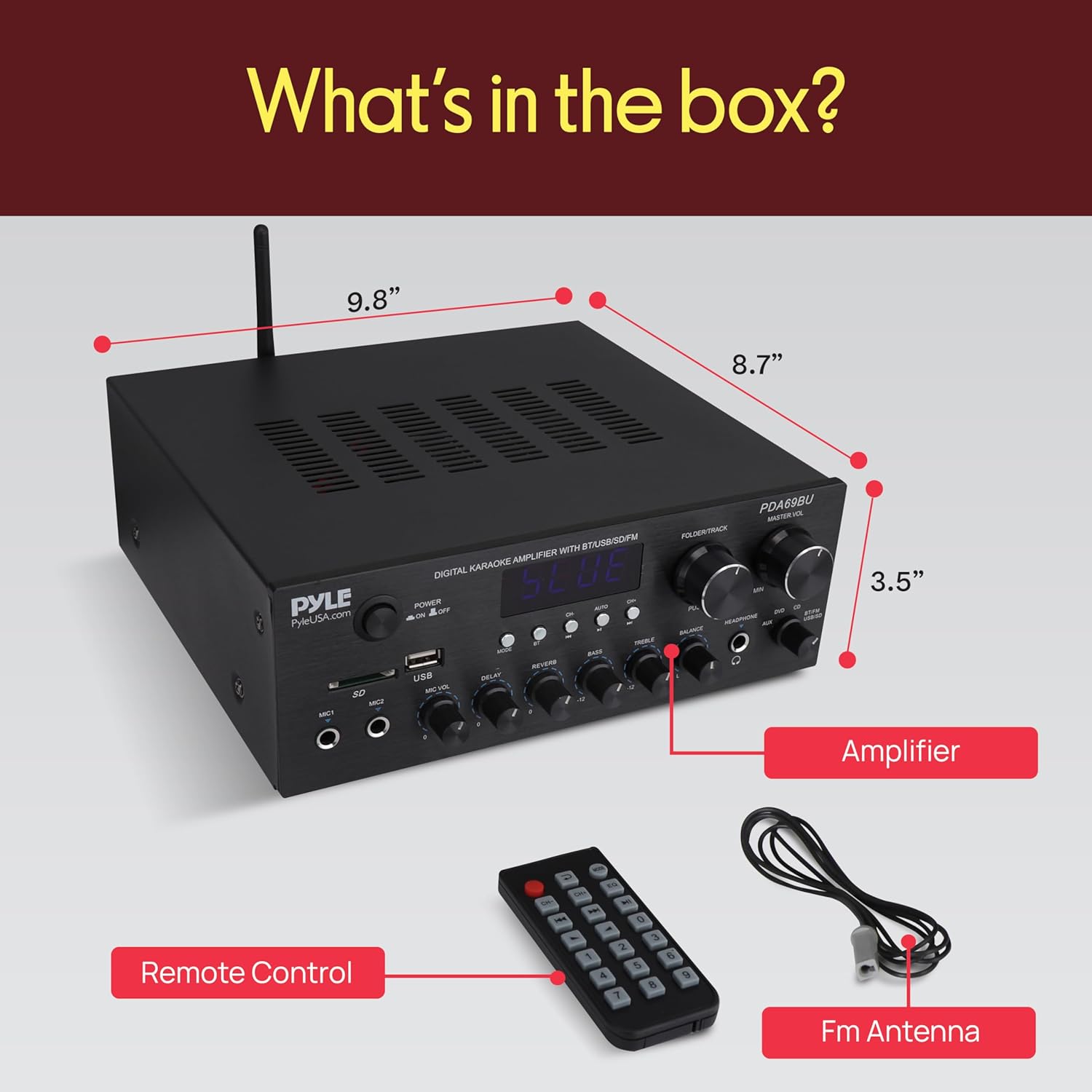
చిత్రం 6: చేర్చబడిన భాగాలు.
This image displays the contents of the Pyle PDA69BU package, including the amplifier unit, remote control, and FM antenna.
- పైల్ PDA69BU స్టీరియో Ampజీవితకాల గ్రహీత
- రిమోట్ కంట్రోల్
- FM యాంటెన్నా
వారంటీ మరియు మద్దతు
Pyle products typically come with a manufacturer's warranty. For specific warranty details, registration, or technical support, please visit the official Pyle webసైట్ లేదా వారి కస్టమర్ సేవా విభాగాన్ని సంప్రదించండి.
ఆన్లైన్ మద్దతు: www.pyleusa.com


