పరిచయం
This manual provides detailed instructions for the VEDINDUST HDMI ARC Digital to Analog Audio Converter. This device is designed to extract audio from an HDMI ARC-enabled television and convert digital audio signals (Toslink/Coaxial) into analog L/R stereo or 3.5mm jack outputs. It supports various audio formats and offers multiple input options for versatile connectivity.
Please read this manual carefully before using the product to ensure proper operation and to maximize its performance.
ప్యాకేజీ విషయాలు
దయచేసి అన్ని అంశాలు ప్యాకేజీలో ఉన్నాయని ధృవీకరించండి:
- 1x VEDINDUST HDMI ARC Digital to Analog Audio Converter
- 1x USB పవర్ కేబుల్
- 1x HDMI కేబుల్
- 1x వినియోగదారు మాన్యువల్

ఉత్పత్తి ముగిసిందిview
The VEDINDUST HDMI ARC Digital to Analog Audio Converter is a compact device designed to manage various audio signals. It features multiple input and output ports for flexible audio routing.
పరికర లేఅవుట్
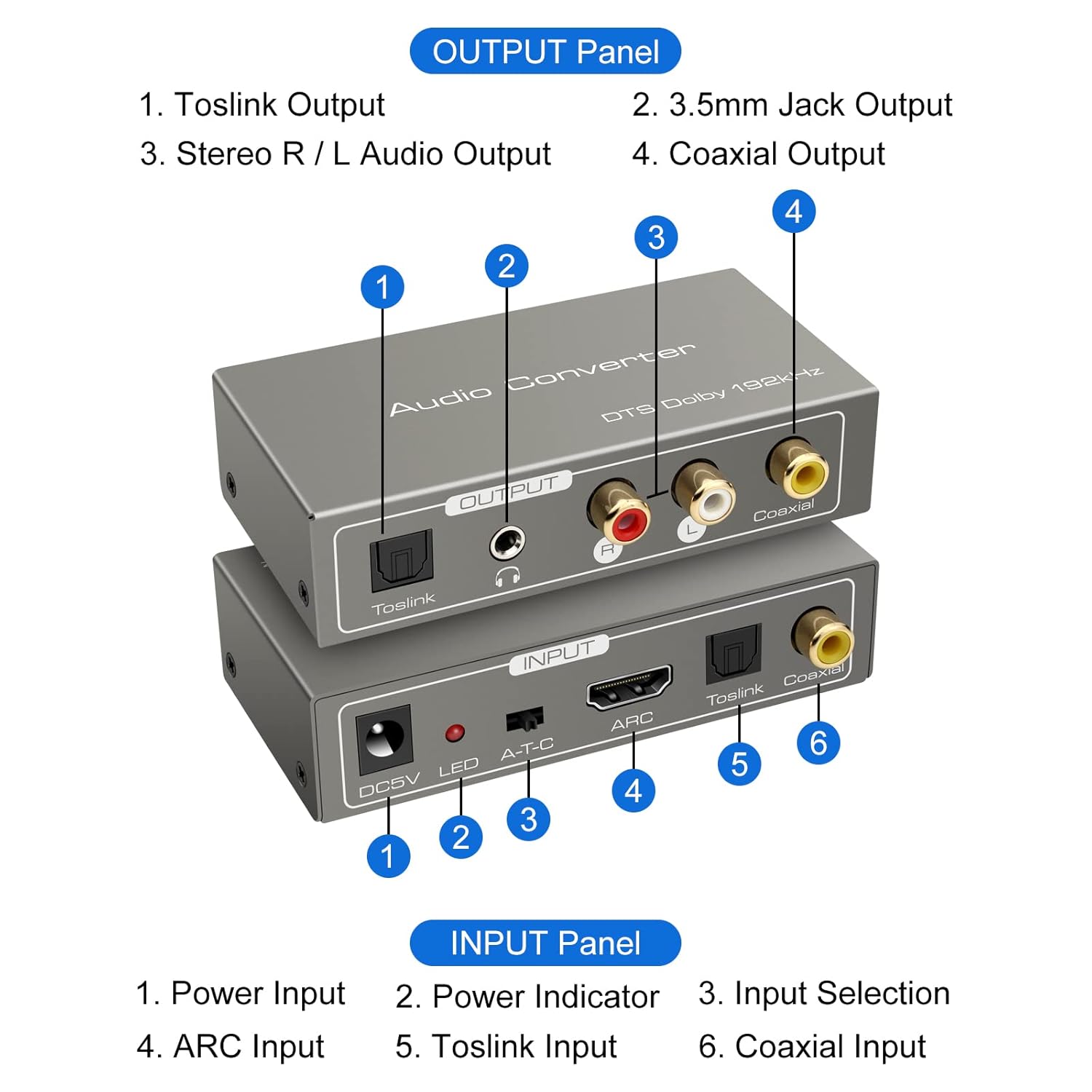
ఇన్పుట్ ప్యానెల్:
- DC5V Power Input: Connect the provided USB power cable here.
- LED సూచిక: పరికరం ఆన్ చేసినప్పుడు వెలుగుతుంది.
- A-T-C Input Selection Switch: Used to select the audio input mode (A for ARC, T for Toslink, C for Coaxial).
- ARC ఇన్పుట్: Connect an HDMI cable from an ARC-compatible TV's HDMI ARC port.
- Toslink ఇన్పుట్: Connect an optical fiber cable from your audio source.
- ఏకాక్షక ఇన్పుట్: Connect a coaxial cable from your audio source.
Output Panel:
- టోస్లింక్ అవుట్పుట్: Connect to an optical input on an ampలైఫైయర్ లేదా సౌండ్ సిస్టమ్.
- 3.5mm Jack Output: Connect to headphones or an auxiliary input on an audio device.
- Stereo R/L Audio Output: Connect RCA cables to the L/R analog inputs of an ampలైఫైయర్ లేదా స్పీకర్లు.
- ఏకాక్షక అవుట్పుట్: Connect to a coaxial input on an ampలైఫైయర్ లేదా సౌండ్ సిస్టమ్.
సెటప్ సూచనలు
Follow these steps to correctly set up your VEDINDUST audio converter:
1. పవర్ కనెక్షన్
- Connect the provided USB power cable to the DC5V input port on the converter.
- Plug the other end of the USB power cable into a 5V USB power adapter (not included) or a USB port on your TV/device.
- Ensure the LED indicator on the converter illuminates, indicating it is powered on.
2. ఆడియో ఇన్పుట్ కనెక్షన్
Choose one of the following input methods based on your audio source:

ARC Input Mode:
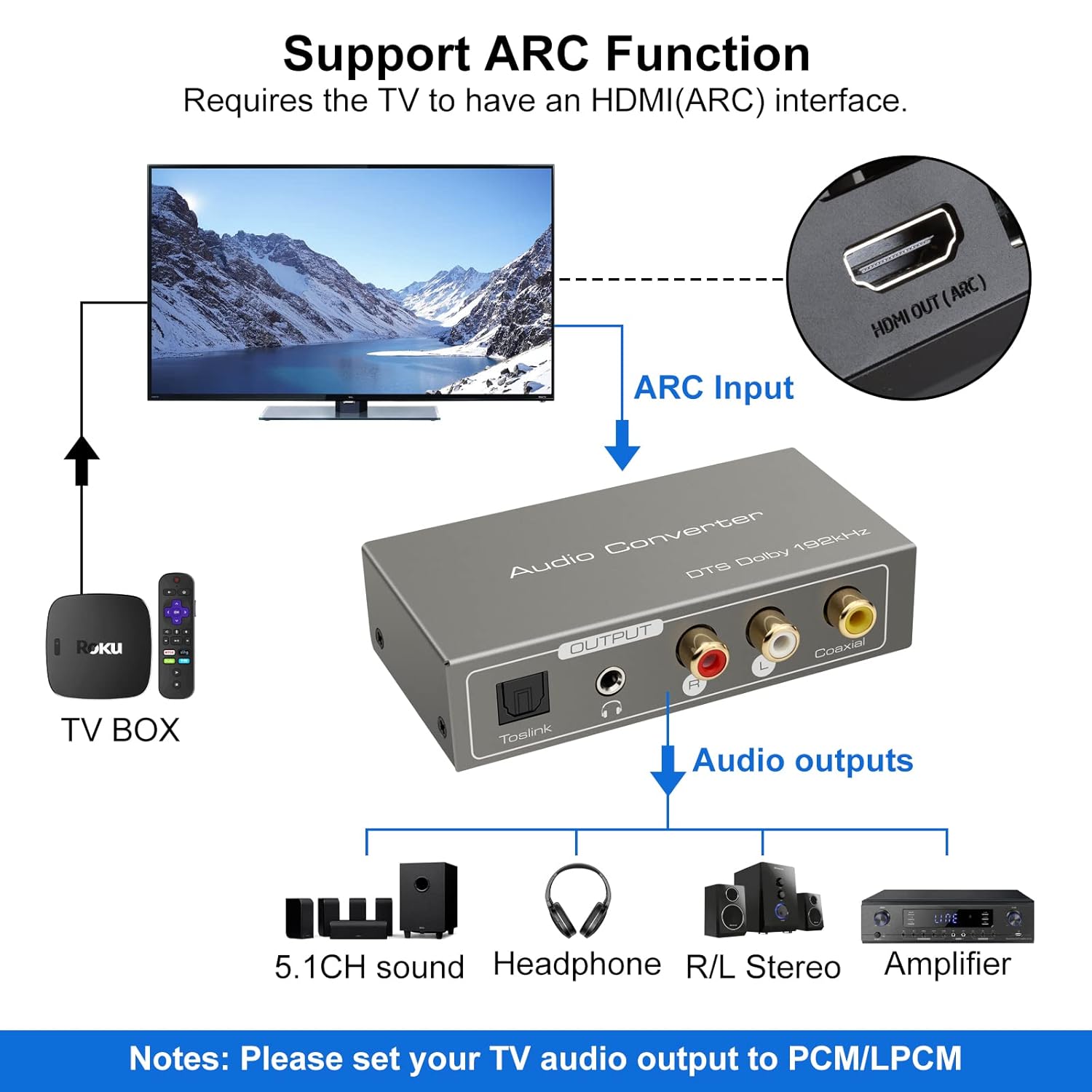
- Connect an HDMI cable from your ARC-compatible television's HDMI ARC output port to the ARC input port on the converter.
- Ensure your television's HDMI port supports ARC functionality.

TOSLink Input Mode:
- Connect an optical fiber cable from your audio source (e.g., game console, Blu-ray player) to the Toslink input port on the converter.
Coaxial Input Mode:
- Connect a coaxial cable from your audio source to the Coaxial input port on the converter.
3. ఆడియో అవుట్పుట్ కనెక్షన్
Connect the converter's output ports to your desired audio receiving devices:
- For Digital Audio: Connect an optical fiber cable to the Toslink Output or a coaxial cable to the Coaxial Output, then connect to your amplifier, soundbar, or home cinema system.
- For Analog Audio: Connect RCA L/R cables to the Stereo R/L Audio Output, or a 3.5mm audio cable to the 3.5mm Jack Output. Connect these to your amplifier, speakers, or headphones.
ఆపరేటింగ్ సూచనలు
1. ఇన్పుట్ మోడ్ ఎంపిక
Use the A-T-C switch on the input panel to select the active audio input:
- స్విచ్ని సెట్ చేయండి 'A' for HDMI ARC input.
- స్విచ్ని సెట్ చేయండి 'T' for TOSLink optical input.
- స్విచ్ని సెట్ చేయండి 'C' for Coaxial input.

2. Audio Format Configuration
For optimal performance and to ensure audio output, especially when using the R/L or 3.5mm jack outputs, it is crucial to configure the audio format on your source device (e.g., TV, game console).
- ముఖ్యమైన: If you experience no sound output, set the audio format of your signal source (e.g., TV audio settings) to PCM or LPCM.
- The converter supports DTS / DSD / LPCM formats for Toslink/Coaxial output. However, for R/L or 3.5mm jack outputs, only LPCM/PCM audio format input is supported.
ట్రబుల్షూటింగ్
If you encounter issues while using the VEDINDUST HDMI ARC Digital to Analog Audio Converter, please refer to the following common problems and solutions:
-
సౌండ్ అవుట్పుట్ లేదు:
- Ensure the converter is properly powered via the DC5V input and the LED indicator is on.
- Verify that the A-T-C input selection switch is set to the correct input mode (A for ARC, T for Toslink, C for Coaxial).
- Check the audio settings on your source device (TV, game console, etc.). The audio output format must be set to PCM or LPCM, especially for analog (RCA L/R or 3.5mm) outputs.
- Confirm that all audio cables (HDMI, optical, coaxial, RCA, 3.5mm) are securely connected to both the converter and your audio devices.
- Test with different audio cables if possible, to rule out faulty cables.
-
ARC Function Not Working:
- Ensure your television's HDMI port specifically supports Audio Return Channel (ARC). Not all HDMI ports are ARC-enabled.
- Check your TV's audio settings to ensure ARC is enabled and configured correctly.
- Try restarting both your TV and the converter.
-
పేలవమైన ఆడియో నాణ్యత:
- Ensure all connections are tight and free from interference.
- Verify that the audio format from your source is compatible with the converter's outputs (LPCM/PCM for analog outputs).
- Avoid using excessively long or low-quality cables, which can degrade signal integrity.
సాంకేతిక లక్షణాలు
| ఉత్పత్తి కొలతలు (L x W x H) | 9.8 x 5 x 0.1 సెం.మీ |
| బరువు | 250 గ్రాములు |
| తయారీదారు | VEDINDUST |
| మోడల్ సంఖ్య | 20220119 |
| మూలం దేశం | చైనా |
| రంగు | బూడిద రంగు |
| కనెక్టర్ రకం | HDMI, 3.5mm Jack, Toslink, Coaxial |
| అనుకూల పరికరాలు | Game Console, Blu-ray Player, Television, DVD Player, Satellite Receiver, Apple TV, HDTV, Soundbar, Amplifier, Speakers, Home Cinema System, AV Ampజీవితకాలం |
| కేబుల్ రకం | HDMI, Optical, Coaxial, Auxiliary |
| పోర్టుల సంఖ్య | 5 |
| UPC | 798610310694 |
| మద్దతు ఇచ్చిన ఎస్ampలింగ్ ఫ్రీక్వెన్సీలు | 32 KHz, 44.1 KHz, 48 KHz, 96 KHz, 192 KHz (24-bit) |
| Supported Audio Formats (Digital Output) | DTS, Dolby-AC3, DSD, LPCM |
| Supported Audio Formats (Analog Output) | LPCM, PCM |
సంరక్షణ మరియు నిర్వహణ
To ensure the longevity and optimal performance of your VEDINDUST audio converter, please follow these care guidelines:
- శుభ్రపరచడం: Use a soft, dry cloth to clean the device. Do not use liquid cleaners or aerosol sprays, as they may damage the unit.
- నిల్వ: పరికరాన్ని ప్రత్యక్ష సూర్యకాంతి మరియు తీవ్రమైన ఉష్ణోగ్రతలు లేకుండా చల్లని, పొడి ప్రదేశంలో నిల్వ చేయండి.
- నిర్వహణ: పరికరాన్ని వదలడం లేదా బలమైన ప్రభావాలకు గురి చేయడం మానుకోండి.
- పర్యావరణం: పరికరాన్ని నీరు, తేమ మరియు అధిక తేమ ఉన్న వాతావరణాల నుండి దూరంగా ఉంచండి.
వారంటీ మరియు కస్టమర్ మద్దతు
For warranty information or if you require further assistance with your VEDINDUST HDMI ARC Digital to Analog Audio Converter, please contact VEDINDUST customer support through the retailer where you purchased the product or refer to the contact information provided with your purchase documentation.
ఏవైనా వారంటీ క్లెయిమ్ల కోసం దయచేసి మీ కొనుగోలు రుజువును ఉంచుకోండి.


