1. పరిచయం
This manual provides essential information for the safe and efficient use of your new Hyundai 43-inch 4K Ultra HD Smart LED TV, model UHDHY43WSR4BYI5. Please read these instructions thoroughly before operating the television and retain them for future reference. This guide covers setup, operation, maintenance, and troubleshooting to ensure you get the best experience from your device.

Image: Hyundai 43-inch 4K Smart LED TV front view తో WebOS ఇంటర్ఫేస్.
2. భద్రతా సమాచారం
To reduce the risk of electric shock, fire, or damage to the television, always follow these basic safety precautions:
- శక్తి మూలం: సరైన వాల్యూమ్ ఉన్న AC పవర్ అవుట్లెట్కు మాత్రమే టీవీని కనెక్ట్ చేయండి.tage ఉత్పత్తి లేబుల్పై సూచించిన విధంగా.
- వెంటిలేషన్: Ensure adequate ventilation around the TV. Do not block ventilation openings or place the TV on soft surfaces that may block airflow.
- నీరు మరియు తేమ: టీవీని వర్షం లేదా తేమకు గురిచేయవద్దు. టీవీపై కుండీల వంటి ద్రవాలతో నిండిన వస్తువులను ఉంచవద్దు.
- శుభ్రపరచడం: శుభ్రం చేసే ముందు టీవీని అన్ప్లగ్ చేయండి. మృదువైన, పొడి వస్త్రాన్ని ఉపయోగించండి. లిక్విడ్ క్లీనర్లను లేదా ఏరోసోల్ క్లీనర్లను ఉపయోగించవద్దు.
- ప్లేస్మెంట్: టీవీని స్థిరమైన, సమతల ఉపరితలంపై ఉంచండి. ప్రత్యక్ష సూర్యకాంతిలో లేదా ఉష్ణ వనరుల దగ్గర ఉంచకుండా ఉండండి.
- పిల్లలు: Supervise children to ensure they do not climb on the TV or furniture it is placed on.
3. ప్యాకేజీ విషయాలు
ప్యాకేజీలో అన్ని అంశాలు ఉన్నాయని నిర్ధారించుకోండి:
- 1 x Hyundai 43-inch LED TV
- 1 x Remote Control (Magic Remote)
- 1 x వినియోగదారు మాన్యువల్
- 1 x వారంటీ కార్డ్
- 1 x Pair of Table Stand
- 1 x వాల్ మౌంట్ కిట్
4. భౌతిక సెటప్
4.1. టీవీని అమర్చడం
Your TV supports both table-top placement and wall mounting. Choose the method that best suits your environment.
టేబుల్ స్టాండ్ ఇన్స్టాలేషన్:
- స్క్రీన్ దెబ్బతినకుండా ఉండటానికి టీవీని ముఖం కిందకి మృదువైన, శుభ్రమైన ఉపరితలంపై జాగ్రత్తగా ఉంచండి.
- Attach the provided table stands to the designated slots on the bottom of the TV using the screws included in the kit. Ensure they are securely fastened.
- టీవీని స్థిరమైన, స్థాయి ఉపరితలంపై ఉంచండి.
వాల్ మౌంట్ ఇన్స్టాలేషన్:
Use the included wall mount kit. Follow the instructions provided with the wall mount kit for safe and secure installation. It is recommended to have professional assistance for wall mounting.

Image: Diagram illustrating the dimensions of the Hyundai 43-inch Smart LED TV, showing width, height, and depth with stand. Also indicates screen size and weights.
4.2. కేబుల్స్ కనెక్ట్
Connect the power cord to the TV and then to a wall outlet. Connect your external devices (e.g., set-top box, gaming console, Blu-ray player) to the appropriate ports.
- HDMI: For high-definition audio and video. Your TV has multiple HDMI ports.
- USB: For connecting USB storage devices for media playback. Your TV has 2 USB ports.
- RF IN: యాంటెన్నా లేదా కేబుల్ టీవీని కనెక్ట్ చేయడానికి.
- ఈథర్నెట్ (RJ45): వైర్డు ఇంటర్నెట్ కనెక్షన్ కోసం.
- AV IN: కాంపోజిట్ వీడియో మరియు స్టీరియో ఆడియో కేబుల్లను ఉపయోగించి పాత పరికరాలను కనెక్ట్ చేయడానికి.
- ఆప్టికల్: సౌండ్బార్ లేదా హోమ్ థియేటర్ సిస్టమ్కు డిజిటల్ ఆడియో అవుట్పుట్ కోసం.

చిత్రం: వెనుక view of the Hyundai 43-inch Smart LED TV, showing the mounting points and general layout of the back panel.
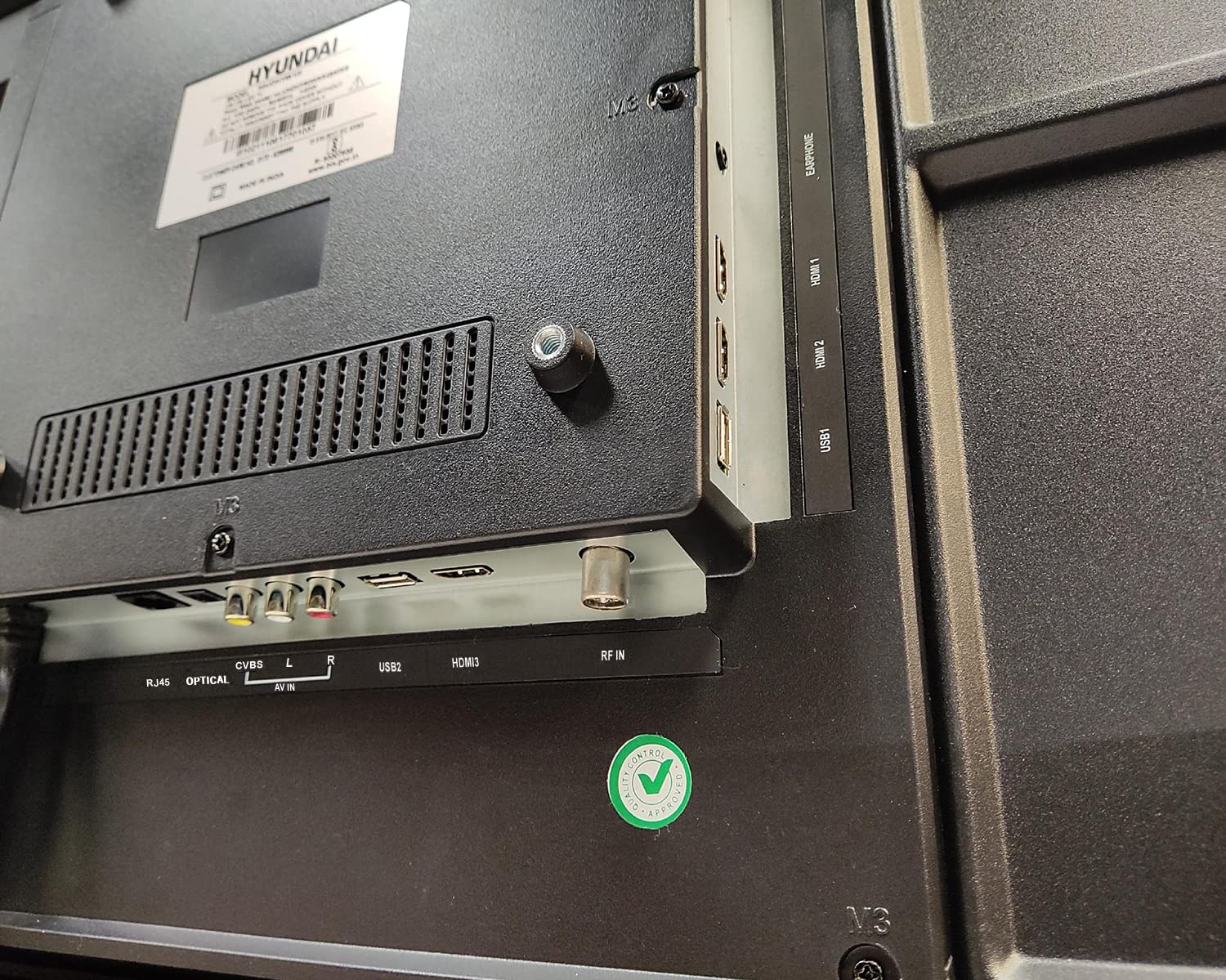
చిత్రం: క్లోజప్ view of the connectivity ports on the rear of the Hyundai 43-inch Smart LED TV, including HDMI, USB, RF IN, AV IN, Optical, and RJ45 Ethernet.
5. Initial Power On & Basic Operation
5.1. మొదటిసారి సెటప్
After connecting the power, press the power button on the remote control or the TV. The TV will guide you through the initial setup process, which includes:
- భాష ఎంపిక
- Country/Region selection
- నెట్వర్క్ కనెక్షన్ (Wi-Fi లేదా ఈథర్నెట్)
- Channel scanning (for antenna/cable TV)
- నిబంధనలు మరియు షరతులను అంగీకరిస్తున్నారు
5.2. మ్యాజిక్ రిమోట్ని ఉపయోగించడం
Your Hyundai TV comes with a Magic Remote, offering intuitive control through pointing, clicking, scrolling, and voice commands.

Image: Diagram detailing the features of the Hyundai Magic Remote, including Air Mouse, Single Click Access, Scroll wheel, Voice Control, Universal Control, and Hot Keys for Netflix and Prime Video.
- ఎయిర్ మౌస్: కర్సర్ను తరలించడానికి రిమోట్ను స్క్రీన్ వైపు ఉంచండి.
- స్క్రోల్ వీల్: Use the wheel to scroll through menus and web pages, or zoom in/out.
- వాయిస్ నియంత్రణ: Press the microphone button and speak your commands to search for content or control the TV.
- హాట్ కీలు: Dedicated buttons for popular streaming services like Netflix and Prime Video for quick access.
- యూనివర్సల్ కంట్రోల్: The Magic Remote can control compatible external devices such as set-top boxes and sound systems.

Image: Front and angled side view of the Hyundai Magic Remote, showcasing దాని ఎర్గోనామిక్ డిజైన్ మరియు బటన్ లేఅవుట్.
6. స్మార్ట్ టీవీ ఫీచర్లు (WebOS)
Your Hyundai TV is powered by WebOS, offering a user-friendly interface and access to a wide range of smart features.
6.1. ఇంటర్నెట్కి కనెక్ట్ చేస్తోంది
For smart features, connect your TV to the internet:
- Wi-Fi: Go to Settings > Network > Wi-Fi Connection, select your network, and enter the password. The TV supports 5 GHz / 2.4 GHz Dual Band Wi-Fi.
- ఈథర్నెట్: Connect an Ethernet cable from your router to the RJ45 port on the TV.
6.2 నావిగేట్ చేస్తోంది WebOS and Apps
ది WebOS launcher bar provides quick access to installed applications, inputs, and settings. Use the Magic Remote to navigate.
- ముందే ఇన్స్టాల్ చేసిన యాప్లు: Enjoy popular streaming services like Netflix, Prime Video, Disney+ Hotstar, YouTube, ZEE5, SonyLIV, Voot, ALT Balaji, and Hungama.
- Content Store: Download additional applications from the WebOS Content Store.
- థిన్క్యూ AI: Utilize AI features for personalized recommendations and smart home integration.
- Magic Mobile Connection: Easily connect your smartphone to the TV for content sharing.
- షేర్ నియంత్రణ: Share content from your mobile device to the TV.
- మిరాకాస్ట్: Wirelessly mirror your compatible device's screen to the TV.

Image: Hyundai 43-inch Smart TV displaying WebOS home screen with various smart features like ThinQ AI, 4K Upscaling, HDR10, Magic Remote, MEMC, Miracast, Bezel-less design, Dual Band Wi-Fi, Dolby Audio, Bluetooth 5.0, Real Cinema Experience, and Alexa.

చిత్రం: పై నుండి క్రిందికి view of the Hyundai 43-inch Smart TV screen showing popular streaming app logos including Netflix, Disney+ Hotstar, Prime Video, ZEE5, SonyLIV, Voot, YouTube, ALT Balaji, and Hungama.
7. నిర్వహణ
7.1. టీవీని శుభ్రపరచడం
శుభ్రం చేసే ముందు టీవీని ఎల్లప్పుడూ అన్ప్లగ్ చేయండి.
- స్క్రీన్: మెత్తటి, మెత్తటి బట్టతో స్క్రీన్ను సున్నితంగా తుడవండి. మొండి మరకల కోసం, తేలికగా dampen the cloth with water or a specialized screen cleaner (ensure it's safe for LED screens) and wipe carefully. Do not spray liquid directly onto the screen.
- శరీరం: Wipe the TV frame and back panel with a soft, dry cloth. Avoid using abrasive cleaners or solvents.
7.2. సాఫ్ట్వేర్ నవీకరణలు
Your TV may receive software updates to improve performance and add new features. It is recommended to keep your TV connected to the internet to receive these updates automatically or check for them manually in the settings menu.
8. ట్రబుల్షూటింగ్
మీ టీవీలో సమస్యలు ఎదురైతే, ఈ క్రింది సాధారణ సమస్యలు మరియు పరిష్కారాలను చూడండి:
| సమస్య | సాధ్యమైన పరిష్కారం |
|---|---|
| శక్తి లేదు | Check if the power cord is securely plugged into both the TV and the wall outlet. Ensure the outlet is working. Try a different power outlet. |
| చిత్రం లేదా ధ్వని లేదు | Verify that the correct input source is selected. Check all cable connections (HDMI, AV, etc.). Ensure external devices are powered on. |
| రిమోట్ కంట్రోల్ పనిచేయడం లేదు | Check the batteries and replace them if necessary. Ensure there are no obstructions between the remote and the TV. Re-pair the Magic Remote if it has become disconnected. |
| Wi-Fi కనెక్షన్ సమస్యలు | Restart your router and modem. Check the Wi-Fi password. Ensure the TV is within range of your Wi-Fi router. Try a wired Ethernet connection. |
| Smart features not responding | Check your internet connection. Restart the TV by unplugging it for a few minutes and plugging it back in. Ensure the TV's software is up to date. |
ఈ పరిష్కారాలను ప్రయత్నించిన తర్వాత కూడా సమస్య కొనసాగితే, దయచేసి కస్టమర్ మద్దతును సంప్రదించండి.
9. స్పెసిఫికేషన్లు
Key technical specifications for the Hyundai UHDHY43WSR4BYI5 TV:
- మోడల్: UHDHY43WSR4BYI5
- స్క్రీన్ పరిమాణం: 109 సెం.మీ (43 అంగుళాలు)
- రిజల్యూషన్: 4K అల్ట్రా HD (3840 x 2160 పిక్సెల్స్)
- ప్రదర్శన సాంకేతికత: LED, A+ Display Type
- ఆపరేటింగ్ సిస్టమ్: WebOS
- ప్రాసెసర్: ARM CA55 1.1 GHz Quad Core Processor
- RAM: 1.5 GB
- ROM: 8 GB
- రిఫ్రెష్ రేట్: 60 Hz
- ఆడియో అవుట్పుట్: 20 Watts Box Speakers, Dolby Ultra Surround
- కనెక్టివిటీ: Wi-Fi (Dual Band 5 GHz / 2.4 GHz), Bluetooth 5.0, HDMI (multiple), USB (2 ports), Ethernet (RJ45), Headphone, AV In, Optical
- ప్రత్యేక లక్షణాలు: Simplink (HDMI CEC), Magic Mobile Connection, Share Control, ThinQ AI, Magic Remote with Voice Control and Air Mouse, HDR10, 4K Upscaling, MEMC, Miracast, Bezel-less design, Alexa built-in.
- ఉత్పత్తి కొలతలు (LxWxH): 96.2 x 56.7 x 9 సెం.మీ (స్టాండ్ లేకుండా)
- వస్తువు బరువు: 6.7 kg (without stand), 6.8 kg (with table stand)
- శక్తి మూలం: AC 130 Volts, 108 Watts
- Viewకోణం: 178 డిగ్రీలు
10. వారంటీ మరియు మద్దతు
Your Hyundai 43-inch 4K Ultra HD Smart LED TV comes with a 1 సంవత్సరాల వారంటీ from the date of purchase. Please retain your purchase receipt and warranty card for any warranty claims.
For technical support, service requests, or further assistance, please contact Goldenarch Consumer Electronics Pvt. Ltd., the manufacturer, at smiles@Hyundaice.in or call 0172 52-99-999.


