1. పరిచయం
Thank you for choosing the ARGO Polyfemo Slim Evaporative Cooler. This manual provides important information regarding the safe operation, installation, maintenance, and troubleshooting of your appliance. Please read this manual thoroughly before use and keep it for future reference.
1.1. భద్రతా సమాచారం
- ఉపకరణం ఎల్లప్పుడూ స్థిరమైన, సమతల ఉపరితలంపై ఉంచబడిందని నిర్ధారించుకోండి.
- ఉపకరణం, త్రాడు లేదా ప్లగ్ నీటిలో లేదా ఇతర ద్రవాలలో ముంచవద్దు.
- ఉపకరణాన్ని శుభ్రం చేయడానికి, నింపడానికి లేదా ఏదైనా నిర్వహణ చేయడానికి ముందు పవర్ అవుట్లెట్ నుండి అన్ప్లగ్ చేయండి.
- పిల్లలు మరియు పెంపుడు జంతువులకు దూరంగా ఉంచండి.
- ఎయిర్ ఇన్లెట్లు లేదా అవుట్లెట్లను నిరోధించవద్దు.
- వాటర్ ట్యాంక్లో శుభ్రమైన కుళాయి నీటిని మాత్రమే వాడండి.
- త్రాడు లేదా ప్లగ్ దెబ్బతిన్నట్లయితే, లేదా ఉపకరణం పనిచేయకపోయినా లేదా ఏదైనా విధంగా దెబ్బతిన్నా ఉపకరణాన్ని ఆపరేట్ చేయవద్దు.
2. ఉత్పత్తి ముగిసిందిview
The ARGO Polyfemo Slim is a high-performance evaporative cooler designed for efficient air cooling and circulation. Its patented Vortex System ensures a circular airflow, wide cooling area, and low noise levels.
2.1 కీ ఫీచర్లు
- Patented VORTEX System: Circular airflow for wide cooling and low noise.
- అధిక వాయు ప్రవాహ సామర్థ్యం: Up to 750 m³/h with an effective range of up to 10 meters.
- స్లిమ్ డిజైన్: Only 17 cm deep for minimal space occupation.
- Multiple Ventilation Options: Natural, Normal, and Sleep modes.
- మూడు ఫ్యాన్ వేగం: High, Medium, Low.
- సులభమైన నిర్వహణ: Removable dust filter and honeycomb design for cleaning.
- Convenient Water Tank: 4-liter capacity with patented opening system for easy removal and filling.
- సహజమైన నియంత్రణ: Large Soft-Touch control panel and remote control.
2.2. భాగాలు

మూర్తి 2.1: ముందు-ఎడమ view of the ARGO Polyfemo Slim Evaporative Cooler, showcasing its sleek design and main air outlet.

మూర్తి 2.2: వైపు view of the evaporative cooler, highlighting its slim profile.

మూర్తి 2.3: డైరెక్ట్ ఫ్రంట్ view of the evaporative cooler, showing the large fan grille and water level indicator.

మూర్తి 2.4: పేలింది view illustrating the internal fan and removable front grille for maintenance.

మూర్తి 2.5: Close-up of the Soft-Touch control panel with digital display and various function icons.

మూర్తి 2.6: వెనుక view showing the access panel for the dust filter and the removable water tank.
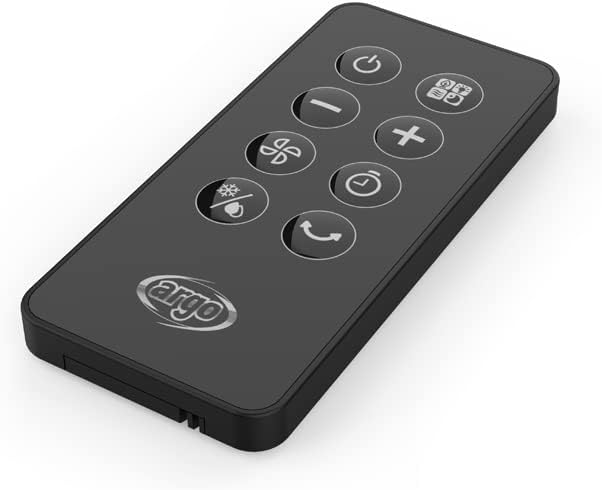
మూర్తి 2.7: The compact remote control for convenient operation of the evaporative cooler.

మూర్తి 2.8: Technical drawing indicating the dimensions of the ARGO Polyfemo Slim: 675mm height, 258mm width, 170mm depth.
3. సెటప్
3.1. అన్ప్యాకింగ్
- Carefully remove the evaporative cooler from its packaging.
- రవాణా సమయంలో ఏవైనా నష్టం సంకేతాలు ఉన్నాయా అని తనిఖీ చేయండి. దెబ్బతిన్నట్లయితే, ఆపరేట్ చేయవద్దు మరియు కస్టమర్ సపోర్ట్ను సంప్రదించండి.
- ఏవైనా రక్షణ ఫిల్మ్లు లేదా టేపులతో సహా అన్ని ప్యాకింగ్ సామగ్రిని తీసివేయండి.
- Ensure all included components are present: the product unit, user manual, warranty card, and synthetic ice board (ice pack).
3.2. ప్లేస్మెంట్
- Place the evaporative cooler on a firm, level surface.
- Ensure there is adequate space around the unit for proper airflow (at least 20 cm from walls or furniture).
- యూనిట్ను ఉష్ణ వనరుల దగ్గర లేదా ప్రత్యక్ష సూర్యకాంతిలో ఉంచవద్దు.
3.3. వాటర్ ట్యాంక్ నింపడం
- Pull out the water tank from the rear of the unit using its patented opening system.
- Fill the tank with clean tap water. Do not exceed the maximum fill line indicated on the tank. The tank capacity is 4 liters.
- For enhanced cooling, place the provided synthetic ice board (ice pack) in the freezer until frozen, then add it to the water tank.
- వాటర్ ట్యాంక్ సరిగ్గా అమర్చబడే వరకు జాగ్రత్తగా దాన్ని తిరిగి యూనిట్లోకి జారండి.
4. ఆపరేటింగ్ సూచనలు
The ARGO Polyfemo Slim can be operated using the Soft-Touch control panel on top of the unit or the included remote control.
4.1. కంట్రోల్ ప్యానెల్ విధులు
- పవర్ బటన్: యూనిట్ను ఆన్/ఆఫ్ చేస్తుంది.
- మోడ్ బటన్: Cycles through operating modes: Normal, Natural, and Sleep.
- స్పీడ్ బటన్: Adjusts fan speed: Low, Medium, High.
- టైమర్ బటన్: Sets the operating timer (e.g., 1-8 hours).
- Cooling/Humidification Button: బాష్పీభవన శీతలీకరణ ఫంక్షన్ను సక్రియం చేస్తుంది లేదా నిష్క్రియం చేస్తుంది.
- స్వింగ్ బటన్: విస్తృత గాలి పంపిణీ కోసం డోలనం ఫంక్షన్ను సక్రియం చేస్తుంది లేదా నిష్క్రియం చేస్తుంది.
4.2. రిమోట్ కంట్రోల్
The remote control duplicates all functions available on the main control panel, allowing for convenient operation from a distance. Ensure the remote control has working batteries and is pointed towards the unit's receiver.
4.3. ఆపరేటింగ్ మోడ్లు
- సాధారణ మోడ్: ఎంచుకున్న వేగంతో స్థిరమైన గాలి ప్రవాహాన్ని అందిస్తుంది.
- సహజ మోడ్: ఫ్యాన్ వేగాన్ని అడపాదడపా మార్చడం ద్వారా సహజ గాలిని అనుకరిస్తుంది.
- స్లీప్ మోడ్: Gradually reduces fan speed and dims display lights for quiet operation during sleep.
5. నిర్వహణ
క్రమం తప్పకుండా నిర్వహణ మీ బాష్పీభవన కూలర్ యొక్క ఉత్తమ పనితీరు మరియు దీర్ఘాయువును నిర్ధారిస్తుంది.
5.1. డస్ట్ ఫిల్టర్ను శుభ్రపరచడం
- పవర్ అవుట్లెట్ నుండి ఉపకరణాన్ని అన్ప్లగ్ చేయండి.
- Open the rear panel to access the dust filter.
- డస్ట్ ఫిల్టర్ తొలగించండి.
- Clean the filter with a soft brush or vacuum cleaner to remove accumulated dust. For thorough cleaning, rinse with water and mild detergent, then allow to air dry completely before reinserting.
- Reinstall the dust filter and close the rear panel.
5.2. Cleaning the Honeycomb Design
The honeycomb design (evaporative pad) should be cleaned periodically to prevent mineral buildup and maintain cooling efficiency.
- ఉపకరణాన్ని అన్ప్లగ్ చేయండి.
- Remove the water tank and dust filter as described above.
- Carefully remove the honeycomb pad.
- Rinse the honeycomb pad under running water to remove dust and mineral deposits. For stubborn buildup, soak in a solution of water and white vinegar (1:1 ratio) for 30 minutes, then rinse thoroughly.
- Allow the honeycomb pad to dry completely before reassembling.
5.3. వాటర్ ట్యాంక్ శుభ్రం చేయడం
To prevent mold and mildew growth, clean the water tank regularly.
- Unplug the appliance and remove the water tank.
- మిగిలిన నీటిని ఖాళీ చేయండి.
- Clean the inside of the tank with a soft cloth and mild detergent. You can also use a solution of water and white vinegar to remove mineral deposits.
- Rinse the tank thoroughly with clean water and allow it to air dry before refilling and reinserting.
6. ట్రబుల్షూటింగ్
If you encounter issues with your ARGO Polyfemo Slim, please refer to the following common problems and solutions before contacting customer support.
| సమస్య | సాధ్యమైన కారణం | పరిష్కారం |
|---|---|---|
| యూనిట్ ఆన్ చేయబడలేదు. | విద్యుత్ సరఫరా లేదు. | పవర్ కార్డ్ పనిచేసే అవుట్లెట్లోకి సురక్షితంగా ప్లగ్ చేయబడిందో లేదో తనిఖీ చేయండి. |
| శీతలీకరణ ప్రభావం లేదు. | Water tank is empty or cooling function is off. | Fill the water tank. Ensure the cooling/humidification function is activated. |
| బలహీనమైన గాలి ప్రవాహం. | Dust filter or honeycomb pad is dirty. | Clean the dust filter and honeycomb pad as per maintenance instructions. |
| అసాధారణ శబ్దం. | యూనిట్ సమతల ఉపరితలంపై లేదు; ఫ్యాన్లో విదేశీ వస్తువు; నీటి పంపు సమస్య. | Ensure the unit is on a flat surface. Unplug and check for obstructions. If noise persists, contact support. |
| రిమోట్ కంట్రోల్ పనిచేయడం లేదు. | బ్యాటరీలు డెడ్ అయ్యాయి లేదా తప్పుగా చొప్పించబడ్డాయి. | Replace batteries, ensuring correct polarity. Point remote directly at the unit. |
7. స్పెసిఫికేషన్లు
| ఫీచర్ | స్పెసిఫికేషన్ |
|---|---|
| బ్రాండ్ | ARGO |
| మోడల్ పేరు | POLIFEMO SLIM |
| మోడల్ సంఖ్య | ARGO POLIFEMO SLIM |
| రంగు | తెలుపు |
| ఉత్పత్తి కొలతలు (L x W x H) | 17 x 25 x 67 సెం.మీ |
| వస్తువు బరువు | 4.44 కిలోలు |
| వాల్యూమ్tage | 230 వోల్ట్లు |
| మౌంటు రకం | అంతస్తు మౌంట్ |
| ప్రత్యేక ఫీచర్ | పోర్టబుల్ |
| గాలి ప్రవాహ సామర్థ్యం | 750 CMPH (Cubic Meters Per Hour) |
| నియంత్రణ రకం | టచ్ కంట్రోల్ |
| ట్యాంక్ సామర్థ్యం | 4 లీటర్లు |
| చేర్చబడిన భాగాలు | Product unit, User Manual, Warranty, Synthetic Ice Board |
8. వారంటీ మరియు మద్దతు
Your ARGO Polyfemo Slim Evaporative Cooler comes with a manufacturer's warranty. Please refer to the included warranty card for specific terms and conditions, including the warranty period and coverage details.
For technical assistance, troubleshooting beyond this manual, or warranty claims, please contact ARGO customer support. Contact information can typically be found on the manufacturer's webసైట్ లేదా వారంటీ కార్డులో.


