1. పరిచయం
The Bloody M70 TWS True Wireless Gaming Earbuds are designed to provide a high-quality audio experience for gaming and music. Featuring Bluetooth 5.0 connectivity, dual ENC noise-canceling microphones, deep bass, and low latency, these earbuds are built for immersive sound. The IPX4 water-resistant rating ensures durability against splashes.

Image: Bloody M70 TWS True Wireless Gaming Earbuds in their open charging case, highlighting the design and red LED indicators.
2. ప్యాకేజీ విషయాలు
Verify that all items are present in your Bloody M70 TWS Earbuds package:
- Bloody M70 TWS Earbuds (Left and Right)
- ఛార్జింగ్ కేసు
- USB ఛార్జింగ్ కేబుల్
- సిలికాన్ చెవి చిట్కాలు (చిన్న, మధ్యస్థ, పెద్ద)
- వినియోగదారు మాన్యువల్

Image: An illustration showing the Bloody M70 TWS Earbuds, charging case, various ear tip sizes, and charging cable as included in the package.
3. ప్రారంభించడం
3.1 ఇయర్బడ్లు మరియు కేస్ను ఛార్జ్ చేయడం
Before first use, fully charge the earbuds and charging case. The charging case features a slide-lid design for easy access.
- ఇయర్బడ్లను ఛార్జింగ్ కేసులో ఉంచండి. అవి సరిగ్గా అమర్చబడ్డాయని నిర్ధారించుకోండి.
- USB ఛార్జింగ్ కేబుల్ను కేస్లోని ఛార్జింగ్ పోర్ట్కు మరియు పవర్ సోర్స్కి కనెక్ట్ చేయండి.
- The charging time for the earbuds is approximately 1.5 hours. The case provides extended playtime up to 24 hours.

Image: The Bloody M70 TWS charging case demonstrating its slide-lid mechanism for opening.

Image: A visual representation of the Bloody M70 TWS Earbuds' battery performance, showing 6 hours of music playback, 24 hours with the charging case, and 1.5 hours for earbud charging.
3.2 బ్లూటూత్ జత చేయడం
The Bloody M70 TWS Earbuds utilize Bluetooth 5.0 for a stable and fast connection.
- Open the charging case and remove the earbuds. They will automatically enter pairing mode.
- మీ పరికరంలో (స్మార్ట్ఫోన్, టాబ్లెట్, కంప్యూటర్), బ్లూటూత్ను ప్రారంభించండి.
- కోసం వెతకండి available devices and select "Bloody M70" from the list.
- కనెక్ట్ చేసిన తర్వాత, మీరు నిర్ధారణ టోన్ వింటారు మరియు ఇయర్బడ్లు ఉపయోగం కోసం సిద్ధంగా ఉంటాయి.
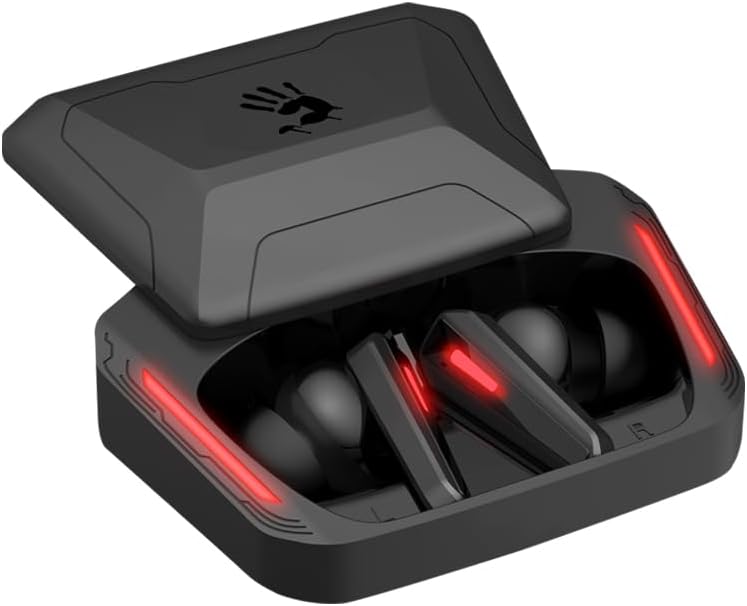
Image: A visual guide to Bluetooth pairing, showing a smartphone's Bluetooth menu with the 'Bloody M70' selected for connection.
4. ఆపరేషన్
4.1 టచ్ నియంత్రణలు
The Bloody M70 earbuds feature intuitive touch controls for managing audio and calls.
- వాల్యూమ్ -: Long tap the left earbud for 2 seconds.
- వాల్యూమ్ +: Long tap the right earbud for 2 seconds.
- Play / Call: ఏ ఇయర్బడ్నైనా ఒకసారి నొక్కండి.
- మునుపటి ట్రాక్: ఎడమ ఇయర్బడ్ని రెండుసార్లు నొక్కండి.
- తదుపరి ట్రాక్: కుడి ఇయర్బడ్ని రెండుసార్లు నొక్కండి.
- వాయిస్ అసిస్టెంట్: ఎడమ ఇయర్బడ్ను మూడుసార్లు నొక్కండి.
- Gaming / Audio Mode Switch: కుడి ఇయర్బడ్ను మూడుసార్లు నొక్కండి.

Image: A comprehensive diagram detailing the touch gestures and their corresponding functions on both the left and right Bloody M70 earbuds.
4.2 Dual-Mode Options (Game/Audio)
Switch between Game Mode for low-latency audio and Audio Mode for general listening by triple tapping the right earbud.

Image: A visual comparison of the Bloody M70 TWS Earbuds operating in Game Mode (highlighting low latency for gaming) and Audio Mode (for general music enjoyment).
4.3 నీటి నిరోధకత (IPX4)
The earbuds are rated IPX4 water-resistant, protecting them from splashes and sweat. This makes them suitable for workouts and outdoor activities, but they are not designed for submersion.

Image: An earbud being splashed with water, visually representing the IPX4 water-resistant feature of the Bloody M70 TWS Earbuds.
5. కంఫర్ట్ మరియు ఫిట్
Achieving a proper fit is crucial for both sound quality and comfort. The Bloody M70 TWS Earbuds come with three sizes of silicone ear tips (Small, Medium, Large).
- Experiment with different ear tip sizes to find the best seal for your ears. A good seal enhances bass response and noise isolation.
- Gently insert the earbuds into your ear canal and twist slightly until they feel secure and comfortable.

Image: An illustration demonstrating the proper fit of an earbud in the ear, alongside the three available ear tip sizes (Small, Medium, Large) for optimal comfort and sound.
6. సంరక్షణ మరియు నిర్వహణ
To ensure the longevity and optimal performance of your Bloody M70 TWS Earbuds, follow these care guidelines:
- శుభ్రపరచడం: ఇయర్బడ్లు మరియు ఛార్జింగ్ కేసును మృదువైన, పొడి, మెత్తటి బట్టతో క్రమం తప్పకుండా శుభ్రం చేయండి. కఠినమైన రసాయనాలు లేదా రాపిడి పదార్థాలను ఉపయోగించవద్దు.
- చెవి చిట్కాలు: Remove and clean the silicone ear tips with mild soap and water, then dry thoroughly before reattaching.
- ఛార్జింగ్ పరిచయాలు: సరైన ఛార్జింగ్ను నిర్వహించడానికి ఇయర్బడ్లు మరియు కేస్ లోపల ఛార్జింగ్ కాంటాక్ట్లు శుభ్రంగా మరియు శిధిలాలు లేకుండా ఉన్నాయని నిర్ధారించుకోండి.
- నిల్వ: ఉపయోగంలో లేనప్పుడు, ఇయర్బడ్లను దుమ్ము మరియు నష్టం నుండి రక్షించడానికి వాటి ఛార్జింగ్ కేసులో నిల్వ చేయండి.
- విపరీతమైన పరిస్థితులను నివారించండి: Do not expose the earbuds to extreme temperatures, humidity, or direct sunlight for extended periods.
7. ట్రబుల్షూటింగ్
If you encounter issues with your Bloody M70 TWS Earbuds, refer to the following common solutions:
- ఇయర్బడ్లు జత కావడం లేదు:
- రెండు ఇయర్బడ్లు ఛార్జ్ అయ్యాయని నిర్ధారించుకోండి.
- మీ పరికరంలో బ్లూటూత్ను ఆఫ్ చేసి, ఆపై దాన్ని తిరిగి ఆన్ చేయండి.
- Forget "Bloody M70" from your device's Bluetooth list and attempt to pair again.
- Place earbuds back in the case, close the lid, wait a few seconds, then reopen to reset.
- ఒక ఇయర్బడ్ నుండి శబ్దం లేదు:
- రెండు ఇయర్బడ్లు ఛార్జ్ అయ్యాయని నిర్ధారించుకోండి.
- రెండు ఇయర్బడ్లను తిరిగి ఛార్జింగ్ కేసులో ఉంచి, మూత మూసివేసి, ఆపై వాటిని మళ్ళీ బయటకు తీయడానికి ప్రయత్నించండి.
- ఇయర్బడ్ మరియు కేస్ రెండింటిలోనూ ఛార్జింగ్ కాంటాక్ట్లను శుభ్రం చేయండి.
- తక్కువ వాల్యూమ్ లేదా పేలవమైన ధ్వని నాణ్యత:
- మీ పరికరం మరియు ఇయర్బడ్లు రెండింటిలోనూ వాల్యూమ్ను సర్దుబాటు చేయండి.
- చెవి చివరలు మీ చెవి కాలువలో సరైన సీలింగ్ను అందిస్తాయని నిర్ధారించుకోండి. విభిన్న పరిమాణాలను ప్రయత్నించండి.
- ఇయర్బడ్ మెష్ నుండి ఏదైనా ఇయర్వాక్స్ లేదా చెత్తను శుభ్రం చేయండి.
- ఛార్జింగ్ కేసు ఛార్జింగ్ కాదు:
- ఛార్జింగ్ కేబుల్ కేస్ మరియు పవర్ సోర్స్ రెండింటికీ సురక్షితంగా కనెక్ట్ చేయబడిందని నిర్ధారించుకోండి.
- వేరే USB కేబుల్ లేదా పవర్ అడాప్టర్ని ప్రయత్నించండి.
- కేసుపై ఛార్జింగ్ పోర్టును శుభ్రం చేయండి.
8. స్పెసిఫికేషన్లు
| ఫీచర్ | స్పెసిఫికేషన్ |
|---|---|
| మోడల్ పేరు | M70 |
| కనెక్టివిటీ టెక్నాలజీ | వైర్లెస్ (బ్లూటూత్ 5.0) |
| బ్లూటూత్ రేంజ్ | 10 మీటర్లు |
| నాయిస్ కంట్రోల్ | Active Noise Cancellation (ENC for Mics) |
| బ్యాటరీ లైఫ్ (ఇయర్బడ్స్) | 6 గంటలు |
| మొత్తం ప్లేటైమ్ (కేస్తో సహా) | 24 గంటల వరకు |
| ఛార్జింగ్ సమయం | 1.5 గంటలు |
| నీటి నిరోధక స్థాయి | IPX4 (వాటర్ప్రూఫ్) |
| నియంత్రణ రకం | టచ్ కంట్రోల్ |
| ఆడియో డ్రైవర్ రకం | Dynamic Driver (Hybrid Diaphragm Technology) |
| అనుకూల పరికరాలు | Gaming Consoles, Desktops, Laptops, Mobile Devices |
| వస్తువు బరువు | 0.24 కిలోగ్రాములు (8.4 ఔన్సులు) |
| మెటీరియల్ | Metal, Plastic, Silicone |
9. వారంటీ మరియు మద్దతు
Bloody offers a 24 నెలల వారంటీ for the M70 TWS True Wireless Gaming Earbuds. This warranty covers manufacturing defects and ensures product reliability.
For technical support, warranty claims, or any questions regarding your Bloody M70 earbuds, please refer to the contact information provided on the official Bloody website or your purchase documentation. When contacting support, please have your product model (M70) and proof of purchase readily available.


