1. పరిచయం
Thank you for choosing the TeleAdapt LCD Display Alarm Clock. This device is designed to provide accurate timekeeping, reliable alarm functions, and convenient charging for your mobile devices. Its compact design and intuitive features make it an ideal addition to any bedside table, office, or living space. This manual will guide you through the setup, operation, and maintenance of your new alarm clock.
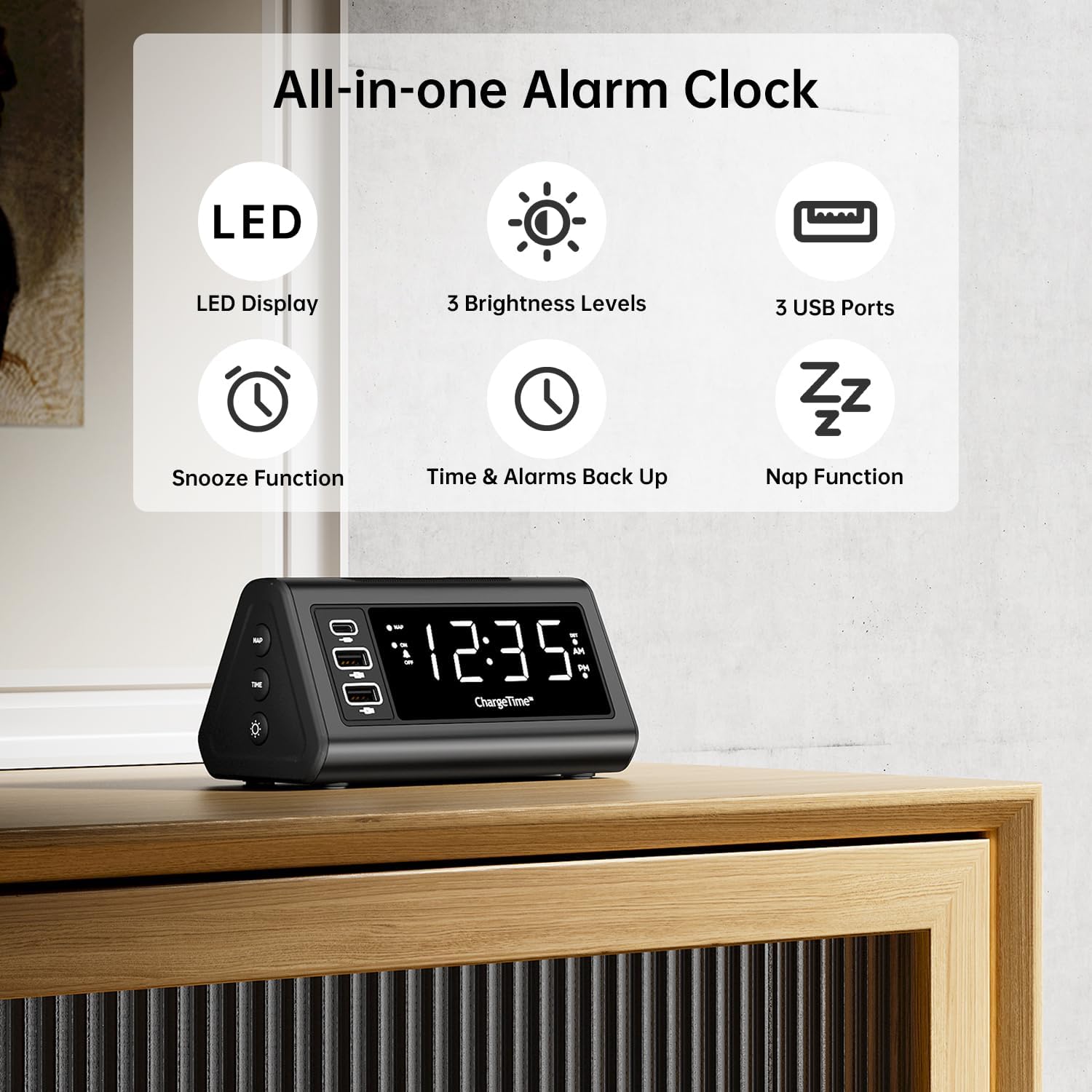
చిత్రం 1: పైగాview of TeleAdapt Alarm Clock features.
2. ముఖ్యమైన భద్రతా సమాచారం
Please read all safety instructions carefully before using this product. Failure to follow these instructions may result in electric shock, fire, or damage to the device.
- పరికరాన్ని నీరు లేదా అధిక తేమకు గురిచేయవద్దు.
- పరికరాన్ని విడదీయవద్దు, మరమ్మత్తు చేయవద్దు లేదా సవరించవద్దు. అన్ని సర్వీసింగ్లను అర్హత కలిగిన సిబ్బందికి సూచించండి.
- Use only the provided AC power adapter. Using an incompatible adapter may damage the device.
- Ensure proper ventilation around the device. Do not cover ventilation openings.
- Keep the device away from direct sunlight, heat sources, and open flames.
- స్థానిక నిబంధనల ప్రకారం బ్యాటరీలను సరిగ్గా పారవేయండి.
3. ప్యాకేజీ విషయాలు
ప్యాకేజీలో అన్ని అంశాలు ఉన్నాయని నిర్ధారించుకోండి:
- TeleAdapt LCD Display Alarm Clock
- AC Power Adapter with interchangeable plugs
- 2 x AAA Batteries (for backup)
- సూచనల మాన్యువల్ (ఈ పత్రం)
4. ఉత్పత్తి ముగిసిందిview
Familiarize yourself with the various parts and controls of your alarm clock:
Front Display and USB Ports:
- పెద్ద LED డిస్ప్లే: Shows current time, AM/PM indicator, and DST status.
- USB-C Port (1x): For fast charging compatible devices (5V/3A output).
- USB-A పోర్ట్లు (2x): For charging various devices (5V/2.4A each output).
- NAP Indicator: Lights up when Nap function is active.
- అలారం సూచిక: Lights up when alarm is set.
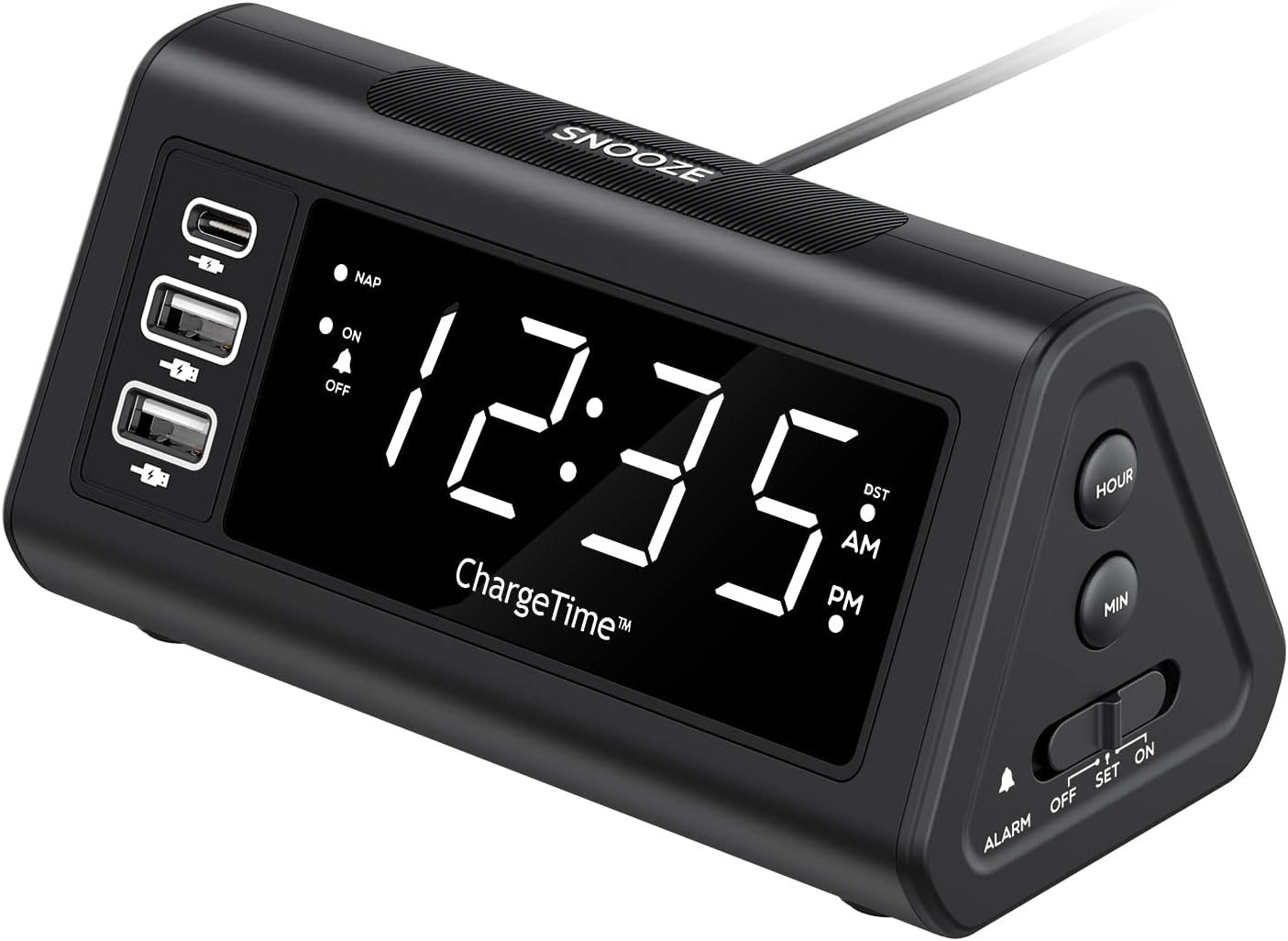
మూర్తి 2: ముందు view with display and USB ports.
Side Controls:
- NAP Button: Activates and adjusts the nap timer.
- ఆన్-ఆఫ్ బటన్: Toggles the alarm on or off.
- టైమ్ బటన్: Used in conjunction with SNOOZE to set time.
- DIMMER బటన్: Adjusts display brightness (Off, Low, High).

Figure 3: Side controls for various functions.
పైన మరియు వెనుక:
- స్నూజ్ బటన్: Large button on top for snooze and dimmer adjustment.
- ALARM Switch (OFF/SET/ON): Slider switch to control alarm setting and activation.
- గంట బటన్: Adjusts hour during time/alarm setting.
- MIN బటన్: Adjusts minute during time/alarm setting.
- బ్యాటరీ కంపార్ట్మెంట్: Holds 2 x AAA batteries for backup power.
- DC 12V/5A ఇన్పుట్: Power input for the AC adapter.
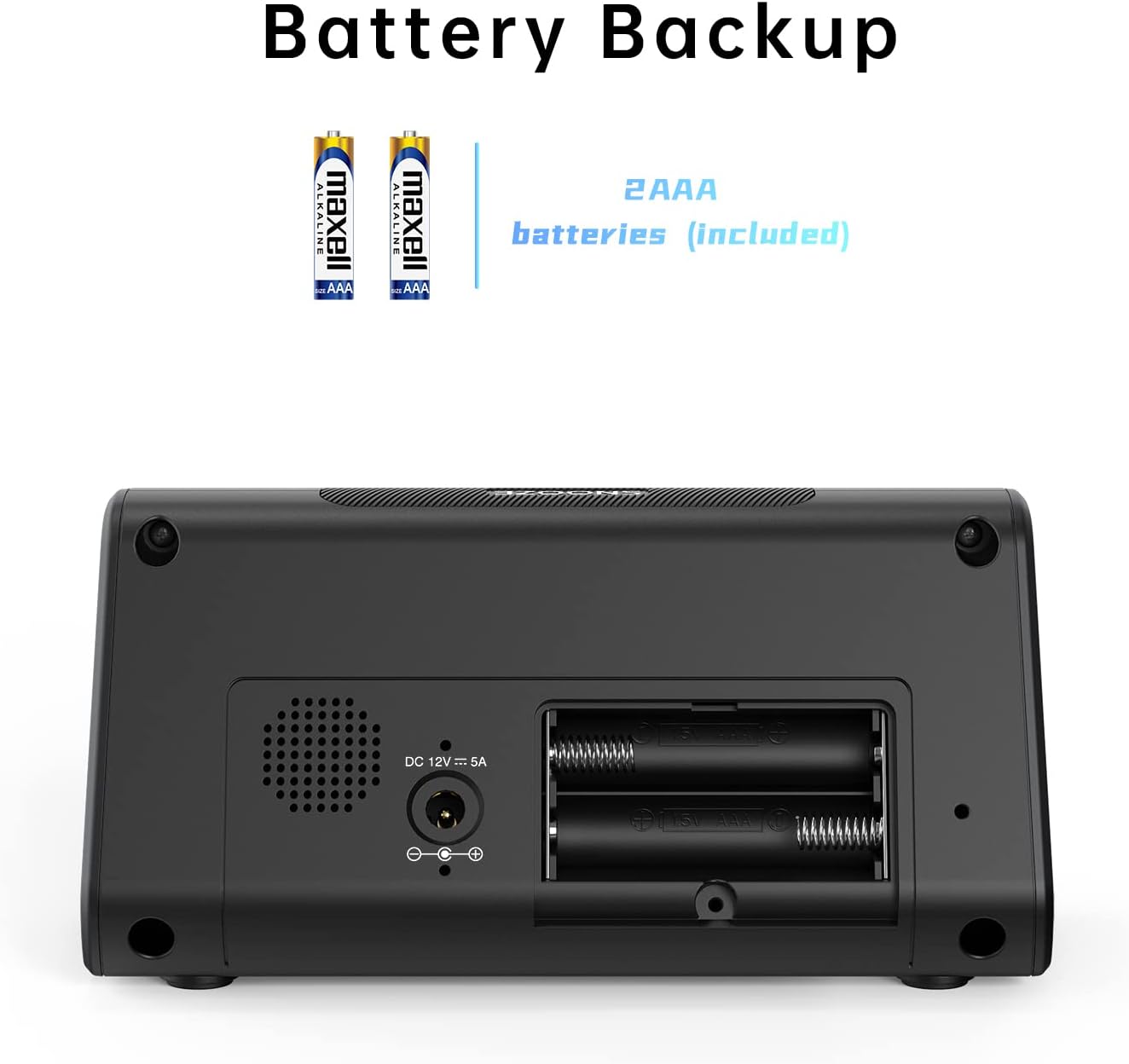
మూర్తి 4: వెనుకకు view with battery compartment and power input.
5. సెటప్
5.1. పవర్ కనెక్షన్
- Insert the 2 x AAA batteries into the battery compartment on the back of the alarm clock. Ensure correct polarity. These batteries provide backup power to retain time and alarm settings during a power outage.
- Connect the provided AC power adapter to the DC 12V/5A input port on the back of the alarm clock.
- Plug the AC power adapter into a standard wall outlet. The display will light up.

Figure 5: Connecting the AC power adapter.
5.2. ప్రస్తుత సమయాన్ని సెట్ చేయడం
- నొక్కండి మరియు పట్టుకోండి TIME బటన్ మరియు స్నూజ్ button simultaneously for 3 seconds. The display will begin to flash, indicating time setting mode.
- ఉపయోగించండి గంట మరియు MIN buttons on the side to adjust the year, month, and date in sequence. Press the TIME ప్రతి సెట్టింగ్ను నిర్ధారించి, తదుపరిదానికి తరలించడానికి బటన్.
- After setting the date, adjust the current hour and minute using the గంట మరియు MIN బటన్లు.
- నొక్కండి TIME button again to confirm the time.
- You can enable or disable the Auto DST (Daylight Saving Time) feature in this menu. Use the గంట or MIN buttons to select ON or OFF, then press TIME to confirm. (Note: Auto DST is only available in US time zones).

Figure 6: Setting the time on the alarm clock.
6. ఆపరేటింగ్ సూచనలు
6.1. అలారం అమర్చుట
- స్లయిడ్ చేయండి అలారం switch on the side to the సెట్ position. The time display will flash.
- ఉపయోగించండి గంట మరియు MIN buttons to set your desired wake-up time.
- స్లయిడ్ చేయండి అలారం కు మారండి ON position to activate the alarm. The alarm indicator light will illuminate on the display.
6.2. స్నూజ్ ఫంక్షన్
అలారం మోగినప్పుడు, పెద్ద బటన్ను నొక్కండి స్నూజ్ button on top to temporarily silence the alarm. The alarm will sound again after the set snooze duration.
To set the snooze duration (5, 10, or 15 minutes):
- నొక్కండి మరియు పట్టుకోండి స్నూజ్ button for 3 seconds. The current snooze time will flash on the display.
- పదే పదే నొక్కండి స్నూజ్ button to cycle through 5, 10, or 15 minutes.
- నొక్కండి స్నూజ్ మీ ఎంపికను నిర్ధారించడానికి మళ్లీ బటన్ చేయండి.

Figure 7: Using the Snooze function.
6.3. Nap Function
The Nap function allows you to set a short-term alarm for a nap without affecting your main alarm setting.
- నొక్కండి NAP button on the side of the clock. The display will show a nap duration (e.g., 90, 75, 60, 45, 30, 15 minutes) or OFF.
- నొక్కడం కొనసాగించండి NAP button to cycle through the desired nap times or select OFF to disable. The “NAP” indicator will light when active.
- To stop the nap alarm when it sounds, press either the స్నూజ్ or NAP బటన్.

Figure 8: Utilizing the Nap function.
6.4. డిస్ప్లే ప్రకాశాన్ని సర్దుబాటు చేయడం
The alarm clock features three levels of display brightness: Off, Low, and High.
- పదే పదే నొక్కండి SNOOZE / DIMMER button on the top of the clock to cycle through the brightness levels.

Figure 9: Display brightness options.
6.5. ఛార్జింగ్ పరికరాలు
The alarm clock includes three USB charging ports for your convenience:
- 1 x USB-C Port: Provides 5V/3A output for fast charging compatible devices.
- 2 x USB-A పోర్ట్లు: Provide 5V/2.4A output each for charging various smartphones, tablets, and other USB-powered devices.
Simply connect your device's charging cable to the appropriate USB port on the alarm clock. No additional charging station is required.
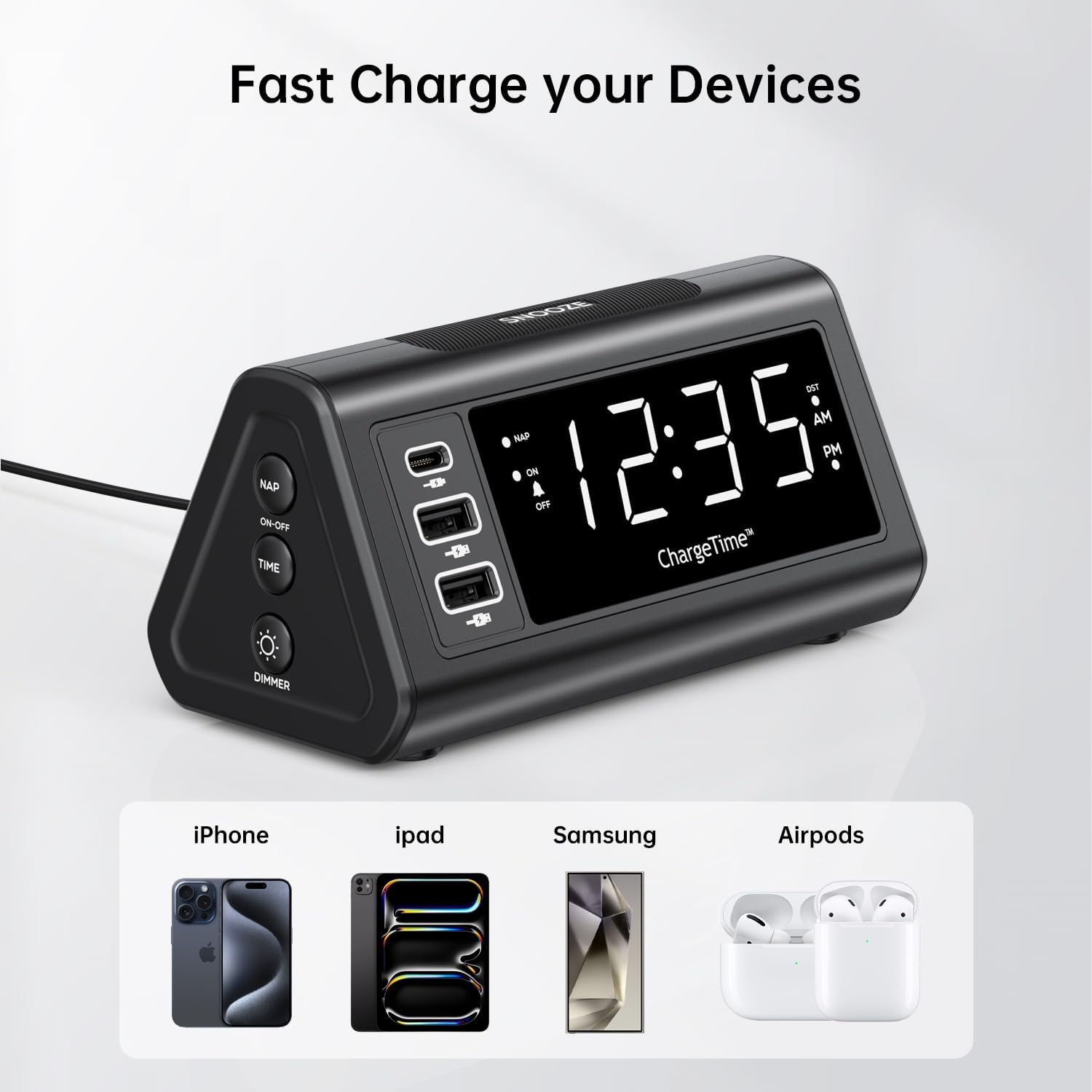
Figure 10: Charging devices via USB ports.
7. నిర్వహణ
7.1. శుభ్రపరచడం
To clean the alarm clock, gently wipe the surface with a soft, dry cloth. Do not use abrasive cleaners, waxes, or solvents as they may damage the finish. Ensure the device is unplugged from the power outlet before cleaning.
7.2. బ్యాటరీ భర్తీ
The 2 x AAA batteries are for backup only and do not power the main functions. Replace them periodically (e.g., once a year) to ensure settings are retained during power outages. To replace, open the battery compartment on the back, remove old batteries, and insert new ones with correct polarity.
8. ట్రబుల్షూటింగ్
| సమస్య | సాధ్యమైన కారణం | పరిష్కారం |
|---|---|---|
| డిస్ప్లే ఖాళీగా ఉంది లేదా వెలగడం లేదు. | No power, power adapter not connected, or display brightness set to OFF. | Ensure AC adapter is securely plugged into the clock and wall outlet. Press the SNOOZE/DIMMER button repeatedly to adjust brightness. |
| అలారం మోగడం లేదు. | Alarm is not set, alarm switch is OFF, or volume is too low (if applicable). | Verify alarm time is set correctly. Slide the ALARM switch to the ON position. |
| Time settings are lost after power outage. | బ్యాకప్ బ్యాటరీలు డెడ్ అయ్యాయి లేదా ఇన్స్టాల్ చేయబడలేదు. | Ensure 2 x AAA batteries are installed correctly and are not depleted. Replace if necessary. |
| సమయం/అలారం సెట్ చేయలేరు. | Incorrect button combination or sequence. | Refer to Section 5.2 for time setting (TIME + SNOOZE for 3 seconds) and Section 6.1 for alarm setting (ALARM switch to SET). |
| Devices not charging via USB ports. | Device not compatible, cable faulty, or clock not powered. | Ensure the alarm clock is powered by the AC adapter. Try a different USB cable or device to confirm functionality. |
9. స్పెసిఫికేషన్లు
- బ్రాండ్: TeleAdapt
- మోడల్: ChargeTime USB-C (TA-7835)
- రంగు: నలుపు
- ప్రదర్శన రకం: డిజిటల్ LED
- శక్తి మూలం: Corded Electric (AC mains), Battery Powered (backup)
- USB-C అవుట్పుట్: 5V/3A
- USB-A అవుట్పుట్: 5V/2.4A (each port)
- బ్యాటరీ బ్యాకప్: 2 x AAA బ్యాటరీలు (చేర్చబడినవి)
- కొలతలు: సుమారు 7.48 x 5.35 x 3.43 అంగుళాలు
- వస్తువు బరువు: సుమారు 1.54 పౌండ్లు
- ప్రత్యేక లక్షణాలు: 3-level display brightness, Snooze function (5/10/15 min), Nap timer (15-90 min), Auto-DST (US time zones only)
10. వారంటీ మరియు మద్దతు
For warranty information or technical support, please contact TeleAdapt customer service. Details can typically be found on the manufacturer's official webమీ కొనుగోలు కేంద్రం ద్వారా లేదా సైట్ ద్వారా. వారంటీ క్లెయిమ్ల కోసం దయచేసి మీ కొనుగోలు రుజువును మీ వద్ద ఉంచుకోండి.
తయారీదారు: TeleAdapt
Webసైట్: www.teleadapt.com (దయచేసి గమనించండి: ఇది ఒక ప్లేస్హోల్డర్ URL. సరైన మద్దతు సంప్రదింపు సమాచారం కోసం మీ ఉత్పత్తి ప్యాకేజింగ్ లేదా అధికారిక డాక్యుమెంటేషన్ను చూడండి.)


