1. పరిచయం
This manual provides comprehensive instructions for the installation, operation, and maintenance of your ESX VN940-4G Autoradio Navigation Naviceiver. Please read this manual thoroughly before using the device to ensure proper and safe operation.
The ESX VN940-4G is a state-of-the-art car radio system featuring a 9-inch touchscreen display, integrated navigation, and Bluetooth connectivity, designed to enhance your in-car entertainment and navigation experience.
2. భద్రతా సమాచారం
పరికరానికి గాయం లేదా నష్టం జరగకుండా నిరోధించడానికి ఎల్లప్పుడూ క్రింది భద్రతా జాగ్రత్తలను గమనించండి:
- డ్రైవింగ్ నుండి మీ దృష్టి మరల్చే విధంగా పరికరాన్ని ఆపరేట్ చేయవద్దు. ఎల్లప్పుడూ రోడ్డు భద్రతకు ప్రాధాన్యత ఇవ్వండి.
- Ensure all wiring is correctly connected to prevent short circuits or electrical hazards. Consult a professional for installation if unsure.
- పరికరాన్ని తీవ్రమైన ఉష్ణోగ్రతలకు, ఎక్కువసేపు ప్రత్యక్ష సూర్యకాంతికి లేదా అధిక తేమకు గురిచేయవద్దు.
- Avoid disassembling or modifying the unit. This can void the warranty and cause damage.
- Keep the volume at a level that allows you to hear external traffic sounds.
3. ప్యాకేజీ విషయాలు
దయచేసి ప్యాకేజీలో అన్ని అంశాలు ఉన్నాయో లేదో తనిఖీ చేయండి:
- ESX VN940-4G Naviceiver Unit
- మౌంటు బ్రాకెట్
- పవర్ కేబుల్ హార్నెస్
- GPS యాంటెన్నా
- USB ఎక్స్టెన్షన్ కేబుల్
- వినియోగదారు మాన్యువల్ (ఈ పత్రం)
4. సెటప్ మరియు ఇన్స్టాలేషన్
Proper installation is crucial for the performance and longevity of your ESX VN940-4G. It is recommended to have the unit installed by a qualified professional.
4.1 యూనిట్ మౌంట్
Use the provided mounting bracket to secure the Naviceiver in your vehicle's dashboard. Ensure the unit is firmly seated and does not obstruct any vehicle controls or airbags.
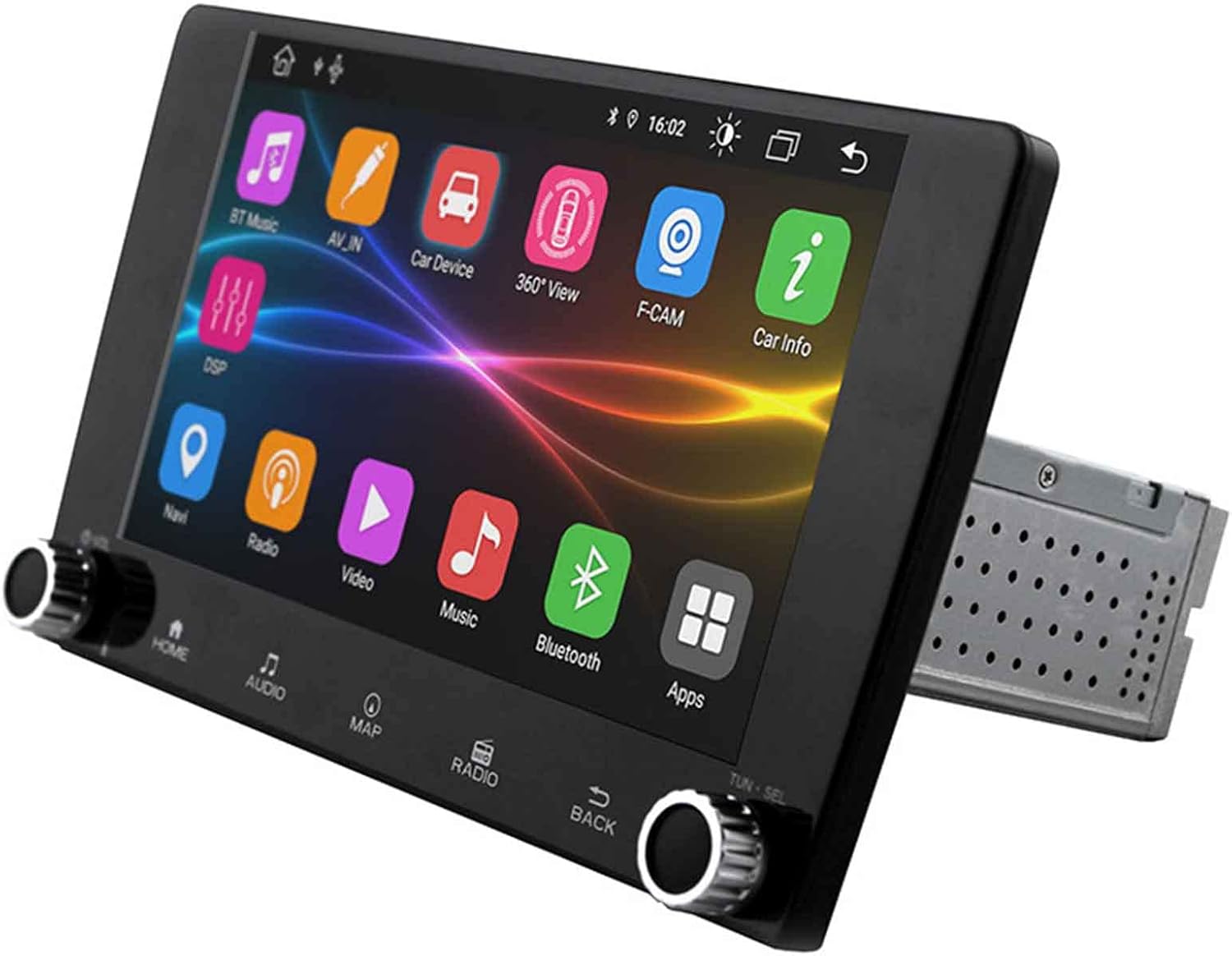
Image: The ESX VN940-4G Naviceiver unit, displaying its side profile and the integrated mounting cage, ready for dashboard installation.
4.2 వైరింగ్ కనెక్షన్లు
Connect the power harness, speaker wires, GPS antenna, and any other auxiliary inputs/outputs according to your vehicle's wiring diagram and the unit's connection ports. Pay close attention to positive and negative terminals.
- శక్తి (పసుపు): స్థిర 12V (బ్యాటరీ)
- Ignition (Red): Switched 12V (ACC)
- నేల (నలుపు): వాహన ఛాసిస్ గ్రౌండ్
- స్పీకర్ వైర్లు: Connect to corresponding vehicle speaker wires (e.g., Front Left +, Front Left -).
- GPS యాంటెన్నా: Connect to the dedicated GPS antenna port and mount the antenna in a location with a clear view ఆకాశం యొక్క.
4.3 ప్రారంభ పవర్-ఆన్ మరియు కాన్ఫిగరేషన్
After installation, turn on your vehicle's ignition. The unit should power on. Follow the on-screen prompts for initial setup, which may include:
- భాష ఎంపిక
- సమయం మరియు తేదీ సెట్టింగ్
- Radio Region Selection
5. ఆపరేటింగ్ సూచనలు
This section details the primary functions and operations of your ESX VN940-4G.
5.1 ప్రాథమిక నియంత్రణలు
- పవర్ బటన్: Press and hold to turn the unit on/off. Short press to mute/unmute.
- వాల్యూమ్ నాబ్: వాల్యూమ్ పెంచడానికి సవ్యదిశలో తిప్పండి, తగ్గించడానికి అపసవ్యదిశలో తిప్పండి.
- హోమ్ బటన్: ప్రధాన మెనూ స్క్రీన్కు తిరిగి వస్తుంది.
- వెనుక బటన్: మునుపటి స్క్రీన్ లేదా మెనుకి తిరిగి వస్తుంది.
5.2 రేడియో ఆపరేషన్
From the main menu, select the 'Radio' icon. You can manually tune frequencies, scan for stations, or save your favorite stations as presets.
- స్కాన్: Automatically searches for and stops at strong signals.
- ప్రీసెట్లు: Touch and hold a numbered button to save the current station.
5.3 బ్లూటూత్ కనెక్టివిటీ
హ్యాండ్స్-ఫ్రీ కాలింగ్ మరియు ఆడియో స్ట్రీమింగ్ కోసం యూనిట్ బ్లూటూత్కు మద్దతు ఇస్తుంది.
- Go to the 'Bluetooth' menu.
- మీ మొబైల్ పరికరంలో బ్లూటూత్ని ప్రారంభించండి మరియు అందుబాటులో ఉన్న పరికరాల కోసం శోధించండి.
- Select 'ESX VN940-4G' from the list on your phone.
- ప్రాంప్ట్ చేయబడితే జత చేసే కోడ్ను నిర్ధారించండి.
జత చేసిన తర్వాత, మీరు కాల్స్ చేయవచ్చు/స్వీకరించవచ్చు మరియు వైర్లెస్గా సంగీతాన్ని ప్రసారం చేయవచ్చు.
5.4 నావిగేషన్ సిస్టమ్
Access the navigation application by selecting the 'Map' or 'Navi' icon from the main menu. The system provides turn-by-turn directions and real-time traffic information (if supported by the map software).

Image: The ESX VN940-4G Naviceiver's touchscreen displaying a detailed navigation map, including current route, speed, and remaining distance to destination.
- గమ్యస్థాన ఇన్పుట్: Use the on-screen keyboard to enter addresses or points of interest.
- మార్గ మార్గదర్శకత్వం: Follow the voice prompts and visual cues on the screen.
- మ్యాప్ View: 2D మరియు 3D మధ్య మారండి views, and adjust zoom levels.
5.5 మీడియా ప్లేబ్యాక్
The unit supports media playback from various sources, such as USB drives. Connect your USB device to the designated USB port. The unit will automatically detect compatible audio or video files.
6. నిర్వహణ
Regular maintenance ensures the longevity and optimal performance of your Naviceiver.
- స్క్రీన్ క్లీనింగ్: Use a soft, lint-free cloth to gently wipe the touchscreen. For stubborn smudges, dampen the cloth slightly with water or a screen-cleaning solution. Do not use abrasive cleaners.
- సాఫ్ట్వేర్ అప్డేట్లు: తయారీదారుని కాలానుగుణంగా తనిఖీ చేయండి webఅందుబాటులో ఉన్న సాఫ్ట్వేర్ నవీకరణల కోసం సైట్. నవీకరణలు పనితీరును మెరుగుపరుస్తాయి, కొత్త లక్షణాలను జోడించగలవు లేదా బగ్లను పరిష్కరించగలవు. నవీకరణ ప్యాకేజీతో అందించబడిన సూచనలను జాగ్రత్తగా అనుసరించండి.
7. ట్రబుల్షూటింగ్
If you encounter issues with your ESX VN940-4G, refer to the following common problems and solutions:
| సమస్య | సాధ్యమైన కారణం | పరిష్కారం |
|---|---|---|
| యూనిట్ పవర్ ఆన్ చేయదు. | తప్పు వైరింగ్, ఎగిరిన ఫ్యూజ్, వాహన బ్యాటరీ సమస్య. | పవర్ మరియు గ్రౌండ్ కనెక్షన్లను తనిఖీ చేయండి. వాహన ఫ్యూజ్లను తనిఖీ చేయండి. బ్యాటరీ ఛార్జ్ అయ్యిందని నిర్ధారించుకోండి. |
| స్పీకర్ల నుండి శబ్దం లేదు. | Speaker wires disconnected, volume too low, unit muted. | Verify speaker connections. Increase volume. Check if unit is muted. |
| బ్లూటూత్ కనెక్షన్ విఫలమైంది. | Bluetooth not enabled on phone/unit, device out of range, interference. | Ensure Bluetooth is active on both devices. Move phone closer. Restart both devices. |
| GPS సిగ్నల్ పోయింది లేదా సరిగ్గా లేదు. | GPS antenna obstructed, faulty antenna, poor satellite reception. | Relocate GPS antenna to a clear area. Check antenna connection. Wait for clear sky. |
ఈ పరిష్కారాలను ప్రయత్నించిన తర్వాత కూడా సమస్య కొనసాగితే, దయచేసి కస్టమర్ మద్దతును సంప్రదించండి.
8. స్పెసిఫికేషన్లు
| ఫీచర్ | వివరాలు |
|---|---|
| మోడల్ పేరు | ESX VN940-4G |
| బ్రాండ్ | ESX |
| ప్రదర్శన పరిమాణం | 9 అంగుళాలు (22.8 సెం.మీ.) |
| డిస్ప్లే రిజల్యూషన్ | 800 x 480 పిక్సెల్లు |
| కనెక్టివిటీ టెక్నాలజీ | బ్లూటూత్ |
| మౌంటు రకం | Dashboard-Mounting |
| ఆడియో అవుట్పుట్ మోడ్ | స్టీరియో |
| వాహన సేవా రకం | కారు |
| చేర్చబడిన భాగాలు | మౌంటు బ్రాకెట్ |
| మొదట అందుబాటులో ఉన్న తేదీ | మార్చి 10, 2022 |
9. వారంటీ మరియు మద్దతు
For warranty information, please refer to the documentation provided at the time of purchase or contact your retailer. Warranty terms and conditions may vary by region and seller.
For technical support, troubleshooting assistance beyond this manual, or inquiries about spare parts, please contact the seller or the official ESX customer service. Contact details are typically available on the seller's website or the ESX official webసైట్.


