1. పరిచయం
This manual provides detailed instructions for the installation, operation, and maintenance of your ANNKE 4K PoE Security Camera System. This system is designed for comprehensive surveillance, offering high-resolution video recording and smart detection features for both home and business environments. Please read this manual thoroughly before using the product to ensure proper setup and functionality.

Image 1.1: ANNKE 4K PoE Security Camera System components including NVR and 12 dome cameras.
2. ప్యాకేజీ విషయాలు
క్రింద జాబితా చేయబడిన అన్ని వస్తువులు మీ ప్యాకేజీలో చేర్చబడ్డాయని నిర్ధారించుకోండి. ఏవైనా వస్తువులు తప్పిపోయినా లేదా దెబ్బతిన్నా, దయచేసి ANNKE కస్టమర్ సపోర్ట్ను సంప్రదించండి.
- 1x 16-Channel 8MP PoE NVR (with 4TB HDD pre-installed)
- 12x 8MP IP PoE Dome Cameras
- 6x 30m/100ft Network Cables
- 6x 18m/60ft Network Cables
- 1x Power Adapter for NVR (DC48V)
- 1x 5.9ft/1.8m HDMI Cable
- 1x 3.2ft/1m Ethernet Cable
- 1x USB మౌస్
- 1x Quick Instruction Guide
- 1x వాల్ స్టిక్కర్
- 12x Screws for camera mounting

Image 2.1: Visual representation of all items included in the ANNKE 4K PoE Security Camera System package.
3 కీ ఫీచర్లు
- అల్ట్రా HD 4K రిజల్యూషన్: Equipped with 8MP image sensors, delivering video footage with four times the pixels of 1080p, allowing for enhanced detail upon digital zoom.
- PoE (Power over Ethernet) Connectivity: Simplifies installation by transmitting both data and power through a single network cable, eliminating the need for separate power adapters for cameras.
- Person and Vehicle Detection: Advanced algorithms differentiate between human and vehicle movement, reducing false alarms.
- H.265+ వీడియో కంప్రెషన్: Efficiently saves up to 75% of storage space compared to H.264, optimizing HDD usage for longer recording times.
- 24/7 నిరంతర రికార్డింగ్: The included 4TB surveillance-grade HDD is engineered for constant operation, supporting simultaneous recording from all 16 channels.
- Remote Access via ANNKE Vision App: Free mobile application for Android and iOS devices enables live viewing, snapshots, video recording, and push notifications with event images.
- Customizable Motion Detection Areas: Define specific zones for motion detection to focus on critical areas and minimize irrelevant alerts.
- IP67 వాతావరణ నిరోధక కెమెరాలు: Cameras feature a robust metal and ABS housing, providing protection against extreme weather conditions with an operating temperature range of -22°F to 140°F.

Image 3.1: Day and night vision clarity with 4K resolution.

Image 3.2: Simplified installation with PoE technology.
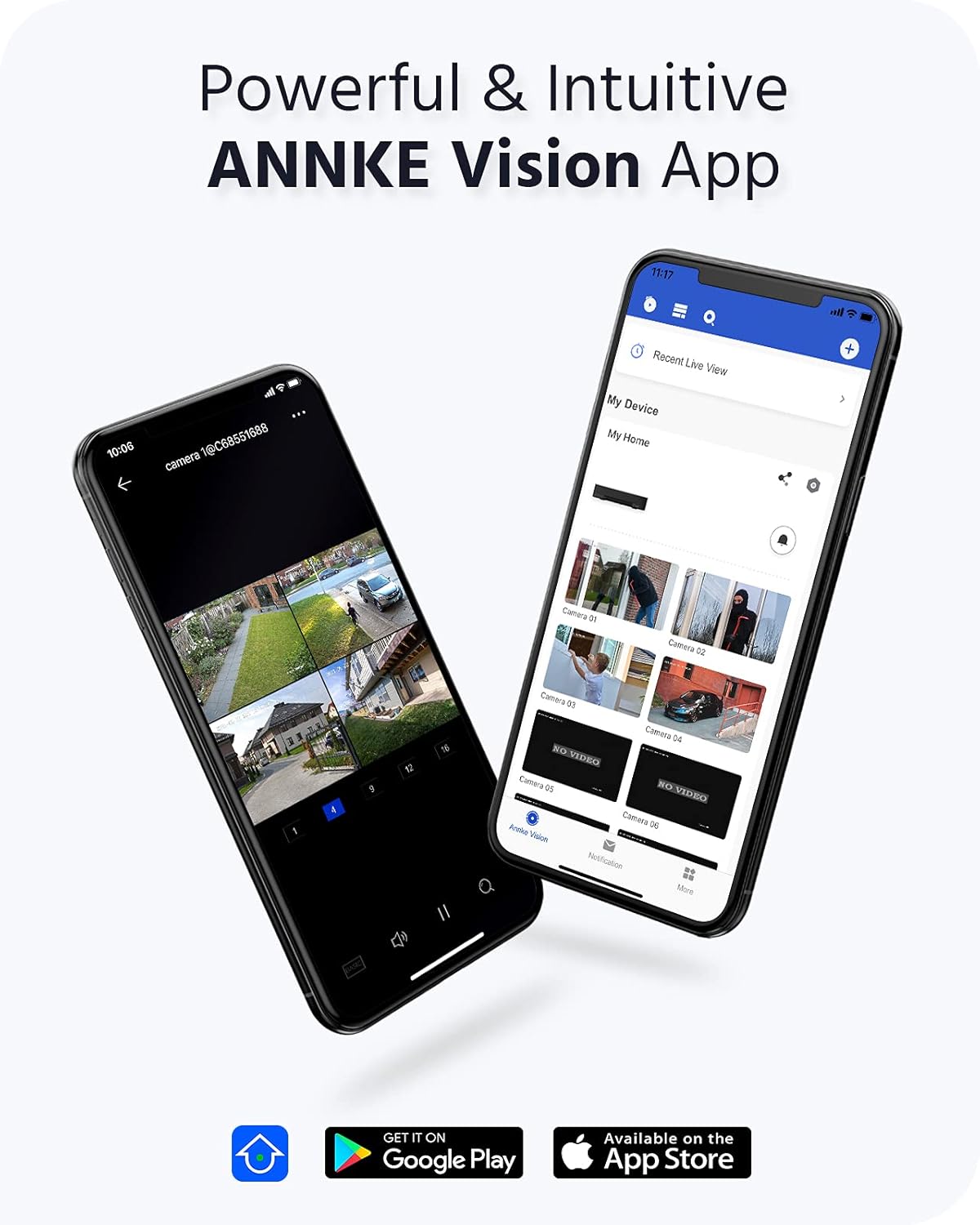
Image 3.3: ANNKE Vision App for remote monitoring.

Image 3.4: Various 24/7 monitoring and recording options.

Image 3.5: H.265+ video compression efficiency.

Image 3.6: Customizing motion detection areas.

Image 3.7: IP67 weatherproof and wide operating temperature range.
4. సెటప్ గైడ్
Follow these steps to set up your ANNKE 4K PoE Security Camera System.
4.1 NVR ప్రారంభ సెటప్
- మానిటర్ను కనెక్ట్ చేయండి: అందించిన HDMI కేబుల్ లేదా VGA కేబుల్ (చేర్చబడలేదు) ఉపయోగించి NVRని మానిటర్కి కనెక్ట్ చేయండి.
- మౌస్ను కనెక్ట్ చేయండి: USB మౌస్ను NVR యొక్క USB పోర్ట్లలో ఒకదానికి ప్లగ్ చేయండి.
- నెట్వర్క్ని కనెక్ట్ చేయండి: Connect the NVR to your router using the Ethernet cable for internet access and remote viewసామర్థ్యాలు.
- పవర్ ఆన్: Connect the NVR power adapter to the NVR and then to a power outlet. The NVR will power on automatically.
- ప్రారంభ కాన్ఫిగరేషన్: Follow the on-screen wizard to set up basic settings such as language, date/time, and create a strong password for the NVR.
4.2 Camera Installation and Connection
The ANNKE PoE system utilizes Power over Ethernet, simplifying camera installation.
- కెమెరాలను అమర్చండి: మీ కెమెరాలకు అనువైన ప్రదేశాలను ఎంచుకోండి, సరైనదని నిర్ధారించుకోండి viewing angles and coverage. Use the provided screws to securely mount the cameras.
- PoE కేబుల్లను కనెక్ట్ చేయండి: Connect one end of the network cable to the camera's PoE port and the other end to an available PoE port on the NVR. The cameras will receive both power and data through this single cable.
- కనెక్షన్ని ధృవీకరించండి: Once connected, the cameras should automatically be detected and display video on the connected monitor.
4.3 ANNKE Vision App Setup
For remote access and mobile monitoring, download and configure the ANNKE Vision App.
- అనువర్తనాన్ని డౌన్లోడ్ చేయండి: కోసం వెతకండి 'ANNKE Vision' in the Apple App Store (iOS) or Google Play Store (Android) and install it.
- ఖాతా నమోదు: యాప్ని తెరిచి కొత్త ఖాతాను నమోదు చేసుకోండి లేదా మీకు ఇప్పటికే ఖాతా ఉంటే లాగిన్ అవ్వండి.
- పరికరాన్ని జోడించండి: Tap the '+' icon to add your NVR. You can typically scan the QR code displayed on your NVR's monitor (under Network settings) or manually enter the NVR's serial number.
- ప్రత్యక్షం View: Once added, you can access live video feeds from your cameras, view recordings, and receive notifications directly on your smartphone.
5. ఆపరేటింగ్ సూచనలు
This section covers the basic operation of your ANNKE Security Camera System.
5.1 ప్రత్యక్ష ప్రసారం View
After successful setup, you can view లైవ్ ఫూtage from your cameras:
- పర్యవేక్షణలో: The NVR will display a multi-channel live view on the connected monitor. Use the USB mouse to navigate the interface.
- Via ANNKE Vision App: Open the app on your smartphone or tablet, select your NVR, and tap on the desired camera feed for live viewing.
- ద్వారా Web బ్రౌజర్: NVR లను యాక్సెస్ చేయండి web దాని IP చిరునామాను a లోకి నమోదు చేయడం ద్వారా ఇంటర్ఫేస్ web అదే నెట్వర్క్కి కనెక్ట్ చేయబడిన కంప్యూటర్లోని బ్రౌజర్.
5.2 రికార్డింగ్ మోడ్లు
NVR వివిధ రికార్డింగ్ మోడ్లకు మద్దతు ఇస్తుంది:
- నిరంతర రికార్డింగ్: Records 24/7 without interruption. Configurable via NVR settings.
- మోషన్ డిటెక్షన్ రికార్డింగ్: Records only when motion is detected in the configured areas.
- షెడ్యూల్డ్ రికార్డింగ్: Records during specific time periods set by the user.
- ఈవెంట్ రికార్డింగ్: Records triggered by specific events like person/vehicle detection.
These modes can be configured through the NVR's menu system (right-click with the mouse on the monitor) or via the ANNKE Vision App/web ఇంటర్ఫేస్.
5.3 ప్లేబ్యాక్
తిరిగిview రికార్డ్ చేసిన footage:
- On NVR: From the NVR's main menu, select 'Playback'. Choose the camera(s), date, and time range to review.
- Via ANNKE Vision App: In the app, select your NVR, then navigate to the playback section. Select the desired camera and timeline to view రికార్డింగ్లు.
5.4 Smart Detection (Person/Vehicle)
Configure smart detection features to receive more accurate alerts:
- యాక్సెస్ సెట్టింగ్లు: Navigate to the 'Event' or 'Smart Analysis' section in the NVR menu or app settings.
- గుర్తింపును ప్రారంభించండి: Activate 'Person Detection' and/or 'Vehicle Detection' for specific cameras.
- Configure Areas: Draw specific detection zones on the camera's view to define where the system should look for persons or vehicles.
- Set Actions: Choose actions to be taken upon detection, such as recording, sending push notifications, or triggering an audible alarm.
6. నిర్వహణ
క్రమం తప్పకుండా నిర్వహణ మీ భద్రతా వ్యవస్థ యొక్క ఉత్తమ పనితీరును మరియు దీర్ఘాయువును నిర్ధారిస్తుంది.
6.1 Cleaning Cameras
- కెమెరా లెన్స్ మరియు హౌసింగ్ను మృదువైన, d తో సున్నితంగా తుడవండి.amp వస్త్రం. రాపిడి క్లీనర్లు లేదా ద్రావకాలను నివారించండి.
- Ensure the lens is free from dust, dirt, or spiderwebs for clear image quality.
6.2 ఫర్మ్వేర్ నవీకరణలు
- కాలానుగుణంగా ANNKE ని తనిఖీ చేయండి website or the NVR's system settings for available firmware updates.
- Firmware updates can improve system stability, add new features, and enhance security. Follow the provided instructions carefully when performing updates.
6.3 హార్డ్ డ్రైవ్ నిర్వహణ
- The 4TB HDD is configured for continuous recording with overwrite functionality, meaning older footage is automatically deleted to make space for new recordings.
- You can check the HDD status and remaining capacity in the NVR's storage settings.
7. ట్రబుల్షూటింగ్
ఈ విభాగం మీ ANNKE సెక్యూరిటీ కెమెరా సిస్టమ్తో మీరు ఎదుర్కొనే సాధారణ సమస్యలను పరిష్కరిస్తుంది.
7.1 వీడియో డిస్ప్లే లేదు
- శక్తిని తనిఖీ చేయండి: NVR ఆన్ చేయబడిందని మరియు పవర్ అడాప్టర్ సురక్షితంగా కనెక్ట్ చేయబడిందని నిర్ధారించుకోండి.
- మానిటర్ కనెక్షన్: Verify the HDMI/VGA cable connection between the NVR and the monitor. Try a different cable or monitor if possible.
- కెమెరా కనెక్షన్: Ensure all PoE cables are securely connected to both the cameras and the NVR's PoE ports. Check for any damaged cables.
- NVR Output Resolution: If the monitor shows 'Out of Range', the NVR's output resolution might be too high for the monitor. Connect the NVR to a different monitor or try resetting the NVR's display settings (refer to the quick guide for specific steps).
7.2 No Remote Access
- నెట్వర్క్ కనెక్షన్: Ensure the NVR is connected to your router via an Ethernet cable and has internet access. Check the network status in the NVR settings.
- యాప్ లాగిన్: Verify you are logged into the ANNKE Vision App with the correct account.
- పరికర స్థితి: In the app, check if the NVR device is online. If offline, troubleshoot the NVR's network connection.
- ఫైర్వాల్/రూటర్ సెట్టింగ్లు: Ensure your router's firewall is not blocking the NVR's connection. Port forwarding might be required in some complex network setups (consult your router's manual or ISP).
7.3 రికార్డింగ్ సమస్యలు
- HDD Status: Check the HDD status in the NVR's storage settings. Ensure it is detected and healthy.
- రికార్డింగ్ షెడ్యూల్: Verify that the recording schedule is correctly configured for the desired cameras and times.
- మోషన్ డిటెక్షన్ సెట్టింగ్లు: If using motion detection, ensure it is enabled and the sensitivity and detection areas are properly set.
For further assistance, please refer to the ANNKE support webసైట్ లేదా కస్టమర్ సేవను సంప్రదించండి.
8. స్పెసిఫికేషన్లు
| ఫీచర్ | స్పెసిఫికేషన్ |
|---|---|
| బ్రాండ్ | ANNKE |
| మోడల్ సంఖ్య | AU-N46PCK4-V2-9CBN-V3#USH1 (H800 Series) |
| కనెక్టివిటీ టెక్నాలజీ | వైర్డు (PoE) |
| ప్రత్యేక లక్షణాలు | Image Sensor, Person Detection, Vehicle Detection, Night Vision |
| NVR ఛానెల్లు | 16-ఛానల్ |
| కెమెరా రిజల్యూషన్ | 8MP (4K అల్ట్రా HD) |
| వీడియో కంప్రెషన్ | H.265 + |
| నిల్వ సామర్థ్యం | 4TB HDD (Surveillance-grade) |
| శక్తి మూలం | కార్డెడ్ ఎలక్ట్రిక్ (NVR), పవర్ ఓవర్ ఈథర్నెట్ (కెమెరాలు) |
| కెమెరా వాతావరణ నిరోధక రేటింగ్ | IP67 |
| ఆపరేటింగ్ ఉష్ణోగ్రత | -22°F నుండి 140°F (-30°C నుండి 60°C) |
| NVR Video Output | HDMI (up to 4K), VGA (up to 1080p) |
| Product Dimensions (NVR) | 20.87 x 19.29 x 11.81 అంగుళాలు (సుమారుగా) |
| మొదటి తేదీ అందుబాటులో ఉంది | ఏప్రిల్ 24, 2022 |
9. వారంటీ మరియు మద్దతు
ANNKE products are designed for reliability and performance. For warranty information, technical support, or service inquiries, please visit the official ANNKE website or contact their customer support team directly. Ensure you have your product model number (H800) and purchase details available when seeking support.
ANNKE అధికారి Webసైట్: www.annke.com


