1. ఉత్పత్తి ముగిసిందిview
The AZZA CSAZ-280B Spectra Black is an ATX Mid Tower gaming case designed to house various computer components. It features a tempered glass side panel and a steel right panel. This manual provides instructions for the proper installation and maintenance of your computer components within this case.

చిత్రం 1.1: ముందు-ఎడమ view of the AZZA CSAZ-280B Spectra Black case, showcasing the tempered glass side panel and the front panel design with integrated RGB lighting.
ముఖ్య లక్షణాలు:
- Left Panel: Tempered glass with rubber mounts for secure installation.
- Right Panel: Solid steel panel.
- Motherboard Compatibility: Supports ATX, Micro-ATX, and ITX motherboards.
- Drive Bays: Up to three 2.5" drive bays and up to two 3.5" drive bays.
- Maximum CPU Cooler Height: Up to 170 mm.
- Maximum Video Card Length: Up to 290 mm.
2. సెటప్ మరియు కాంపోనెంట్ ఇన్స్టాలేషన్
Follow these steps for proper installation of your computer components into the AZZA CSAZ-280B case. Ensure the system is powered off and unplugged before beginning any installation.
2.1 Front I/O Panel Connections
The top panel of the case features various input/output ports and controls for convenient access.

చిత్రం 2.1: పై నుండి క్రిందికి view of the case's front I/O panel, indicating the Power button, LED control button, Audio jacks (Mic and Headphone), two USB 2.0 ports, and one USB 3.0 port.
- పవర్ బటన్: సిస్టమ్ను ఆన్ లేదా ఆఫ్ చేయడానికి నొక్కండి.
- LED బటన్: Controls the RGB lighting effects of the case.
- ఆడియో జాక్స్: మైక్రోఫోన్ మరియు హెడ్ఫోన్ల కోసం ప్రత్యేక పోర్ట్లు.
- USB 2.0 పోర్ట్లు: Two ports for connecting USB 2.0 devices.
- USB 3.0 పోర్ట్: One port for connecting USB 3.0 devices, offering faster data transfer speeds.
2.2 డ్రైవ్ ఇన్స్టాలేషన్
The case supports both 3.5" HDDs and 2.5" SSDs. Refer to the images below for drive bay locations.

చిత్రం 2.2: అంతర్గత view showing the lower drive cage, capable of holding one 3.5" HDD or one 2.5" SSD, and an additional dedicated 3.5" HDD bay.

చిత్రం 2.3: అంతర్గత view showing two dedicated 2.5" SSD mounting brackets located behind the motherboard tray.
- For 3.5" HDDs: Install drives into the designated 3.5" drive cage located at the bottom front of the case. Secure with screws.
- For 2.5" SSDs: Install drives into the dedicated 2.5" mounting brackets behind the motherboard tray or in the lower drive cage. Secure with screws.
2.3 గ్రాఫిక్స్ కార్డ్ ఇన్స్టాలేషన్
ఈ కేసు 290mm పొడవు వరకు గ్రాఫిక్స్ కార్డులకు మద్దతు ఇస్తుంది.

చిత్రం 2.4: అంతర్గత view illustrating the maximum supported length for a video card, which is 290mm.
- కేసు వెనుక నుండి అవసరమైన PCI-E స్లాట్ కవర్లను తీసివేయండి.
- Carefully insert the graphics card into the PCI-E slot on your motherboard.
- స్క్రూలతో గ్రాఫిక్స్ కార్డ్ను కేస్కు బిగించండి.
2.4 ఫ్యాన్ ఇన్స్టాలేషన్ మరియు ఎయిర్ఫ్లో
Proper fan placement ensures optimal cooling performance. The case supports various fan configurations:
- ముందు: Supports 3 x 120mm fans or 2 x 140mm fans.
- టాప్: 2 x 120mm ఫ్యాన్లకు మద్దతు ఇస్తుంది.
- వెనుక: Supports 1 x 120mm fan.
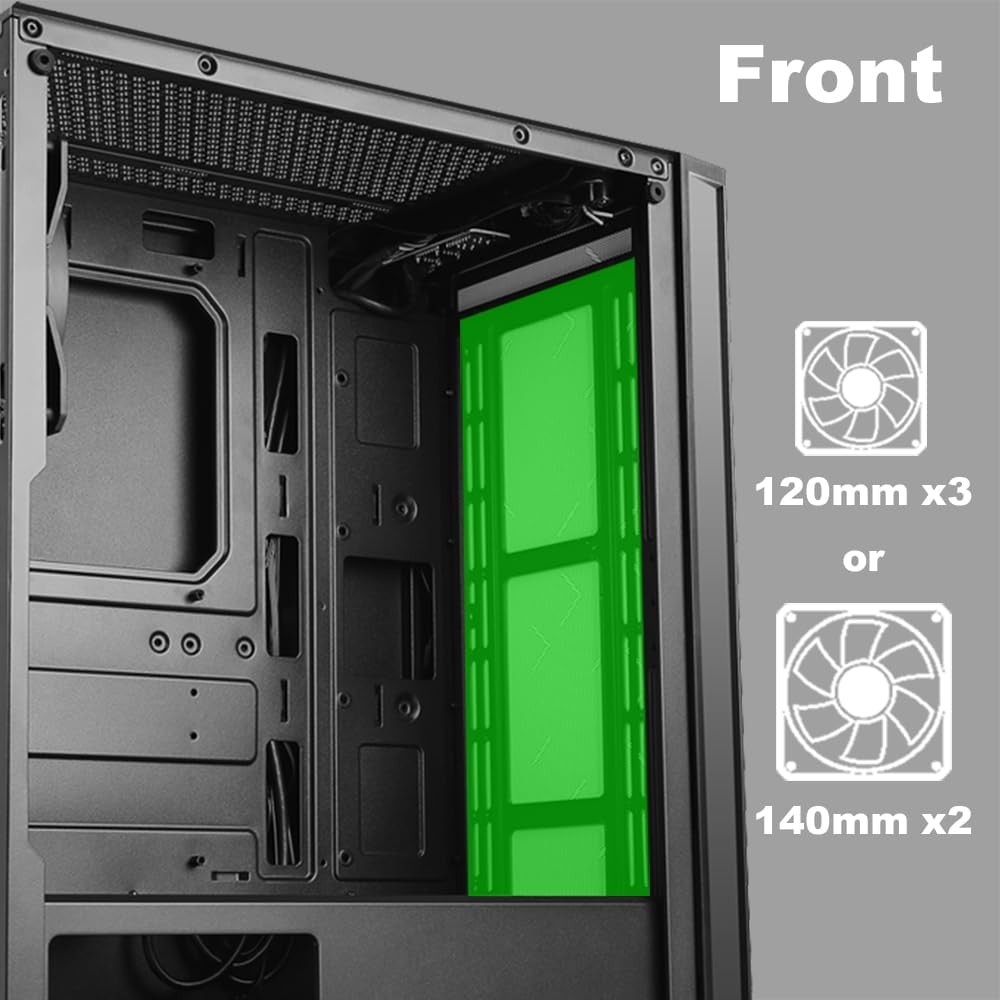
చిత్రం 2.5: అంతర్గత view of the front panel, highlighting the mounting locations for up to three 120mm fans or two 140mm fans.

చిత్రం 2.6: అంతర్గత view of the top panel, showing the mounting locations for up to two 120mm fans.

చిత్రం 2.7: అంతర్గత view of the rear panel, indicating the mounting location for one 120mm fan.
- Identify the desired fan mounting locations (front, top, rear).
- Secure fans to the case using appropriate fan screws.
- Connect fan power cables to the motherboard or a fan controller.
2.5 విద్యుత్ సరఫరా సంస్థాపన
The power supply unit (PSU) mounts at the bottom of the case.
- Slide the PSU into the designated compartment at the bottom rear of the case.
- వెనుక నుండి స్క్రూలను ఉపయోగించి PSUని కేసుకు భద్రపరచండి.
- Route power cables through the cable management cutouts to reach your components.
3. ఆపరేటింగ్ సూచనలు
3.1 పవర్ ఆన్/ఆఫ్
To power on your system, press the power button located on the top I/O panel. To power off, either shut down through your operating system or press and hold the power button for several seconds.
3.2 LED నియంత్రణ
Use the dedicated LED button on the top I/O panel to cycle through various lighting modes and colors for the integrated RGB elements of the case.
4. నిర్వహణ
క్రమం తప్పకుండా నిర్వహణ మీ PC భాగాల యొక్క ఉత్తమ పనితీరు మరియు దీర్ఘాయువును నిర్ధారించడంలో సహాయపడుతుంది.
- దుమ్ము శుభ్రపరచడం: సంపీడన గాలిని ఉపయోగించి దుమ్ము ఫిల్టర్లు మరియు అంతర్గత భాగాలను కాలానుగుణంగా శుభ్రం చేయండి. శుభ్రపరిచే ముందు సిస్టమ్ పవర్ ఆఫ్ చేయబడిందని మరియు అన్ప్లగ్ చేయబడిందని నిర్ధారించుకోండి.
- కేబుల్ నిర్వహణ: Ensure cables are neatly routed to prevent obstruction of airflow and to maintain a clean interior.
- Panel Care: Clean the tempered glass panel with a soft, lint-free cloth and a mild glass cleaner. Avoid abrasive materials.
5. ట్రబుల్షూటింగ్
ఈ విభాగం మీరు ఎదుర్కొనే సాధారణ సమస్యలను పరిష్కరిస్తుంది.
- సిస్టమ్ ఆన్ కావడం లేదు:
- అన్ని పవర్ కేబుల్స్ (24-పిన్ ATX, 8-పిన్ CPU, GPU పవర్) మదర్బోర్డ్ మరియు భాగాలకు సురక్షితంగా కనెక్ట్ చేయబడ్డాయని ధృవీకరించండి.
- విద్యుత్ సరఫరా స్విచ్ 'ఆన్' స్థానంలో ఉందని నిర్ధారించుకోండి.
- Check that the front panel power button cable is correctly connected to the motherboard's front panel header.
- ఫ్యాన్లు తిరగడం లేదు / LEDలు వెలగడం లేదు:
- Confirm fan power cables are properly connected to the motherboard or fan controller.
- Ensure LED cables are correctly connected to the motherboard's RGB header or the case's LED controller.
- Press the LED button on the top I/O panel to cycle through modes or turn on the lighting.
- పనిచేయని USB పోర్టులు:
- Check that the USB 2.0 and USB 3.0 headers from the front panel are correctly plugged into the corresponding ports on your motherboard.
- Audio Jacks Not Working:
- Ensure the HD Audio cable from the front panel is securely connected to the HD Audio header on your motherboard.
6. స్పెసిఫికేషన్లు
Detailed technical specifications for the AZZA CSAZ-280B Spectra Black case.
| ఫీచర్ | స్పెసిఫికేషన్ |
|---|---|
| మోడల్ పేరు | CSAZ-280B SPECTRA BLACK |
| కేసు రకం | మిడ్ టవర్ |
| మదర్బోర్డు అనుకూలత | ATX, మైక్రో-ATX, ITX |
| మెటీరియల్ | ప్లాస్టిక్, టెంపర్డ్ గ్లాస్ |
| రంగు | నలుపు |
| కొలతలు (L x W x H) | 19.69 x 17.32 x 9.84 అంగుళాలు |
| వస్తువు బరువు | 11 పౌండ్లు |
| 2.5" డ్రైవ్ బేలు | 3 వరకు |
| 3.5" డ్రైవ్ బేలు | 2 వరకు |
| గరిష్ట CPU కూలర్ ఎత్తు | 170 మి.మీ |
| గరిష్ట వీడియో కార్డ్ పొడవు | 290 మి.మీ |
| ఫ్రంట్ I / O పోర్ట్స్ | 2 x USB 2.0, 1 x USB 3.0, Audio, Mic, Power, LED Control |
| ఫ్రంట్ ఫ్యాన్ సపోర్ట్ | 3 x 120 మిమీ లేదా 2 x 140 మిమీ |
| Top Fan Support | 2 x 120 మి.మీ |
| Rear Fan Support | 1 x 120 మి.మీ |
| విద్యుత్ సరఫరా మౌంటు | దిగువ మౌంట్ |
7. వారంటీ మరియు మద్దతు
7.1 రిటర్న్ పాలసీ
This product is subject to a 30-day return policy for refund or replacement, as per the retailer's terms.
7.2 సాంకేతిక మద్దతు
For technical assistance or inquiries regarding your AZZA product, please visit the official AZZA website or contact their customer support channels. You can find more information and contact details by visiting the AZZA Store on Amazon.


