పరిచయం
The SofaBaton X1 is a universal remote control system designed to simplify your home entertainment experience by consolidating control of multiple devices into a single unit. It features a remote control and a hub, utilizing Bluetooth, Wi-Fi, and infrared (IR) technologies to communicate with a wide range of devices. This manual provides detailed instructions for setting up, operating, maintaining, and troubleshooting your SofaBaton X1.
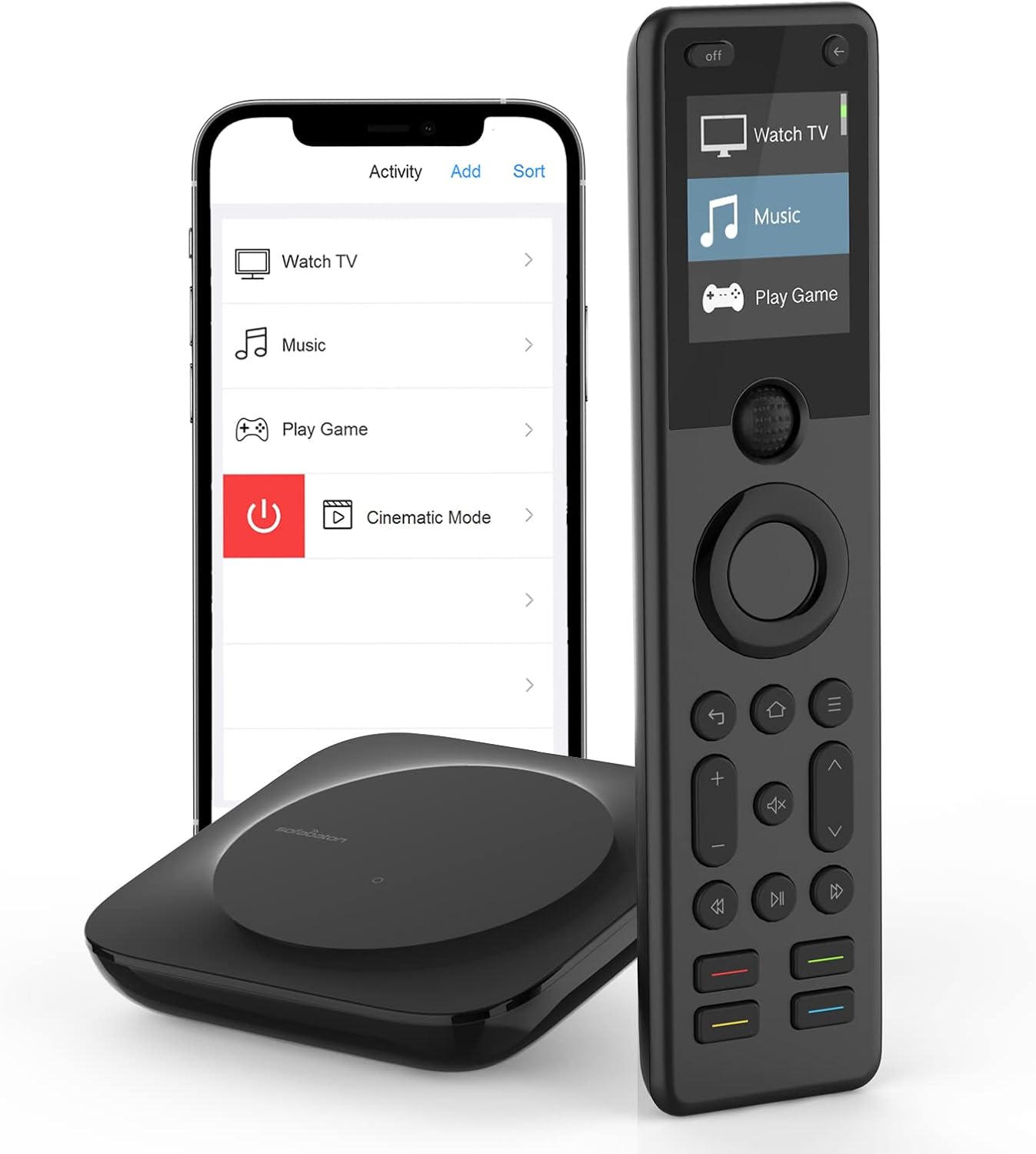
Figure 1: The SofaBaton X1 remote, hub, and the accompanying smartphone application interface.
సెటప్
1. అన్బాక్సింగ్ మరియు భాగాలు
ప్రారంభించడానికి ముందు, అన్ని భాగాలు ఉన్నాయని నిర్ధారించుకోండి:
- SofaBaton X1 Remote
- SofaBaton X1 Hub
- USB టైప్-సి కేబుల్
- ఛార్జర్
- Infrared Blaster(s) (if included)
2. Connecting the X1 Hub
Place the X1 Hub in a central location within your entertainment area, ensuring it has a clear line of sight to the devices it will control, or use the included IR blasters for devices in cabinets. Connect the hub to power using the provided USB Type-C cable and charger. The hub will indicate readiness with a status light.

Figure 2: The X1 Hub provides 360-degree infrared signal coverage for device control.

Figure 3: Connect external IR blasters to the hub for controlling devices located inside cabinets or out of direct line of sight.
3. App Installation and Initial Setup
Download the SofaBaton app from your device's app store. Follow the in-app instructions to connect the X1 Hub to your home Wi-Fi network. The hub supports 2.4 GHz Wi-Fi (IEEE 802.11 b/g/n, WEP/WPA-PSK/WPA2-PSK). Note that the hub does not operate on a 5GHz network.

Figure 4: Important note regarding the X1 Hub's network compatibility (2.4GHz only) and limitations with direct Alexa device control.
4. పరికరాలను కలుపుతోంది
Use the SofaBaton app to add your entertainment devices (TVs, sound systems, Blu-ray players, gaming consoles, etc.). The X1 supports over 6,000 brands and 500,000 devices, including IR, Bluetooth, and Wi-Fi controlled equipment. The app will guide you through the process of selecting device types and brands, and testing commands.

Figure 5: The SofaBaton X1 is compatible with a wide range of home entertainment devices, including TVs, DVD players, game consoles, and more.

Figure 6: The SofaBaton X1 supports a vast library of entertainment and smart devices, enabling control of popular streaming services and media players.
Operating the SofaBaton X1
1. Remote Control Interface
The X1 remote features a 2-inch backlit screen and backlit keys for visibility in low-light environments. Most keys are backlit, excluding the directional pad and scroll wheel. Use the scroll wheel to navigate menus and switch between devices or activities.

Figure 7: Key features of the SofaBaton X1 remote, including the scroll wheel, backlit screen, and backlit keys for enhanced usability.
2. One-Touch Activities
కస్టమ్ను సృష్టించండి
సంబంధిత పత్రాలు - X1
 |
సోఫాబాటన్ X1S స్మార్ట్ రిమోట్ యూజర్ మాన్యువల్ మరియు సెటప్ గైడ్ సోఫాబాటన్ X1S స్మార్ట్ రిమోట్ను సెటప్ చేయడానికి మరియు ఉపయోగించడానికి సమగ్ర గైడ్, ఇందులో హబ్ పొజిషనింగ్, యాప్ సెటప్, పరికర జత చేయడం, కార్యాచరణ సృష్టి మరియు అలెక్సా మరియు గూగుల్ అసిస్టెంట్తో అనుసంధానం ఉన్నాయి. |
 |
సోఫాబాటన్ X2 స్మార్ట్ రిమోట్ ఇన్స్ట్రక్షన్ మాన్యువల్ - సెటప్ మరియు యూసేజ్ గైడ్ సోఫాబాటన్ X2 స్మార్ట్ రిమోట్ సిస్టమ్ కోసం సమగ్ర గైడ్. X2-హబ్ను ఎలా సెటప్ చేయాలో, పరికరాలను జత చేయడం (IR, Wi-Fi, బ్లూటూత్), వన్-టచ్ కార్యకలాపాలను సృష్టించడం మరియు హోమ్ అసిస్టెంట్, అలెక్సా మరియు గూగుల్ అసిస్టెంట్ వంటి స్మార్ట్ హోమ్ పర్యావరణ వ్యవస్థలతో ఎలా అనుసంధానించాలో తెలుసుకోండి. |
 |
SofaBaton U1 యూనివర్సల్ రిమోట్ కంట్రోల్: త్వరిత ప్రారంభ మార్గదర్శి మరియు సెటప్ మీ SofaBaton U1 యూనివర్సల్ రిమోట్ కంట్రోల్ను ఎలా సెటప్ చేయాలో మరియు ఉపయోగించాలో తెలుసుకోండి. ఈ గైడ్ బ్యాటరీ ఇన్స్టాలేషన్, యాప్ డౌన్లోడ్, IR మరియు బ్లూటూత్ ద్వారా పరికర జత చేయడం మరియు కీ కాన్ఫిగరేషన్ను కవర్ చేస్తుంది. |
 |
SofaBaton X1 స్మార్ట్ రిమోట్ యూజర్ మాన్యువల్ SofaBaton X1 స్మార్ట్ రిమోట్ను సెటప్ చేయడానికి మరియు ఉపయోగించడానికి సమగ్ర గైడ్, ఇందులో Wi-Fiకి కనెక్ట్ చేయడం, పరికరాలను జోడించడం, కార్యకలాపాలను సృష్టించడం మరియు వాయిస్ ఆదేశాలను ఉపయోగించడం వంటివి ఉన్నాయి. |
 |
సోఫాబాటన్ U2 రిమోట్ కంట్రోల్ యూజర్ మాన్యువల్ సోఫాబాటన్ U2 బ్లూటూత్ రిమోట్ కంట్రోలర్ కోసం యూజర్ మాన్యువల్, సెటప్ వివరాలు, IR మరియు బ్లూటూత్ ద్వారా పరికర జోడింపు మరియు వినియోగ సూచనలు. |