1. పరిచయం
This manual provides essential information for the safe and efficient operation of your ONN 43-Inch Class 4K UHD (2160P) LED Smart TV. This television offers a 4K Ultra High Definition display, High Dynamic Range (HDR) compatibility, and integrated smart TV functionalities powered by Roku. It supports popular streaming services and voice assistants like Alexa and Google Assistant. Please read this manual thoroughly before using your television and retain it for future reference.

Image 1: ONN 43-Inch 4K UHD Smart TV in a typical living room environment.
2. భద్రతా సమాచారం
Always follow basic safety precautions when using this product to reduce the risk of fire, electric shock, and injury. Keep this manual handy for reference.
- శక్తి మూలం: టీవీని పేర్కొన్న విద్యుత్ సరఫరాకు మాత్రమే కనెక్ట్ చేయండి.
- వెంటిలేషన్: టీవీ చుట్టూ తగినంత వెంటిలేషన్ ఉండేలా చూసుకోండి. వెంటిలేషన్ ఓపెనింగ్లను బ్లాక్ చేయవద్దు.
- నీరు మరియు తేమ: టీవీని వర్షం లేదా తేమకు గురిచేయవద్దు. టీవీపై ద్రవాలతో నిండిన వస్తువులను ఉంచవద్దు.
- శుభ్రపరచడం: శుభ్రం చేసే ముందు టీవీని అన్ప్లగ్ చేయండి. మృదువైన, పొడి వస్త్రాన్ని ఉపయోగించండి.
- వాల్ మౌంటు: If wall mounting, ensure the mount is compatible with VESA 400x400 standards and installed by qualified personnel.
- పిల్లలు: పిల్లలు టీవీ పైకి ఎక్కడం లేదా ఆడుకోకుండా నిరోధించడానికి పర్యవేక్షించండి.
3. ప్యాకేజీ విషయాలు
ప్యాకేజీలో అన్ని వస్తువులు ఉన్నాయని నిర్ధారించుకోండి. ఏవైనా వస్తువులు తప్పిపోయినా లేదా దెబ్బతిన్నా, మీ రిటైలర్ను సంప్రదించండి.
- ONN 43-Inch Class 4K UHD LED Smart TV
- రిమోట్ కంట్రోల్
- Wall Mount (Note: For renewed products, TV stands may not be included as a wall mount is provided for installation.)
- పవర్ కార్డ్
- త్వరిత ప్రారంభ మార్గదర్శి (ఈ మాన్యువల్లో చేర్చబడలేదు)

Image 2: The ONN 43-Inch 4K UHD Smart TV alongside its included wall mount.
4. సెటప్
4.1 వాల్ మౌంట్ ఇన్స్టాలేషన్
Your ONN 43-Inch Smart TV is designed for wall mounting using a VESA 400x400 compatible bracket. Follow these general steps for installation:
- గోడను సిద్ధం చేయండి: Locate wall studs and ensure the mounting area can support the TV's weight (approximately 16.9 pounds) plus the mount.
- Attach Mount Brackets to TV: Secure the wall mount brackets to the VESA holes on the back of the TV using appropriate screws.
- వాల్ ప్లేట్ను ఇన్స్టాల్ చేయండి: Mount the wall plate securely to the wall studs according to the wall mount manufacturer's instructions.
- టీవీని వేలాడదీయండి: Carefully lift the TV and attach it to the wall plate. Ensure it is securely locked in place.
Note: Always refer to the specific instructions provided with your wall mount for detailed installation steps. Professional installation is recommended.
4.2 కనెక్ట్ పెరిఫెరల్స్
బాహ్య పరికరాలను కనెక్ట్ చేయడానికి టీవీ వివిధ పోర్టులను అందిస్తుంది:
- HDMI: 3 HDMI ports (including 1 eARC) for high-definition audio/video devices like Blu-ray players, gaming consoles, or cable boxes.
- USB: 1 USB port for media playback from USB drives.
- LAN: 1 Ethernet port for wired internet connection.
- ఆప్టికల్: 1 Optical digital audio output for connecting to soundbars or home theater systems.
- మిశ్రమ: 1 Composite video input for older devices.
- Coaxial/Cable: 1 Coaxial input for antenna or cable TV connection.
- హెడ్ఫోన్: 1 Headphone jack for private listening.
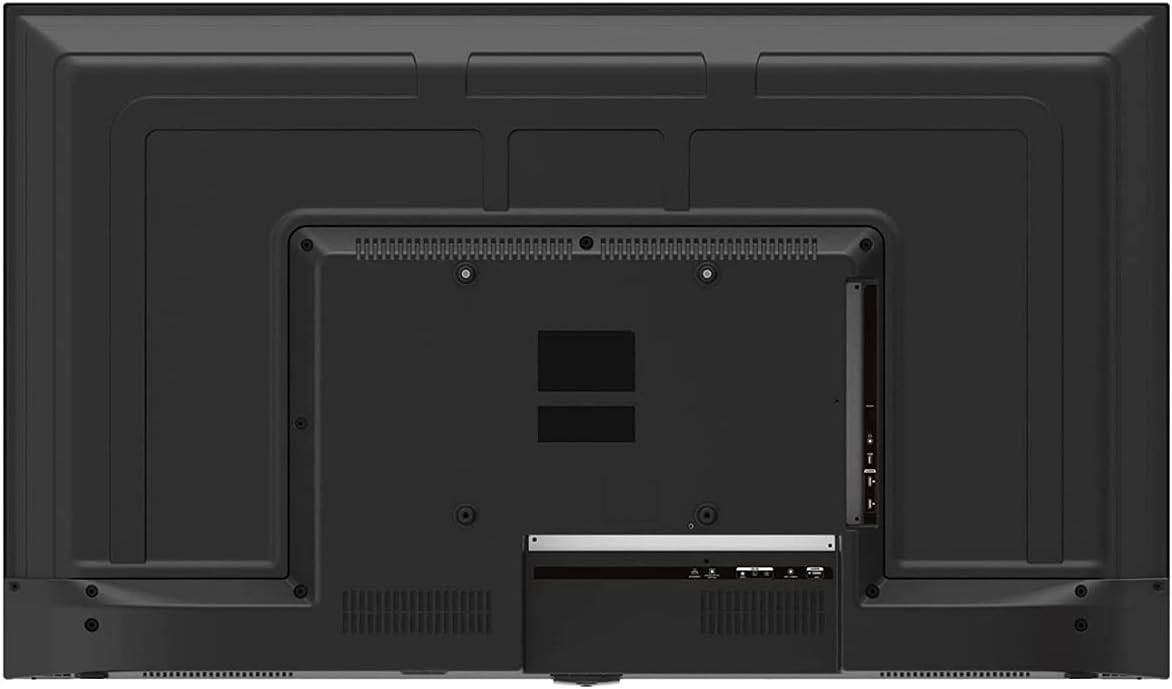
Image 3: Rear panel of the ONN 43-Inch Smart TV, highlighting the available connectivity ports.
4.3 ప్రారంభ పవర్ ఆన్ మరియు నెట్వర్క్ సెటప్
- పవర్ ఆన్: Connect the power cord to the TV and a power outlet. Press the power button on the remote control.
- భాష ఎంపిక: మీకు నచ్చిన భాషను ఎంచుకోవడానికి స్క్రీన్పై కనిపించే ప్రాంప్ట్లను అనుసరించండి.
- నెట్వర్క్ కనెక్షన్: Select your Wi-Fi network from the list and enter the password. Alternatively, connect an Ethernet cable for a wired connection.
- Roku Account Setup: Follow the instructions to create or sign in to your Roku account. This is necessary to access streaming channels and features.
5. మీ టీవీని ఆపరేట్ చేయడం
5.1 రిమోట్ కంట్రోల్
The included remote control provides easy access to all TV functions and streaming services. It features dedicated buttons for popular streaming apps like Netflix, Apple TV+, Paramount+, and HBO Max.
5.2 Smart TV Interface (Roku TV)
The Roku TV home screen provides a centralized hub for all your entertainment. You can easily navigate through streaming channels, live TV inputs, and device connections.

Image 4: The Roku TV home screen on the ONN 43-Inch Smart TV, showing available streaming applications.

చిత్రం 5: కోణీయ view of the ONN 43-Inch Smart TV, showcasing the user interface from a different perspective.
- హోమ్: Access the main Roku TV interface.
- ప్రత్యక్ష ప్రసార టీవీ: Browse available live television channels.
- Streaming Store: Discover and add new streaming channels.
- యాప్లు & ఇన్పుట్లు: Select connected devices (e.g., HDMI 1, HDMI 2) or launch installed applications.
5.3 వాయిస్ అసిస్టెంట్ ఇంటిగ్రేషన్
The TV is compatible with Alexa and Google Assistant. You can use a compatible voice assistant device (sold separately) or the Roku mobile app to control your TV with voice commands, such as turning it on/off, changing channels, or launching apps.
5.4 చిత్ర సెట్టింగ్లు
To adjust picture quality, navigate to Settings > Picture Settings on the Roku TV menu. Options typically include Brightness, Contrast, Color, Tint, Sharpness, and various picture modes (e.g., Movie, Sports, Vivid, Standard).
5.5 సౌండ్ సెట్టింగ్లు
To adjust audio settings, navigate to Settings > Audio Settings. Options may include Volume Mode, Audio Delay, and various sound modes (e.g., Standard, Theater, Music).
6. నిర్వహణ
6.1 టీవీని శుభ్రపరచడం
- శుభ్రం చేసే ముందు టీవీని ఎల్లప్పుడూ అన్ప్లగ్ చేయండి.
- స్క్రీన్ మరియు క్యాబినెట్ను సున్నితంగా తుడవడానికి మృదువైన, మెత్తటి బట్టను ఉపయోగించండి.
- మొండి గుర్తులకు, తేలికగా dampనీటితో లేదా తేలికపాటి, రాపిడి లేని స్క్రీన్ క్లీనర్తో వస్త్రాన్ని తుడవండి. క్లీనర్ను ఎప్పుడూ స్క్రీన్పై నేరుగా పిచికారీ చేయవద్దు.
6.2 సాఫ్ట్వేర్ నవీకరణలు
Your ONN Roku TV automatically receives software updates to improve performance and add new features. Ensure your TV is connected to the internet for these updates. You can manually check for updates via సెట్టింగ్లు > సిస్టమ్ > సిస్టమ్ అప్డేట్.
7. ట్రబుల్షూటింగ్
మీ టీవీలో మీకు సమస్యలు ఎదురైతే, ఈ క్రింది సాధారణ పరిష్కారాలను చూడండి:
| సమస్య | పరిష్కారం |
|---|---|
| పవర్ లేదు | టీవీ మరియు పనిచేసే ఎలక్ట్రికల్ అవుట్లెట్ రెండింటికీ పవర్ కార్డ్ సురక్షితంగా ప్లగ్ చేయబడిందని నిర్ధారించుకోండి. వేరే అవుట్లెట్ను ప్రయత్నించండి. |
| చిత్రం/ధ్వని లేదు | Check all cable connections (HDMI, coaxial). Ensure the correct input source is selected on the TV. |
| రిమోట్ పని చేయడం లేదు | రిమోట్ కంట్రోల్లోని బ్యాటరీలను మార్చండి. రిమోట్ మరియు టీవీ యొక్క IR సెన్సార్ మధ్య ఎటువంటి అడ్డంకులు లేవని నిర్ధారించుకోండి. |
| Wi-Fi కి కనెక్ట్ చేయడం సాధ్యం కాలేదు | Verify your Wi-Fi password. Restart your router and modem. Move the TV closer to the router if possible. |
| పేలవమైన చిత్ర నాణ్యత | Check the resolution settings of your connected device. Adjust picture settings on the TV. Ensure you are viewసరైన రిజల్యూషన్ కోసం 4K కంటెంట్ను డౌన్లోడ్ చేసుకోండి. |
8. స్పెసిఫికేషన్లు
| ఫీచర్ | వివరాలు |
|---|---|
| స్క్రీన్ పరిమాణం | 43 అంగుళాలు |
| ప్రదర్శన సాంకేతికత | LED |
| రిజల్యూషన్ | 4K అల్ట్రా HD (2160p) |
| HDR అనుకూలత | అవును |
| స్మార్ట్ టీవీ ప్లాట్ఫారమ్ | రోకు టీవీ |
| వాయిస్ అసిస్టెంట్ సపోర్ట్ | అలెక్సా, గూగుల్ అసిస్టెంట్ |
| కనెక్టివిటీ | 3 HDMI (1 eARC), 1 Composite, 1 USB, 1 LAN, 1 Optical, 1 Coaxial/Cable, 1 Headphone |
| కారక నిష్పత్తి | 16:9 |
| ఉత్పత్తి కొలతలు (D x W x H) | 7" x 38" x 23" |
| వస్తువు బరువు | 16.9 పౌండ్లు |
| రంగు | నలుపు |

చిత్రం 6: సైడ్ ప్రోfile of the ONN 43-Inch Smart TV, illustrating its slim design.

Image 7: Energy Guide label providing estimated yearly energy cost and consumption for the television.
9. వారంటీ మరియు మద్దతు
For warranty information and technical support, please refer to the documentation included with your product or visit the official ONN support website. As this is a renewed product, specific warranty terms may vary. Please consult the seller or product listing for details regarding the renewed product warranty.


