1. పరిచయం
Thank you for choosing the KAIDI KD-771 TWS Smart Touch V5.1 Wireless Earbuds. This manual provides essential information for the proper use, setup, and maintenance of your new earbuds. Please read it carefully before use and retain it for future reference.
ప్యాకేజీ విషయాలు:
- 1 Pair of KAIDI KD-771 Wireless Earbuds
- 1 ఛార్జింగ్ కేసు
- 1 USB Charging Cable (Type-C)
- 1 వినియోగదారు మాన్యువల్

Image 1.1: KAIDI KD-771 Wireless Earbuds with their retail packaging.
2. భద్రతా సమాచారం
- Do not disassemble, repair, or modify the product. This may cause fire, electronic breakdown, or complete product damage.
- పరికరాన్ని తీవ్రమైన ఉష్ణోగ్రతలు, ప్రత్యక్ష సూర్యకాంతి మరియు అధిక తేమ నుండి దూరంగా ఉంచండి.
- Avoid exposing the earbuds to water or other liquids. While rated IPX4 for splash resistance, they are not waterproof and should not be submerged.
- అందించిన ఛార్జింగ్ కేబుల్ లేదా సర్టిఫైడ్ దానికి సమానమైన దాన్ని మాత్రమే ఉపయోగించండి.
- వినికిడి దెబ్బతినకుండా ఉండటానికి ఇయర్బడ్లను ఎక్కువసేపు అధిక వాల్యూమ్లలో ఉపయోగించవద్దు.
- పిల్లలకు దూరంగా ఉంచండి.
3. ఉత్పత్తి ముగిసిందిview
The KAIDI KD-771 earbuds feature a compact design with intuitive touch controls and a portable charging case.

Image 3.1: The KAIDI KD-771 Wireless Earbuds alongside their closed charging case.

చిత్రం 3.2: వివరణాత్మకమైనది view of the earbuds and charging case, highlighting the USB Type-C charging port and earbud design.
భాగాలు:
- ఇయర్బడ్స్: Left and Right earbuds with Smart Touch sensors.
- ఛార్జింగ్ కేసు: Stores and charges the earbuds. Features a battery indicator LED and a USB Type-C charging port.
- మైక్రోఫోన్: Integrated into each earbud for calls.
4. సెటప్
4.1 ఇయర్బడ్లు మరియు కేస్ను ఛార్జ్ చేయడం
మొదటిసారి ఉపయోగించే ముందు, ఇయర్బడ్లు మరియు ఛార్జింగ్ కేసును పూర్తిగా ఛార్జ్ చేయండి.
- ఇయర్బడ్లను ఛార్జింగ్ కేసులో ఉంచండి. అవి సరిగ్గా అమర్చబడ్డాయని నిర్ధారించుకోండి.
- Connect the USB Type-C charging cable to the charging port on the case and the other end to a USB power source (e.g., wall adapter, computer).
- The LED indicator on the charging case will illuminate to show charging status. Once fully charged, the indicator may change color or turn off.
- A full charge provides approximately 4 hours of earbud usage, with additional charges available from the case.
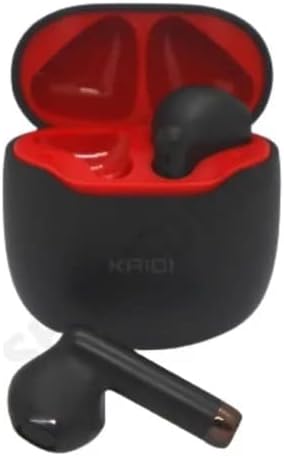
చిత్రం 4.1: ఛార్జింగ్ కేస్ లోపల ఉంచిన ఇయర్బడ్లు, ఛార్జింగ్ కోసం సిద్ధంగా ఉన్నాయి.
4.2 పరికరంతో జత చేయడం
The earbuds use Bluetooth V5.1 for a stable and low-latency connection.
- పవర్ ఆన్: Open the charging case. The earbuds will automatically power on and enter pairing mode. You may hear an audible prompt.
- బ్లూటూత్ని యాక్టివేట్ చేయండి: On your smartphone or other Bluetooth-enabled device, go to the Bluetooth settings and ensure Bluetooth is enabled.
- పరికరాన్ని ఎంచుకోండి: In the list of available Bluetooth devices, locate and select "KD-771".
- కనెక్షన్ని నిర్ధారించండి: Once connected, you will hear a confirmation sound, and the earbuds will be ready for use.
- ఆటోమేటిక్ రీకనెక్షన్: After initial pairing, the earbuds will automatically connect to the last paired device when removed from the case, provided Bluetooth is active on the device.
5. ఆపరేటింగ్ సూచనలు
The KAIDI KD-771 earbuds feature Smart Touch controls for easy management of audio and calls.
5.1 స్మార్ట్ టచ్ నియంత్రణలు
- ప్లే/పాజ్: ఇయర్బడ్పై ఒక్కసారి నొక్కండి.
- తదుపరి ట్రాక్: కుడి ఇయర్బడ్పై రెండుసార్లు నొక్కండి.
- మునుపటి ట్రాక్: ఎడమ ఇయర్బడ్పై రెండుసార్లు నొక్కండి.
- సమాధానం/ముగింపు కాల్: ఇన్కమింగ్ కాల్ లేదా యాక్టివ్ కాల్ సమయంలో ఇయర్బడ్పై ఒకేసారి నొక్కండి.
- కాల్ని తిరస్కరించండి: ఇన్కమింగ్ కాల్ సమయంలో ఇయర్బడ్లో దేనినైనా 2 సెకన్ల పాటు నొక్కి పట్టుకోండి.
- వాయిస్ అసిస్టెంట్ను సక్రియం చేయండి: ఇయర్బడ్లలో దేనినైనా (ఉదాహరణకు సిరి, గూగుల్ అసిస్టెంట్) మూడుసార్లు నొక్కండి.
- వాల్యూమ్ నియంత్రణ: Volume adjustments must be made directly on the connected device (smartphone, tablet, etc.). The earbuds do not have integrated volume controls.
5.2 పవర్ ఆన్/ఆఫ్
- పవర్ ఆన్: Open the charging case, or press and hold the touch area on both earbuds for 3 seconds if they are outside the case and off.
- పవర్ ఆఫ్: ఇయర్బడ్లను తిరిగి ఛార్జింగ్ కేసులో ఉంచి, మూతను మూసివేయండి. ప్రత్యామ్నాయంగా, రెండు ఇయర్బడ్లపై టచ్ ఏరియాను 5 సెకన్ల పాటు నొక్కి పట్టుకోండి.
6. నిర్వహణ
6.1 శుభ్రపరచడం
- ఇయర్బడ్లు మరియు ఛార్జింగ్ కేసును మృదువైన, పొడి, మెత్తటి బట్టతో తుడవండి.
- రాపిడి క్లీనర్లు, ఆల్కహాల్ లేదా రసాయన ద్రావకాలను ఉపయోగించవద్దు.
- ఇయర్బడ్లు మరియు కేస్ రెండింటిలోనూ ఛార్జింగ్ కాంటాక్ట్లు శుభ్రంగా మరియు చెత్త లేకుండా ఉన్నాయని నిర్ధారించుకోండి.
6.2 నిల్వ
- ఉపయోగంలో లేనప్పుడు, ఇయర్బడ్లను రక్షించడానికి మరియు వాటిని ఛార్జ్లో ఉంచడానికి వాటి ఛార్జింగ్ కేసులో నిల్వ చేయండి.
- ప్రత్యక్ష సూర్యకాంతి మరియు తీవ్రమైన ఉష్ణోగ్రతల నుండి దూరంగా, చల్లని, పొడి ప్రదేశంలో నిల్వ చేయండి.
6.3 నీటి నిరోధకత
The KAIDI KD-771 earbuds are rated IPX4, meaning they are resistant to splashes of water from any direction. This makes them suitable for workouts or light rain. However, they are not designed for submersion in water, showering, or swimming. Avoid exposing them to heavy rain or direct streams of water.
7. ట్రబుల్షూటింగ్
| సమస్య | సాధ్యమైన కారణం | పరిష్కారం |
|---|---|---|
| ఇయర్బడ్లు పవర్ ఆన్ చేయవు. | తక్కువ బ్యాటరీ. | ఇయర్బడ్లు మరియు ఛార్జింగ్ కేస్ను పూర్తిగా ఛార్జ్ చేయండి. |
| ఇయర్బడ్లు పరికరంతో జత కావు. | Bluetooth is off on device; earbuds not in pairing mode; device list cluttered. | Ensure Bluetooth is on. Place earbuds in case, close, then open to re-enter pairing mode. Forget "KD-771" on your device and try pairing again. |
| ఇయర్బడ్ల నుండి శబ్దం లేదు. | వాల్యూమ్ చాలా తక్కువగా ఉంది; ఇయర్బడ్లు కనెక్ట్ కాలేదు; మీడియా పాజ్ చేయబడింది. | Increase volume on your device. Check Bluetooth connection. Ensure media is playing. |
| ఒక ఇయర్బడ్లో శబ్దం లేదు. | Earbuds not properly synced; low battery on one earbud. | Place both earbuds back in the case, close the lid, then open again. Ensure both earbuds are charged. |
| ఛార్జింగ్ కేసు ఛార్జ్ కావడం లేదు. | తప్పు కేబుల్ లేదా పవర్ సోర్స్. | Try a different USB Type-C cable and/or power adapter. Ensure connections are secure. |
8. స్పెసిఫికేషన్లు
- మోడల్ పేరు: KD-771
- కనెక్టివిటీ టెక్నాలజీ: వైర్లెస్ (బ్లూటూత్ V5.1)
- వైర్లెస్ కమ్యూనికేషన్ టెక్నాలజీ: బ్లూటూత్
- నియంత్రణ పద్ధతి: టచ్
- ప్రత్యేక లక్షణాలు: Volume control (via device), Lightweight, Microphone included, IPX4 Splash Resistant
- చెవి ప్లేస్మెంట్: ఇన్-ఇయర్
- మెటీరియల్: ప్లాస్టిక్
- ఫ్రీక్వెన్సీ రెస్పాన్స్: 20 Hz - 20 kHz (implied from 20000 Hz spec)
- Sound Responsiveness: 115 డెసిబెల్స్
- ఇంపెడెన్స్: 32 ఓం
- ఫ్రీక్వెన్సీ పరిధి: 2.400 - 2.485 గిగాహెర్ట్జ్
- శక్తి మూలం: బ్యాటరీ
- Average Battery Life (Earbuds): 4 గంటలు
- బ్యాటరీ కూర్పు: లిథియం-అయాన్
- ఛార్జింగ్ పోర్ట్: USB టైప్-C
- ఉత్పత్తి బరువు: 100 గ్రా
- ANATEL Certification: 18583-21-14467
9. వారంటీ మరియు మద్దతు
9.1 తయారీదారు వారంటీ
This product comes with a manufacturer's warranty of 3 నెలలు కొనుగోలు చేసిన తేదీ నుండి. ఈ వారంటీ సాధారణ ఉపయోగంలో తయారీ లోపాలను కవర్ చేస్తుంది. దుర్వినియోగం, ప్రమాదాలు, అనధికార మార్పులు లేదా సాధారణ తరుగుదల వల్ల కలిగే నష్టాన్ని ఇది కవర్ చేయదు.
9.2 కస్టమర్ మద్దతు
For technical assistance, warranty claims, or further inquiries, please contact your retailer or the KAIDI customer support channel provided at the point of purchase. Please have your proof of purchase and product model number (KD-771) ready when contacting support.


