పరిచయం
The Neo 10-in-1 Steam Cleaner is a versatile and powerful cleaning appliance designed to effectively clean various surfaces using the power of steam. This lightweight and compact unit is ideal for tackling dirt and grime on floors, carpets, windows, and more, offering a chemical-free cleaning solution for your home. This manual provides essential information for safe and efficient operation, maintenance, and troubleshooting.

Image: The Neo 10-in-1 Steam Cleaner shown with its full array of accessories, including various brushes, nozzles, and pads, highlighting its multi-functional design.
ముఖ్యమైన భద్రతా సమాచారం
ఉపకరణాన్ని ఉపయోగించే ముందు దయచేసి అన్ని సూచనలను జాగ్రత్తగా చదవండి. ఈ సూచనలను పాటించడంలో విఫలమైతే విద్యుత్ షాక్, అగ్ని ప్రమాదం లేదా తీవ్రమైన గాయం సంభవించవచ్చు.
- Always ensure the appliance is unplugged from the power outlet before filling with water, cleaning, or performing maintenance.
- Do not leave the steam cleaner unattended while it is plugged in or operating.
- పిల్లలు మరియు పెంపుడు జంతువులకు దూరంగా ఉంచండి.
- Use only clean tap water. Do not add cleaning solutions, perfumes, or other chemicals to the water tank, as this may damage the appliance or create hazardous fumes.
- Steam is hot. Avoid direct contact with steam. Keep hands, face, and body away from the steam nozzle.
- పరికరాన్ని నీటిలో లేదా మరే ఇతర ద్రవంలో ముంచవద్దు.
- త్రాడు లేదా ప్లగ్ దెబ్బతిన్నట్లయితే ఉపకరణాన్ని ఆపరేట్ చేయవద్దు.
- Use the appliance only for its intended household cleaning purposes as described in this manual.
ఉత్పత్తి ముగిసిందిview
Familiarize yourself with the components of your Neo 10-in-1 Steam Cleaner.

Image: The steam cleaner is depicted in both its upright mop configuration and its detached handheld mode, illustrating its 2-in-1 functionality. Key features like the ergonomic handle, 5m cable, and 180-degree swivel head are highlighted.
ప్రధాన యూనిట్ లక్షణాలు:
- ఎర్గోనామిక్ హ్యాండిల్: సౌకర్యవంతమైన పట్టు మరియు వాడుకలో సౌలభ్యం కోసం రూపొందించబడింది.
- నీటి ట్యాంక్: 400 ml capacity for extended cleaning sessions.
- Steam Ready Indicator: Light indicates when the unit is ready to produce steam (approx. 30 seconds).
- వేరియబుల్ ఆవిరి నియంత్రణ: Adjust steam output for different surfaces and cleaning needs.
- 180° Swivel Head: Allows for easy maneuverability around furniture and into tight spaces.
- 5m Power Cable: అందిస్తుంది ample reach without frequent outlet changes.
- 2-ఇన్-1 ఫంక్షనాలిటీ: Easily converts from an upright steam mop to a handheld steam cleaner.
చేర్చబడిన ఉపకరణాలు:

చిత్రం: వివరణాత్మక view of the 10-piece accessory set, including various brushes, nozzles, a measuring cup, and microfiber pads, demonstrating the versatility of the steam cleaner.
- కొలిచే కప్పు
- విండో స్క్వీజీ
- Small Round Brass Brush
- గ్రౌట్ బ్రష్
- Fine Brush
- స్క్రాపర్ సాధనం
- Carpet Tool / Glider
- Fabric Tool
- జెట్ నాజిల్
- నైలాన్ బ్రష్
- Washable Microfiber Pad(s)
సెటప్ మరియు అసెంబ్లీ
- అన్ప్యాక్: ప్యాకేజింగ్ నుండి అన్ని భాగాలను జాగ్రత్తగా తొలగించండి.
- హ్యాండిల్ను అసెంబుల్ చేయండి: Insert the handle into the main body of the steam cleaner until it clicks securely into place.
- Attach Mop Head (for floor cleaning): Slide the mop head onto the main unit. Ensure it is firmly attached.
- Attach Microfiber Pad: Secure the washable microfiber pad to the bottom of the mop head.
- వాటర్ ట్యాంక్ నింపండి: Open the water tank cap. Use the provided measuring cup to fill the tank with up to 400 ml of clean tap water. Do not overfill. Close the cap securely.
- Select Accessory (for handheld use): For handheld cleaning, detach the main unit from the mop head. Select the appropriate accessory (e.g., jet nozzle, brush) and attach it firmly to the handheld unit's nozzle.
ఆపరేటింగ్ సూచనలు
సాధారణ ఆపరేషన్:
- Ensure the water tank is filled and the desired attachment is secured.
- Plug the power cord into a grounded electrical outlet. The indicator light will illuminate.
- Wait approximately 30 seconds for the unit to heat up and produce steam. The indicator light may change or turn off when ready, depending on the model.
- Press the steam trigger or button to release steam. Adjust the variable steam control as needed.
- Begin cleaning the desired surface. Move the steam cleaner slowly over the area to allow the steam to penetrate and clean effectively.
- When finished, release the steam trigger/button, unplug the unit, and allow it to cool down before emptying any remaining water and storing.
నిర్దిష్ట శుభ్రపరిచే అప్లికేషన్లు:
The Neo 10-in-1 Steam Cleaner is suitable for all floor types, and its accessories allow for targeted cleaning.

Image: Multiple Neo 10-in-1 Steam Cleaners in different colors are displayed on a wooden floor, with labels indicating suitability for Carpet, Tile, Stone, and Hard Floor surfaces.
Floor Cleaning (Mop Mode):
- Attach the mop head and a clean microfiber pad.
- For hard floors (tile, sealed hardwood, laminate, stone), move the mop slowly and steadily across the surface.
- For carpets, attach the carpet glider over the mop head and microfiber pad. Glide the unit over the carpet to refresh and sanitize.
- The steam cleaner is designed to kill 99.99% of bacteria on surfaces.

Image: This graphic illustrates key performance features: "Ready to use in 30 seconds," "Variable steam control," and "Large 400ml tank," along with an icon indicating it "Kills 99.99% of bacteria."
Handheld Cleaning (with accessories):
- జెట్ నాజిల్: Ideal for concentrated steam on stubborn dirt in tight spaces, such as stovetops or bathroom fixtures.

Image: The handheld steam cleaner with the jet nozzle attachment is shown directing steam onto a stovetop burner, demonstrating its use for focused cleaning.
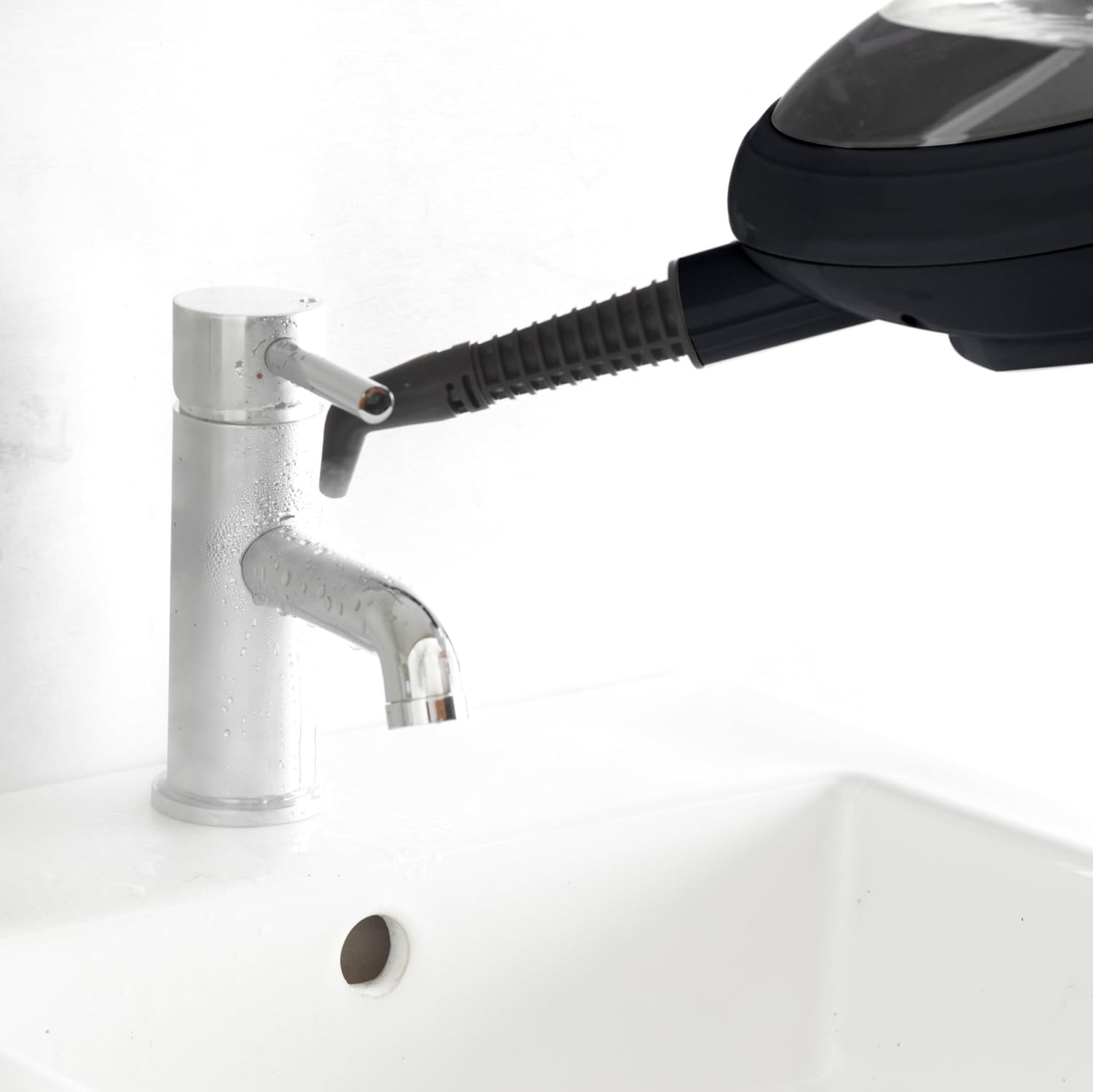
Image: The handheld steam cleaner with the jet nozzle is used to clean around a bathroom faucet, illustrating its effectiveness in sanitizing fixtures.
- Grout Brush: Use with the jet nozzle for deep cleaning grout lines between tiles.

Image: The handheld steam cleaner with the grout brush attachment is shown cleaning the grout lines between white tiles, demonstrating its precision cleaning capability.
- Window Squeegee: Attach for streak-free cleaning of windows, mirrors, and glass surfaces.
- Fabric Tool: Use with a microfiber cloth for steaming garments, upholstery, and curtains to remove wrinkles and refresh fabrics.
- Brass Brush: For very tough, baked-on grime on durable surfaces (e.g., oven racks, BBQ grills). Use with caution to avoid scratching.
- నైలాన్ బ్రష్: General purpose scrubbing brush for various surfaces.
- Scraper Tool: For removing sticky residues or dried-on spills.
నిర్వహణ మరియు శుభ్రపరచడం
Regular maintenance ensures optimal performance and extends the life of your steam cleaner.
- ఖాళీ నీటి ట్యాంక్: After each use, unplug the unit and allow it to cool. Empty any remaining water from the tank.
- Clean Microfiber Pads: The microfiber pads are washable. Remove them from the mop head and machine wash with mild detergent. Do not use bleach or fabric softener. Air dry or tumble dry on low.
- తుడిచిపెట్టే యూనిట్: ప్రకటనతో ఆవిరి క్లీనర్ యొక్క బాహ్య భాగాన్ని తుడవండిamp గుడ్డ. రాపిడి క్లీనర్లను ఉపయోగించవద్దు.
- Descale (if necessary): If you notice reduced steam output or mineral buildup, descale the unit. Consult the manufacturer's website or customer support for specific descaling instructions, as this may vary by model.
- స్టోర్: Store the steam cleaner in a cool, dry place, away from direct sunlight and extreme temperatures.
ట్రబుల్షూటింగ్
| సమస్య | సాధ్యమైన కారణం | పరిష్కారం |
|---|---|---|
| ఆవిరి లేదు లేదా తక్కువ ఆవిరి అవుట్పుట్. |
|
|
| యూనిట్ నుంచి నీరు కారుతోంది. |
|
|
| యూనిట్ ఆన్ చేయడం లేదు. |
|
|
ఈ పరిష్కారాలను ప్రయత్నించిన తర్వాత కూడా సమస్య కొనసాగితే, దయచేసి కస్టమర్ మద్దతును సంప్రదించండి.
స్పెసిఫికేషన్లు
- మోడల్: SFP-STM-MOP-COP
- శక్తి: 1500 వాట్స్
- వాల్యూమ్tage: 220-240 వోల్ట్లు
- నీటి ట్యాంక్ సామర్థ్యం: 400 మిల్లీలీటర్లు
- వేడి సమయం: సుమారు 30 సెకన్లు
- నిరంతర ఆవిరి సమయం: Up to 30 minutes per tank
- బరువు: 2.3 కిలోలు
- కొలతలు (L x W x H): 9 x 30 x 119 సెం.మీ
- పవర్ కేబుల్ పొడవు: 5 మీటర్లు
- ప్రత్యేక లక్షణాలు: Lightweight, Variable Steam Control, 2-in-1 Mop and Handheld Function, 180° Swivel Head
వారంటీ మరియు మద్దతు
For warranty information, product registration, and customer support, please refer to the documentation included with your purchase or visit the official Neo webసైట్. ఏవైనా వారంటీ క్లెయిమ్ల కోసం మీ కొనుగోలు రుజువును ఉంచుకోండి.
తయారీదారు: నియో


