DEERC D60 డ్రోన్ ఇన్స్ట్రక్షన్ మాన్యువల్
Brand: DEERC | Model: D60
1. పరిచయం
This manual provides essential information for the safe and efficient operation of your DEERC D60 Drone. Please read all instructions carefully before use and retain this manual for future reference. The DEERC D60 is a foldable RC quadcopter equipped with a 1080P HD FPV camera, designed for both adults and kids, offering various intelligent flight modes for an enjoyable flying experience.
2. పెట్టెలో ఏముంది
ప్యాకేజింగ్లో అన్ని భాగాలు ఉన్నాయని నిర్ధారించుకోండి:
- DEERC D60 డ్రోన్
- రిమోట్ కంట్రోల్
- Flight Battery (1 or 2 depending on package)
- USB ఛార్జింగ్ కేబుల్
- విడి ప్రొపెల్లర్లు
- స్క్రూడ్రైవర్
- ఇన్స్ట్రక్షన్ మాన్యువల్

Image: The DEERC D60 drone, remote control, battery, and accessories laid out next to the product box.
The package includes the foldable drone, a remote controller with a phone holder, a flight battery, a USB charging cable, spare propellers, and a small screwdriver for maintenance.
3. ఉత్పత్తి ముగిసిందిview
The DEERC D60 is a compact and foldable drone, making it highly portable. It features a 1080P HD camera with an adjustable lens for capturing clear photos and FPV video. The drone is equipped with direct drive motors for enhanced durability and performance.
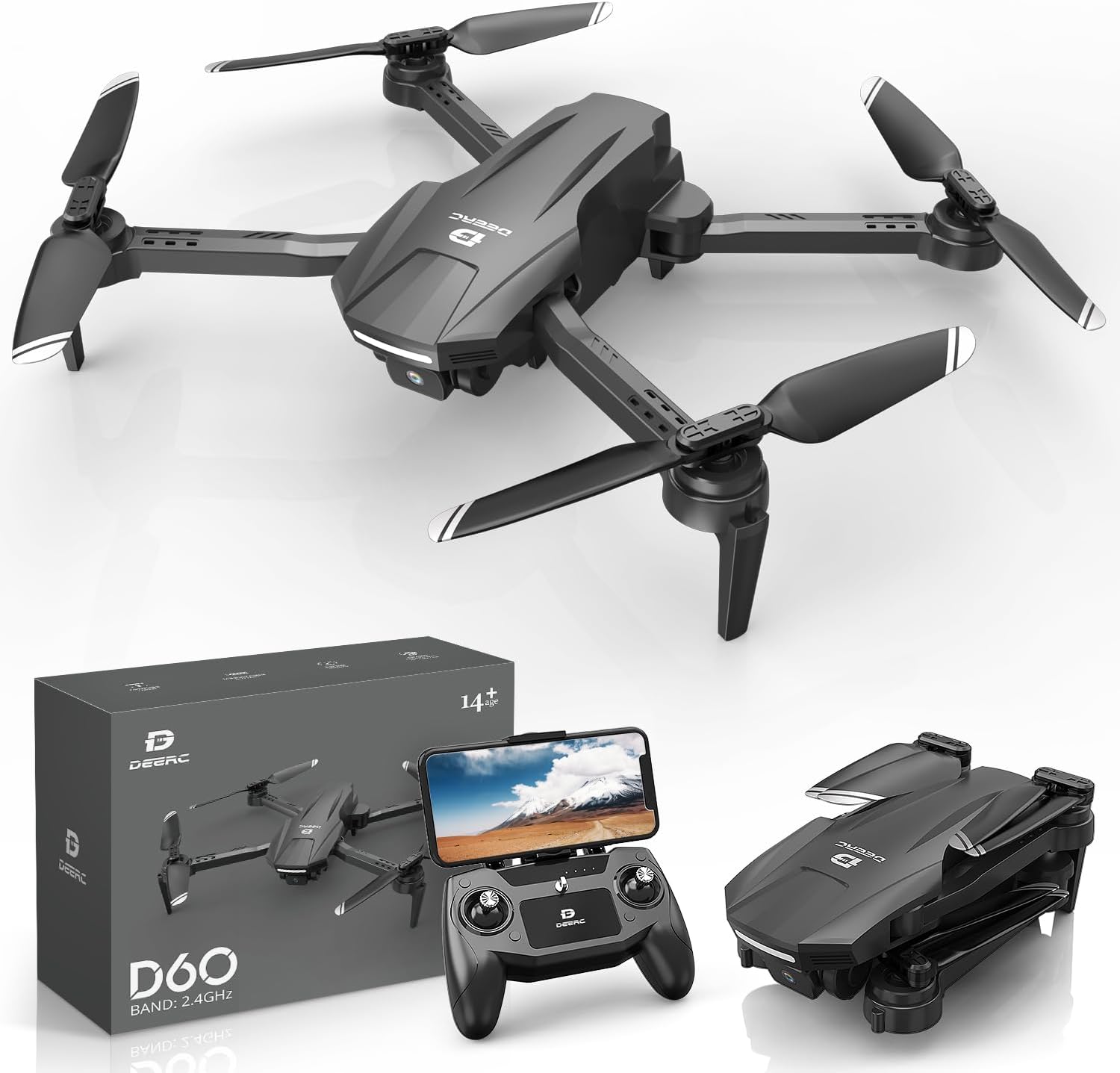
Image: The DEERC D60 drone unfolded, showcasing its design, alongside the remote control with a smartphone attached, and the product packaging.
The drone's arms fold inward for compact storage and transport. When unfolded, it reveals its four propellers and the camera unit located at the front underside.
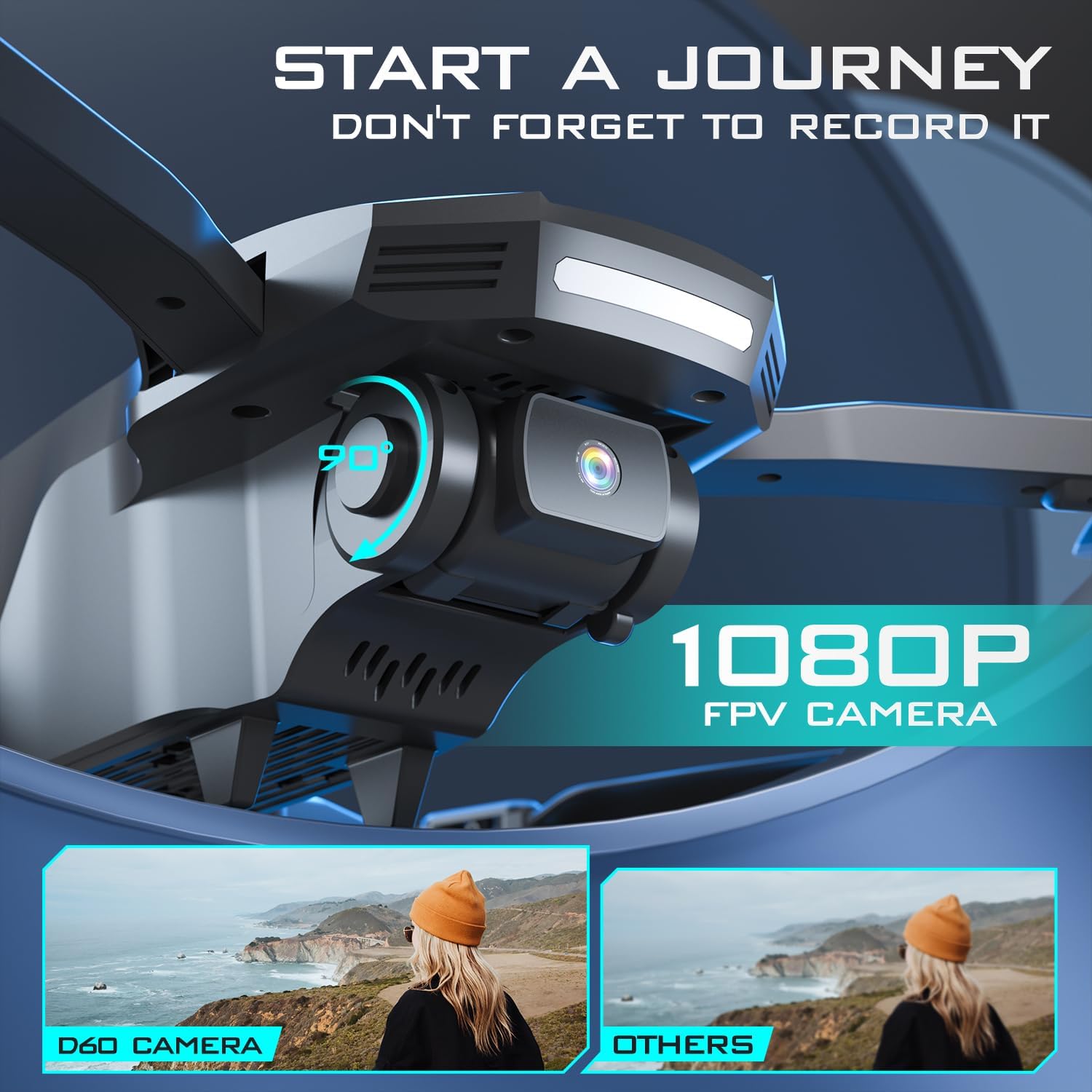
Image: The DEERC D60 drone shown in both folded and unfolded states, with dimensions indicating its compact size when folded (5.70*3.18*2.36 inches) and larger size when unfolded (9.20*13.05*2.36 inches).
The D60 drone is designed for portability, easily folding to a compact size for storage and travel. Its unfolded dimensions provide stability during flight.

Image: Close-up of the DEERC D60 drone's 1080P FPV camera, highlighting its adjustable lens with a 90-degree rotation indicator.
The integrated 1080P HD camera offers First Person View (FPV) capabilities, allowing real-time video streaming to your connected smartphone. The lens can be manually adjusted up to 90 degrees to capture various angles.
4. ప్రారంభించడం
4.1 బ్యాటరీని ఛార్జ్ చేయడం
Each flight battery provides up to 22 minutes of flight time. Use the provided USB Type-C charging cable to charge the battery. The charging indicator light on the battery will turn green when fully charged.
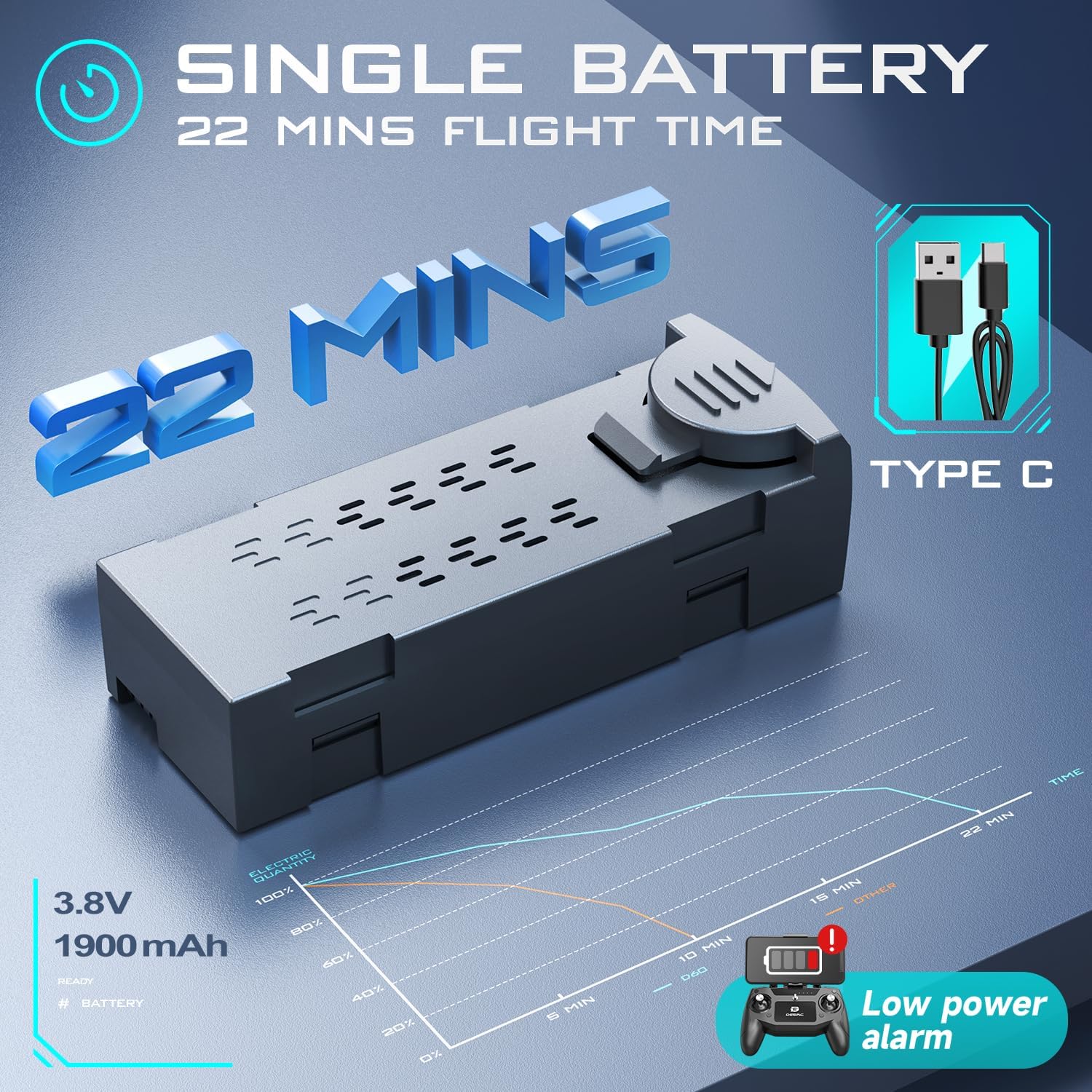
Image: A diagram showing the 3.8V 1900mAh battery for the DEERC D60 drone, with a Type-C charging cable and a graph illustrating 22 minutes of flight time and a low power alarm.
The drone's battery is a 3.8V 1900mAh Lithium Polymer type, offering extended flight duration. Always ensure the battery is fully charged before each flight for optimal performance.
4.2 బ్యాటరీని వ్యవస్థాపించడం
Insert the charged flight battery into the drone's battery compartment until it clicks securely into place.
4.3 డ్రోన్ను విప్పడం
Gently unfold the drone's arms until they are fully extended and locked into position. Ensure all four arms are securely in place before flight.
4.4 కంట్రోలర్ సెటప్
Install 2x AA batteries (not included) into the remote control. Extend the phone holder to mount your smartphone for FPV viewing.
4.5 యాప్ ఇన్స్టాలేషన్ మరియు కనెక్షన్
Download the 'Deerc FPV' app by scanning the QR codes provided on the controller guide or searching in your device's app store. Connect your smartphone to the drone's Wi-Fi network (usually named 'DEERC-FPV-XXXX').
4.6 క్రమాంకనం
Place the drone on a level surface with its head pointing forward. Turn on the drone, then the remote control. Push the left joystick up, then down. The drone's lights will blink fast, then turn off. To calibrate the gyro, simultaneously push both joysticks towards the inner bottom corners for 2 seconds until the drone beeps. Ensure the drone is on a flat surface during calibration.
Video: A short demonstration of the DEERC D60 drone and its remote control, highlighting the drone's features and the controller's functions, including battery installation and basic setup.
This video provides a quick overview of the drone and its remote, demonstrating how to install the battery, unfold the drone, and connect the remote. It also shows the Type-C charging port on the battery.
5. ఆపరేటింగ్ సూచనలు
5.1 టేకాఫ్ మరియు ల్యాండింగ్
After calibration, push the left joystick up, then down to start the motors. Alternatively, press the One-Key Takeoff/Landing button on the remote for automatic takeoff or landing.
5.2 స్పీడ్ మోడ్లు
The drone offers 3 speed levels (Fast, Faster, Fastest). Use the speed switch button on the remote to cycle through them. Beginners are advised to start with lower speeds.
5.3 సంజ్ఞ నియంత్రణ
Use simple hand gestures to command the drone to take photos or start recording video. Refer to the app interface for specific gestures.

Image: The DEERC D60 drone responding to hand gestures for control, and a person using voice commands ('FLY', 'LEFT') to control the drone.
The drone supports gesture control, allowing users to initiate photo or video capture with specific hand movements. This feature enhances the interactive flying experience.
5.4 వాయిస్ నియంత్రణ
Issue voice commands through the app to control the drone's flight, such as
సంబంధిత పత్రాలు - D60
 |
DEERC D70 డ్రోన్: ఉపయోగం కోసం సూచనలు మరియు భద్రతా మార్గదర్శకాలు DEERC D70 డ్రోన్ను ఆపరేట్ చేయడానికి సమగ్ర గైడ్, సెటప్, విమాన నియంత్రణలు, భద్రతా జాగ్రత్తలు మరియు నిర్వహణను కవర్ చేస్తుంది. ఎగరడం, ఫోటోలు మరియు వీడియోలను సంగ్రహించడం మరియు హెడ్లెస్ మోడ్ మరియు 360° ఫ్లిప్ల వంటి అధునాతన ఫీచర్లను ఉపయోగించడం ఎలాగో తెలుసుకోండి. |
 |
DEERC D10 డ్రోన్: ఉపయోగం మరియు ఆపరేషన్ గైడ్ కోసం సూచనలు DEERC D10 డ్రోన్ కోసం సమగ్ర గైడ్, సెటప్, ఆపరేషన్, భద్రతా మార్గదర్శకాలు, విధులు, స్పెసిఫికేషన్లు మరియు సంప్రదింపు సమాచారాన్ని కవర్ చేస్తుంది. ఈ యూజర్ ఫ్రెండ్లీ మాన్యువల్తో మీ DEERC D10 డ్రోన్ను సురక్షితంగా మరియు సమర్థవంతంగా ఎలా ఎగురవేయాలో తెలుసుకోండి. |
 |
DEERC D10 డ్రోన్: ఉపయోగం మరియు ఆపరేషన్ గైడ్ కోసం సూచనలు DEERC D10 డ్రోన్ కోసం సమగ్ర గైడ్, భద్రతా మార్గదర్శకాలు, ఇన్స్టాలేషన్, ఆపరేషన్, ఛార్జింగ్ మరియు విధులను కవర్ చేస్తుంది. మీ డ్రోన్ను సురక్షితంగా మరియు ప్రభావవంతంగా ఎలా ఎగరాలి మరియు నిర్వహించాలో తెలుసుకోండి. |
 |
DEERC D11 డ్రోన్: ఉపయోగం కోసం సూచనలు మరియు భద్రతా మార్గదర్శకాలు DEERC D11 డ్రోన్ కోసం సమగ్ర గైడ్, సెటప్, విమాన కార్యకలాపాలు, భద్రతా జాగ్రత్తలు, నిర్వహణ మరియు సాంకేతిక వివరణలను కవర్ చేస్తుంది. మీ డ్రోన్ను సురక్షితంగా మరియు సమర్థవంతంగా ఎలా ఆపరేట్ చేయాలో తెలుసుకోండి. |
 |
DEERC D50 డ్రోన్: ఉపయోగం కోసం సూచనలు, భద్రతా మార్గదర్శకాలు మరియు స్పెసిఫికేషన్లు DEERC D50 డ్రోన్ కోసం సమగ్ర గైడ్, సెటప్, ఆపరేషన్, భద్రతా జాగ్రత్తలు, నిర్వహణ మరియు సాంకేతిక వివరణలను కవర్ చేస్తుంది. బ్యాటరీ సంరక్షణ, విమాన మోడ్లు మరియు ట్రబుల్షూటింగ్పై సమాచారం ఉంటుంది. |
 |
DEERC D23 డ్రోన్: ఉపయోగం మరియు ఆపరేషన్ గైడ్ కోసం సూచనలు DEERC D23 మినీ డ్రోన్ కోసం సమగ్ర గైడ్, సెటప్, ఆపరేషన్, భద్రతా మార్గదర్శకాలు, స్పెసిఫికేషన్లు మరియు ట్రబుల్షూటింగ్ను కవర్ చేస్తుంది. మీ DEERC D23 డ్రోన్ను ఎలా ఎగరాలి, ఛార్జ్ చేయాలి మరియు నిర్వహించాలి అని తెలుసుకోండి. |