1. పరిచయం
The Kinivo 8K HDMI Switch SW-840BN allows you to connect up to four HDMI source devices to a single HDMI display. This device supports advanced video and audio technologies, including 8K 60Hz, 4K 120Hz, HDR10+, Dolby Vision, and Dolby Atmos, ensuring a high-quality viewing and listening experience. It is designed to simplify your home entertainment setup by eliminating the need to constantly swap HDMI cables between devices.
2. ప్యాకేజీ విషయాలు
- Kinivo 8K HDMI Switch SW-840BN
- పవర్ అడాప్టర్
- IR రిమోట్ కంట్రోల్
- వినియోగదారు మాన్యువల్
3. ఉత్పత్తి ముగిసిందిview
The Kinivo SW-840BN features four HDMI input ports and one HDMI output port, along with a power input and control buttons. Its compact design and robust construction ensure reliable performance.
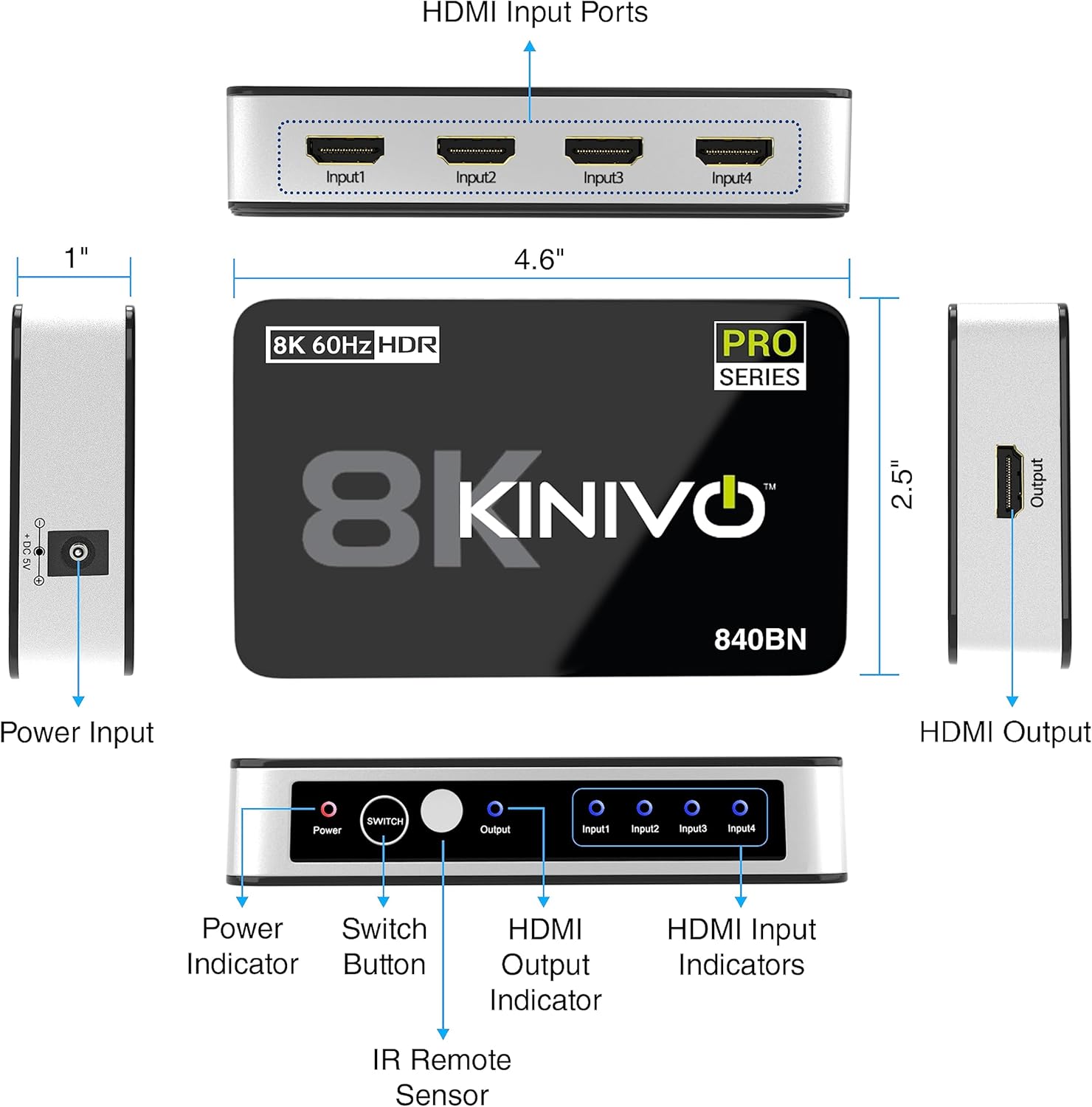
Detailed diagram of the Kinivo 8K HDMI Switch SW-840BN, showing all ports (Power Input, HDMI Input Ports 1-4, HDMI Output), buttons (Power, Switch), and indicators (Power, Output, Input 1-4), along with product dimensions.
ముఖ్య భాగాలు:
- HDMI Input Ports (1-4): Connect your source devices (e.g., gaming consoles, Blu-ray players, streaming devices).
- HDMI Output Port: Connects to your display (e.g., HDTV, monitor, projector).
- పవర్ ఇన్పుట్ (DC 5V): చేర్చబడిన పవర్ అడాప్టర్ను కనెక్ట్ చేయండి.
- పవర్ బటన్: పరికరాన్ని ఆన్ లేదా ఆఫ్ చేస్తుంది.
- స్విచ్ బటన్: Manually cycles through input sources.
- IR Remote Sensor: రిమోట్ కంట్రోల్ నుండి సంకేతాలను అందుకుంటుంది.
- LED సూచికలు: Show power status and active input source.
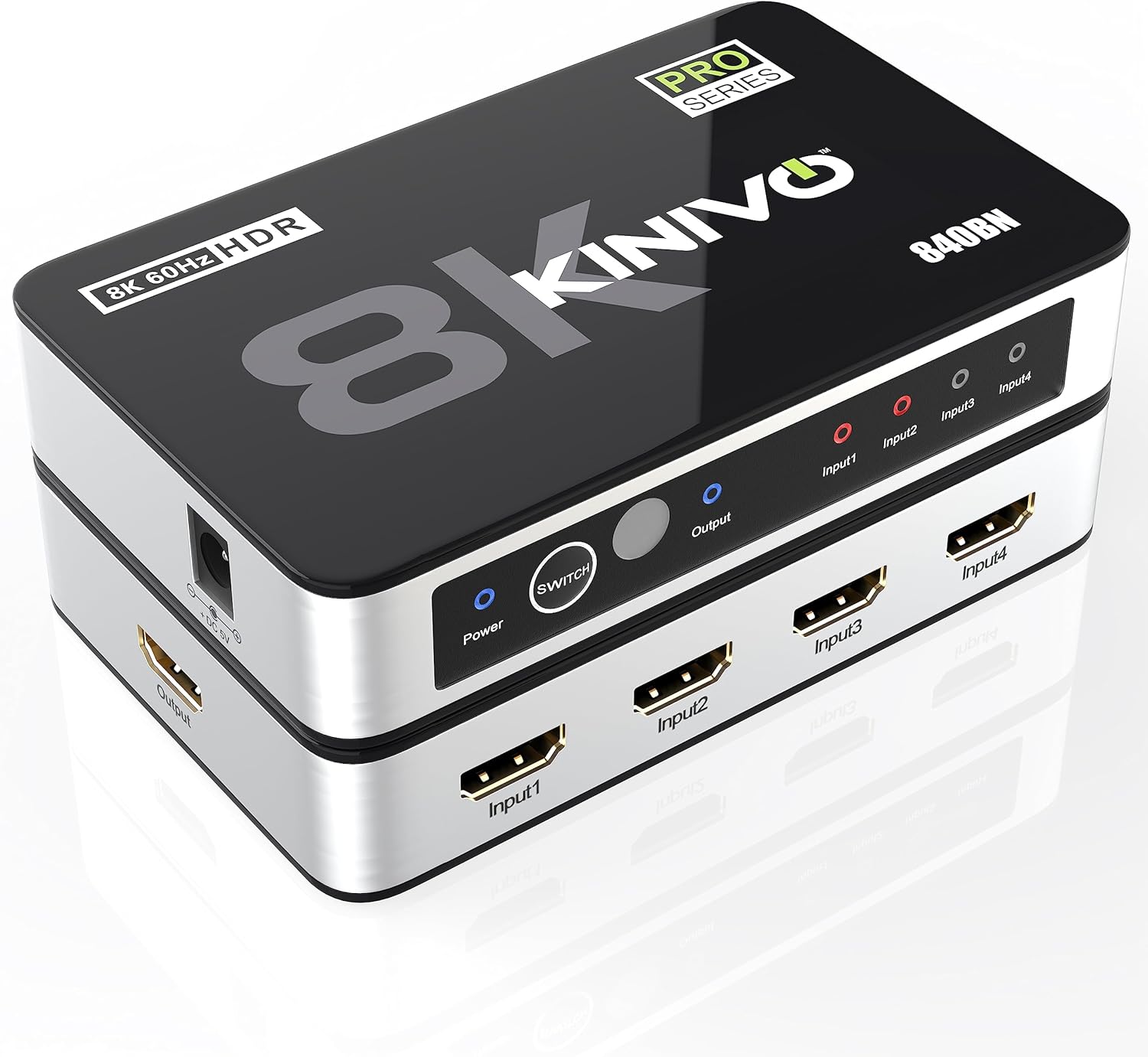
Kinivo 8K HDMI Switch SW-840BN, top-down angled view showing inputs, output, power button, and indicator lights.
4. సెటప్ సూచనలు
- మూల పరికరాలను కనెక్ట్ చేయండి: Plug your HDMI source devices (e.g., PS5, Xbox, Apple TV, Blu-ray player) into the HDMI Input ports (Input1, Input2, Input3, Input4) on the Kinivo switch using high-quality HDMI 2.1 cables.
- డిస్ప్లేకి కనెక్ట్ చేయండి: Connect the HDMI Output port of the Kinivo switch to an HDMI input on your display (HDTV, monitor, projector) using a high-quality HDMI 2.1 cable.
- పవర్ కనెక్ట్ చేయండి: Plug the included power adapter into the DC 5V power input on the switch, then connect it to a power outlet. The Power LED indicator will illuminate.
- పవర్ ఆన్: Press the Power button on the switch or use the remote control to turn on the device.

Diagram showing the connection of a PlayStation 5, Xbox Series X, and Apple TV to the Kinivo 8K HDMI Switch, which then connects to a television display.
5. ఆపరేటింగ్ సూచనలు
ఇన్పుట్ సోర్స్లను మారుస్తోంది:
- మాన్యువల్ స్విచింగ్: Press the 'Switch' button on the front panel of the Kinivo device to cycle through the connected HDMI input sources. The corresponding input LED will light up.
- రిమోట్ కంట్రోల్ స్విచింగ్: Use the included IR remote control to directly select an input source (Input 1, Input 2, Input 3, Input 4) or to cycle through them. Ensure the remote is pointed towards the IR sensor on the switch.
- ఆటోమేటిక్ స్విచింగ్: The Kinivo switch supports automatic input detection. When a new device is powered on or starts sending an HDMI signal, the switch may automatically switch to that input. Note: Not all devices support auto-switching (e.g., Apple TV, Fire TV, Xbox One, PS5, Roku). Manual or remote switching may be required for these devices.

Image depicting two methods of switching inputs on the Kinivo 8K HDMI Switch: manual switching via the device button and remote control switching, with a family enjoying content on a TV.
6. లక్షణాలు మరియు సామర్థ్యాలు
- 8K 60Hz and 4K 120Hz Support: Experience ultra-high-definition video with smooth motion.
- 48Gbps Bandwidth: High-speed data transmission for uncompressed video and audio.
- HDR10+ మరియు డాల్బీ విజన్: Enhanced contrast and color depth for a more realistic picture.
- డాల్బీ అట్మోస్: లీనమయ్యే ఆడియో అనుభవం.
- HDCP 2.3: రక్షిత కంటెంట్తో అనుకూలతను నిర్ధారిస్తుంది.
- ఉన్నతమైన నిర్మాణం: Features 24K gold-plated connectors for optimal signal transfer and an aluminum alloy shell for efficient heat dissipation and durability.

Visual comparison of 4K 30Hz, 4K 60Hz, and 8K 60Hz resolutions, illustrating the enhanced clarity of 8K with a vibrant underwater scene.

పేలింది view of the Kinivo 8K HDMI Switch SW-840BN, highlighting its internal components: powerful IC chip, aluminum alloy shell for heat dissipation, and 24K gold-plated connectors.
7. అనుకూలత
The Kinivo 8K HDMI Switch is broadly compatible with a variety of HDMI-enabled devices.
అనుకూల ఇన్పుట్ పరికరాలు:
- Gaming Consoles (e.g., PS5, Xbox Series X/S, Nintendo Switch 2)
- Streaming Devices (e.g., Apple TV, Fire TV, Roku)
- Blu-ray Players, DVD Players
- Laptops, Desktop PCs
- Set-top Boxes
Compatible Output Devices:
- HDTVలు
- మానిటర్లు
- ప్రొజెక్టర్లు

Compatibility chart for the Kinivo 8K HDMI Switch, listing various input devices like laptops, TV boxes, streaming devices, game consoles, desktops, and output devices such as HDTVs, monitors, and projectors.
8. స్పెసిఫికేషన్లు
| ఫీచర్ | స్పెసిఫికేషన్ |
|---|---|
| మోడల్ సంఖ్య | SW-840BN |
| HDMI పోర్ట్లు | 4 Inputs, 1 Output |
| డేటా థ్రూపుట్ | 48 Gbps |
| రిజల్యూషన్ మద్దతు | 8K 60Hz, 4K 120Hz |
| HDR మద్దతు | HDR10+, డాల్బీ విజన్ |
| ఆడియో మద్దతు | Dolby Atmos, Dolby Digital, Dolby TrueHD, DTSHD |
| HDCP వెర్షన్ | 2.3 |
| ఉత్పత్తి కొలతలు | 3.23 x 3.98 x 5.79 అంగుళాలు |
| వస్తువు బరువు | 7.1 ఔన్సులు |
| పవర్ ఇన్పుట్ | DC 5V |
| రంగు | నలుపు |

Comparison table of Kinivo HDMI switch models (840BN, 360BNT, 550BN/350BN) detailing HDMI ports, data throughput, resolution, audio output, and support for Dolby Vision, HDR, HDCP. Below the table, a visual comparison of 8K 60Hz and 4K 60Hz gaming visuals.
9. ట్రబుల్షూటింగ్
- చిత్రం/సిగ్నల్ లేదు:
- అన్ని HDMI కేబుల్లు స్విచ్ మరియు మీ పరికరాలు/డిస్ప్లే రెండింటికీ సురక్షితంగా కనెక్ట్ అయ్యాయని నిర్ధారించుకోండి.
- Verify the power adapter is correctly connected and the switch is powered on.
- Try selecting the input source manually using the switch button or remote control.
- Test with different HDMI cables, especially high-quality HDMI 2.1 certified cables for 8K/4K 120Hz content.
- Bypass the switch and connect the source directly to the display to confirm the source and display are working correctly.
- మినుకుమినుకుమనే లేదా అడపాదడపా సిగ్నల్:
- This often indicates a cable issue. Replace HDMI cables with shorter, higher-quality ones, especially for 8K/4K 120Hz signals.
- Ensure the power adapter is providing stable power to the switch.
- Reduce the resolution or refresh rate of the source device temporarily to see if the issue persists.
- ఆడియో లేదు:
- Check audio settings on your source device and display to ensure correct output.
- Verify that the HDMI cables support audio transmission.
- Auto-Switching Not Working:
- As noted, some devices (e.g., Apple TV, Xbox, PS5) may not trigger auto-switching. Use manual or remote control switching for these devices.
- Ensure the source device is fully powered off when not in use to allow auto-switching to other active inputs.
10. నిర్వహణ
- పరికరాన్ని ప్రత్యక్ష సూర్యకాంతి మరియు ఉష్ణ వనరులకు దూరంగా చల్లని, పొడి ప్రదేశంలో ఉంచండి.
- పరికరాన్ని మృదువైన, పొడి వస్త్రంతో శుభ్రం చేయండి. ద్రవ క్లీనర్లు లేదా ఏరోసోల్లను ఉపయోగించవద్దు.
- Avoid blocking ventilation openings to ensure proper heat dissipation.
- పరికరాన్ని మీరే విడదీయడానికి లేదా మరమ్మతు చేయడానికి ప్రయత్నించవద్దు. అర్హత కలిగిన సేవా సిబ్బందిని సంప్రదించండి.
11. వారంటీ మరియు మద్దతు
Kinivo offers a two-year warranty for the SW-840BN HDMI Switch. Additionally, lifetime US-based customer support is available to assist with any questions or issues you may encounter.
For technical support or warranty claims, please visit the official Kinivo webసైట్ లేదా వారి కస్టమర్ సేవా విభాగాన్ని సంప్రదించండి.


