1. పరిచయం
This manual provides detailed instructions for the setup, operation, and maintenance of your ORIA Digital Alarm Clock (Model OUS-HY-WA109B). Please read this manual thoroughly before using the product to ensure proper function and safety.
1.1 ప్యాకేజీ విషయాలు
- ORIA Digital Alarm Clock (Model OUS-HY-WA109B)
- USB పవర్ కేబుల్
- వినియోగదారు మాన్యువల్

Figure 1: Package contents including the ORIA Digital Alarm Clock, USB cable, and user manual.
2. భద్రతా సమాచారం
- పరికరాన్ని తీవ్రమైన ఉష్ణోగ్రతలు, ప్రత్యక్ష సూర్యకాంతి లేదా అధిక తేమకు గురిచేయవద్దు.
- పరికరాన్ని నీరు లేదా ఇతర ద్రవాలకు దూరంగా ఉంచండి.
- Use only the provided USB cable or a certified equivalent for power.
- పరికరాన్ని విడదీయడానికి లేదా మరమ్మతు చేయడానికి ప్రయత్నించవద్దు. సహాయం కోసం కస్టమర్ సపోర్ట్ని సంప్రదించండి.
- స్థానిక నిబంధనల ప్రకారం బ్యాటరీలను పారవేయండి.
3. సెటప్
3.1 పరికరాన్ని శక్తివంతం చేయడం
The ORIA Digital Alarm Clock offers dual power options:
- DC Cable Power (Recommended): Connect the provided USB power cable to the DC 5V port on the back of the clock and plug the other end into a USB power adapter (not included) or a USB port. The display will remain continuously on.
- Battery Power (Backup/Power Saving Mode): Insert 3 AAA batteries (not included) into the battery compartment on the back of the clock. In battery mode, the screen will automatically turn off after 8 seconds to conserve power. Touch the top button to wake up the screen for 8 seconds.
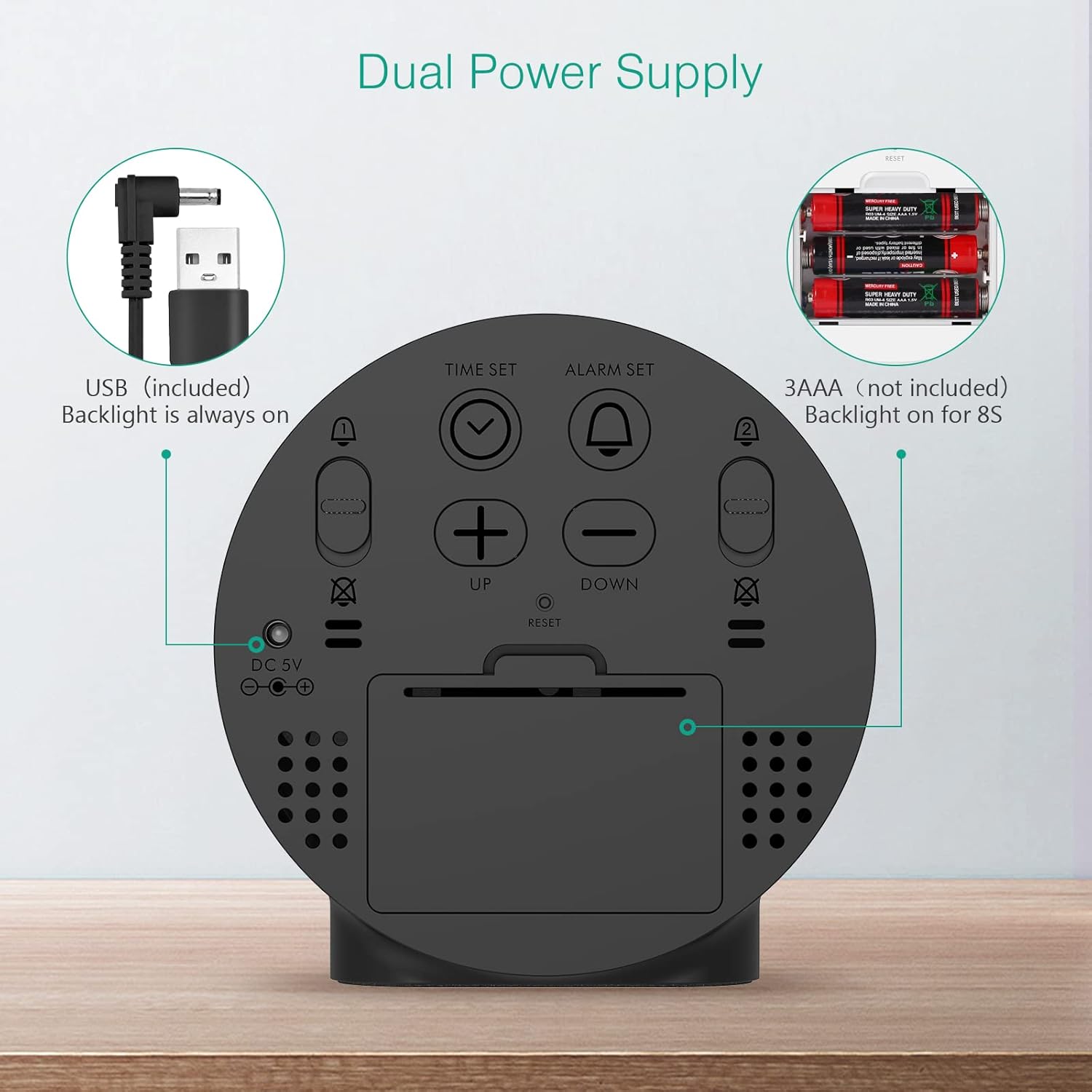
Figure 2: Back panel illustrating the USB power input and battery compartment for dual power supply.
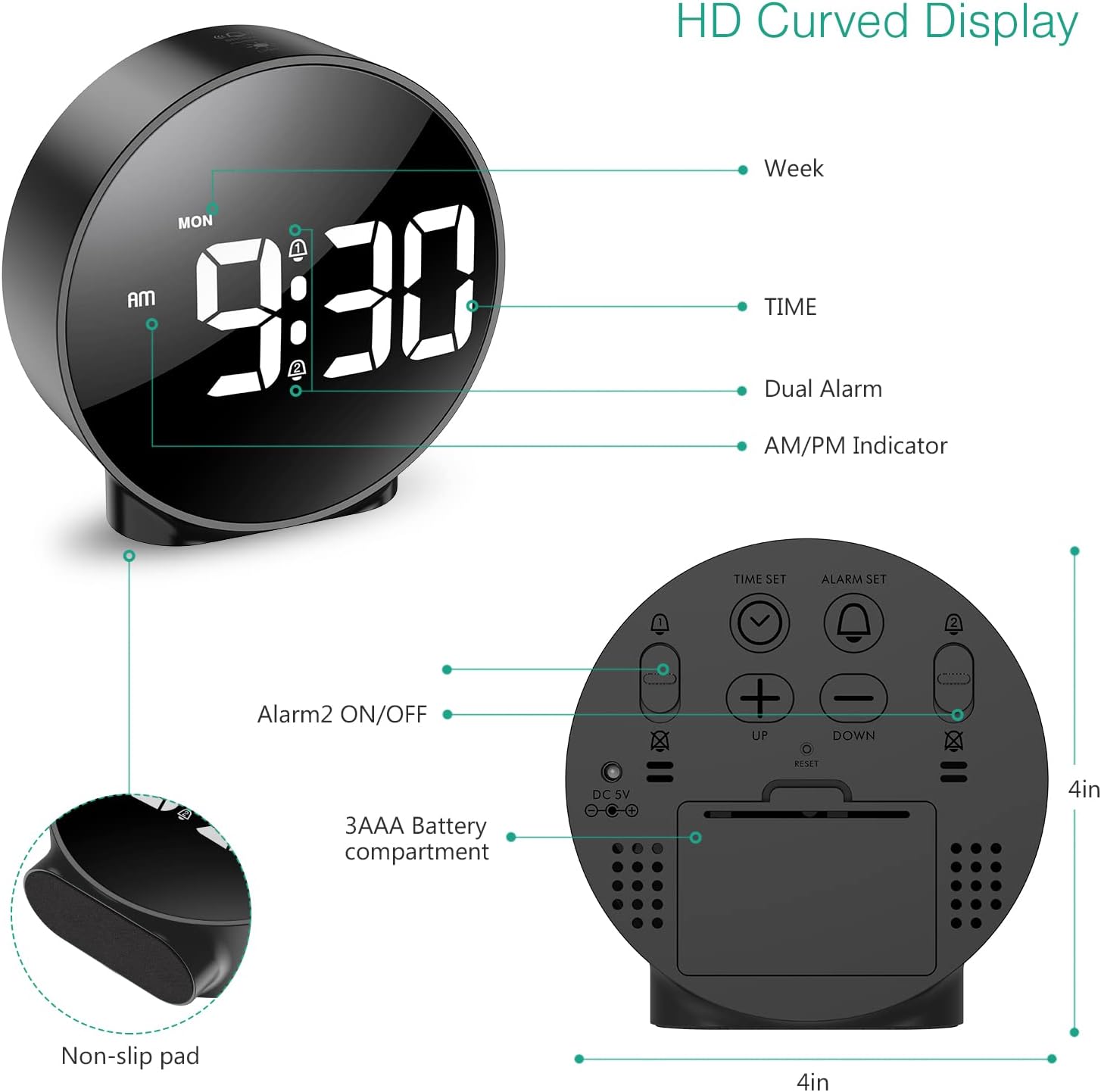
మూర్తి 3: వివరంగా view of the clock's back panel, highlighting the DC 5V input, battery compartment, and control buttons.
4. ఆపరేటింగ్ సూచనలు
4.1 Setting the Time (12/24Hr Format)
- నొక్కండి మరియు పట్టుకోండి టైమ్ సెట్ button on the back of the clock for 3 seconds to enter time setting mode. The hour digits will start flashing.
- ఉపయోగించండి UP or డౌన్ గంటను సర్దుబాటు చేయడానికి బటన్లు.
- నొక్కండి టైమ్ సెట్ గంటను నిర్ధారించి, నిమిషాల సెట్టింగ్కి వెళ్లడానికి మళ్ళీ నొక్కండి. నిమిషాల అంకెలు ఫ్లాష్ అవుతాయి.
- ఉపయోగించండి UP or డౌన్ నిమిషం సర్దుబాటు చేయడానికి బటన్లు.
- నొక్కండి టైమ్ సెట్ again to confirm the minute and exit time setting mode.
- 12-గంటల మరియు 24-గంటల ఫార్మాట్ మధ్య మారడానికి, 12/24HR బటన్.
4.2 Setting Alarms (Dual Alarms)
The clock supports two independent alarms (Alarm 1 and Alarm 2) with 5 alarm modes.
- నొక్కండి మరియు పట్టుకోండి అలారం సెట్ బటన్ (అలారం 1 కోసం) లేదా అలారం 2 ఆన్/ఆఫ్ button (for Alarm 2) for 3 seconds to enter alarm setting mode. The hour digits will flash.
- ఉపయోగించండి UP or డౌన్ అలారం గంటను సర్దుబాటు చేయడానికి బటన్లు.
- సంబంధిత నొక్కండి అలారం సెట్ or అలారం 2 ఆన్/ఆఫ్ గంటను నిర్ధారించి, నిమిషం సెట్టింగ్కు వెళ్లడానికి మళ్ళీ బటన్ను నొక్కండి. నిమిషం అంకెలు ఫ్లాష్ అవుతాయి.
- ఉపయోగించండి UP or డౌన్ అలారం నిమిషం సర్దుబాటు చేయడానికి బటన్లు.
- సంబంధిత నొక్కండి అలారం సెట్ or అలారం 2 ఆన్/ఆఫ్ button again to confirm the minute and select the alarm mode. The display will show the current mode (e.g., "1-1" for one day).
- ఉపయోగించండి UP or డౌన్ buttons to cycle through the 5 alarm modes:
- 1-1: Alarm sounds once.
- 1-5: సోమవారం నుండి శుక్రవారం వరకు అలారం మోగుతుంది.
- 1-6: సోమవారం నుండి శనివారం వరకు అలారం మోగుతుంది.
- 1-7: Alarm sounds Monday to Sunday.
- 6-7: Alarm sounds Saturday to Sunday.
- సంబంధిత నొక్కండి అలారం సెట్ or అలారం 2 ఆన్/ఆఫ్ button one last time to confirm the alarm mode and exit alarm setting.
- To turn an alarm ON or OFF, short press the respective అలారం సెట్ or అలారం 2 ఆన్/ఆఫ్ బటన్. యాక్టివేట్ చేసినప్పుడు డిస్ప్లేలో అలారం చిహ్నం కనిపిస్తుంది.
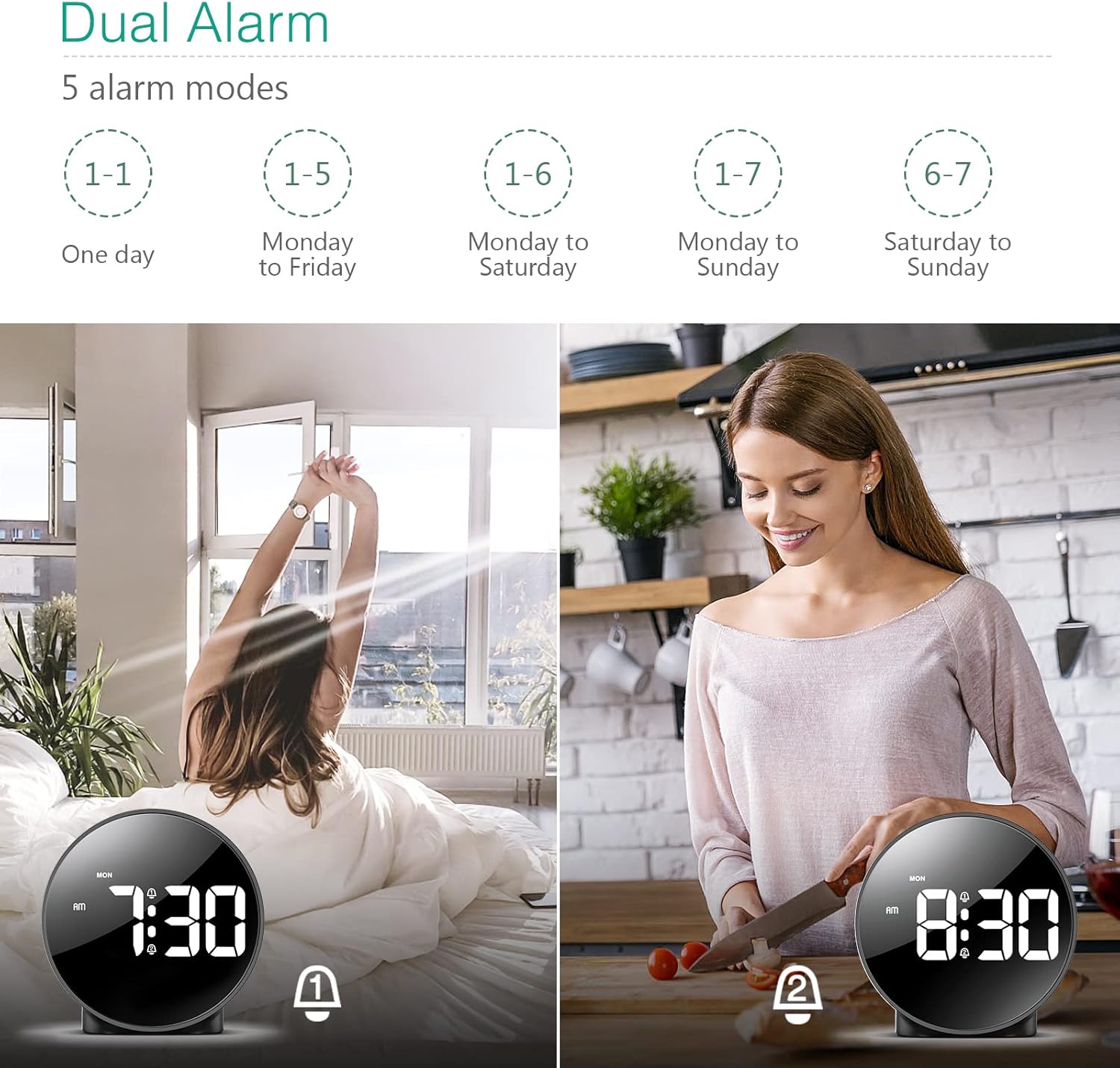
Figure 4: Illustration of the dual alarm functionality with various scheduling modes.
4.3 స్నూజ్ ఫంక్షన్
అలారం మోగినప్పుడు, పెద్ద బటన్ను నొక్కండి SNOOZE / LIGHT button on the top of the clock to activate the snooze function. The alarm will pause for 5 minutes and then sound again. You can repeat this process multiple times.

Figure 5: Activating the snooze function by touching the top of the clock.
4.4 ప్రకాశం సర్దుబాటు
The clock features 4 levels of adjustable brightness. Short press the SNOOZE / LIGHT button on the top of the clock to cycle through the brightness levels (100%, 80%, 60%, and 0% (off)).

Figure 6: Visual representation of the four adjustable brightness levels of the clock display.
4.5 పగటి ఆదా సమయం (DST)
The clock supports Daylight Saving Time adjustment. Refer to the included mini-manual for specific instructions on how to activate or deactivate DST.
5 ఫీచర్లు
- HD LED డిస్ప్లే: Large, high-definition curved display for clear time reading.
- Dual Alarms with 5 Modes: Set two independent alarms with flexible scheduling options (one-day, weekdays, weekends, or every day).
- సర్దుబాటు ప్రకాశం: Four levels of display brightness, including an off mode, to suit various environments and preferences.
- తాత్కాలికంగా ఆపివేయి ఫంక్షన్: Provides an additional 5 minutes of sleep with a simple touch.
- 12/24 గంటల ఫార్మాట్: Easily switch between standard and military time displays.
- ద్వంద్వ విద్యుత్ సరఫరా: Operates via USB cable for continuous display or AAA batteries for power-saving mode (display turns off after 8 seconds).
- కాంపాక్ట్ డిజైన్: Suitable for various locations such as bedrooms, living rooms, offices, or for travel.
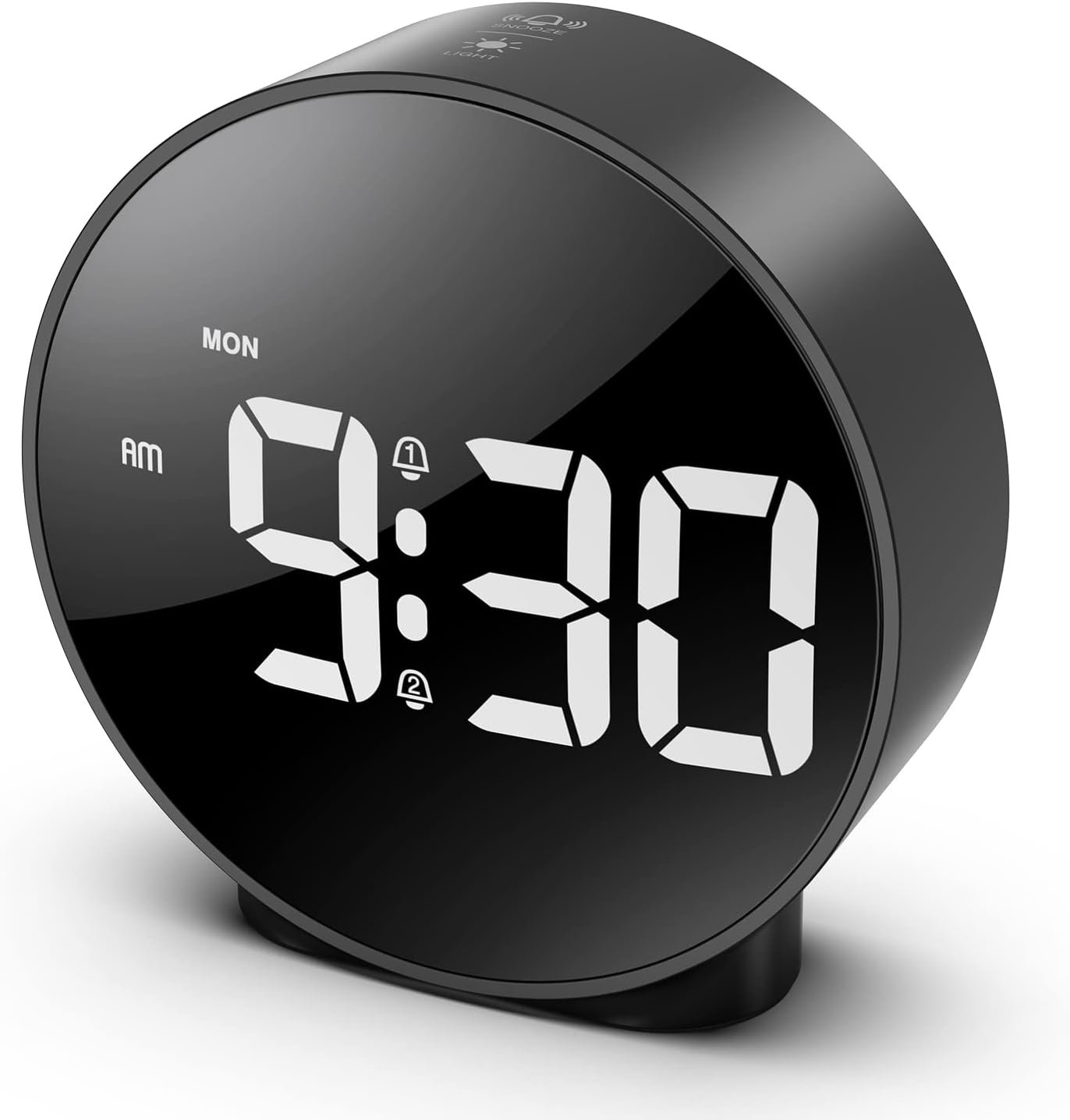
Figure 7: The ORIA Digital Alarm Clock showcasing its clear HD LED display.
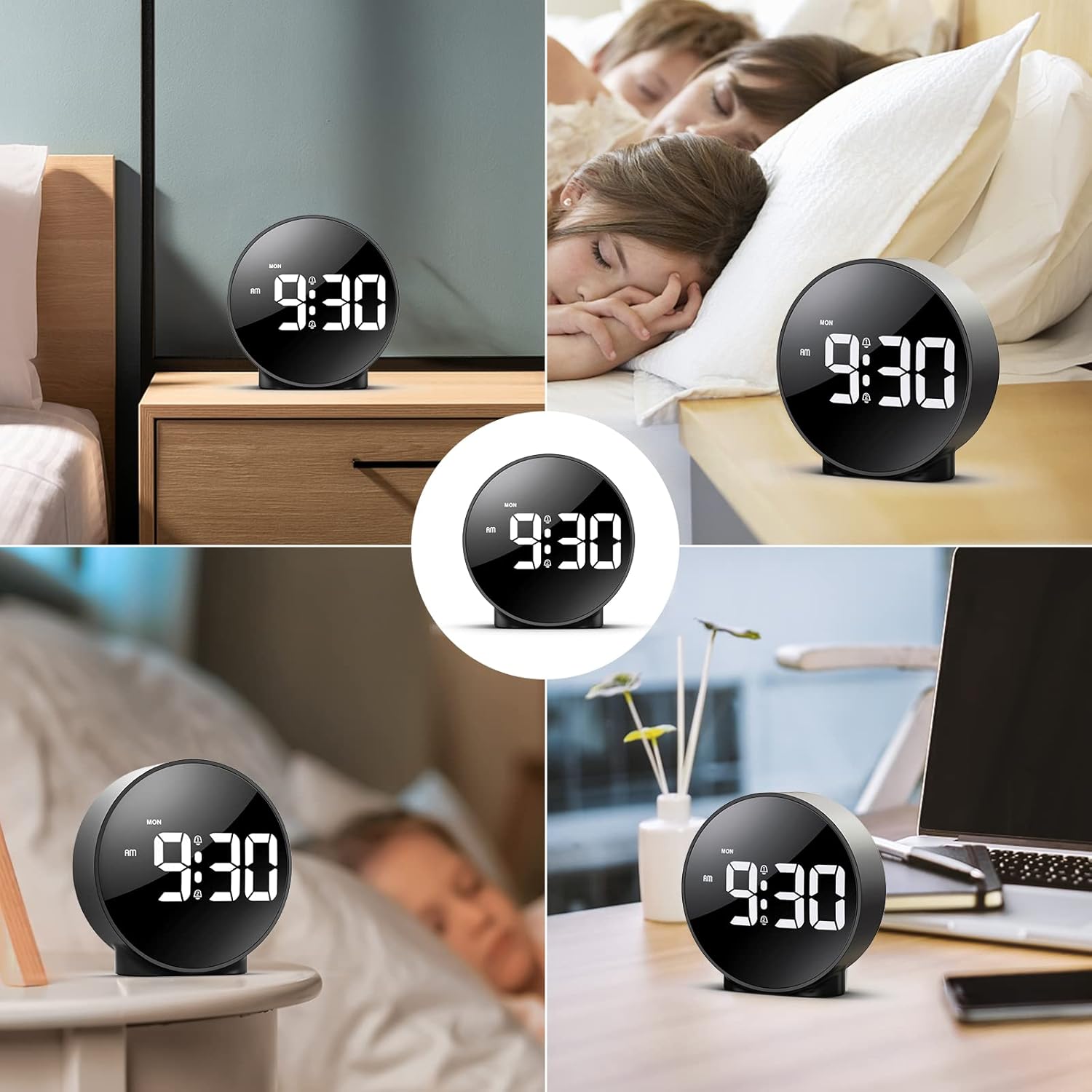
Figure 8: The versatile ORIA Digital Alarm Clock integrated into different environments like a bedroom, office, and living room.
6. నిర్వహణ
- మృదువైన, పొడి వస్త్రంతో గడియారాన్ని శుభ్రం చేయండి. రాపిడి క్లీనర్లు లేదా ద్రావకాలను ఉపయోగించవద్దు.
- ఎక్కువ కాలం ఉపయోగంలో లేకపోతే, లీకేజీని నివారించడానికి బ్యాటరీలను తీసివేయండి.
7. ట్రబుల్షూటింగ్
- Display is off in battery mode: This is normal for power saving. Touch the top button to activate the display for 8 seconds. For continuous display, use the USB power cable.
- బటన్లు స్పందించడం లేదు: Try resetting the clock by pressing the small రీసెట్ చేయండి button located on the back panel using a thin object (e.g., a paperclip).
- అలారం మోగడం లేదు: Ensure the alarm is activated (alarm icon visible on display) and the volume is not set to zero.
- తప్పు సమయం/తేదీ: Re-enter time setting mode and adjust the time and date as per Section 4.1.
8. స్పెసిఫికేషన్లు
| బ్రాండ్ | ORIA |
| మోడల్ సంఖ్య | OUS-HY-WA109B |
| రంగు | Black Case & White Digit |
| ప్రదర్శన రకం | డిజిటల్ LED |
| ఉత్పత్తి కొలతలు | 4.29"అడుగు x 4.8"అడుగు |
| వస్తువు బరువు | 5.9 ఔన్సులు (0.17 కిలోగ్రాములు) |
| శక్తి మూలం | Corded Electric & Battery Powered (3x AAA, not included) |
| మెటీరియల్ | ప్లాస్టిక్ |
| ప్రత్యేక లక్షణాలు | Alarm, LED Display, Adjustable Brightness, Dual Alarms, Snooze |
9. వారంటీ మరియు మద్దతు
- 1-సంవత్సరం వారంటీ: ఉత్పత్తి 1 సంవత్సరాల పరిమిత వారంటీతో కవర్ చేయబడింది.
- 90-Day Free Replacements: Enjoy free replacements for eligible issues within 90 days of purchase.
- 30-రోజుల ఉచిత వాపసులు: Returns are accepted within 30 days of purchase.
- 24/7 కస్టమర్ సపోర్ట్: For any inquiries or assistance, please contact ORIA customer support.
- జీవితకాల సాంకేతిక మద్దతు: Benefit from lifetime technical support for your product.
మరింత సహాయం కోసం, దయచేసి సందర్శించండి ORIA Store on Amazon.


