పరిచయం
Thank you for choosing the ROCAM CR1023 7-Inch Digital Alarm Clock. This manual provides detailed instructions for setting up, operating, and maintaining your new alarm clock. Please read this manual thoroughly before use to ensure optimal performance and longevity of your device.

The ROCAM CR1023 digital alarm clock features a large blue LED display, with a smartphone and wireless earbuds charging via its integrated USB ports.
ప్యాకేజీ విషయాలు
దయచేసి ఈ క్రింది అంశాల కోసం ప్యాకేజీని తనిఖీ చేయండి:
- 1 x ROCAM CR1023 Digital Alarm Clock
- 1 x Power Adapter with Cable (AC 100-240V compatible)
- 1 x వినియోగదారు మాన్యువల్

The package includes the ROCAM CR1023 digital alarm clock, a power adapter with cable, and a user manual.
ఉత్పత్తి లక్షణాలు
- 7-Inch Large LED Display: Clear and bold digital time display.
- ద్వంద్వ అలారాలు: Set two independent alarms for different wake-up times.
- తాత్కాలికంగా ఆపివేయి ఫంక్షన్: Provides an additional 9 minutes of sleep.
- Adjustable Brightness (Dimmer): 0-100% dimming for display.
- టచ్ కంట్రోల్ నైట్ లైట్: Integrated night light with adjustable brightness.
- USB & Type-C Charging Ports: Conveniently charge your mobile devices (5V, 1A output).
- 7-Level Volume Adjustment: Customize alarm volume.
- 12/24 Hour & DST Mode: Switch between time formats and activate Daylight Saving Time.
- బ్యాటరీ బ్యాకప్: Retains time and alarm settings during power outages (requires 2 x AAA batteries, not included).
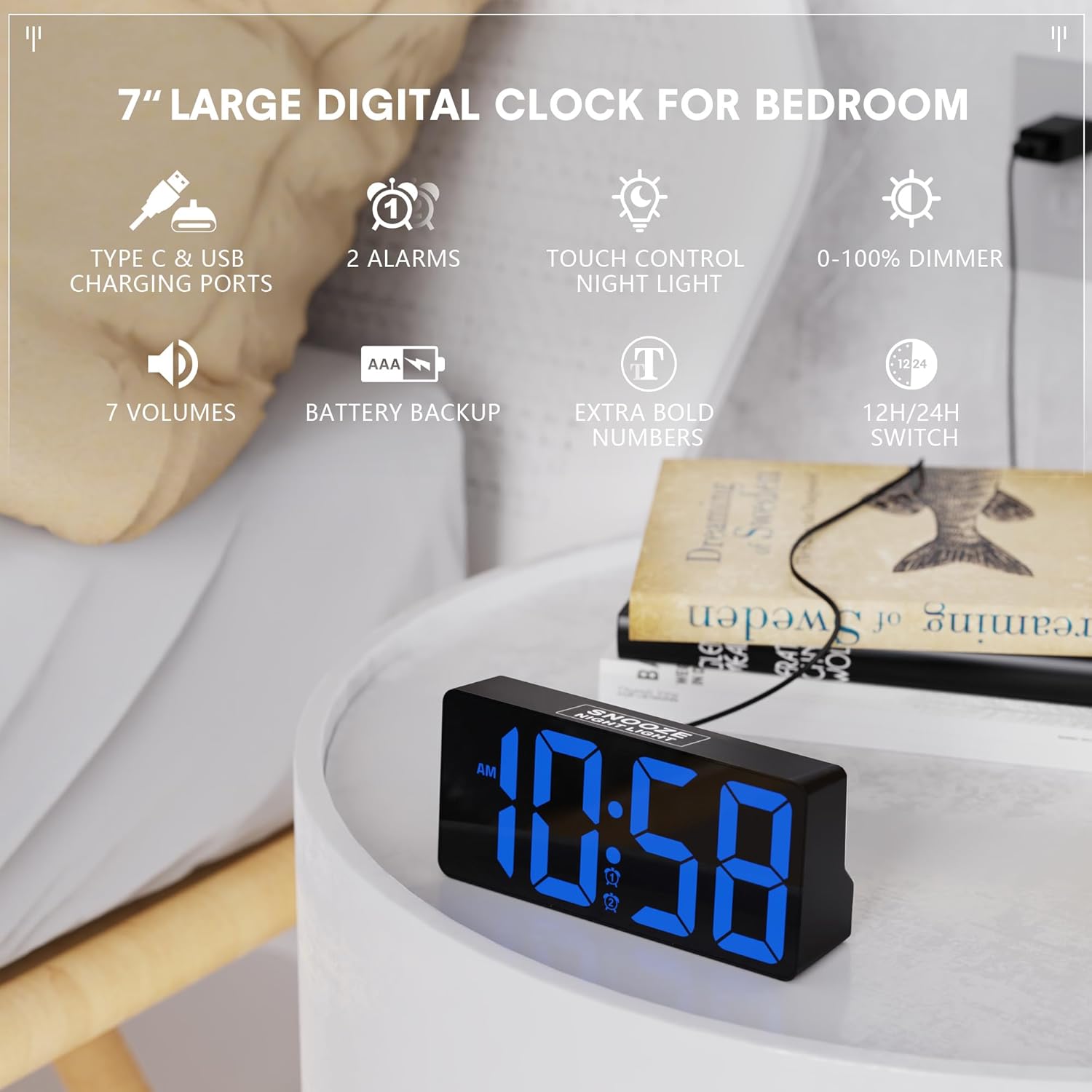
This image illustrates the ROCAM CR1023 digital alarm clock's main features, including its 7-inch display, dual alarms, touch-controlled night light, and USB charging capabilities.
సెటప్
1. పవర్ కనెక్షన్
- అలారం గడియారం మరియు అన్ని ఉపకరణాలను అన్ప్యాక్ చేయండి.
- Connect the provided power adapter cable to the DC IN port on the back of the clock.
- Plug the power adapter into a standard AC 100-240V wall outlet. The clock display will light up.
2. Battery Backup Installation (Optional but Recommended)
The battery backup function is designed to save your time and alarm settings during a power outage. The display will not remain on when operating on battery backup alone.
- Locate the battery compartment on the bottom of the clock.
- బ్యాటరీ కంపార్ట్మెంట్ కవర్ తెరవండి.
- Insert 2 x 1.5V AAA batteries (not included) according to the polarity markings (+/-).
- బ్యాటరీ కంపార్ట్మెంట్ కవర్ను సురక్షితంగా మూసివేయండి.
ఆపరేటింగ్ సూచనలు
1. సమయాన్ని నిర్ణయించడం
- నొక్కండి మరియు పట్టుకోండి TIME/DST button on the back of the clock until the hour digits flash.
- ఉపయోగించండి + or - గంటను సర్దుబాటు చేయడానికి బటన్లు.
- నొక్కండి TIME/DST గంటను నిర్ధారించి, నిమిషం సెట్టింగ్కు వెళ్లడానికి మళ్ళీ బటన్ను నొక్కండి. నిమిషం అంకెలు ఫ్లాష్ అవుతాయి.
- ఉపయోగించండి + or - నిమిషాలను సర్దుబాటు చేయడానికి బటన్లు.
- నొక్కండి TIME/DST సమయ సెట్టింగ్ మోడ్ను నిర్ధారించడానికి మరియు నిష్క్రమించడానికి మరోసారి బటన్ను నొక్కండి.
2. అలారాలను సెట్ చేయడం (అలారం 1 మరియు అలారం 2)
The clock supports two independent alarms.
- నొక్కండి మరియు పట్టుకోండి అలారం 1 బటన్ (అలారం 1 కోసం) లేదా అలారం 2 button (for Alarm 2) on the back until the alarm hour digits flash.
- ఉపయోగించండి + or - అలారం గంటను సర్దుబాటు చేయడానికి బటన్లు.
- Press the respective alarm button again to confirm the hour and move to minute setting. The alarm minute digits will flash.
- ఉపయోగించండి + or - అలారం నిమిషాలను సర్దుబాటు చేయడానికి బటన్లు.
- Press the respective alarm button one more time to confirm and exit alarm setting mode.
3. Activating/Deactivating Alarms
- క్లుప్తంగా నొక్కండి అలారం 1 or అలారం 2 అలారంను ఆన్ లేదా ఆఫ్ చేయడానికి బటన్.
- An alarm icon will appear on the display when the alarm is active.

The dual alarm feature allows for two separate wake-up times, and the snooze function provides an additional 9 minutes of sleep.
4. స్నూజ్ ఫంక్షన్
When an alarm sounds, touch the SNOOZE/NIGHT LIGHT area on the top of the clock to activate the snooze function. The alarm will pause for 9 minutes and then sound again.
5. Display Brightness Adjustment (Dimmer)
తిప్పండి మసకబారిన knob on the back of the clock to adjust the display brightness from 0% (off) to 100% (brightest).

The clock offers a 0-100% adjustable dimming feature, allowing users to set the display brightness from completely off to high, suitable for any environment.
6 నైట్ లైట్ ఫంక్షన్
తాకండి SNOOZE/NIGHT LIGHT area on the top of the clock to turn the night light on or off. Hold the touch area to adjust the brightness of the night light.
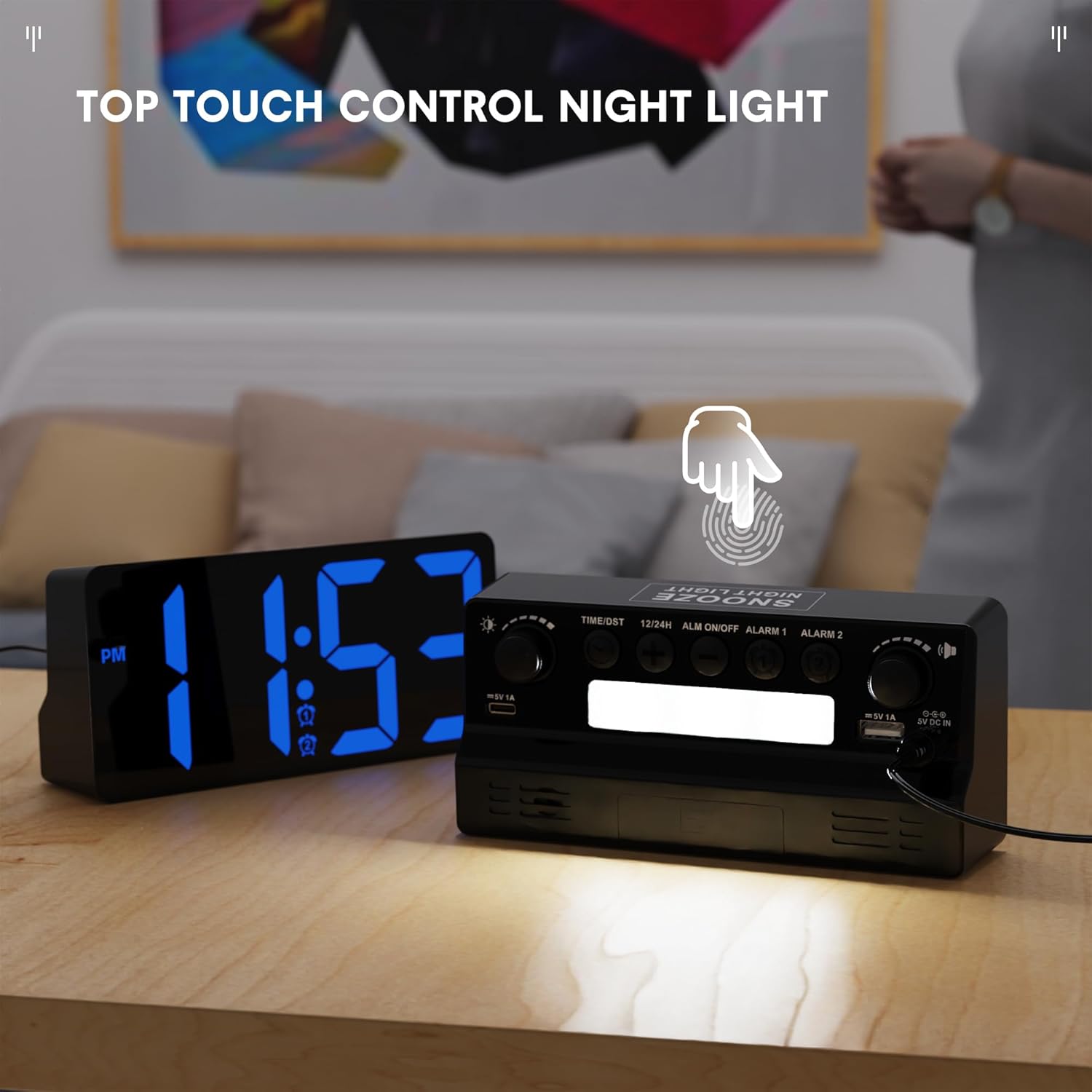
The integrated night light can be activated and controlled via a touch-sensitive area on the top of the clock, providing soft illumination.
7. 12/24 Hour Format and DST
- క్లుప్తంగా నొక్కండి 12/24H button on the back to switch between 12-hour and 24-hour time formats.
- క్లుప్తంగా నొక్కండి TIME/DST button to activate or deactivate Daylight Saving Time (DST). An indicator will appear on the display when DST is active.

Users can easily switch between 12-hour and 24-hour time formats, and activate Daylight Saving Time (DST) mode as needed.
Using the USB and Type-C Charging Ports
The ROCAM CR1023 features both a standard USB-A port and a Type-C port (5V, 1A output) for charging your mobile devices.
- Connect your device's charging cable to either the USB-A or Type-C port on the back of the clock.
- Ensure the clock is powered via the AC adapter for the charging ports to function.
- The charging ports are for convenience and provide standard 5V/1A output. Charging speed may vary depending on your device.

The clock provides convenient charging for mobile devices through its integrated USB and Type-C ports, as shown with two smartphones connected.
స్పెసిఫికేషన్లు
| ఫీచర్ | వివరాలు |
|---|---|
| మోడల్ | CR1023 |
| ప్రదర్శించు | 7-inch LED HD Display |
| AC అడాప్టర్ ఇన్పుట్ | AC 100-240V |
| డిమ్మర్ ప్రదర్శించు | 0-100% సర్దుబాటు |
| USB ఛార్జింగ్ పోర్ట్లు | Type C & USB (5V, 1A) |
| బ్యాకప్ బ్యాటరీ | 2 x 1.5V AAA బ్యాటరీలు (చేర్చబడలేదు) |
| ఉత్పత్తి బరువు | సుమారు 0.23 కిలోలు (0.5 పౌండ్లు) |
| ఉత్పత్తి కొలతలు | సుమారుగా 16.5 x 7.6 x 4.5 సెం.మీ (6.5 x 3 x 1.77 అంగుళాలు) |
నిర్వహణ
- శుభ్రపరచడం: మృదువైన, పొడి గుడ్డతో గడియారాన్ని తుడవండి. రాపిడి క్లీనర్లు లేదా ద్రావకాలను ఉపయోగించవద్దు.
- ప్లేస్మెంట్: Place the clock on a stable, flat surface away from direct sunlight, heat sources, and moisture.
- బ్యాటరీ భర్తీ: If using battery backup, replace AAA batteries annually or when they are depleted to ensure settings are retained during power interruptions.
ట్రబుల్షూటింగ్
- Clock display is blank:
- Ensure the power adapter is securely plugged into both the clock and a working wall outlet. If using battery backup during a power outage, the display will be blank, but settings are retained.
- అలారం మోగడం లేదు:
- Check if the alarm is activated (alarm icon visible on display). Ensure the alarm volume is not set to minimum. Verify the alarm time is set correctly.
- USB/Type-C charging not working:
- Confirm the clock is connected to AC power. Check if the charging cable is properly connected to both the clock and your device. Ensure your device is compatible with 5V/1A charging.
- పవర్ తర్వాత సమయం తప్పుగా ఉంది outage:
- If backup batteries were not installed or were depleted, the time may reset. Re-set the time manually. Ensure fresh AAA batteries are installed for future backup.
వారంటీ మరియు మద్దతు
For warranty information or technical support, please refer to the contact details provided with your purchase or visit the official ROCAM webవారంటీ క్లెయిమ్ల కోసం కొనుగోలు రుజువుగా మీ కొనుగోలు రసీదును ఉంచండి.


