ఉత్పత్తి ముగిసిందిview
The Baseus Bowie WM05 True Wireless Earbuds are designed to provide a superior audio experience by effectively eliminating ambient noise and offering seamless transitions between various listening modes. These earbuds feature a low-latency mode for synchronized audio and video, making them ideal for gaming and media consumption. With a large-capacity battery and efficient wireless technology, they offer extended usage throughout the day. An intelligent AI neural network algorithm enhances voice clarity during calls by filtering out surrounding noise, ensuring your conversations are loud and clear. The earbuds are available in a cream white finish.
ముఖ్య లక్షణాలు ఉన్నాయి:
- Effective ambient noise isolation and seamless mode switching.
- Low-latency mode for smooth audio and video synchronization.
- Large capacity battery with low-power wireless technology for extended use.
- Quick charging: up to two hours of battery life with only 10 minutes of charging.
- AI neural network algorithm for clear call quality by filtering ambient noise.

Image: Baseus Bowie WM05 True Wireless Earbuds shown inside their charging case, highlighting their compact and sleek design.
ప్యాకేజీ విషయాలు
దయచేసి ప్యాకేజీలో అన్ని అంశాలు ఉన్నాయని నిర్ధారించుకోండి:
- 1 x Pair of Baseus Bowie WM05 True Wireless Earbuds
- 1 x ఛార్జింగ్ కేస్
- 1 x USB-C ఛార్జింగ్ కేబుల్
- 3 x Pairs of Eartips (Small, Medium, Large)
- 1 x వినియోగదారు మాన్యువల్

Image: The retail packaging of the Baseus Bowie WM05 earbuds, displaying the product and key features.
సెటప్ గైడ్
1. ప్రారంభ ఛార్జింగ్
మొదటిసారి ఉపయోగించే ముందు, ఇయర్బడ్లు మరియు ఛార్జింగ్ కేస్ను పూర్తిగా ఛార్జ్ చేయండి. అందించిన USB-C కేబుల్ను కేస్లోని ఛార్జింగ్ పోర్ట్కు మరియు పవర్ సోర్స్కు కనెక్ట్ చేయండి. కేస్లోని ఇండికేటర్ లైట్ ఛార్జింగ్ స్థితిని చూపుతుంది.

చిత్రం: పైన view of the Baseus Bowie WM05 charging case, showing the Baseus logo and smooth finish.
2. పరికరంతో జత చేయడం
- ఇయర్బడ్లు ఛార్జింగ్ కేసులో ఉన్నాయని మరియు కేస్ మూత తెరిచి ఉందని నిర్ధారించుకోండి.
- మీ పరికరంలో (స్మార్ట్ఫోన్, టాబ్లెట్, మొదలైనవి), బ్లూటూత్ను ప్రారంభించండి.
- కోసం వెతకండి new Bluetooth devices. The earbuds should appear as "Baseus Bowie WM05".
- Select "Baseus Bowie WM05" to pair. Once connected, a voice prompt will confirm successful pairing.
- The earbuds will automatically connect to the last paired device when removed from the case and Bluetooth is enabled on the device.
ఆపరేటింగ్ సూచనలు
ఇయర్బడ్స్ ధరించడం
Choose the correct size eartips for a comfortable and secure fit. Insert the earbuds into your ears and gently twist them until they feel snug and the sound quality is optimal.
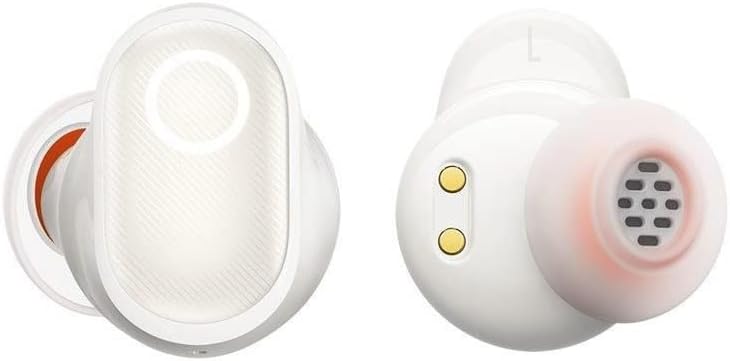
చిత్రం: వివరణాత్మకం view of the Baseus Bowie WM05 earbuds, showing the in-ear design and charging contacts.
టచ్ కంట్రోల్స్
The Baseus Bowie WM05 earbuds feature touch-sensitive areas for easy control of music playback, calls, and modes.
| చర్య | నియంత్రణ |
|---|---|
| ప్లే/పాజ్ చేయండి | ఇయర్బడ్ని రెండుసార్లు నొక్కండి |
| తదుపరి ట్రాక్ | Triple-tap right earbud |
| మునుపటి ట్రాక్ | Triple-tap left earbud |
| సమాధానం/కాల్ ముగించు | ఇయర్బడ్ని రెండుసార్లు నొక్కండి |
| కాల్ని తిరస్కరించండి | ఇయర్బడ్ని 2 సెకన్ల పాటు నొక్కి, పట్టుకోండి |
| తక్కువ-జాప్యం మోడ్ను సక్రియం చేయండి | ఎడమ ఇయర్బడ్ని 2 సెకన్ల పాటు నొక్కి, పట్టుకోండి |
| Toggle Noise Control (ANC/Transparency) | కుడి ఇయర్బడ్ని 2 సెకన్ల పాటు నొక్కి పట్టుకోండి |
| వాయిస్ అసిస్టెంట్ని యాక్టివేట్ చేయండి | Quadruple-tap either earbud |
నిర్వహణ మరియు సంరక్షణ
Proper maintenance ensures the longevity and optimal performance of your Baseus Bowie WM05 earbuds.
- శుభ్రపరచడం: ఇయర్బడ్లు మరియు ఛార్జింగ్ కేస్ను మృదువైన, పొడి, మెత్తటి బట్టతో క్రమం తప్పకుండా శుభ్రం చేయండి. రాపిడి క్లీనర్లను లేదా ద్రావకాలను ఉపయోగించవద్దు.
- ఇర్టిప్స్: అవసరమైతే చెవి కొనలను తీసివేసి తేలికపాటి సబ్బు మరియు నీటితో శుభ్రం చేయండి. తిరిగి అతికించే ముందు అవి పూర్తిగా పొడిగా ఉన్నాయని నిర్ధారించుకోండి.
- ఛార్జింగ్ పరిచయాలు: Gently wipe the charging contacts on both the earbuds and inside the case with a dry cotton swab to prevent accumulation of dirt or debris.
- నిల్వ: ఉపయోగంలో లేనప్పుడు, ఇయర్బడ్లను రక్షించడానికి మరియు వాటిని ఛార్జ్లో ఉంచడానికి వాటి ఛార్జింగ్ కేసులో నిల్వ చేయండి. తీవ్రమైన ఉష్ణోగ్రతలను నివారించండి.
- నీటి నిరోధకత: The earbuds are not waterproof. Avoid exposure to excessive moisture, rain, or submersion in water.
ట్రబుల్షూటింగ్
మీ ఇయర్బడ్లతో సమస్యలు ఎదురైతే, ఈ క్రింది సాధారణ పరిష్కారాలను చూడండి:
- ధ్వని లేదు:
- ఇయర్బడ్లు ఛార్జ్ అయ్యాయని నిర్ధారించుకోండి.
- మీ పరికరంలో బ్లూటూత్ కనెక్షన్ను తనిఖీ చేయండి.
- Increase volume on both the earbuds and your device.
- ఇయర్బడ్లను తిరిగి జత చేయడానికి ప్రయత్నించండి.
- ఇయర్బడ్స్ జత చేయడం లేదు:
- Ensure earbuds are in pairing mode (open case lid).
- మీ పరికరంలో బ్లూటూత్ను ఆఫ్ చేసి ఆన్ చేయండి.
- Forget "Baseus Bowie WM05" from your device's Bluetooth list and try pairing again.
- ఇయర్బడ్లకు ఇతర పరికరాలు కనెక్ట్ కాలేదని నిర్ధారించుకోండి.
- ఛార్జింగ్ సమస్యలు:
- Check if the USB-C cable is properly connected.
- వేరే USB-C కేబుల్ లేదా పవర్ అడాప్టర్ని ప్రయత్నించండి.
- ఇయర్బడ్లు మరియు కేస్ రెండింటిలోనూ ఛార్జింగ్ కాంటాక్ట్లను శుభ్రం చేయండి.
- పేలవమైన కాల్ నాణ్యత:
- మీ చెవుల్లో ఇయర్బడ్లు సరిగ్గా అమర్చబడ్డాయని నిర్ధారించుకోండి.
- Check for strong Bluetooth signal (stay close to your device).
- మైక్రోఫోన్ అడ్డుపడకుండా చూసుకోండి.
సమస్యలు కొనసాగితే, దయచేసి Baseus కస్టమర్ సపోర్ట్ను సంప్రదించండి.
స్పెసిఫికేషన్లు
| ఫీచర్ | వివరాలు |
|---|---|
| బ్రాండ్ | బేసియస్ |
| మోడల్ పేరు | బౌవీ WM05 |
| అంశం మోడల్ సంఖ్య | NGTW200002 |
| రంగు | క్రీమ్ వైట్ |
| చెవి ప్లేస్మెంట్ | ఇన్-ఇయర్ |
| నాయిస్ కంట్రోల్ | యాక్టివ్ నాయిస్ రద్దు |
| కనెక్టివిటీ టెక్నాలజీ | వైర్లెస్ |
| వైర్లెస్ కమ్యూనికేషన్ టెక్నాలజీ | బ్లూటూత్ |
| ఉత్పత్తి కొలతలు | 10 x 5 x 3 సెం.మీ |
| వస్తువు బరువు | 230 గ్రాములు |
| బ్యాటరీలు | 1 Non-standard battery required. (Included) |
| మొదట అందుబాటులో ఉన్న తేదీ | సెప్టెంబర్ 8, 2022 |
వారంటీ మరియు మద్దతు
Baseus products are manufactured to the highest quality standards. For information regarding warranty coverage, please refer to the warranty card included in your product packaging or visit the official Baseus webసైట్.
For technical support, troubleshooting assistance, or any product-related inquiries, please contact Baseus customer service through their official channels. Contact information can typically be found on the product packaging or their official webసైట్.


