పరిచయం
This instruction manual provides detailed information on the safe and efficient operation, maintenance, and troubleshooting of your Severin KA 4851 FILKA filter coffee machine with integrated grinder. Please read this manual thoroughly before first use and keep it for future reference.
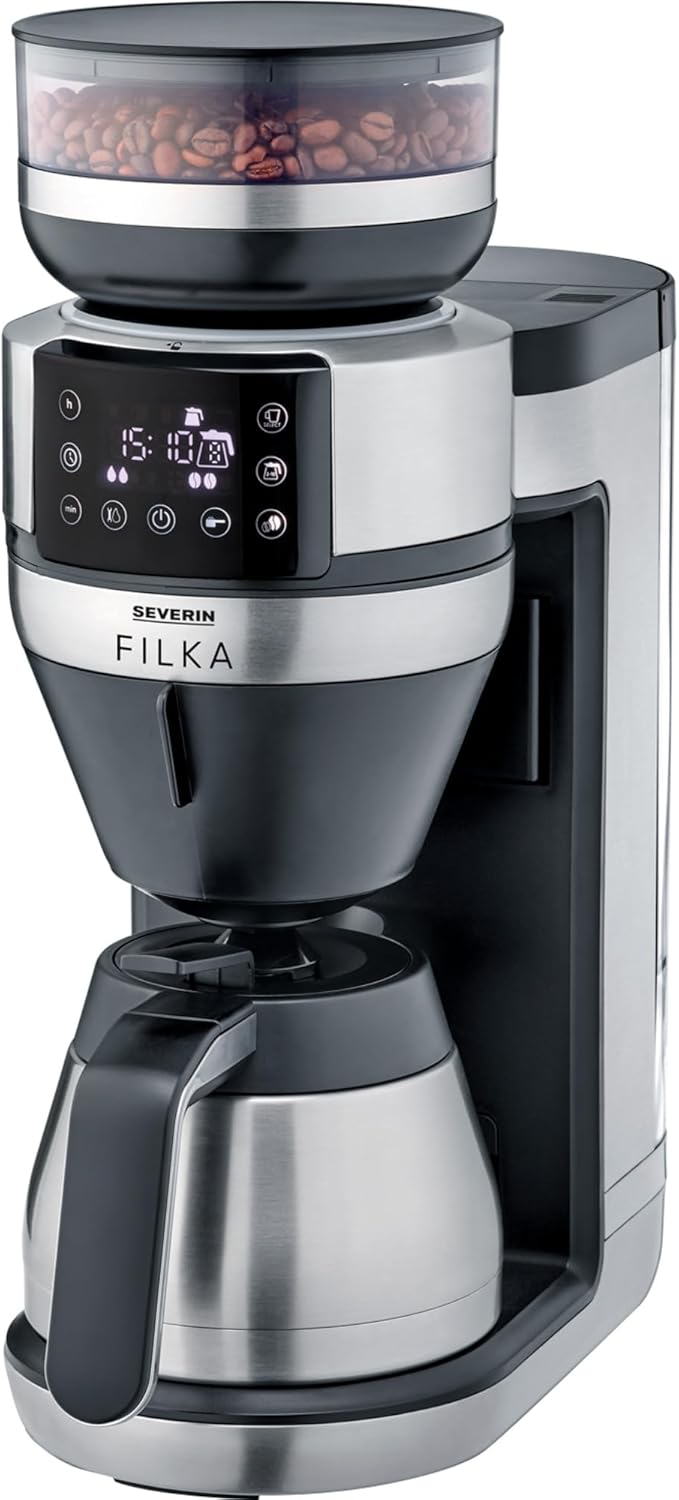
Image: The Severin KA 4851 FILKA coffee machine, featuring a sleek silver and black design with a bean hopper on top, a digital display, and a thermal carafe at the base.
భద్రతా సమాచారం
ఉపకరణానికి గాయం లేదా నష్టం జరగకుండా ఉండటానికి ఎల్లప్పుడూ క్రింది భద్రతా జాగ్రత్తలను గమనించండి:
- వాల్యూమ్ నిర్ధారించుకోండిtage indicated on the rating plate matches your mains supply.
- ఉపకరణం, త్రాడు లేదా ప్లగ్ నీటిలో లేదా ఇతర ద్రవాలలో ముంచవద్దు.
- పరికరాన్ని పిల్లలకు అందుబాటులో లేకుండా ఉంచండి.
- Unplug the appliance from the mains socket when not in use, before cleaning, or in case of malfunction.
- దెబ్బతిన్న త్రాడు లేదా ప్లగ్తో ఉపకరణాన్ని ఆపరేట్ చేయవద్దు.
- అసలు ఉపకరణాలు మరియు విడిభాగాలను మాత్రమే ఉపయోగించండి.
- Do not open the housing of the appliance. Repairs should only be carried out by authorized personnel.
- ఉపకరణం గృహ వినియోగం కోసం మాత్రమే ఉద్దేశించబడింది.
- Avoid contact with hot surfaces, especially the brewing unit and hot water/coffee.
ఉత్పత్తి ముగిసిందిview
Familiarize yourself with the components of your Severin KA 4851 FILKA coffee machine:
- 1. బీన్ హాప్పర్: For storing whole coffee beans.
- 2. Grinder: Integrated conical burr grinder for fresh grinding.
- 3. వాటర్ ట్యాంక్: మంచినీటితో నింపడానికి తొలగించగల ట్యాంక్.
- 4. నియంత్రణ ప్యానెల్: Digital display and buttons for settings and operation.
- 5. Brewing Unit: Where coffee is brewed.
- 6. Permanent Gold Tone Filter: గ్రౌండ్ కాఫీ కోసం పునర్వినియోగ ఫిల్టర్.
- 7. Drip Stop: Prevents dripping when the carafe is removed.
- 8. Thermal Carafe: Insulated carafe to keep coffee warm.
- 9. Cup Control Platform: Adjustable platform for various cup and carafe sizes.

Image: A user's hand interacting with the Severin KA 4851 FILKA coffee machine, highlighting its slim design and the thermal jug. The image also points out features like "Easy Clean" and "Super Silent".
సెటప్
- అన్ప్యాకింగ్: అన్ని ప్యాకేజింగ్ సామాగ్రిని జాగ్రత్తగా తీసివేసి, ఏదైనా నష్టం జరిగిందో లేదో తనిఖీ చేయండి. అవసరమైతే భవిష్యత్తులో రవాణా కోసం ప్యాకేజింగ్ను ఉంచండి.
- ప్రారంభ శుభ్రపరచడం: Before first use, clean all removable parts (water tank, bean hopper, permanent filter, thermal carafe) with warm water and a mild detergent. Wipe the main unit with a damp గుడ్డ.
- స్థానం: Place the appliance on a stable, level, and heat-resistant surface, away from heat sources and direct sunlight. Ensure adequate ventilation.
- First Use (Rinsing Cycle):
- Fill the water tank with fresh cold water up to the MAX mark.
- Place the empty thermal carafe with its lid closed on the warming plate.
- Run a full brewing cycle without coffee beans or ground coffee to rinse the internal components. Discard the water. Repeat this process 2-3 times.
ఆపరేటింగ్ సూచనలు
Brewing Coffee from Whole Beans
- వాటర్ ట్యాంక్ నింపండి: Fill the water tank with fresh, cold water according to the desired number of cups. The "Cup Control" feature automatically draws the necessary amount of water.
- కాఫీ గింజలను జోడించండి: బీన్ హాప్పర్ మూత తెరిచి దానిలో మొత్తం కాఫీ గింజలను నింపండి. మూతను సురక్షితంగా మూసివేయండి.
- ఫిల్టర్ని చొప్పించండి: Ensure the permanent gold tone filter is correctly inserted into the brewing unit. You may also use a traditional paper filter if preferred.
- Place Carafe/Cup: Place the thermal carafe on the warming plate for multiple cups, or adjust the Cup Control platform and place your single cup/travel mug for individual servings.
- సెట్టింగ్లను ఎంచుకోండి: Use the control panel to select the desired coffee strength and number of cups. The machine offers flexible options for various container sizes.
- బ్రూయింగ్ ప్రారంభించండి: Press the start button. The machine will grind the beans, brew the coffee, and dispense it into your chosen container.
గ్రౌండ్ కాఫీ నుండి కాఫీని తయారు చేయడం
- వాటర్ ట్యాంక్ నింపండి: వాటర్ ట్యాంక్ను తాజా, చల్లటి నీటితో నింపండి.
- గ్రౌండ్ కాఫీ జోడించండి: Open the brewing unit and add the desired amount of pre-ground coffee into the permanent gold tone filter (or paper filter).
- Place Carafe/Cup: Place the thermal carafe or your single cup/travel mug.
- సెట్టింగ్లను ఎంచుకోండి: Use the control panel to select the ground coffee mode and desired strength/cups.
- బ్రూయింగ్ ప్రారంభించండి: ప్రారంభ బటన్ను నొక్కండి.
ప్రోగ్రామబుల్ ఫీచర్లు
The Severin KA 4851 FILKA features a programmable timer. Refer to the control panel instructions on the display to set the desired brewing time for automatic start.

Image: An illustration highlighting key features of the Severin KA 4851 FILKA, including "Cup Control" for automatic water measurement, "Flexible & Individual" 5-in-1 compatibility for various containers, "Hot & Strong" brewing temperature up to 96°C, and the "Gold Tone Filter" as a reusable alternative to paper filters.
నిర్వహణ మరియు శుభ్రపరచడం
క్రమం తప్పకుండా శుభ్రపరచడం మరియు నిర్వహణ మీ కాఫీ యంత్రం యొక్క ఉత్తమ పనితీరు మరియు దీర్ఘాయువును నిర్ధారిస్తాయి.
రోజువారీ శుభ్రపరచడం
- ప్రతి ఉపయోగం తర్వాత, ఉపకరణాన్ని అన్ప్లగ్ చేసి, చల్లబరచడానికి అనుమతించండి.
- Remove and empty the permanent gold tone filter. Rinse it thoroughly under running water. It is dishwasher-safe.
- Empty and rinse the thermal carafe and its lid.
- ప్రకటనతో ఉపకరణం యొక్క బాహ్య భాగాన్ని తుడవండిamp గుడ్డ. రాపిడి క్లీనర్లను ఉపయోగించవద్దు.
- Clean the drip tray and Cup Control platform.
descaling
Depending on water hardness and frequency of use, descaling is necessary to prevent limescale buildup. The machine may indicate when descaling is required. Use a commercially available descaling agent suitable for coffee machines and follow the manufacturer's instructions. Always rinse the machine thoroughly with several cycles of fresh water after descaling.
గ్రైండర్ శుభ్రపరచడం
Periodically clean the grinder to remove coffee oil residue and old grounds. Refer to the specific instructions in the appliance's digital display or a more detailed manual for grinder cleaning, as this may involve removing specific parts.
ట్రబుల్షూటింగ్
| సమస్య | సాధ్యమైన కారణం | పరిష్కారం |
|---|---|---|
| కాఫీ కాయదు లేదా నెమ్మదిగా ప్రవహిస్తుంది. | Water tank empty; filter clogged; limescale buildup; carafe not correctly placed. | Fill water tank; clean filter; descale the machine; ensure carafe is properly seated. |
| కాఫీ రుచి బలహీనంగా లేదా చాలా బలంగా ఉంటుంది. | Incorrect coffee-to-water ratio; grind setting too coarse/fine; old coffee beans. | Adjust coffee quantity; adjust grind setting; use fresh coffee beans. |
| గ్రైండర్ శబ్దం చేస్తుంది లేదా గ్రైండింగ్ చేయడం లేదు. | Bean hopper empty; foreign object in grinder; grinder clogged. | Fill bean hopper; check for and remove foreign objects; clean grinder. |
| యంత్రం నుండి నీరు లీక్ అవుతుంది. | వాటర్ ట్యాంక్ సరిగ్గా అమర్చబడలేదు; అంతర్గత భాగాల సమస్య. | Ensure water tank is securely in place. If leaking persists, contact customer support. |
స్పెసిఫికేషన్లు
- బ్రాండ్: Severin
- మోడల్ సంఖ్య: KA 4851
- రంగు: Brushed, matte, black, silver-colored
- కొలతలు (L x W x H): 17 x 38 x 46 సెం.మీ
- బరువు: 8.2 కిలోలు
- సామర్థ్యం: 350 Milliliters (Note: This capacity seems low for a coffee machine, likely refers to a specific component or is a typo in source data. Typically coffee machines measure capacity in liters or cups for the carafe.)
- వాల్యూమ్tage: 230 వోల్ట్లు
- మెటీరియల్: స్టెయిన్లెస్ స్టీల్
- ప్రత్యేక లక్షణాలు: Permanent filter, Programmable
- రకం: Electric Filter Coffee Machine
వారంటీ మరియు మద్దతు
For warranty information, technical support, or spare parts, please contact SEVERIN customer service directly. Refer to the official SEVERIN website or your purchase documentation for contact details and specific warranty terms applicable to your region.
You can visit the official SEVERIN store on Amazon for more information: సెవెరిన్ స్టోర్


