1. పరిచయం మరియు ఓవర్view
The LASER TREE LT-4LDS-V2 is an upgraded 20W optical power laser module kit designed for DIY laser engraving and cutting machines. This module features advanced quad-beam compression spot technology, delivering powerful and precise results for various materials.
It is capable of cutting materials such as 10mm plywood, 8mm acrylic, and 6mm MDF in a single pass. Additionally, it can engrave and cut thin stainless steel sheets. The module includes an 80W input laser head, ensuring stable optical output power for consistent performance. Its fixed focus design at 40mm and high stability connector contribute to reliable operation.
The LT-4LDS-V2 is designed for ease of installation and broad compatibility with most engraving machines on the market, thanks to an included adapter board. It supports both Digital (TTL/PWM) and Analog Modulation.

Key features of the LT-4LDS-V2 laser module, highlighting its 20W optical power, quad-beam compression technology, precise spot size, integrated driver, air assist capability, focus-free operation, eye protection, and material cutting capacities.
2. భద్రతా సమాచారం
WARNING: This product contains a high-power laser. Improper use can cause serious injury, including permanent eye damage and skin burns. Always follow safety guidelines.
- కంటి రక్షణ: Always wear certified laser safety goggles (OD4+ or higher for 450nm blue laser) when operating or observing the laser module. Never look directly into the laser beam or its reflection.
- చర్మ రక్షణ: Avoid direct exposure of skin to the laser beam.
- అగ్ని ప్రమాదం: Laser cutting and engraving can generate heat and sparks, potentially igniting flammable materials. Always operate in a well-ventilated area, have a fire extinguisher nearby, and never leave the machine unattended during operation.
- వెంటిలేషన్: Ensure adequate ventilation to remove fumes and smoke produced during laser processing, which can be harmful.
- పిల్లలు మరియు పెంపుడు జంతువులు: Keep children and pets away from the laser machine and work area.
- విద్యుత్ సరఫరా: Ensure the power supply meets the specified requirements (DC24V-4A minimum).
- అత్యసవర నిలుపుదల: Familiarize yourself with the emergency stop procedure for your engraving machine.

Detail of the new protective cover design, which effectively filters blue light during engraving or cutting, providing enhanced eye protection for the user.
3. ఉత్పత్తి భాగాలు
The LASER TREE LT-4LDS-V2 kit typically includes the following components:
- LASER TREE LT-4LDS-V2 Laser Module Head
- P-DA-01 Driver Adapter Board
- Power Adapter (DC24V-4A)
- మౌంటు ప్లేట్
- Air Assist Tube and Nozzle
- Control Cables (Signal and Power)
- Fixed Focus Lens (if separate)
- Accessories for Sliding Plate (screws, nuts)

పైగాview of the LASER TREE LT-4LDS-V2 20W laser module kit, including the laser head, driver adapter board, power adapter, cables, air assist tube, mounting plate, and accessories.
వివరంగా view of the LT-4LDS-V2 packing list, showing all included components, and technical drawings with outline dimensions and connection points for installation reference.
4. సెటప్ మరియు ఇన్స్టాలేషన్
The LT-4LDS-V2 laser module is designed for easy integration with most DIY laser engraving machines. Follow these general steps for installation:
- పవర్ ఆఫ్: Ensure your engraving machine is powered off and unplugged before beginning installation.
- మౌంటు: Attach the laser module to your engraving machine's gantry using the provided mounting plate and screws. Ensure it is securely fastened and aligned correctly. Refer to your engraving machine's manual for specific mounting points.
- Connect Driver Adapter Board: Connect the laser module to the P-DA-01 Driver Adapter Board using the appropriate cables.
- Connect Control Cables: Connect the control cables from the adapter board to your engraving machine's control board. The module supports Digital (TTL/PWM) and Analog Modulation. Ensure correct pin connections (VCC, GND, TTL/PWM, NULL).
- పవర్ కనెక్షన్: Connect the power adapter to the driver adapter board. Ensure your engraving machine can provide at least 24V 4A power supply. If not, use the provided adapter board with an external power source.
- Air Assist (Optional but Recommended): Connect the air assist tube to the air assist port on the laser module. If your machine has an air pump, connect it to the tube. Air assist significantly improves cutting quality and reduces charring.
- ఫోకస్ సర్దుబాటు: The LT-4LDS-V2 features a 40mm fixed focus. Ensure the distance from the laser nozzle to the material surface is approximately 40mm for optimal performance. Some models may have a fixed focus lever for easy adjustment.
5. ఆపరేటింగ్ సూచనలు
Once the laser module is installed and connected, you can begin operating it for engraving and cutting tasks. Always wear laser safety goggles during operation.
- సాఫ్ట్వేర్ సెటప్: Use compatible laser control software (e.g., LightBurn, LaserGRBL) to prepare your designs and set parameters.
- మెటీరియల్ ప్లేస్మెంట్: Place the material to be processed on the workbed, ensuring it is flat and secure.
- Focus Verification: Double-check the focus distance (approximately 40mm from the nozzle to the material surface).
- పారామీటర్ సెట్టింగ్లు: Adjust laser power, speed, and number of passes based on the material type and desired outcome. Refer to the table below for general guidelines.
- ఆపరేషన్ ప్రారంభించండి: Initiate the engraving or cutting process from your software. Monitor the operation closely.
- Air Assist Activation: If using air assist, ensure your air pump is active during cutting operations.
Recommended Parameters (Single Pass)
| మెటీరియల్ | మందం | శక్తి | వేగం |
|---|---|---|---|
| Bass Plywood | 10మి.మీ | 100% | 3mm/s |
| యాక్రిలిక్ | 8మి.మీ | 100% | 50మిమీ/మీ |
| MDF | 6మి.మీ | 100% | 3mm/s |
| స్టెయిన్లెస్ స్టీల్ షీట్ | 0.08మి.మీ | 100% | అవసరమైన విధంగా సర్దుబాటు చేయండి |
Note: These parameters are starting points. Optimal settings may vary depending on material composition, machine rigidity, and environmental factors. Always perform test cuts on scrap material first.

Comparison demonstrating the effect of air assist on laser cutting. The left image shows cleaner cuts with air assist, while the right image shows charring without it, emphasizing improved performance with air assistance.

Examples of single-pass cutting capabilities: 10mm bass plywood at 3mm/s, 8mm acrylic at 50mm/m, and 5mm MDF at 3mm/s, all at 100% power, showcasing the module's cutting efficiency.

Illustration of the high precision engraving resolution (0.08mm) achieved by the LT-4LDS-V2, comparing its detailed output to a less precise result from other modules, highlighting the fine spot size.

Examples of metal cutting capabilities, showing the laser module cutting 0.08mm metal sheets and various metal designs like an anchor, coffee cup, and bird silhouettes.
6. నిర్వహణ
Regular maintenance ensures the longevity and optimal performance of your laser module.
- లెన్స్ క్లీనింగ్: Periodically inspect and clean the laser lens. Use a soft, lint-free cloth and specialized lens cleaning solution (or isopropyl alcohol) to gently wipe away any dust, debris, or residue. A dirty lens can significantly reduce laser power and quality.
- ఫ్యాన్ క్లీనింగ్: The module features a built-in cooling fan. Ensure the fan vents are clear of obstructions and dust. Use compressed air to clean the fan and heatsink to maintain efficient heat dissipation.
- Air Assist Nozzle: If using air assist, ensure the nozzle is clear and free of blockages. Carbon buildup can occur and should be removed.
- కేబుల్ తనిఖీ: Regularly check all cables for any signs of wear, damage, or loose connections.
- నిల్వ: When not in use, store the laser module in a clean, dry environment, away from direct sunlight and extreme temperatures.
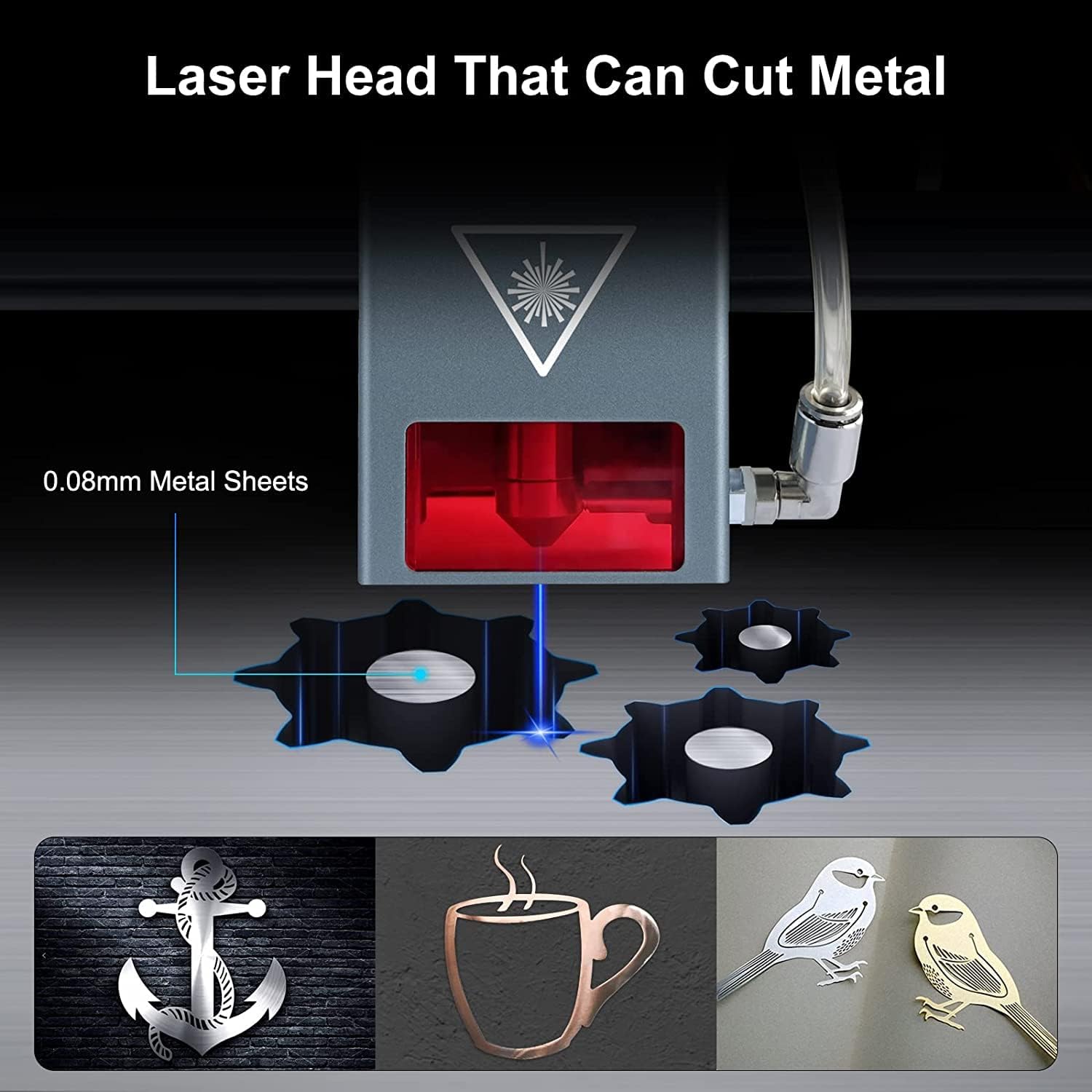
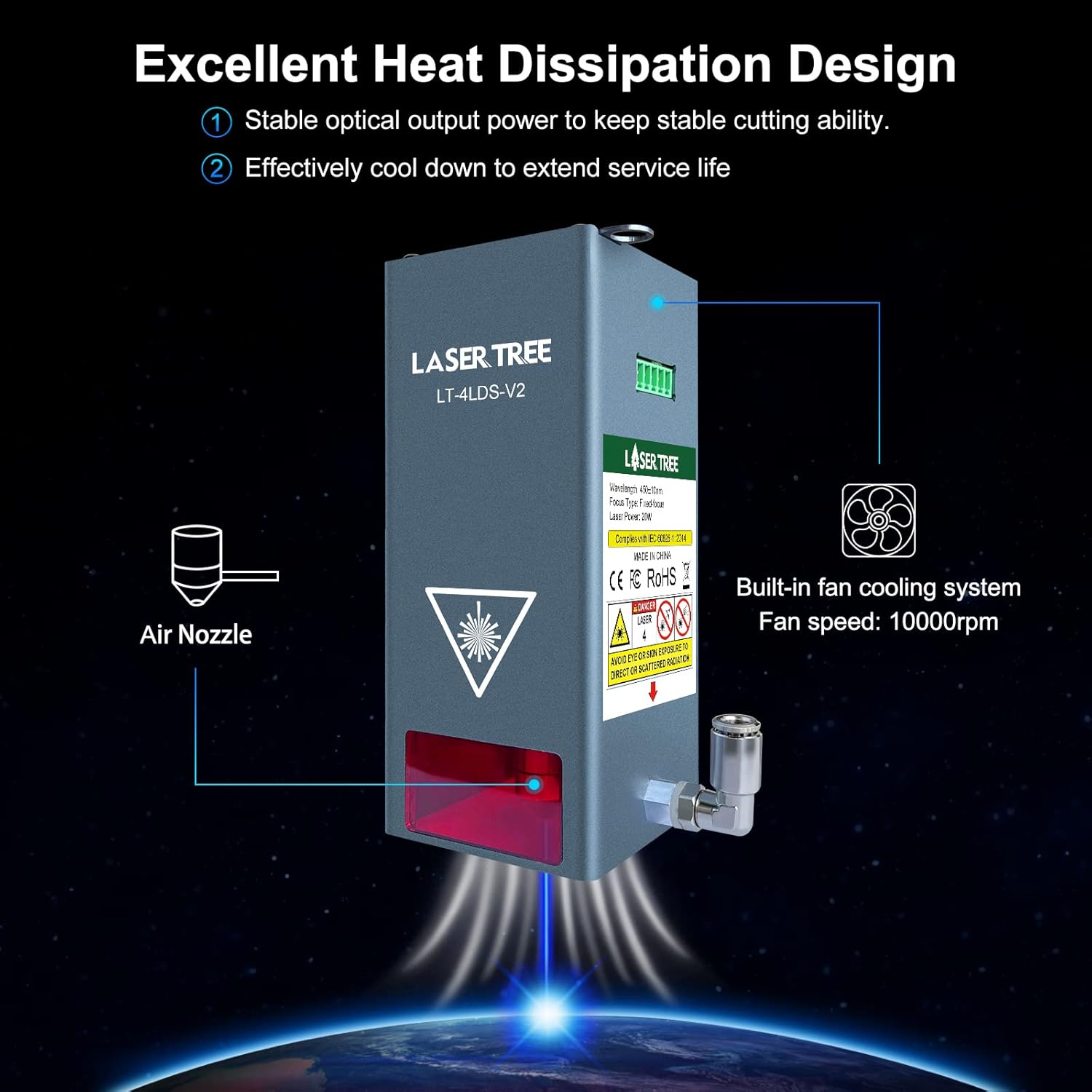
Diagram illustrating the excellent heat dissipation design of the laser module, featuring a built-in fan cooling system operating at 10000rpm to ensure stable optical output and extend service life.
7. ట్రబుల్షూటింగ్
If you encounter issues with your LASER TREE LT-4LDS-V2 module, refer to the common problems and solutions below:
- లేజర్ అవుట్పుట్ లేదు:
- పవర్ అడాప్టర్ సరిగ్గా కనెక్ట్ చేయబడి పవర్ అందుకుంటుందో లేదో తనిఖీ చేయండి.
- Verify all control cables are securely connected to the adapter board and the machine's control board.
- Ensure the engraving machine's power supply meets the 24V 4A requirement.
- Check software settings for laser power and enable/disable commands.
- Weak Laser Power / Poor Engraving/Cutting:
- Clean the laser lens. Dust or debris can significantly reduce power.
- Verify the focus distance (40mm) is accurate.
- Adjust laser power and speed settings in your software. Increase power or decrease speed for deeper cuts/engravings.
- Ensure air assist is properly connected and functioning for cutting tasks.
- Check for any physical obstructions in the laser path.
- మాడ్యూల్ వేడెక్కడం:
- Ensure the built-in cooling fan is operating.
- Clean any dust or debris from the fan and heatsink fins.
- Ensure adequate airflow around the module.
- అస్థిరమైన ఫలితాలు:
- Check for loose connections in power or signal cables.
- Ensure the material is securely fixed and not moving during operation.
- Verify machine calibration and belt tension.
If these steps do not resolve the issue, please contact LASER TREE technical support.
8. స్పెసిఫికేషన్లు
| స్పెసిఫికేషన్ | విలువ |
|---|---|
| బ్రాండ్ | లేజర్ చెట్టు |
| మోడల్ | LT-4LDS-V2 |
| ఆప్టికల్ పవర్ | 20W |
| ఇన్పుట్ పవర్ | 80W |
| తరంగదైర్ఘ్యం | 450nm (Blue Light) |
| స్పాట్ సైజు | 0.08mm * 0.1mm (Compressed) |
| ఇన్పుట్ వాల్యూమ్tage | DC24V-4A |
| ఆపరేటింగ్ కరెంట్ | 7A వరకు |
| ఫోకస్ రకం | స్థిర ఫోకస్ (40mm) |
| మాడ్యులేషన్ | Digital (TTL/PWM) and Analog |
| మెటీరియల్ | అల్యూమినియం |
| ఉత్పత్తి బరువు | 14.4 గ్రాములు |
| ఆపరేటింగ్ మోడ్ | ఆటోమేటిక్ |
| శీతలీకరణ వ్యవస్థ | Built-in Fan (10000rpm) |
9. వారంటీ మరియు మద్దతు
LASER TREE is committed to providing high-quality laser modules and excellent customer service.
- వారంటీ: We offer a 12-month warranty for our products from the date of purchase. This warranty covers manufacturing defects and malfunctions under normal use.
- సాంకేతిక మద్దతు: If you have any questions regarding the installation, operation, or troubleshooting of your LASER TREE LT-4LDS-V2 laser module, please do not hesitate to contact our professional technical support team.
- సంప్రదించండి: You can reach us via Amazon's messaging system or through our official website for timely assistance.


