పరిచయం
The NUX DA-30BT is a 30-watt personal monitor amplifier designed for electronic drums, keyboards, digital pianos, and synthesizers. It features Bluetooth connectivity for audio streaming and two independent input channels, allowing multiple musicians to share monitoring in various settings.
ప్యాకేజీ విషయాలు
దయచేసి ఈ క్రింది అంశాల కోసం పెట్టెను ఎంచుకోండి:
- NUX DA-30BT Personal Monitor Ampజీవితకాలం
- పవర్ కేబుల్
- Input Cables (as specified by manufacturer)
- వినియోగదారు మాన్యువల్ (ఈ పత్రం)
ఉత్పత్తి ముగిసిందిview
ముందు ప్యానెల్ నియంత్రణలు
The front panel of the DA-30BT provides all essential controls for input, tone, and power management.
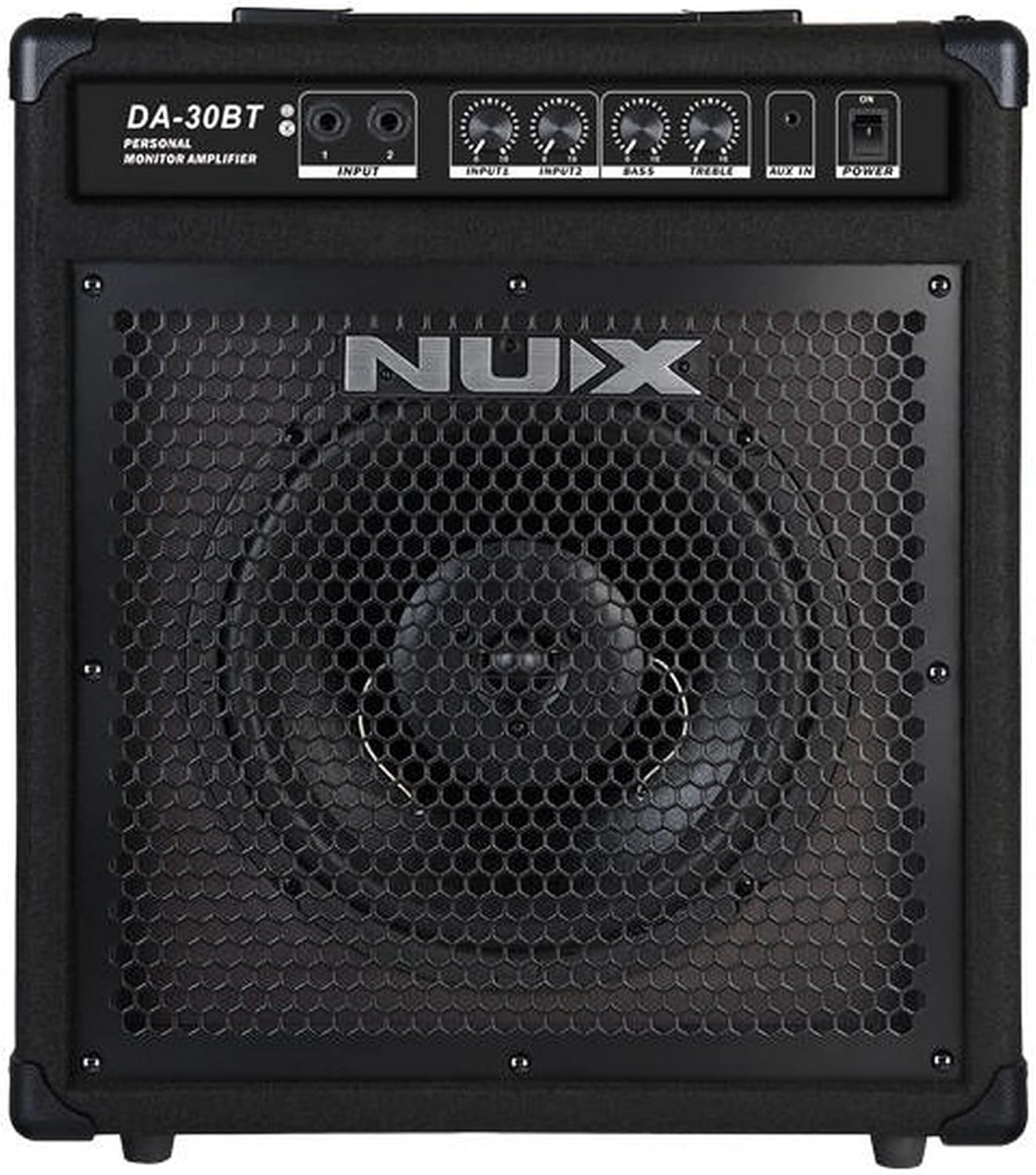
చిత్రం: ముందు భాగం view of the NUX DA-30BT amplifier, showing the speaker grille, control panel with input jacks, volume knobs, bass and treble controls, auxiliary input, and power switch.
- INPUT 1 (1/4" Jack): Main input for instruments like electronic drums or keyboards.
- INPUT 2 (1/4" Jack): Secondary input for another instrument or audio source.
- INPUTS Volume Controls: Independent volume knobs for INPUT 1 and INPUT 2.
- BASS నియంత్రణ: యొక్క తక్కువ-ఫ్రీక్వెన్సీ ప్రతిస్పందనను సర్దుబాటు చేస్తుంది ampజీవితకాలం.
- ట్రెబుల్ నియంత్రణ: Adjusts the high-frequency response of the ampజీవితకాలం.
- AUX IN (3.5mm Jack): Stereo input for connecting external audio devices like smartphones or MP3 players.
- పవర్ స్విచ్: తిరుగుతుంది ampజీవితకాలం ఆన్ లేదా ఆఫ్.
- బ్లూటూత్ సూచిక: Lights up when Bluetooth is active and paired.
వెనుక ప్యానెల్ కనెక్షన్లు
The rear panel houses the power input and important product information.

చిత్రం: వెనుక view of the NUX DA-30BT amplifier, showing the AC power inlet, regulatory information, and serial number label.
- AC పవర్ ఇన్లెట్: అందించిన పవర్ కేబుల్ను ఇక్కడ కనెక్ట్ చేయండి.
- క్రమ సంఖ్య: Unique identifier for your unit.
- నియంత్రణ సమాచారం: Compliance markings and electrical specifications.
సెటప్
- పవర్ కనెక్షన్:
Connect the supplied power cable to the AC Power Inlet on the rear panel of the DA-30BT and then to a suitable electrical outlet.
- పరికర కనెక్షన్:
For electronic drums, keyboards, or other instruments, connect a 1/4" instrument cable from your device's output to either the INPUT 1 or INPUT 2 jack on the front panel.
- Auxiliary Device Connection (Optional):
To play audio from an external device (e.g., smartphone, MP3 player), connect a 3.5mm stereo audio cable from your device's headphone output to the AUX IN jack on the front panel.
- బ్లూటూత్ పెయిరింగ్:
Turn on the DA-30BT. The Bluetooth indicator will flash, indicating it's ready for pairing. On your Bluetooth-enabled device, search for "NUX DA-30BT" and select it to pair. The indicator will become solid once paired.
ఆపరేటింగ్ సూచనలు
- పవర్ ఆన్/ఆఫ్:
Press the POWER switch on the front panel to turn the amplifier on or off. Ensure all volume controls are set to minimum before powering on to prevent sudden loud noises.
- Adjusting Input Volume:
Use the independent volume knobs for INPUT 1 and INPUT 2 to set the desired level for each connected instrument. Adjust the master volume on your instrument as needed.
- టోన్ కంట్రోల్:
Use the BASS and TREBLE controls to adjust the amplifier's tonal characteristics. Turn clockwise to increase, counter-clockwise to decrease.
- Using Auxiliary Input:
When an external device is connected to the AUX IN, control its volume directly from the external device. The AUX IN signal is mixed with the instrument inputs.
- Bluetooth Audio Playback:
Once paired, play audio from your Bluetooth device. The volume can be controlled from your device and the overall ampలైఫైయర్ వాల్యూమ్.
నిర్వహణ
- శుభ్రపరచడం: Disconnect power before cleaning. Use a soft, dry cloth to wipe the exterior. Do not use liquid cleaners or solvents.
- నిల్వ: నిల్వ చేయండి ampప్రత్యక్ష సూర్యకాంతి మరియు విపరీతమైన ఉష్ణోగ్రతలకు దూరంగా చల్లని, పొడి ప్రదేశంలో లైఫైయర్.
- నిర్వహణ: యూనిట్ను పడవేయడం లేదా బలమైన ప్రభావాలకు గురిచేయడం మానుకోండి.
ట్రబుల్షూటింగ్
- సౌండ్ అవుట్పుట్ లేదు:
- నిర్ధారించండి amplifier is powered on and the power indicator is lit.
- Check all cable connections (instrument, power).
- Verify instrument and amplifier volume controls are not set to minimum.
- Test with a different instrument or cable to rule out faulty equipment.
- బ్లూటూత్ కనెక్ట్ కావడం లేదు:
- మీ పరికరంలో బ్లూటూత్ ప్రారంభించబడిందని నిర్ధారించుకోండి.
- Ensure the DA-30BT is in pairing mode (Bluetooth indicator flashing).
- Forget "NUX DA-30BT" from your device's Bluetooth settings and try pairing again.
- మీ పరికరాన్ని దగ్గరగా తరలించండి ampజీవితకాలం.
- వక్రీకరించిన ధ్వని:
- Reduce the volume on your instrument or the amplifier's input volume controls.
- Check if the BASS or TREBLE controls are set too high, causing clipping.
- Ensure cables are fully inserted and not damaged.
స్పెసిఫికేషన్లు
| ఫీచర్ | వివరాలు |
|---|---|
| మోడల్ పేరు | DA-30BT |
| అవుట్పుట్ వాట్tage | 30 వాట్స్ |
| అనుకూల పరికరాలు | Electronic Drums, Keyboards, Digital Pianos, Synthesizers |
| కనెక్టివిటీ | Bluetooth, 1/4 inch phone jack (x2), 3.5mm AUX IN |
| శక్తి మూలం | కార్డెడ్ ఎలక్ట్రిక్ |
| మెటీరియల్ | ప్లాస్టిక్, మెటల్ |
| ఉత్పత్తి కొలతలు (L x W x H) | 3.31 x 2.36 x 4.96 అంగుళాలు |
| వస్తువు బరువు | 5.7 ఔన్సులు (162 గ్రాములు) |
| UPC | 885947103447 |
ముఖ్యమైన భద్రతా సమాచారం
Please read and follow these safety instructions to prevent damage to the product or injury to yourself and others:
- తెరవవద్దు ampలిఫైయర్ సిasing. లోపల వినియోగదారు-సేవ చేయగల భాగాలు లేవు. అన్ని సర్వీసింగ్లను అర్హత కలిగిన సేవా సిబ్బందికి సూచించండి.
- ఈ యూనిట్ను వర్షం లేదా తేమకు బహిర్గతం చేయవద్దు.
- Do not place liquid-filled objects, such as vases, on the unit.
- సరైన వెంటిలేషన్ ఉండేలా చూసుకోండి. ఎలాంటి వెంటిలేషన్ ఓపెనింగ్లను బ్లాక్ చేయవద్దు.
- తయారీదారు పేర్కొన్న విద్యుత్ సరఫరాను మాత్రమే ఉపయోగించండి.
- పవర్ కార్డ్ను నడవకుండా లేదా పించ్ చేయకుండా రక్షించండి.
- మెరుపు తుఫానుల సమయంలో లేదా ఎక్కువ కాలం ఉపయోగించనప్పుడు యూనిట్ను అన్ప్లగ్ చేయండి.
వారంటీ మరియు మద్దతు
For warranty information and technical support, please refer to the official NUX website or contact your local NUX distributor. Keep your purchase receipt as proof of purchase.
అధికారిక NUX Webసైట్: www.nuxefx.com


