1. ఉత్పత్తి ముగిసిందిview
The JSAUX 10W Wireless Charger Stand offers a convenient and efficient way to charge your compatible smartphones. This 2-pack includes two versatile charging stands, each designed for ergonomic use and equipped with intelligent safety features. It supports both vertical and horizontal charging orientations, making it ideal for various uses such as watching videos, video conferencing, or simply keeping your device powered.

This image displays the two JSAUX wireless charging stands in black, each actively charging a smartphone. One phone is positioned vertically, and the other horizontally, demonstrating the stand's flexible design. A USB-A to USB-C charging cable is visible in the foreground, highlighting the product's connectivity.
2 కీ ఫీచర్లు
- ఎర్గోనామిక్ డిజైన్: Allows for vertical or horizontal phone placement, ideal for media consumption or video calls while charging.
- Sleep-Friendly LED Indicator: Features an intelligent adaptive LED that brightens during the day and dims in the dark, preventing disturbance during sleep.
- Dual Ports Input: Equipped with both Type-C and USB-A input ports for broad compatibility with various wall chargers. (Note: Wall charger not included. Use 18W, 20W, or higher power adapters for optimal performance.)
- Intelligent Charging & Multi-functional Protection: Integrated smart chip provides temperature control, over-current protection, over-voltage protection, and short-circuit protection for safe charging.
- Two Wireless Charging Modes: Supports 10W charging for compatible Samsung Galaxy devices (S23/S22/S21/S20/S10/S9, Note 20/10/9 series) and 7.5W charging for compatible iPhone models (14/13/12/11/XS/XR/X series).
This image shows a user at a desk, comfortably viewing their smartphone which is charging vertically on the JSAUX stand. The illustration highlights the optimal 60-degree viewing angle, designed to reduce neck strain during extended use.

This diagram illustrates the internal structure of the JSAUX wireless charger, emphasizing its multiple safety features. Icons represent protection against over-current, over-voltage, over-temperature, and short-circuits, ensuring a secure charging environment. A smaller inset image shows the charger in use on a nightstand, with a person sleeping peacefully, indicating its sleep-friendly design.
3. సెటప్ గైడ్
Follow these steps to assemble and set up your JSAUX Wireless Charger Stand:
- Unpack the charging pad and the stand from the packaging.
- Locate the USB cable attached to the charging pad.
- Thread the USB cable through the designated hole in the back of the stand.
- Pull the remaining cable through until the charging pad aligns securely with the recess in the stand.
- Remove the protective sticker from the back of the charging pad to ensure proper seating within the stand.
- Connect the USB-A or USB-C end of the cable to a compatible power adapter (18W or higher recommended, not included).

This visual guide illustrates the straightforward assembly process of the JSAUX wireless charger stand. It shows five steps: passing the cable through the hole, passing the charging pad through the stand, pulling the remaining cable past, aligning the charging pad with the recess, and finally, the completed installation.
This video provides a detailed demonstration of how to assemble the JSAUX wireless charger stand, including threading the cable and securing the charging pad. It also showcases the charger in action with various phone placements, highlighting its versatility and ease of use.
4. ఆపరేటింగ్ సూచనలు
Once assembled and connected to power, the JSAUX Wireless Charger Stand is ready for use. Simply place your compatible smartphone on the charging pad in one of the following orientations:
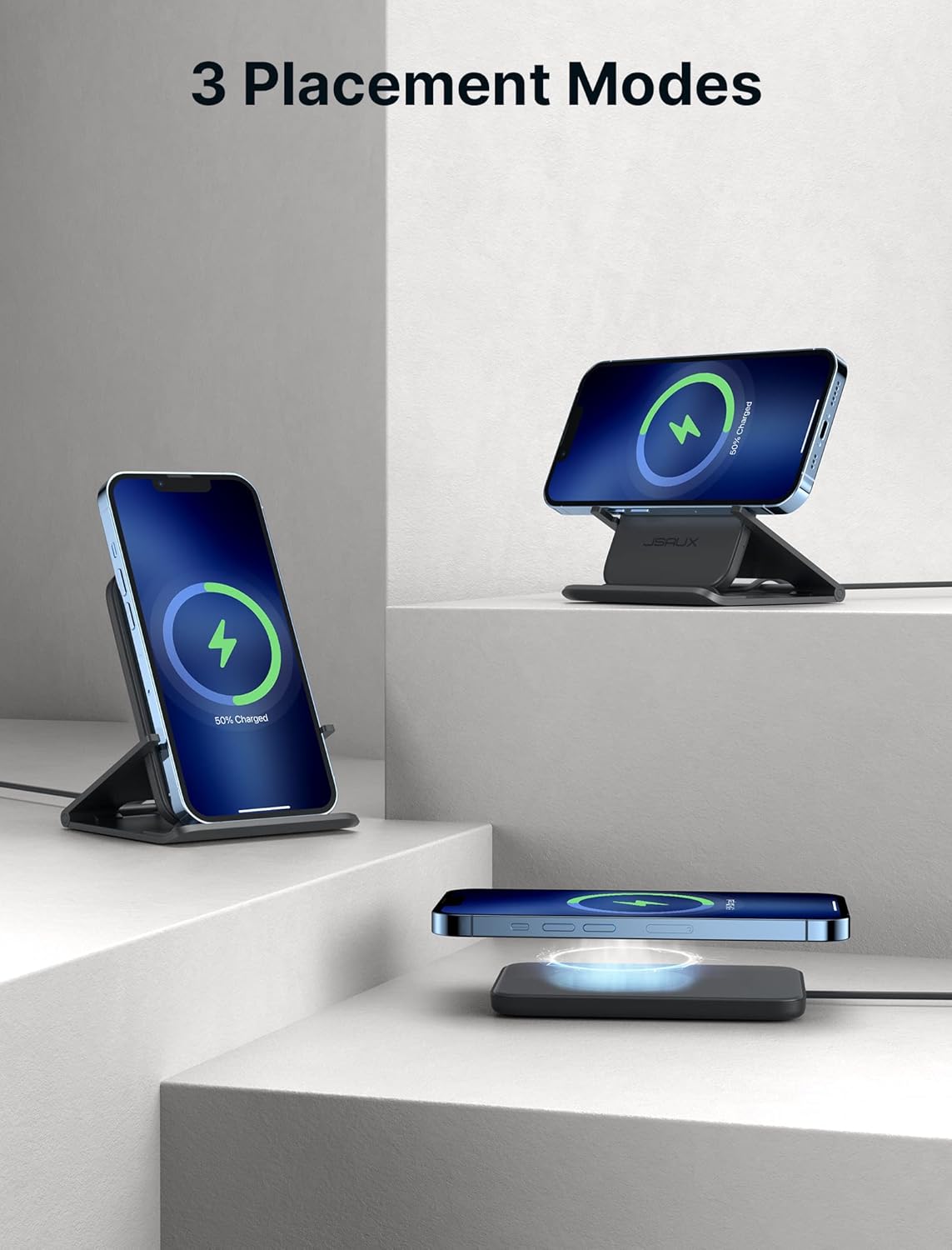
- Vertical Placement: Ideal for social media browsing, checking notifications, or video calls. The phone sits upright on the stand.
- క్షితిజ సమాంతర స్థానం: Perfect for watching videos, movies, or playing games. The phone rests sideways on the stand's arms.
- ఫ్లాట్ ప్లేస్మెంట్: For devices that may not fit well in the stand or for a more compact charging solution, the charging pad can be used flat on a surface. Ensure the phone case is ≤ 4mm thick for optimal charging.
The intelligent adaptive LED indicator will confirm charging status. The charger automatically detects the device and delivers the appropriate charging power (10W or 7.5W).

This image showcases the three versatile placement modes of the JSAUX wireless charger stand: vertical for upright viewing, horizontal for landscape media consumption, and flat for compact charging. This flexibility allows users to choose the most convenient orientation for their needs.
5. అనుకూలత
The JSAUX 10W Wireless Charger Stand is compatible with a wide range of Qi-enabled devices. Refer to the list below for specific models:
- 10W Charge Model: Compatible with Samsung Galaxy S23/S23+/S23 Ultra, S22/S22+/S22 Ultra, S21/S20/S20+/S20 Ultra, S10/S10+/S10E/S9, and Note 20/20 Ultra/10/10+/9.
- 7.5W Charge Model: Compatible with iPhone 14/14 Pro/14 Plus/14 Pro Max, iPhone 13/13 Pro/13 Pro Max, 12/12 Pro/12 Pro Max, 11/11 Pro/11 Pro Max, XS/XS Max/XR/X.
- Also compatible with Pixel 3/3XL and other Qi-enabled devices.
Note: Not compatible with iPhone mini series.

This chart visually outlines the extensive compatibility of the JSAUX wireless charger, categorizing supported Samsung and iPhone models with their respective fast charge capabilities (up to 10W for Samsung, up to 7.5W for iPhone). It also notes that the charger is not compatible with iPhone mini series.
6. స్పెసిఫికేషన్లు
| ఫీచర్ | స్పెసిఫికేషన్ |
|---|---|
| బ్రాండ్ | JSAUX |
| మోడల్ సంఖ్య | WP1002 |
| ప్యాకేజీ కొలతలు | 13.3 x 7.28 x 0.59 అంగుళాలు |
| వస్తువు బరువు | 12.3 ఔన్సులు |
| రంగు | నలుపు |
| కనెక్టివిటీ టెక్నాలజీ | Wireless Charger, Wireless Charger Stand |
| కనెక్టర్ రకం | iPhone/Samsung Wireless Charger, Wireless Charger Stand |
| Ampఎరేజ్ | 1.11 Amps |
| చేర్చబడిన భాగాలు | Wireless Charging Stand (2 units) |
| తయారీదారు | షెన్జెన్ వుయిషి టెక్నాలజీ కో., లిమిటెడ్ |
| మొదటి తేదీ అందుబాటులో ఉంది | అక్టోబర్ 11, 2022 |
7. ట్రబుల్షూటింగ్
- నెమ్మదిగా ఛార్జింగ్: Ensure you are using an 18W, 20W, or higher power adapter. Lower wattage adapters may result in slower charging speeds. Wireless charging is generally slower than direct plug-in charging.
- ఛార్జింగ్ లేదు: Verify that the charging pad is correctly assembled into the stand and the cable is securely connected to both the pad and a working power source. Ensure your phone is Qi-enabled and properly aligned on the charging pad. Remove any phone cases thicker than 4mm or those with magnetic plates that might interfere with wireless charging.
- LED సూచిక సమస్యలు: The intelligent adaptive LED indicator is designed to be bright during the day and dim at night. If it behaves unexpectedly, ensure the charger is in a well-lit or dark environment as appropriate for its adaptive function.
8. వారంటీ మరియు మద్దతు
JSAUX అందిస్తుంది 18-Month worry-free period for this product. For any questions or concerns, please contact JSAUX client consultation, available 24/7. Issues will be resolved within 24 hours.
For further assistance, please visit the official JSAUX Store: JSAUX Store on Amazon


