పరిచయం
This manual provides detailed instructions for the setup, operation, and maintenance of your LFF Atomic Clock Model LWC204. This digital clock features a large, easy-to-read display, atomic time synchronization, and a wireless sensor for indoor and outdoor temperature readings. Please read this manual thoroughly before use to ensure proper functionality and longevity of your device.
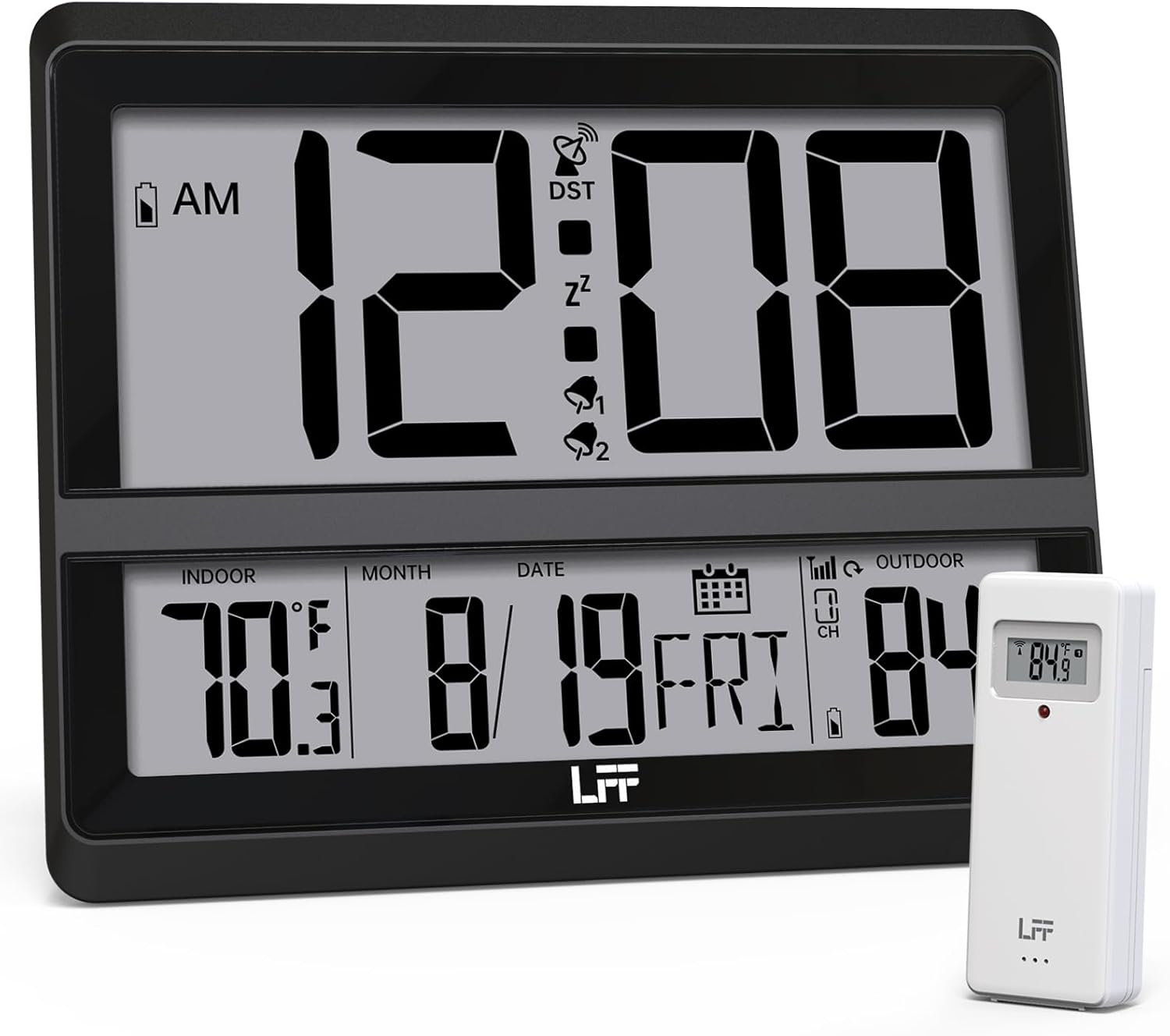
Image: The LFF Atomic Clock main unit with its wireless outdoor temperature sensor.
ప్యాకేజీ విషయాలు
- LFF Atomic Clock Main Unit
- వైర్లెస్ అవుట్డోర్ టెంపరేచర్ సెన్సార్
- సూచనల మాన్యువల్ (ఈ పత్రం)
- Bracket for table standing
Note: Batteries are not included. The main clock unit requires 3x AA batteries, and the outdoor sensor requires 2x AAA batteries.
ఉత్పత్తి ముగిసిందిview
Familiarize yourself with the main components and controls of your LFF Atomic Clock.

Image: Front display and rear button layout of the LFF Atomic Clock.
ప్రదర్శన లక్షణాలు:
- సమయ ప్రదర్శన: Large digits for current time (12/24 Hour format).
- AM/PM సూచిక: 12-గంటల ఫార్మాట్ కోసం.
- DST Symbol: Indicates Daylight Saving Time is active.
- RCC Reception Icon: Shows status of atomic time signal reception.
- Alarm Icons (Zz, 1, 2): Indicate active alarms and snooze function.
- ఇండోర్ ఉష్ణోగ్రత: Current temperature inside (°C/°F).
- బాహ్య ఉష్ణోగ్రత: Current temperature from wireless sensor (°C/°F).
- Date & Weekday: Month, Day, and Day of the Week.
- తక్కువ బ్యాటరీ సూచిక: For both main unit and outdoor sensor.
వెనుక బటన్లు:
- సెట్ బటన్: సెట్టింగ్ మోడ్లోకి ప్రవేశిస్తుంది.
- అలారం బటన్: అలారం సెట్టింగ్లను యాక్సెస్ చేస్తుంది.
- CHANNEL Button: Cycles through outdoor sensor channels (if multiple sensors are used).
- DOWN/WAVE/°C/°F Button: Decreases values in setting mode, manually initiates atomic signal search (WAVE), or switches temperature units.
- UP/ALARM Button: Increases values in setting mode, or activates/deactivates alarm.
సెటప్
1. బ్యాటరీ ఇన్స్టాలేషన్
- అవుట్డోర్ సెన్సార్:
- వైర్లెస్ అవుట్డోర్ సెన్సార్ వెనుక భాగంలో బ్యాటరీ కంపార్ట్మెంట్ను తెరవండి.
- Insert 2x AAA batteries, observing the correct polarity (+/-).
- బ్యాటరీ కంపార్ట్మెంట్ను సురక్షితంగా మూసివేయండి.
- Note: For temperatures below -4°F (-20°C), Lithium batteries are recommended for the outdoor sensor.
- Main Clock Unit:
- ప్రధాన క్లాక్ యూనిట్ వెనుక భాగంలో బ్యాటరీ కంపార్ట్మెంట్ను తెరవండి.
- సరైన ధ్రువణతను (+/-) గమనిస్తూ 3x AA బ్యాటరీలను చొప్పించండి.
- బ్యాటరీ కంపార్ట్మెంట్ను సురక్షితంగా మూసివేయండి.

Image: Battery compartments for the main clock and outdoor sensor.
2. Initial Synchronization and Settings
Upon battery installation, the clock will automatically begin searching for the WWVB atomic time signal and attempt to connect with the outdoor sensor.
- The RCC Reception Icon will flash during the atomic signal search. This process may take several minutes or up to 24 hours depending on signal strength.
- The outdoor temperature should appear on the display within a few minutes after the sensor batteries are installed. If not, press the ఛానెల్ button on the main unit to cycle through channels or press the reset button on the outdoor sensor.
3. Manual Settings (if needed)
If the atomic signal is not received or you wish to adjust settings manually:
- టైమ్ జోన్ సెట్టింగ్:
- నొక్కండి మరియు పట్టుకోండి సెట్ button for 3 seconds to enter time zone setting.
- ఉపయోగించండి UP/ALARM or DOWN/WAVE/°C/°F buttons to select your time zone (e.g., PST, MST, CST, EST).
- నొక్కండి సెట్ నిర్ధారించడానికి మరియు తదుపరి సెట్టింగ్కు వెళ్లడానికి.
- 12/24 గంటల ఫార్మాట్:
- After time zone, the hour format will flash. Use UP/ALARM or DOWN/WAVE/°C/°F to select 12-hour or 24-hour format.
- నొక్కండి సెట్ నిర్ధారించడానికి.
- Manual Time and Date Setting:
- నొక్కడం కొనసాగించండి సెట్ to cycle through Year, Month, Day, Hour, Minute settings.
- ఉపయోగించండి UP/ALARM or DOWN/WAVE/°C/°F ప్రతి విలువను సర్దుబాటు చేయడానికి.
- నొక్కండి సెట్ ప్రతి సెట్టింగ్ని నిర్ధారించడానికి.
- డేలైట్ సేవింగ్ టైమ్ (DST):
- After setting the time, the DST setting will flash. Use UP/ALARM or DOWN/WAVE/°C/°F to enable or disable DST.
- నొక్కండి సెట్ సెట్టింగ్ మోడ్ నుండి నిష్క్రమించడానికి.

Image: The clock automatically corrects time daily via WWVB signal.
4. Outdoor Sensor Placement
- Place the wireless outdoor sensor within 330 feet (100 meters) of the main unit.
- Choose a shaded location to avoid direct sunlight, which can affect temperature accuracy.
- Ensure the sensor is protected from direct rain and snow.
- వైర్లెస్ సిగ్నల్కు అంతరాయం కలిగించే పెద్ద మెటల్ వస్తువులు లేదా విద్యుత్ ఉపకరణాల దగ్గర సెన్సార్ను ఉంచకుండా ఉండండి.

Image: Wireless range of 330 feet for the outdoor sensor.
ఆపరేటింగ్ సూచనలు
1. డిస్ప్లే మోడ్లు
- The clock continuously displays time, indoor temperature, outdoor temperature, date, and day of the week.
- నొక్కండి DOWN/WAVE/°C/°F button to switch between Celsius (°C) and Fahrenheit (°F) for temperature display.
2. అలారం ఫంక్షన్
- అలారం సెట్ చేయడం:
- నొక్కండి అలారం button once to display Alarm 1 time. Press again for Alarm 2.
- While an alarm time is displayed, press and hold the అలారం button for 3 seconds to enter alarm setting mode. The hour will flash.
- ఉపయోగించండి UP/ALARM or DOWN/WAVE/°C/°F గంట సర్దుబాటు. నొక్కండి అలారం నిర్ధారించడానికి.
- నిమిషం ఫ్లాష్ అవుతుంది. ఉపయోగించండి UP/ALARM or DOWN/WAVE/°C/°F నిమిషం సర్దుబాటు చేయడానికి. నొక్కండి అలారం అలారం సెట్టింగ్ని నిర్ధారించడానికి మరియు నిష్క్రమించడానికి.
- యాక్టివేట్ చేయడం/డియాక్టివేట్ చేయడం అలారం:
- నొక్కండి అలారం button to display Alarm 1 or Alarm 2.
- నొక్కండి UP/ALARM button to toggle the alarm ON or OFF. The corresponding alarm icon (1 or 2) will appear/disappear on the display.
- తాత్కాలికంగా ఆపివేయి ఫంక్షన్:
- అలారం మోగినప్పుడు, నొక్కండి స్నూజ్ button (usually located on top or a dedicated button) to activate snooze. The alarm will sound again after approximately 5-10 minutes.
- To stop the alarm completely, press any other button (e.g., అలారం, సెట్).
3. Manual Atomic Signal Search
If you wish to manually initiate a search for the WWVB atomic time signal, press and hold the DOWN/WAVE/°C/°F button for 3 seconds. The RCC Reception Icon will flash, indicating the search is in progress.
నిర్వహణ
- శుభ్రపరచడం: Wipe the clock and sensor with a soft, dry cloth. Do not use abrasive cleaners or solvents.
- బ్యాటరీ భర్తీ: When the low battery indicator appears on the display for either the main unit or the outdoor sensor, replace the batteries promptly to ensure continuous operation and accurate readings. Refer to the "Battery Installation" section for details.
- నిల్వ: పరికరాన్ని ఎక్కువ కాలం నిల్వ ఉంచినట్లయితే, లీకేజీని నివారించడానికి అన్ని బ్యాటరీలను తీసివేయండి.
ట్రబుల్షూటింగ్
| సమస్య | సాధ్యమైన కారణం | పరిష్కారం |
|---|---|---|
| ప్రధాన యూనిట్లో డిస్ప్లే లేదు. | బ్యాటరీలు డెడ్ లేదా తప్పుగా ఇన్స్టాల్ చేయబడ్డాయి. | బ్యాటరీ ధ్రువణతను తనిఖీ చేసి, కొత్త AA బ్యాటరీలతో భర్తీ చేయండి. |
| బయటి ఉష్ణోగ్రత ప్రదర్శించబడలేదు లేదా తప్పుగా ఉంది. |
|
|
| Atomic time signal not received (RCC icon flashing or not displayed). |
|
|
| Time is incorrect after atomic synchronization. | Incorrect time zone setting. | Adjust the time zone setting as described in the "Manual Settings" section. |
స్పెసిఫికేషన్లు
| ఫీచర్ | వివరాలు |
|---|---|
| మోడల్ సంఖ్య | LWC204 |
| ప్రదర్శన రకం | డిజిటల్ ఎల్సిడి |
| పవర్ సోర్స్ (ప్రధాన యూనిట్) | 3x AA బ్యాటరీలు (చేర్చబడలేదు) |
| పవర్ సోర్స్ (అవుట్డోర్ సెన్సార్) | 2x AAA బ్యాటరీలు (చేర్చబడలేదు) |
| ఇండోర్ ఉష్ణోగ్రత పరిధి | 32°F నుండి 122°F (0°C నుండి 50°C) |
| బహిరంగ ఉష్ణోగ్రత పరిధి | -58°F నుండి 158°F (-50°C నుండి 70°C) |
| వైర్లెస్ రేంజ్ | బహిరంగ ప్రదేశంలో 330 అడుగుల (100 మీటర్లు) వరకు |
| సమయ ఆకృతి | 12/24 గంటలు ఎంచుకోవచ్చు |
| కొలతలు (ప్రధాన యూనిట్) | 7.48" W x 8.66" H (approx.) |
| మౌంటు ఐచ్ఛికాలు | Wall Mount or Tabletop (bracket included) |
వారంటీ మరియు మద్దతు
LFF products are designed for reliability and performance. For specific warranty information, please refer to the warranty card included with your purchase or contact LFF customer support.
For technical assistance or further inquiries, please visit the official LFF website or contact their customer service department. Contact details are typically available on the product packaging or the brand's official online presence.


