1. పరిచయం
Thank you for choosing the Gembird USB-C Gigabit Network Adapter with 3-Port USB 3.1 Hub. This device is designed to expand the connectivity of your USB-C enabled laptop, tablet, or computer, providing both high-speed Gigabit Ethernet and additional USB 3.1 ports. This manual provides essential information for setting up, operating, and maintaining your device.
2. ఉత్పత్తి లక్షణాలు
- USB-C కనెక్టివిటీ: Connects to your host device via a reversible USB-C port.
- గిగాబిట్ ఈథర్నెట్ పోర్ట్: Provides a stable and fast wired network connection up to 1000 Mbps.
- 3-Port USB 3.1 Hub: Adds three USB 3.1 ports for connecting peripherals such as external hard drives, flash drives, keyboards, and mice.
- హై-స్పీడ్ డేటా బదిలీ: USB 3.1 ports support data transfer rates up to 5 Gbps.
- ప్లగ్ మరియు ప్లే: No driver installation required for most modern operating systems.
3. ప్యాకేజీ విషయాలు
Please ensure the following items are included in your package:
- Gembird USB-C Gigabit Network Adapter with 3-Port USB 3.1 Hub (Model A-CMU3-LAN-01)
4. ఉత్పత్తి ముగిసిందిview
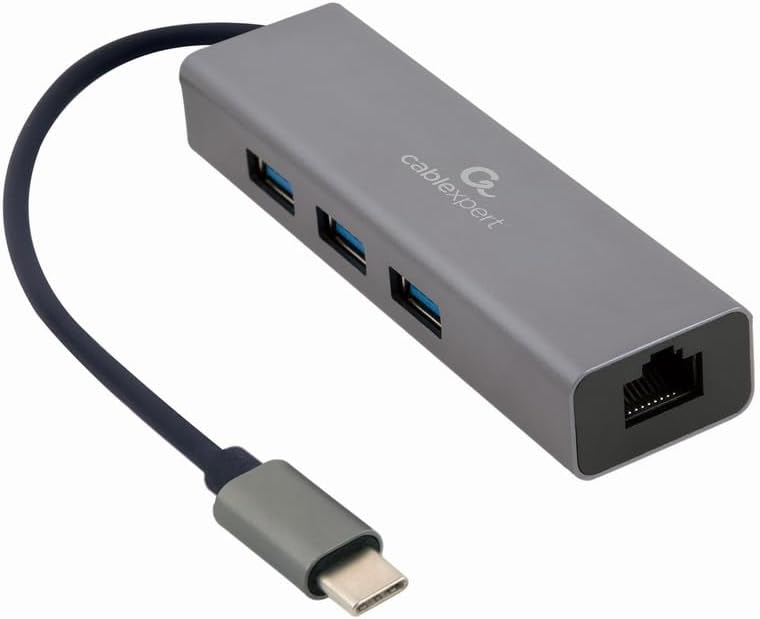
మూర్తి 1: ముందు view of the Gembird USB-C Gigabit Network Adapter, showing the USB-C cable, three USB 3.1 ports, and the RJ45 Gigabit Ethernet port.

మూర్తి 2: Retail packaging for the Gembird USB-C Gigabit Network Adapter, highlighting key features like USB Type-C, USB 3.1 x 3, RJ45, Gigabit, 1000 Mbps, and Plug & Play.
5. సెటప్
Follow these steps to set up your Gembird USB-C Gigabit Network Adapter:
- హోస్ట్ పరికరానికి కనెక్ట్ చేయండి: Plug the USB-C connector of the adapter into an available USB-C port on your laptop, tablet, or computer.
- నెట్వర్క్కు కనెక్ట్ చేయండి: Insert an Ethernet cable (RJ45) from your router or modem into the Gigabit Ethernet port on the adapter.
- USB పెరిఫెరల్స్ కనెక్ట్ చేయండి: Plug your USB devices (e.g., flash drives, external hard drives, mouse, keyboard) into the three available USB 3.1 ports on the adapter.
- డ్రైవర్ ఇన్స్టాలేషన్: The adapter is typically plug-and-play. Your operating system (Windows, macOS, Linux, Chrome OS) should automatically detect and install the necessary drivers. If prompted, allow the system to install drivers.
6. ఆపరేటింగ్ సూచనలు
Once connected, the adapter functions automatically:
- నెట్వర్క్ యాక్సెస్: Your host device should now have a wired network connection. You can verify this in your operating system's network settings.
- USB Device Access: Connected USB peripherals will be recognized by your host device and function as if directly connected.
7. ట్రబుల్షూటింగ్
మీరు సమస్యలను ఎదుర్కొంటే, ఈ క్రింది సాధారణ సమస్యలు మరియు పరిష్కారాలను చూడండి:
- నెట్వర్క్ కనెక్షన్ లేదు:
- Ensure the Ethernet cable is securely connected to both the adapter and your router/modem.
- Check your router/modem for proper operation.
- Verify network settings on your host device.
- మీ హోస్ట్ పరికరంలో అడాప్టర్ను వేరే USB-C పోర్ట్కి కనెక్ట్ చేయడానికి ప్రయత్నించండి.
- గుర్తించబడని USB పరికరాలు:
- Ensure USB devices are properly plugged into the adapter's USB 3.1 ports.
- Try connecting the USB device directly to your host computer to confirm it is functional.
- Some high-power USB devices may require an external power source if your host device's USB-C port does not provide sufficient power (this adapter does not have a dedicated power input).
- నెమ్మదించిన నెట్వర్క్ వేగం:
- Ensure your Ethernet cable is rated for Gigabit speeds (Cat5e or higher).
- Verify your internet service provider's speed and your router's capabilities.
- Ensure your host device's USB-C port supports USB 3.0/3.1 speeds.
8. స్పెసిఫికేషన్లు
| మోడల్ సంఖ్య | A-CMU3-LAN-01 |
| హార్డ్వేర్ ఇంటర్ఫేస్ | USB-C (Host), USB 3.1 (Hub), RJ45 (Ethernet) |
| మొత్తం USB పోర్ట్లు | 3 (USB 3.1) |
| ఈథర్నెట్ పోర్ట్స్ | 1 (గిగాబిట్ RJ45) |
| డేటా బదిలీ రేటు (USB) | 5 Gbps వరకు (USB 3.1) |
| Data Transfer Rate (Ethernet) | 10/100/1000 Mbps |
| ఉత్పత్తి కొలతలు | 10 x 2 x 2.7 అంగుళాలు |
| వస్తువు బరువు | 2.46 ఔన్సులు |
9. నిర్వహణ
To ensure the longevity and optimal performance of your adapter:
- శుభ్రపరచడం: పరికరం యొక్క బాహ్య భాగాన్ని శుభ్రం చేయడానికి మృదువైన, పొడి వస్త్రాన్ని ఉపయోగించండి. ద్రవ క్లీనర్లు లేదా ద్రావకాలను నివారించండి.
- నిల్వ: ఉపయోగంలో లేనప్పుడు ప్రత్యక్ష సూర్యకాంతి మరియు తీవ్రమైన ఉష్ణోగ్రతలకు దూరంగా చల్లని, పొడి ప్రదేశంలో అడాప్టర్ను నిల్వ చేయండి.
- నిర్వహణ: Avoid dropping or subjecting the device to strong impacts. Do not attempt to disassemble the adapter.
10. వారంటీ మరియు మద్దతు
This Gembird product comes with a ఫ్యాక్టరీ లోపాలపై రెండు సంవత్సరాల వారంటీవారంటీ క్లెయిమ్ల కోసం దయచేసి మీ కొనుగోలు రుజువును ఉంచుకోండి.
For technical support or warranty inquiries, please contact your retailer or visit the official Gembird webసంప్రదింపు సమాచారం కోసం సైట్.


