1. ముఖ్యమైన భద్రతా సమాచారం
Please read all safety instructions carefully before using this product. Failure to follow these instructions may result in injury or damage.
- ప్లేస్మెంట్: Avoid placing the camera in unstable locations or within reach of children or pets.
- శక్తి: Use only the provided AC adapter and power cable. Disconnect power before moving the device.
- పర్యావరణం: Keep the camera away from high humidity, dust, and extreme temperatures. This product is not waterproof.
- నిర్వహణ: Do not attempt to disassemble or repair the camera yourself. Contact customer support for any issues.

Image: General safety guidelines for camera usage.
2. ప్యాకేజీ విషయాలు
మీ ప్యాకేజీలో అన్ని వస్తువులు చేర్చబడ్డాయని ధృవీకరించండి:
- Galayou G2 Camera Unit
- AC అడాప్టర్
- పవర్ కేబుల్
- మౌంటింగ్ కిట్ (స్క్రూలు, యాంకర్లు)
- Japanese Instruction Manual

Image: The Galayou G2 camera and a smartphone displaying its live feed.
3. సెటప్ గైడ్
3.1 ప్రారంభ సెటప్
- పవర్ ఆన్: Connect the camera to power using the provided AC adapter and cable. The indicator light will turn red.
- యాప్ డౌన్లోడ్: Download the dedicated 'blurams' app from the App Store (iOS) or Google Play Store (Android).
- యాప్ అనుమతులు: Ensure Bluetooth and Location permissions are enabled for the 'blurams' app in your smartphone settings.
- కెమెరాను రీసెట్ చేయండి: Press and hold the reset button on the camera until you hear a beep sound. The indicator light will flash red and blue alternately, indicating it's ready for network connection.
- యాప్లో పరికరాన్ని జోడించండి: Open the 'blurams' app, tap 'Add Device' or the '+' icon. Select your camera model (G2 or similar D1 model) and choose 'Wi-Fi connection via Bluetooth'.
- Wi-Fi కనెక్షన్: Enter your 2.4GHz Wi-Fi network name and password. The camera only supports 2.4GHz Wi-Fi.
- QR కోడ్ స్కాన్: The app will display a QR code. Hold your smartphone in front of the camera lens to scan the QR code. You will hear a beep sound from the camera upon successful scan.
- కనెక్షన్ నిర్ధారణ: The camera will announce 'Connection successful' and then 'Connecting to network'. Once connected, the indicator light will turn solid blue.
3.2 Video Guide: Bluetooth Wi-Fi Connection
Video: This video demonstrates the Bluetooth-assisted Wi-Fi connection method for the D1 camera, which is similar to the G2 model. It shows the steps from app permissions to successful network connection.
3.3 Video Guide: Camera Setup Method
Video: This video provides a general guide on how to set up a Skyworth pet camera, which can be used as a reference for the Galayou G2's setup process.
4. ఆపరేటింగ్ సూచనలు
4.1 ప్రత్యక్ష ప్రసారం View మరియు పాన్/టిల్ట్ కంట్రోల్
Once connected, you can access the live feed through the 'blurams' app. The camera offers a 355° horizontal rotation and 52° vertical rotation for comprehensive coverage.
- పాన్/టిల్ట్: కెమెరాలను రిమోట్గా సర్దుబాటు చేయడానికి యాప్లోని దిశాత్మక నియంత్రణలను ఉపయోగించండి viewing కోణం.
- డిజిటల్ జూమ్: The camera supports 4x digital zoom to view వివరాలు.

Image: The camera's pan and tilt capabilities, offering a wide field of view.
4.2 వీడియో నాణ్యత మరియు రాత్రి దృష్టి
The G2 camera features 2K high-resolution video (1440p) and a 3-megapixel CMOS sensor for clear images. It also provides advanced night vision capabilities.
- 2K రిజల్యూషన్: Enjoy clear and detailed video footage.
- నైట్ విజన్ మోడ్లు: The camera supports three night vision modes: Smart Night Vision (auto-switches between color and black & white based on motion), Color Night Vision (always color), and Infrared Night Vision (always black & white).
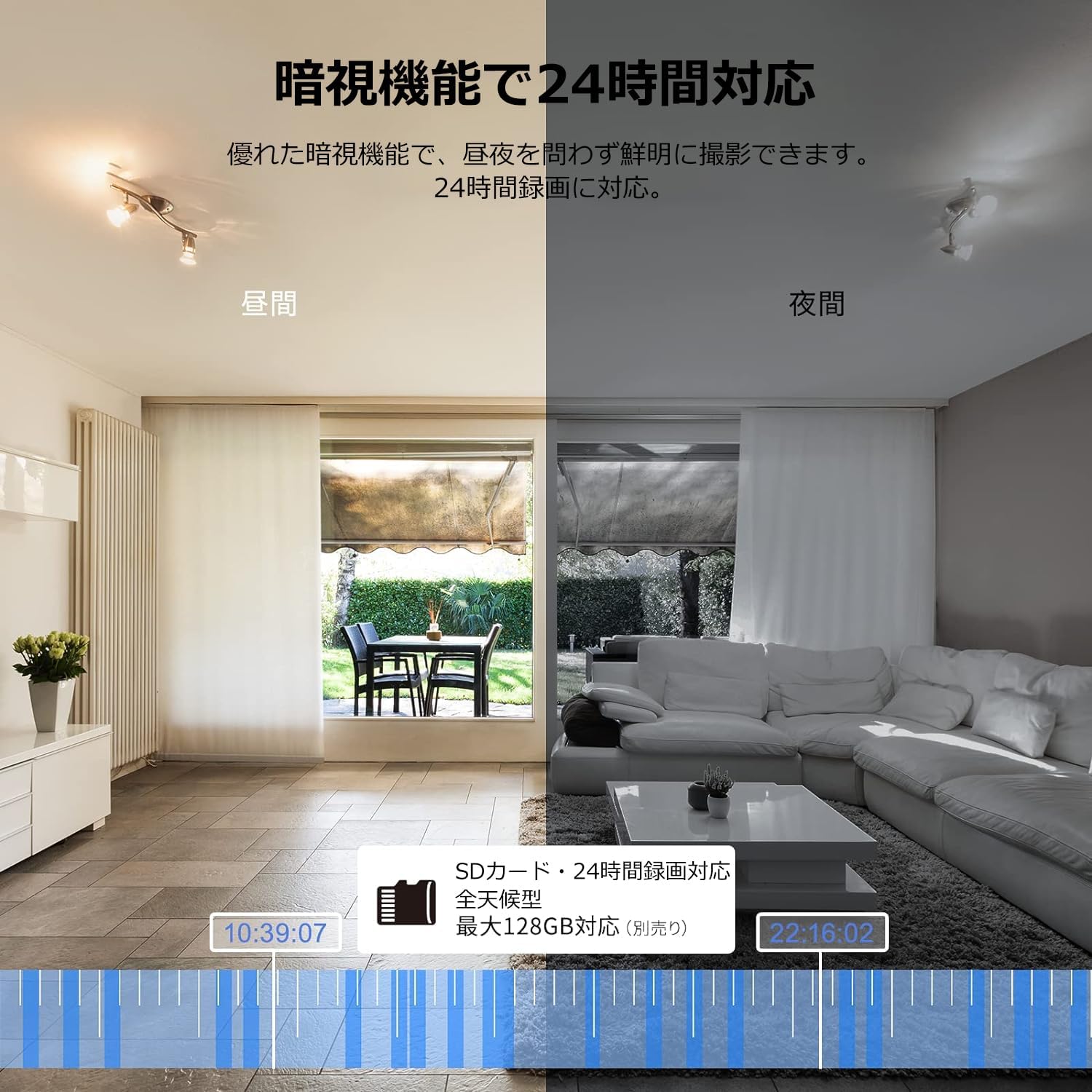
Image: Comparison of day and night vision, demonstrating the camera's ability to record clearly in low light.
4.3 టూ-వే ఆడియో
Equipped with a microphone and speaker, the camera allows for real-time two-way communication.
- Speak and Listen: Talk to family members or pets through the app, and hear their responses.
- శబ్దం తగ్గింపు: The two-way audio features noise reduction for clearer sound.

Image: The camera's two-way audio feature, allowing interaction with pets.
4.4 Motion Detection & Automatic Tracking
The camera can detect motion and automatically track subjects within its field of view.
- చలన హెచ్చరికలు: కదలిక గుర్తించబడినప్పుడు మీ స్మార్ట్ఫోన్లో తక్షణ నోటిఫికేషన్లను స్వీకరించండి.
- ఆటోమేటిక్ ట్రాకింగ్: The camera will follow detected movement, keeping the subject in frame.
- మానవ గుర్తింపు: Advanced AI can differentiate between humans and other moving objects, reducing false alarms.
- అలారం ఫంక్షన్: Trigger an alarm sound from the camera via the app to deter intruders.

Image: Motion detection and alarm features, showing alerts on a smartphone.
4.5 రికార్డింగ్ మరియు నిల్వ
The camera supports both local and cloud storage options for continuous recording.
- మైక్రో SD కార్డ్: Supports up to 128GB microSD cards (sold separately) for 24-hour continuous recording with automatic overwriting.
- క్లౌడ్ నిల్వ: Optional paid cloud storage service is available for extended recording and backup.
- వీడియో కంప్రెషన్: Utilizes H.264 and H.265 compression formats for efficient storage.


Images: MicroSD card recording and cloud storage options.
4.6 గోప్యతా మోడ్
Activate privacy mode to physically cover the camera lens, ensuring your privacy when needed.
- One-Tap Activation: Easily turn off the lens via the app.
- Physical Cover: The camera physically rotates its lens downwards, blocking the view.

Image: Privacy mode icon.
4.7 అలెక్సా ఇంటిగ్రేషన్
The Galayou G2 is Alexa-certified, allowing for voice control and viewing the camera feed on compatible Alexa devices.
- వాయిస్ ఆదేశాలు: వాయిస్ ఆదేశాలను ఉపయోగించండి view the camera feed on an Echo Show or other Alexa-enabled screen.

Image: Alexa integration with the Galayou G2 camera.
4.8 Multi-Camera Support & Sharing
The app supports adding multiple cameras and sharing access with family members.
- బహుళ కెమెరాలు: Monitor different areas of your home by adding several cameras to the app.
- కుటుంబ భాగస్వామ్యం: Share camera access with up to 4 family members simultaneously.

Image: Family sharing and multi-camera viewing.
4.9 Video Guide: Product Features
Video: This video showcases various features of a Skyworth pet camera, including its monitoring capabilities, which are comparable to the Galayou G2.
4.10 Video Guide: Blurams 300万画素 見守りカメラ
Video: This video highlights the features of a Blurams 3-megapixel monitoring camera, demonstrating functionalities similar to the Galayou G2.
4.11 Video Guide: JUFLSKY 300万画素 360°PTZ機 (Preview)
వీడియో: ఒక చిన్న ప్రీview వీడియో షోasing a 300-megapixel 360° PTZ camera, similar in functionality to the G2.
5. ట్రబుల్షూటింగ్
- Wi-Fiకి కనెక్ట్ చేయడం సాధ్యపడదు:
- మీ Wi-Fi నెట్వర్క్ 2.4GHz అని నిర్ధారించుకోండి. కెమెరా 5GHz నెట్వర్క్లకు మద్దతు ఇవ్వదు.
- ఖచ్చితత్వం కోసం మీ Wi-Fi పాస్వర్డ్ను తనిఖీ చేయండి.
- కెమెరాను మీ Wi-Fi రూటర్కి దగ్గరగా తరలించండి.
- Perform a factory reset on the camera and try the setup process again.
- No Live Feed:
- మీ ఇంటర్నెట్ కనెక్షన్ని తనిఖీ చేయండి.
- Ensure the camera is powered on and the indicator light is solid blue.
- యాప్ మరియు/లేదా మీ స్మార్ట్ఫోన్ను పునఃప్రారంభించండి.
- మోషన్ డిటెక్షన్ పనిచేయదు:
- యాప్ సెట్టింగ్లలో మోషన్ డిటెక్షన్ ప్రారంభించబడిందని ధృవీకరించండి.
- మోషన్ డిటెక్షన్ సెన్సిటివిటీని సర్దుబాటు చేయండి.
- కెమెరాను అడ్డుకునే అడ్డంకులు లేవని నిర్ధారించుకోండి view.
- పేలవమైన వీడియో నాణ్యత:
- Check your internet speed. A stable connection is required for optimal streaming.
- కెమెరా లెన్స్ శుభ్రంగా ఉందని నిర్ధారించుకోండి.
- Adjust the video quality settings in the app (e.g., from SD to 2K).
6. స్పెసిఫికేషన్లు
| ఫీచర్ | స్పెసిఫికేషన్ |
|---|---|
| మోడల్ పేరు | G2 |
| మౌంటు రకం | Tabletop and Ceiling Mount |
| వీడియో క్యాప్చర్ రిజల్యూషన్ | 1440p (2K) |
| రంగు | Automatic Tracking Camera |
| చేర్చబడిన భాగాలు | Camera body, AC adapter, Japanese instruction manual, mounting set, power cable |
| వైర్లెస్ కమ్యూనికేషన్ టెక్నాలజీ | Wi-Fi (2.4GHz మాత్రమే) |
| ప్రభావవంతమైన వీడియో రిజల్యూషన్ | 2 Megapixels (300万画素) |
| ఫీల్డ్ View | 95 డిగ్రీలు |
| నైట్ విజన్ రేంజ్ | 7 మీటర్లు |
| ఫ్రేమ్ రేట్ | 15 fps |
| మెటీరియల్ | ప్లాస్టిక్ |
| ఉత్పత్తి కొలతలు (LxWxH) | 7.2 x 7.2 x 10.9 సెం.మీ |
| నీటి నిరోధక స్థాయి | జలనిరోధిత కాదు |
| కాంతి మూలం | ఇన్ఫ్రారెడ్ |
| సిఫార్సు ఉపయోగం | ఇండోర్ సెక్యూరిటీ |
| ఇండోర్/అవుట్డోర్ ఉపయోగం | ఇండోర్ |
| అనుకూల పరికరాలు | Smartphone, Tablet, Desktop, Laptop |
| శక్తి మూలం | కార్డెడ్ ఎలక్ట్రిక్ |
| కంట్రోలర్ రకం | యాప్ |
7. వారంటీ మరియు మద్దతు
The Galayou G2 camera comes with a manufacturer's warranty and customer support.
- వారంటీ: 1-year manufacturer's warranty.
- సాంకేతిక మద్దతు: For any issues or questions, please contact GALAYOU customer support through the app or visit the official GALAYOU store on Amazon.


