పరిచయం
This instruction manual provides essential information for the proper use and maintenance of your AULCMEET RAV435 WW51070 replacement remote control. This remote is designed to be compatible with various Yamaha Home Theater Audio/Video Receiver models, including HTR-2064, YHT-196, HTR2064SZ, NS-B20, NS-C20, and NS-SWP20. Please read this manual thoroughly before operating the remote control.
ఉత్పత్తి ముగిసిందిview
The AULCMEET RAV435 WW51070 is a direct replacement remote control, offering full functionality for compatible Yamaha home theater systems. It requires no programming or setup, allowing for immediate use upon battery installation.
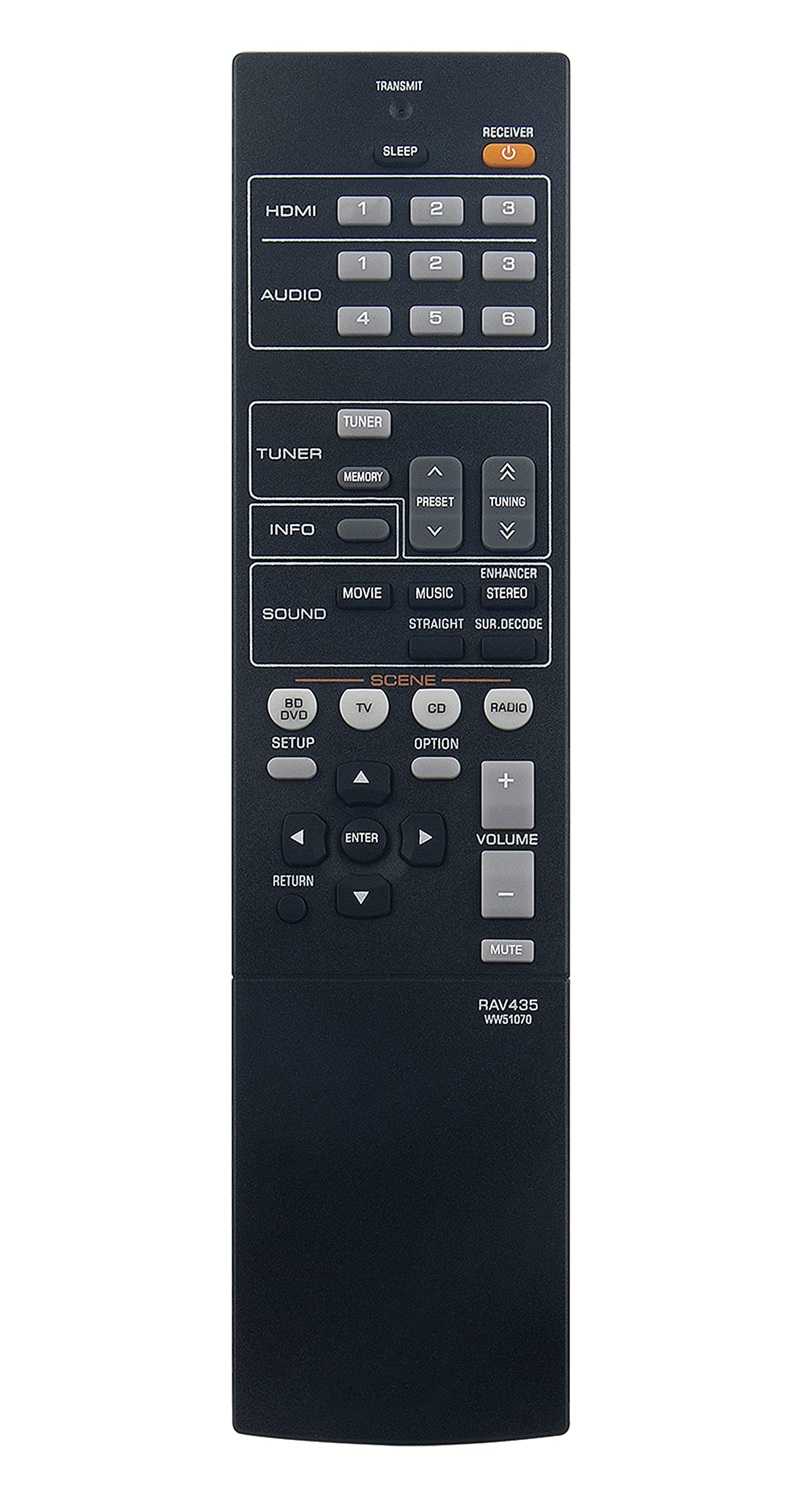
Image: The AULCMEET RAV435 WW51070 replacement remote control, featuring a standard layout with various function buttons for audio/video receiver control.
సెటప్
బ్యాటరీ సంస్థాపన
- రిమోట్ కంట్రోల్ వెనుక బ్యాటరీ కంపార్ట్మెంట్ను గుర్తించండి.
- బ్యాటరీ కంపార్ట్మెంట్ కవర్ను తెరవడానికి దాన్ని క్రిందికి లేదా బయటికి జారండి.
- Insert two (2) 1.5V AAA batteries, ensuring the positive (+) and negative (-) terminals match the diagrams inside the compartment.
- బ్యాటరీ కంపార్ట్మెంట్ కవర్ సురక్షితంగా క్లిక్ అయ్యే వరకు దాన్ని తిరిగి స్థానంలోకి జారడం ద్వారా దాన్ని మూసివేయండి.
గమనిక: This remote control requires no additional setup or programming. It is ready for use with compatible Yamaha receivers immediately after battery installation.
ఆపరేటింగ్ సూచనలు
The RAV435 WW51070 remote control provides access to all standard functions of your compatible Yamaha Home Theater Audio/Video Receiver. Point the remote control directly at the receiver's infrared sensor for optimal performance.
సాధారణ విధులు
- పవర్ బటన్: రిసీవర్ను ఆన్ లేదా ఆఫ్ చేస్తుంది.
- ఇన్పుట్ సెలెక్టర్ బటన్లు: Switches between different audio/video input sources (e.g., CD, DVD, TV, HDMI).
- వాల్యూమ్ అప్/డౌన్: మాస్టర్ వాల్యూమ్ స్థాయిని సర్దుబాటు చేస్తుంది.
- మ్యూట్ బటన్: తాత్కాలికంగా ఆడియో అవుట్పుట్ను నిశ్శబ్దం చేస్తుంది.
- Navigation Buttons (Arrow Keys, Enter): Used to navigate menus and confirm selections on your receiver's display.
- Sound Mode Buttons: Selects various audio processing modes (e.g., Stereo, Surround, DSP programs).
- ట్యూనర్ నియంత్రణలు: For receivers with built-in radio tuners (e.g., AM/FM, preset stations).
Refer to your Yamaha receiver's original manual for specific functions and menu navigation details, as the remote mirrors these controls.
నిర్వహణ
క్లీనింగ్
రిమోట్ కంట్రోల్ను శుభ్రం చేయడానికి, దానిని మృదువైన, పొడి గుడ్డతో సున్నితంగా తుడవండి. మొండి ధూళి కోసం, కొద్దిగా dampనీరు లేదా తేలికపాటి, రాపిడి లేని క్లీనర్తో గుడ్డను శుభ్రం చేయండి. కఠినమైన రసాయనాలు, ద్రావకాలు లేదా రాపిడి పదార్థాలను ఉపయోగించకుండా ఉండండి, ఎందుకంటే ఇవి రిమోట్ యొక్క ఉపరితలం లేదా అంతర్గత భాగాలను దెబ్బతీస్తాయి.
బ్యాటరీ భర్తీ
Replace batteries when the remote's range decreases significantly or if it stops responding. Always replace both batteries at the same time with new 1.5V AAA batteries. Do not mix old and new batteries, or different types of batteries. Remove batteries if the remote will not be used for an extended period to prevent leakage.
ట్రబుల్షూటింగ్
| సమస్య | సాధ్యమైన కారణం | పరిష్కారం |
|---|---|---|
| రిమోట్ స్పందించడం లేదు. | డెడ్ లేదా తప్పుగా చొప్పించిన బ్యాటరీలు. | సరైన ధ్రువణతను నిర్ధారించుకోవడానికి, బ్యాటరీలను కొత్త 1.5V AAA బ్యాటరీలతో భర్తీ చేయండి. |
| రిమోట్ స్వల్ప పరిధి లేదా అడపాదడపా ప్రతిస్పందనను కలిగి ఉంటుంది. | Weak batteries; Obstruction between remote and receiver; Remote not pointed correctly. | Replace batteries. Ensure a clear line of sight to the receiver's IR sensor. Point the remote directly at the receiver. |
| కొన్ని విధులు పనిచేయవు. | Receiver is not compatible with that specific function; Remote is faulty. | Verify the function exists on your Yamaha receiver model. If other functions work, the remote may be faulty and require replacement. |
స్పెసిఫికేషన్లు
- మోడల్ సంఖ్య: RAV435 WW51070
- బ్రాండ్: ఆల్ట్మీట్
- అనుకూల పరికరాలు: Yamaha Home Theater Audio/Video Receivers (HTR-2064, YHT-196, HTR2064SZ, NS-B20, NS-C20, NS-SWP20)
- శక్తి మూలం: 2 x 1.5V AAA బ్యాటరీలు (చేర్చబడలేదు)
- ఉత్పత్తి కొలతలు: 8.1 x 2 x 0.7 అంగుళాలు (సుమారుగా)
- వస్తువు బరువు: 2.92 ఔన్సులు (సుమారుగా)
- రంగు: నలుపు
- ప్రత్యేక ఫీచర్: ఎర్గోనామిక్ డిజైన్
వారంటీ మరియు మద్దతు
For information regarding warranty coverage or technical support, please refer to the retailer or the AULCMEET manufacturer's official webసైట్. ఏవైనా వారంటీ క్లెయిమ్లకు కొనుగోలు రుజువుగా మీ కొనుగోలు రసీదును ఉంచండి.