1. పరిచయం
Welcome to the Aonus A9 Pro Cordless Stick Vacuum Cleaner user manual. This guide provides essential information for the safe and efficient operation, maintenance, and troubleshooting of your new vacuum cleaner. Please read this manual thoroughly before first use and keep it for future reference.
2. ఉత్పత్తి ముగిసిందిview
2.1. చేర్చబడిన భాగాలు
The Aonus A9 Pro package includes the following components:
- Main Motor Unit (with dustbin and LED display)
- ఫోల్డబుల్ ఎక్స్టెన్షన్ ట్యూబ్
- Motorized Brush Head (with LED lights)
- తొలగించగల బ్యాటరీ ప్యాక్
- వాల్ మౌంట్ డాక్
- పవర్ అడాప్టర్/ఛార్జర్
- చీలిక సాధనం
- 2-ఇన్-1 డస్టింగ్ బ్రష్
- Cleaning Tool (for brush head and filter)
- స్పేర్ ఫిల్టర్

Figure 2.1: Aonus A9 Pro Cordless Vacuum Cleaner and its included accessories.
3. సెటప్
3.1. అసెంబ్లీ
- Insert the foldable extension tube into the main motor unit until it clicks securely into place.
- Attach the motorized brush head to the other end of the extension tube, ensuring it clicks firmly.
- For handheld use, attach desired accessories (crevice tool, dusting brush) directly to the main motor unit.
3.2 బ్యాటరీని ఛార్జ్ చేస్తోంది
మొదటిసారి ఉపయోగించే ముందు, బ్యాటరీని పూర్తిగా ఛార్జ్ చేయండి. బ్యాటరీని వాక్యూమ్కు అటాచ్ చేసినప్పుడు లేదా విడిగా ఛార్జ్ చేయవచ్చు.
- Connect the power adapter to the charging port on the main unit or directly to the battery pack.
- అడాప్టర్ను గోడ అవుట్లెట్లోకి ప్లగ్ చేయండి.
- The LED display will indicate charging status. A full charge typically takes 4-5 hours.

Figure 3.2: The removable battery pack and its charging indicators.
4. ఆపరేటింగ్ సూచనలు
4.1. Power On/Off and Suction Modes
Press the power button to turn the vacuum on or off. Use the mode button on the LED display to switch between suction modes:
- తక్కువ చూషణ: For light dust and extended runtime (up to 60 minutes).
- మీడియం సక్షన్: For general cleaning.
- High Suction: For deep cleaning and stubborn dirt (up to 42KPa / 500W).
- ఆటోమేటిక్ మోడ్: The vacuum intelligently detects dust concentration and adjusts suction power accordingly.

Figure 4.1.1: Intelligent LED control screen displaying battery life and suction mode.

Figure 4.1.2: Automatic dust detection adjusts suction for efficient cleaning.

Figure 4.1.3: Demonstration of the vacuum's powerful 42KPa suction.
4.2. Special Features and Usage
- ఫోల్డబుల్ డిజైన్: The extension tube can be folded 180 degrees, allowing easy access under low furniture like beds and sofas without bending over.
- యాంటీ-టాంగిల్ బ్రష్: The motorized brush head is designed to prevent hair entanglement, ensuring smooth operation and effective cleaning on various floor types including carpets, wood, marble, and tile.
- LED హెడ్లైట్లు: The brush head features LED lights to illuminate dust and debris in dark areas, ensuring no spot is missed.
- బహుముఖ ఉపకరణాలు: Use the crevice tool for narrow gaps and corners, and the 2-in-1 dusting brush for upholstery, keyboards, and delicate surfaces.
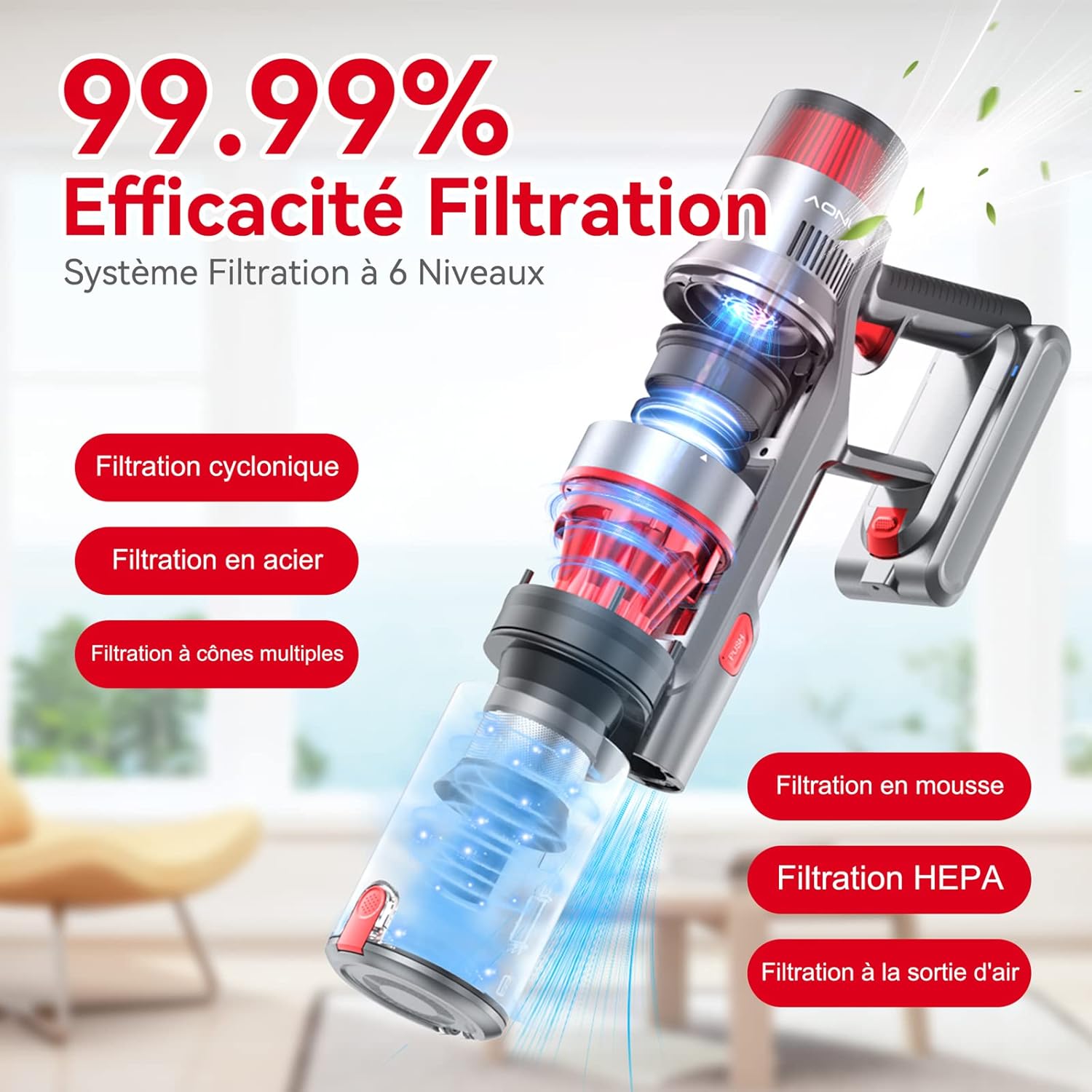
Figure 4.2.1: The 180-degree foldable design allows easy cleaning under low furniture.
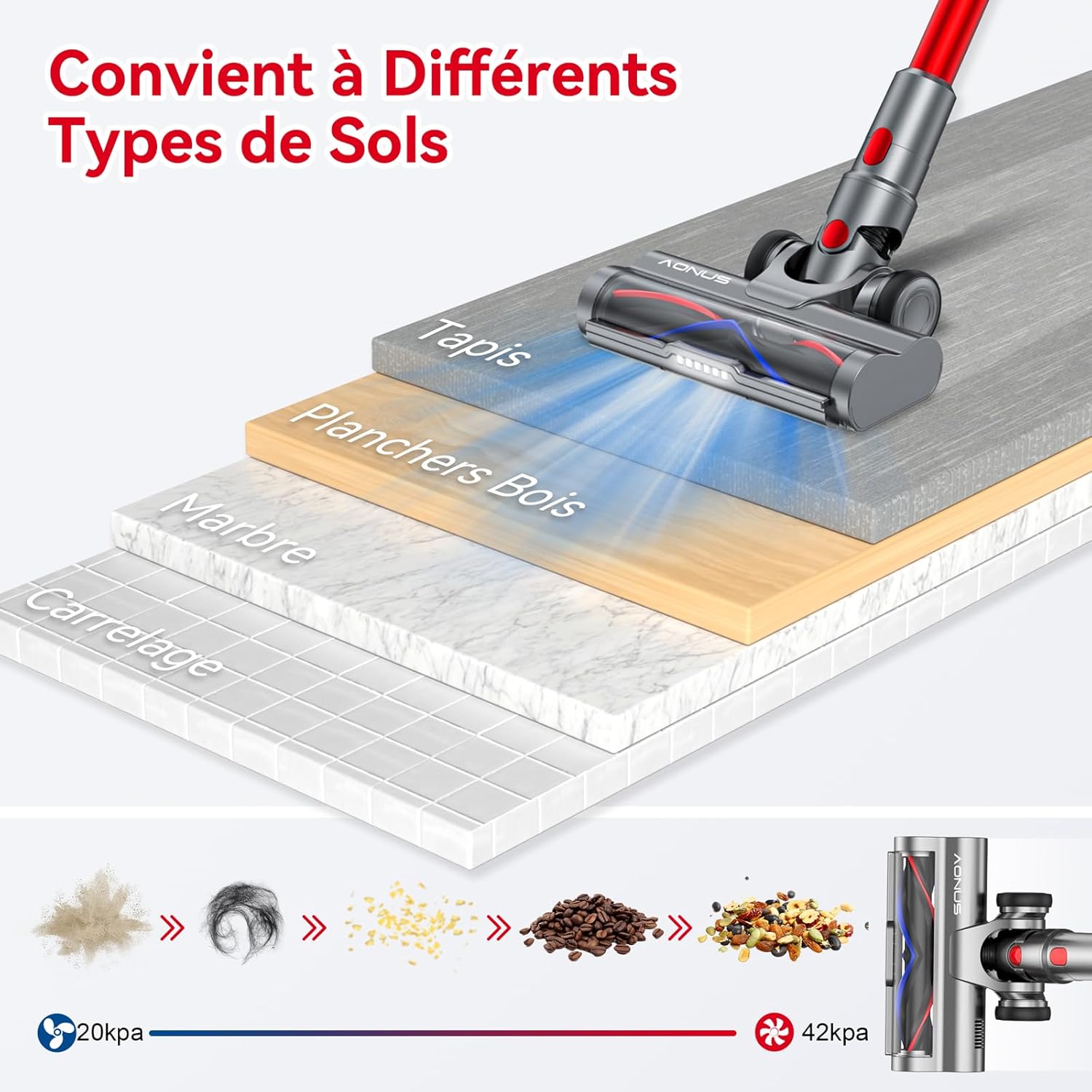
Figure 4.2.2: The vacuum is effective on various floor types including carpet, wood, marble, and tile.

Figure 4.2.3: The vacuum comes with multiple functional accessories for different cleaning scenarios.
5. నిర్వహణ
Regular maintenance ensures optimal performance and extends the lifespan of your Aonus A9 Pro vacuum cleaner.
5.1. చెత్తబుట్టను ఖాళీ చేయడం
Empty the dustbin after each use or when the MAX line is reached.
- ప్రధాన యూనిట్ను చెత్త డబ్బాపై పట్టుకోండి.
- Press the dustbin release button (usually marked "PUSH" or with a trash can icon) to open the bottom flap and release debris.
- Close the flap securely after emptying.

Figure 5.1: One-click dust removal for quick and easy emptying.
5.2. క్లీనింగ్ ఫిల్టర్లు
The Aonus A9 Pro features a 6-level filtration system, including washable HEPA and metal filters. Clean filters regularly (e.g., monthly, depending on usage) to maintain suction power and prevent secondary pollution.
- Twist and pull to remove the dustbin and filter assembly from the main unit.
- Separate the HEPA filter, metal filter, and foam filter.
- నీరు స్పష్టంగా వచ్చే వరకు అన్ని ఉతికిన ఫిల్టర్ భాగాలను చల్లటి నీటితో శుభ్రం చేసుకోండి.
- Allow all filter components to air dry completely for at least 24 hours before reassembling and placing back into the vacuum. Do not use a dryer or direct heat.

Figure 5.2: Diagram illustrating the 6-level filtration system, including cyclonic, steel, multi-cone, foam, and HEPA filters.
5.3. Cleaning the Brush Head
Periodically check the brush head for tangled hair or debris. While designed to be anti-tangle, some accumulation may occur.
- వాక్యూమ్ను ఆపివేసి, బ్రష్ హెడ్ను వేరు చేయండి.
- Use the provided cleaning tool to cut and remove any tangled hair or fibers from the brush roller.
- Ensure the roller spins freely before reattaching.
6. ట్రబుల్షూటింగ్
సాధారణ సమస్యలు మరియు వాటి పరిష్కారాల కోసం క్రింది పట్టికను చూడండి.
| సమస్య | సాధ్యమైన కారణం | పరిష్కారం |
|---|---|---|
| వాక్యూమ్ ఆన్ అవ్వదు. | బ్యాటరీ ఖాళీ అయింది లేదా సరిగ్గా ఇన్స్టాల్ చేయబడలేదు. | Charge the battery fully. Ensure the battery pack is securely clicked into place. |
| తక్కువ చూషణ శక్తి. | Dustbin is full, filters are clogged, or there's a blockage. | Empty the dustbin. Clean all filters thoroughly. Check the extension tube and brush head for blockages. |
| Brush head stops spinning. | Hair or debris tangled in the brush roller, or a blockage in the brush head. | Turn off the vacuum and remove any tangled hair or debris from the brush roller. Clear any blockages in the brush head assembly. |
| తక్కువ బ్యాటరీ రన్టైమ్. | Operating in High Suction mode frequently, or battery degradation. | Use Automatic or Low Suction mode for longer runtime. Ensure battery is fully charged before use. If battery life significantly decreases over time, consider battery replacement. |
7. స్పెసిఫికేషన్లు
| ఫీచర్ | స్పెసిఫికేషన్ |
|---|---|
| బ్రాండ్ | Aonus |
| మోడల్ సంఖ్య | A9 ప్రో |
| రంగు | ఎరుపు |
| ఉత్పత్తి కొలతలు (L x W x H) | 12.7 x 7.62 x 12.7 సెం.మీ |
| వస్తువు బరువు | 2.8 కిలోలు |
| డస్ట్బిన్ కెపాసిటీ | 1 లీటర్లు |
| శక్తి | 500 వాట్స్ |
| గరిష్ట చూషణ | 33000పా |
| మెటీరియల్ | అల్యూమినియం, ప్లాస్టిక్ |
| రన్టైమ్ | 60 నిమిషాల వరకు |
| శబ్దం స్థాయి | 60 డిబి |
| ప్రత్యేక లక్షణాలు | Washable Filter, HEPA, Portable, Cordless, Bagless, Foldable Design, LED Display, Automatic Dust Detection |
| ఫిల్టర్ రకం | కార్ట్రిడ్జ్ (HEPA) |
| సిఫార్సు చేసిన ఉపయోగాలు | Car, Pet Hair, Floors |
8. వారంటీ మరియు మద్దతు
8.1. వారంటీ సమాచారం
The Aonus A9 Pro Cordless Stick Vacuum Cleaner typically comes with a 2-year manufacturer's warranty. Please refer to the warranty card included in your product packaging for specific terms and conditions. Keep your proof of purchase for warranty claims.
8.2. కస్టమర్ మద్దతు
For any questions, technical assistance, or warranty claims, please contact Aonus customer support through the retailer where you purchased the product or visit the official Aonus webసంప్రదింపు వివరాల కోసం సైట్.


