పరిచయం
This manual provides detailed instructions for the setup, operation, and maintenance of your PATPET P Collar 910 Replacement Remote. Please read this manual thoroughly before use to ensure proper functionality and safety.
ఉత్పత్తి ముగిసిందిview
The PATPET P Collar 910 Replacement Remote is designed to control compatible PATPET P Collar 910 receiver collars. It features a durable design, multiple training modes, and a long-range capability.
చేర్చబడిన భాగాలు:
- PATPET P Collar 910 Replacement Remote
- Charging Cable (dual port for remote and collar)
- కాంటాక్ట్ పాయింట్లు (చిన్న మరియు పొడవైన)
- టెస్ట్ లైట్ టూల్
- Wrist/Neck Strap Clip
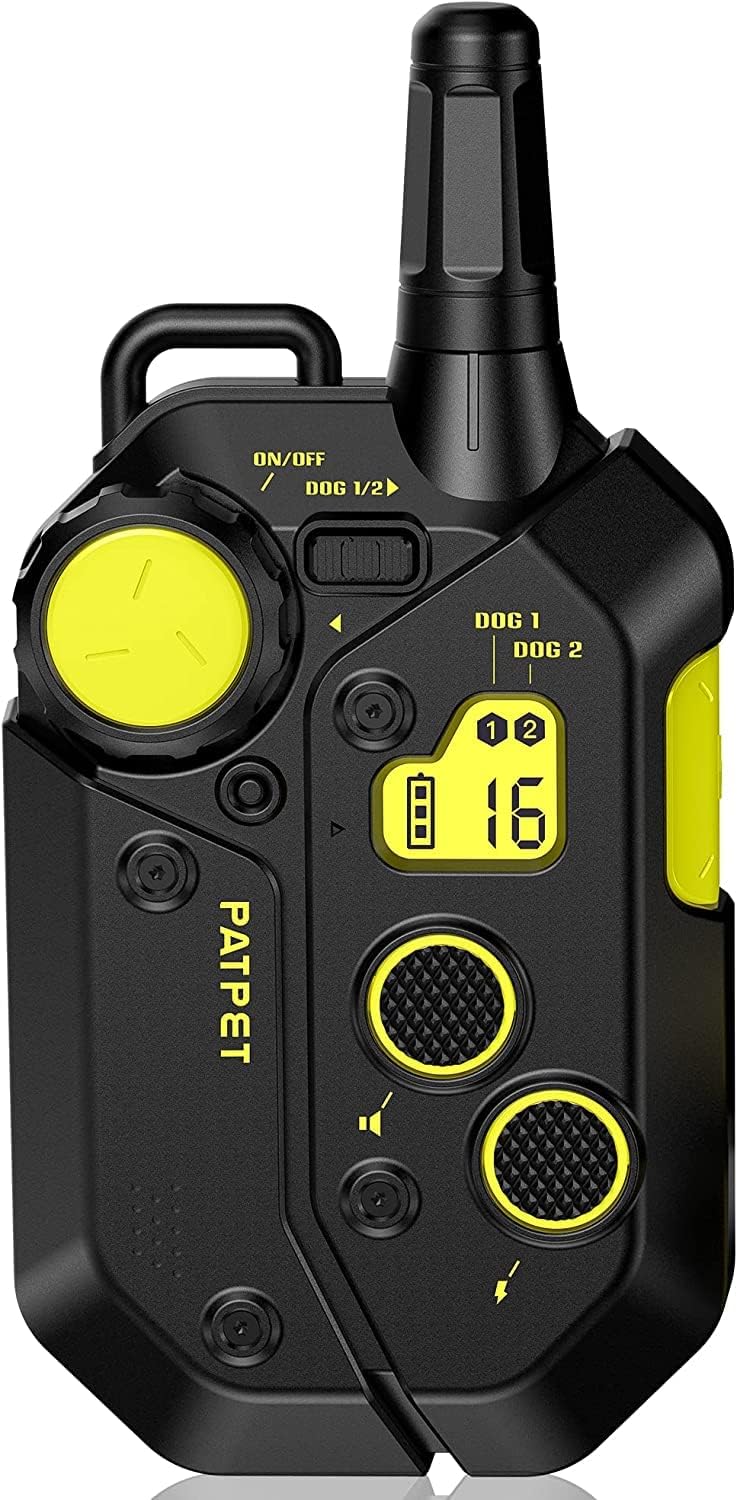
Figure 1: PATPET P Collar 910 Replacement Remote.
The remote control features an ergonomic design with clearly labeled buttons for various functions. The receiver collar is designed for comfort and durability, with an adjustable strap.

మూర్తి 2: వివరంగా view of the remote control buttons and their functions. The large yellow dial adjusts stimulation levels, the yellow button on the side is for vibration, and the smaller yellow button is for sound.
The remote includes a large rotary dial for adjusting stimulation levels, dedicated buttons for vibration and sound, and a channel select switch for controlling multiple collars.

Figure 3: A dog wearing the PATPET P Collar 910, demonstrating the effective 3/4 mile remote range.
The collar is made from a durable TPU rubber, designed to resist chewing. It is adjustable to fit various dog sizes, from 15-150 lbs with a 10"-30" adjustable belt. Excess strap material can be trimmed for a custom fit.
సెటప్ సూచనలు
1. పరికరాలను ఛార్జ్ చేయడం:
Before first use, fully charge both the remote and the receiver collar. The included charging cable features two ports, allowing simultaneous charging of both devices. A full charge typically takes 2 hours.
- Connect the dual charging cable to a USB power adapter (a power brick is included).
- Plug one end into the charging port on the remote (located at the bottom).
- Plug the other end into the charging port on the receiver collar (located on the back).
- సూచిక లైట్లు ఛార్జింగ్ స్థితిని చూపుతాయి.

Figure 4: Remote and collar connected to the dual charging cable.
2. Attaching Contact Points (for Static Stimulation):
If you intend to use the static stimulation feature, attach the appropriate length contact points to the receiver collar. Choose the length that ensures good skin contact through your dog's fur.
- Select the desired contact point length (short or long).
- Screw the contact points into the designated holes on the underside of the receiver collar.
- Ensure they are securely fastened.
3. పవర్ చేయడం ఆన్/ఆఫ్:
- రిమోట్: Press and hold the ON/OFF button (usually the large yellow button) until the screen illuminates.
- స్వీకర్త కాలర్: Press and hold the power button on the back of the collar until you feel a slight vibration and the green LED flashes every 4 seconds, indicating it is active.
- To power off, repeat the process for each device.
4. Pairing the Remote and Receiver (if necessary):
The remote and receiver are typically pre-paired. If re-pairing is needed or you are adding an additional receiver:
- Ensure the remote is on and select the desired dog channel (Dog 1 or Dog 2).
- Turn off the receiver collar you wish to pair.
- Press and hold the power button on the receiver collar for 5 seconds until the indicator light flashes rapidly.
- While the receiver light is flashing, simultaneously press both the "Beep" button and the "Vibration" button on the remote.
- రిసీవర్ లైట్ మెరుస్తూ ఆగిపోతుంది మరియు దృఢంగా ఉంటుంది, ఇది విజయవంతమైన జతను సూచిస్తుంది.
ఆపరేటింగ్ సూచనలు
1. Selecting Training Modes:
The PATPET P Collar 910 offers three training modes: Sound (Beep), Vibration, and Static Stimulation.
- ధ్వని (బీప్): Press the dedicated "Beep" button on the remote.
- కంపనం: Press the dedicated "Vibration" button on the remote.
- స్టాటిక్ స్టిమ్యులేషన్: Adjust the stimulation level using the rotary dial, then press the "Static Stimulation" button.
2. Adjusting Static Stimulation Levels:
The remote offers 16 levels of static stimulation. It is recommended to start at the lowest level (Level 1) and gradually increase it until your dog responds without showing signs of distress. The current level is displayed on the remote's screen.
- Rotate the large yellow dial on the remote to increase or decrease the static stimulation level.
- Observe your dog's reaction to find the appropriate level for effective training.
3. Remote Range:
The remote control has an effective range of up to 3/4 mile (approximately 3000 feet) in open areas, allowing for flexible training environments.
నిర్వహణ
- శుభ్రపరచడం: Regularly wipe down the remote and collar with a damp cloth. Ensure all charging ports are dry before charging.
- బ్యాటరీ లైఫ్: The devices feature a long battery life, with the collar offering up to 11 days of standby time on a full charge.
- నిల్వ: Store the remote and collar in a cool, dry place when not in use.
ట్రబుల్షూటింగ్
| సమస్య | సాధ్యమైన కారణం | పరిష్కారం |
|---|---|---|
| కాలర్ రిమోట్కు స్పందించడం లేదు. | Low battery, not powered on, or not paired. | Charge both devices. Ensure both are powered on. Re-pair the remote and receiver as per "Setup Instructions". |
| Static stimulation not effective. | Contact points not making proper skin contact, or stimulation level too low. | Ensure contact points are appropriate length and have good skin contact. Increase stimulation level gradually. |
| Remote screen is blank. | Remote is off or battery is low. | Press the ON/OFF button to power on. Charge the remote. |
స్పెసిఫికేషన్లు
- మోడల్ సంఖ్య: e1015534-598a-4ae6-bb00-9f8f76e362fa
- బ్రాండ్: PATPET
- అనుకూల పరికరాలు: PATPET P Collar 910
- రిమోట్ రేంజ్: Up to 0.75 Mile (approximately 3000 feet)
- బ్యాటరీ రకం: 1 లిథియం అయాన్ బ్యాటరీ అవసరం (చేర్చబడింది)
- ఛార్జింగ్ సమయం: పూర్తి ఛార్జ్ కోసం సుమారు 2 గంటలు
- Standby Time (Collar): 11 రోజుల వరకు
- ఛానెల్ల సంఖ్య: 2
- Static Stimulation Levels: 1-16
- ప్రత్యేక ఫీచర్: పునర్వినియోగపరచదగినది
- నీటి నిరోధక స్థాయి: వాటర్ రెసిస్టెంట్ కాదు
- వస్తువు బరువు: 4.2 ఔన్సులు
- ప్యాకేజీ కొలతలు: 6.61 x 2.72 x 1.93 అంగుళాలు
- తయారీదారు: షెన్జెన్ పాట్పేట్ టెక్నాలజీ కో, లిమిటెడ్
వారంటీ మరియు మద్దతు
PATPET products typically come with a 1-year full warranty covering manufacturing defects. For warranty claims, technical support, or further assistance, please refer to the contact information provided with your original product packaging or visit the official PATPET webసైట్.
Always ensure to follow all safety guidelines and product instructions for the well-being of your pet.


