1. పరిచయం మరియు ఓవర్view
The GROWATT Shine Link S is a plug-and-play RF monitoring kit designed to connect your Growatt SPH (single-phase) or SPA inverters to the internet. This allows for convenient monitoring via the ShinePhone application or the Growatt Shine server portal.
This manual provides comprehensive instructions for the installation, operation, and maintenance of your Shine Link S kit, ensuring optimal performance and reliable data monitoring.
ముఖ్య లక్షణాలు:
- Cable-free, easy installation
- Automatic IP addressing, plug and play functionality
- Communication distance up to 120 meters (RF)
- గరిష్టంగా 8 పరికరాలకు మద్దతు ఇస్తుంది
- Built-in memory for up to one month of data storage
- Online monitoring and maintenance capabilities

Figure 1.1: GROWATT ShineLanBox and Shine RF S USB key. This image displays the main components of the GROWATT Shine Link S kit: the ShineLanBox and the Shine RF S USB key, which are used for RF communication and internet connectivity.
2. సెటప్ మరియు ఇన్స్టాలేషన్
2.1 కిట్ను అన్ప్యాక్ చేయడం
Before beginning the installation, ensure all components are present and undamaged. Refer to the list below and the accompanying diagram for verification.

Figure 2.1: Unpacking the GROWATT ShineLink kit. This section of the quick installation guide illustrates the components included in the package, such as the ShineLanBox, ShineRFStick, power adapter, fixing screws, wall plastic posts, and user manual.
ప్యాకేజీ విషయాలు:
- ShineLanBox (1 unit)
- ShineRFStick (1 unit)
- Power adapter (1 unit)
- Fixing screws (4 units)
- Wall plastic posts (2 units)
- యూజర్ మాన్యువల్ (1 యూనిట్)
2.2 ఎలక్ట్రికల్ కనెక్షన్
2.2.1 ShineRFStick Electrical Connection
- Remove the waterproof plate from the RS-232 port of your inverter.
- For Inverters with RS-232 Port Type A: Turn on pin 1 of the DIP switch, then plug the Growatt ShineRFStick directly into the RS-232 port and secure it with the screws.
- For Inverters with RS-232 Port Type B: Plug the rubber plug into the waterproof cushion of the Growatt ShineRFStick, then connect the ShineRFStick to the inverter via the RS-232 port and secure it.
- Power on the inverter. Observe the blue LED on the ShineRFStick. If the LED is solid on and then begins to flash, it indicates a successful connection. If not, recheck the installation.
ShineRFStick LED Status:
- సాలిడ్ ఆన్: Device is initializing.
- Flashing Fast (every 0.2s): RS232 port communication.
- Flashing Slow (every 1s): Device found on RS232 port.
- Flashing (change every 1s): Network communication normal.
2.2.2 ShineLanBox Electrical Connection
- Connect the RJ45 interface of the ShineLanBox to your internet router using an Ethernet cable.
- Plug in the power adapter to power on the ShineLanBox.
- After powering on, the Power LED and Network LED will illuminate. The ShineLanBox will then begin searching for the RF device (ShineRFStick).
- If the Network LED is flashing, it indicates successful connection to the server. If the Device LED is flashing, it means devices are connected. If multiple RF devices are present, press the key on the ShineLanBox; the Device LED will flash, indicating the number of connected devices.
ShineLanBox LED Indicators:
- పవర్ LED: విద్యుత్ కనెక్షన్ని సూచిస్తుంది.
- నెట్వర్క్ LED: నెట్వర్క్ కనెక్షన్ని సూచిస్తుంది.
- Device LED: Continuous flashing indicates the number of connected devices.
- Configuration LED: Flashing during successful configuration; turns off when complete.
2.3 Using the ShinePhone Application
To monitor your system, download the "ShinePhone" application. You can find it by searching in your device's app store (Google Play for Android, App Store for iOS) or by scanning the QR code provided in the quick installation guide.
Figure 2.2: ShinePhone Application Setup. This part of the guide shows the QR code for downloading the ShinePhone app and screenshots of the app's login and registration interface.
- Launch the ShinePhone application. If you are a new user, register a new account. When prompted for the SN, enter the ShineLanBox SN (not the inverter SN).
- Log in using your registered username and password.
Note: Ensure you install the latest version of the software for optimal performance.
2.4 Appending New ShineRFStick
To add a new ShineRFStick to your system:
- Short press the button on both the ShineRFStick and the ShineLanBox.
- If successful, the configuration LED on the ShineLanBox will flash, and the blue LED on the ShineRFStick will flash slowly.
Note: Pressing the button on the ShineLanBox for more than 3 seconds until all four LEDs flash will clear the configuration information.
కమ్యూనికేషన్ దూరం: The maximum linear distance between the ShineLanBox and ShineRFStick is 120m in open space. This distance reduces to 20m if there is one wall between them, and further reduces if there are two walls.
3. సిస్టమ్ ఆపరేటింగ్
3.1 Growatt Monitoring Solutions Overview
Growatt offers various monitoring solutions to cater to different PV plant sizes and environments. The Shine Link S is part of this comprehensive ecosystem.

Figure 3.1: Growatt Monitoring Solutions. This image provides an overview of Growatt's various monitoring solutions, including WLAN-based options like ShineWiFi-S and ShineWiFi-X, GPRS/4G solutions such as Shine4G-X, and LAN-based solutions like ShineLan-X. It illustrates how these devices connect to inverters and the internet for data monitoring.
The Shine Link S utilizes RF (Radio Frequency) communication, offering a robust and wireless connection between the ShineRFStick (connected to the inverter) and the ShineLanBox (connected to your router via Ethernet). This setup is ideal for small to medium-sized plants with up to 8 inverters, providing excellent coverage and anti-interference capabilities compared to standard WiFi.
3.2 Inverter Compatibility
The Shine Link S is specifically designed for Growatt SPH (single-phase) and SPA inverters. Refer to the compatibility chart for a detailed overview of Growatt inverters and their compatible monitoring solutions.
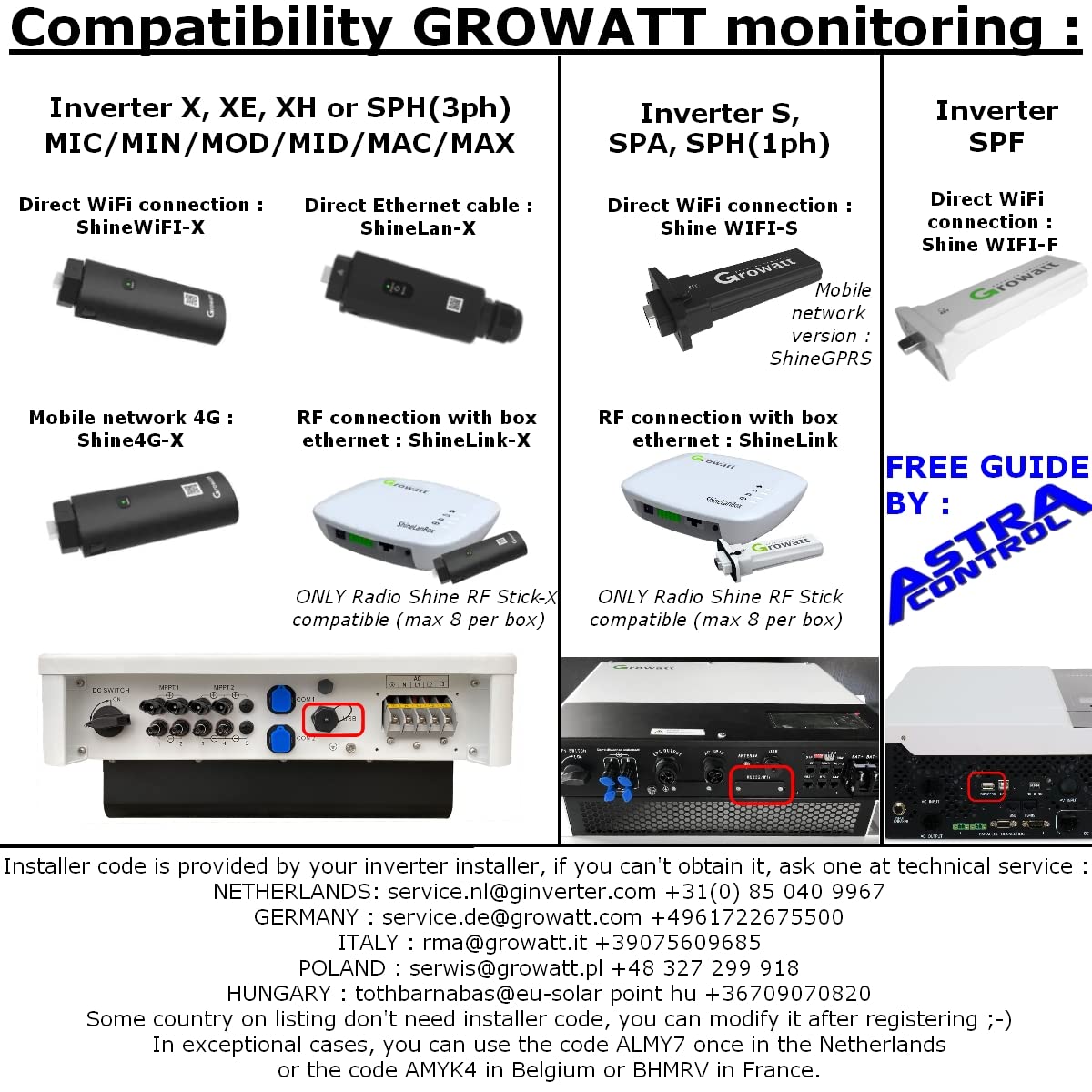
Figure 3.2: GROWATT Inverter Monitoring Compatibility. This chart illustrates the compatibility of various GROWATT inverters (X, XE, XH, SPH, SPA, SPF) with different monitoring solutions like ShineWiFi-X, ShineLan-X, Shine4G-X, ShineWiFi-S, ShineLink, and ShineWiFi-F.
4. ట్రబుల్షూటింగ్ మరియు మద్దతు
4.1 సాధారణ సమస్యలు మరియు పరిష్కారాలు
- No Data on App: Check the LED indicators on both the ShineRFStick and ShineLanBox. Ensure all cables are securely connected and the router has internet access. Refer to Section 2.2 for LED status interpretations.
- కనెక్షన్ సమస్యలు: Verify the communication distance between the ShineLanBox and ShineRFStick. Walls and obstructions can significantly reduce range. Try repositioning devices if possible.
- App Login Problems: Ensure you are using the ShineLanBox SN for registration, not the inverter SN. Double-check your username and password.
4.2 Installer Codes and Technical Support
An installer code may be required for certain configurations. This code is typically provided by your inverter installer. If you do not have one, you can request it from Growatt's technical service in your region.
In exceptional cases where an installer code is not strictly required or if you encounter blocking issues, specific codes can be used:
- నెదర్లాండ్స్: ALMY7
- బెల్జియం: AMYK4
- ఫ్రాన్స్: BHMRV
సాంకేతిక సేవా పరిచయాలు:
- నెదర్లాండ్స్: service.nl@ginverter.com | +31(0) 85 040 9967
- జర్మనీ: service.de@growatt.com | +4961722675500
- ఇటలీ: rma@growatt.it | +39075609685
- పోలాండ్: serwis@growatt.pl | +48 327 299 918
- HUNGARY: tothbarnabas@eu-solar.hu | +36709070820
5. స్పెసిఫికేషన్లు
Detailed technical specifications for the GROWATT Shine Link S:

Figure 5.1: Growatt ShineLink Datasheet. This image presents a detailed datasheet with specifications such as communication interface, power consumption, dimensions, weight, mounting options, IP rating, operating temperature, and warranty information.
| వర్గం | స్పెసిఫికేషన్ |
|---|---|
| కమ్యూనికేషన్ ఇంటర్ఫేస్ | అవును |
| Max. RF Distance (no walls) | 120 మీ.ల వరకు |
| Max. RF Distance (with one wall) | 20 మీ |
| విద్యుత్ వినియోగం (స్టాండ్బై) | <2W |
| విద్యుత్ వినియోగం (పీక్) | <5W |
| AC Power Supply Input Voltage | 100V-250V |
| AC Power Supply Input Frequency | 50/60Hz |
| కొలతలు (L x W x H) | 105x85x26mm |
| బరువు | <1 కిలోలు |
| మౌంటు ఐచ్ఛికాలు | వాల్-మౌంటెడ్ |
| రక్షణ డిగ్రీ | IP30 |
| మొత్తం ప్రదర్శన | LED |
| పరిసర ఉష్ణోగ్రత పరిధి | -20 నుండి 65 °C |
| తేమ | 0-95% (కన్డెన్సింగ్) |
| Programmable Dry Contact | ఐచ్ఛికం |
| గ్రాఫికల్ యూజర్ ఇంటర్ఫేస్ | Android/iOS APP |
| Remote Firmware Upgrades | అవును |
| Max. Number of Devices to Monitor | 8 |
6. వారంటీ సమాచారం
The GROWATT Shine Link S comes with a 1 సంవత్సరాల వారంటీ from the date of purchase. Please retain your proof of purchase for warranty claims. For detailed warranty terms and conditions, please contact Growatt customer service or visit their official webసైట్.
7. సంప్రదింపు సమాచారం
For further assistance, technical inquiries, or support, please contact Growatt New Energy Technology Co., Ltd:
- Webసైట్: www.ginverter.com
- ఇమెయిల్: info@ginverter.com
You can also find more information and support on their social media channels.


