1. పరిచయం
This manual provides essential information for the proper use and maintenance of your FLASHFORGE Chameleon PLA Color Shift Filament. Designed for FDM 3D printers, this 1.75mm filament offers dynamic color-changing effects and reliable printing performance.

Image 1.1: FLASHFORGE Chameleon Nebula Purple PLA filament spool with a printed boat model, showcasing the color shift effect.
ముఖ్య లక్షణాలు:
- Toughness PLA Filament: Optimized for ease of use, printing quality, and minimal shrinkage, suitable for functional projects.
- Clog-Free & Bubble-Free: Manufactured to ensure seamless and steady printing, thoroughly dried and vacuum-sealed with desiccant.
- చిక్కు లేకుండా: Automatic winding with manual detection reduces tangles and line breakage.
- High Printing Performance: Designed for detailed printing with consistent color, dimensional accuracy (+/- 0.02mm), and resistance to warping, jamming, or layer delamination.
2. సెటప్ మరియు తయారీ
Proper preparation of the filament and printer is crucial for successful 3D prints.
2.1 అన్ప్యాకింగ్ మరియు తనిఖీ
Carefully remove the filament spool from its packaging. Inspect the spool for any visible damage. The filament should be tightly wound and free from kinks or breaks. The package includes a desiccant bag to absorb moisture; ensure it is present and the vacuum seal is intact upon opening.
2.2 Filament Drying (Recommended)
Although FLASHFORGE filament is thoroughly dried before packaging, environmental humidity can affect its performance over time. For optimal results, especially if the filament has been exposed to air for an extended period, consider drying it in a filament dryer for at least 24 hours prior to use. This helps prevent issues such as bubbling, stringing, and poor layer adhesion.
2.3 ఫిలమెంట్ను లోడ్ చేస్తోంది
- Ensure your 3D printer is powered on and the hotend is preheated to the recommended PLA temperature (refer to Section 3.1).
- Carefully feed the filament end into the extruder's intake hole.
- Push the filament through until it is gripped by the extruder gears.
- Continue feeding until molten filament extrudes from the nozzle, indicating a clear path.
Image 2.1: A 3D printer nozzle extruding filament, demonstrating the 'Easy to Print' characteristic.
3 ఆపరేటింగ్ పారామితులు
Optimal printing parameters are essential for achieving high-quality prints with Chameleon PLA filament. These settings are general recommendations and may require fine-tuning based on your specific 3D printer model and environmental conditions.
3.1 Recommended Print Settings
| పరామితి | సిఫార్సు చేయబడిన పరిధి |
|---|---|
| ఫిలమెంట్ వ్యాసం | 1.75mm (Dimensional Tolerance +/- 0.02mm) |
| Printing Temperature (Nozzle) | 190-220°C |
| హాట్బెడ్ ఉష్ణోగ్రత | 25-60°C |
| ప్రింటింగ్ స్పీడ్ | 40-200mm/s |
| Nozzle Dimension | ≥0.2మి.మీ |
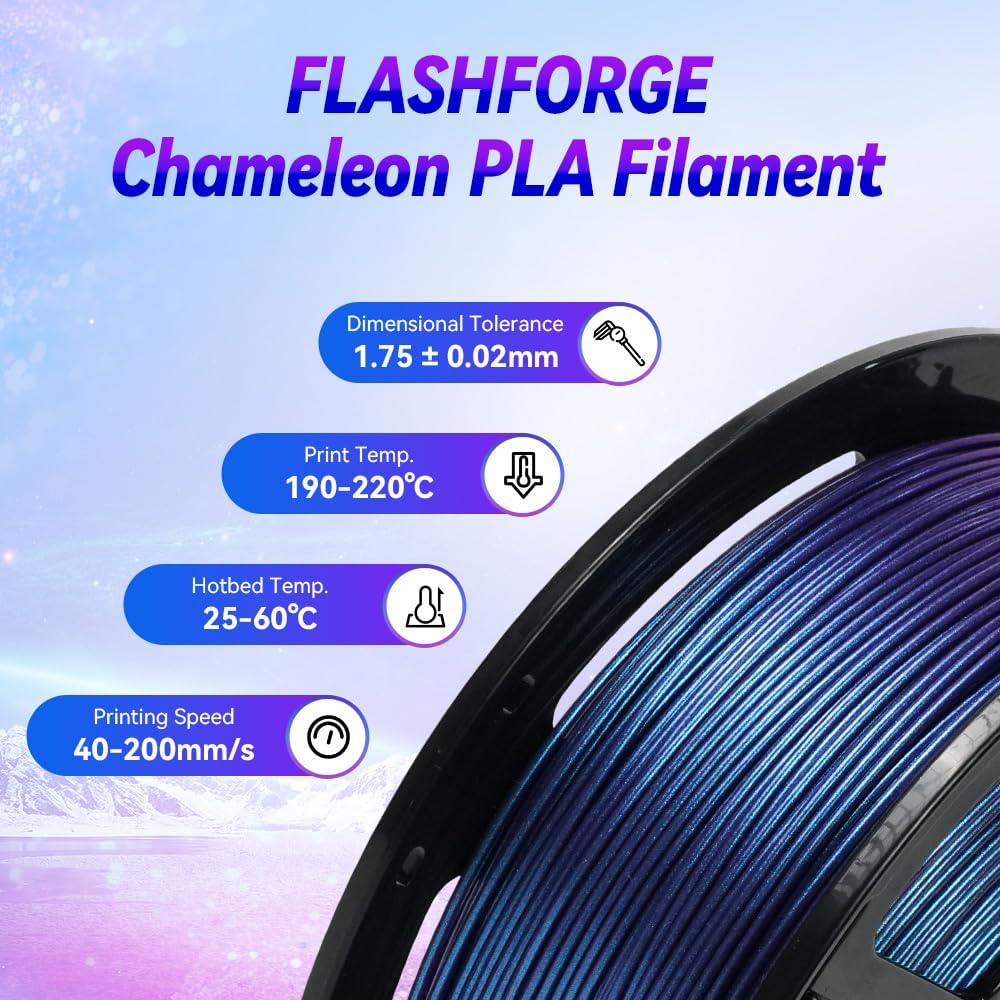
Image 3.1: Recommended printing parameters for FLASHFORGE Chameleon PLA filament.
3.2 Achieving Dynamic Color Effects
The Chameleon PLA filament shifts color based on light and viewing angles. To best showcase this effect, consider printing models with varied surfaces, curves, and angles. Experiment with different lighting conditions to observe the full spectrum of color changes.

Image 3.2: A 3D printed bear demonstrating the dynamic color-changing effects of the Chameleon PLA filament.
4. నిర్వహణ మరియు నిల్వ
Proper maintenance and storage of your filament will ensure its longevity and consistent print quality.
4.1 ఫిలమెంట్ నిల్వ
PLA filament is hygroscopic, meaning it absorbs moisture from the air. To prevent moisture absorption, which can lead to print quality issues (e.g., bubbles, stringing, weak layers), always store the filament in a cool, dry place. After each use, place the spool back into its original vacuum-sealed bag with the desiccant, or use an airtight container.
4.2 Spool Handling
Handle the spool carefully to prevent the filament from unwinding or tangling. Ensure the filament end is secured to the spool when not in use to avoid knots and snags during printing.
5. సాధారణ సమస్యలను పరిష్కరించడం
Here are some common issues encountered during 3D printing with PLA filament and potential solutions.
5.1 బెడ్ అథెషన్ సరిగా లేకపోవడం
- పరిష్కారం: Ensure the print bed is clean and free of oils or dust. Adjust the hotbed temperature within the recommended range (25-60°C). Calibrate the Z-offset to ensure the nozzle is at the correct distance from the bed. Consider using an adhesive (e.g., glue stick, hairspray) if issues persist.
5.2 అడ్డుపడటం లేదా తక్కువగా బయటకు తీయడం
- పరిష్కారం: Verify the nozzle temperature is within the recommended range (190-220°C). Check for any blockages in the nozzle or hotend. Ensure the filament is not tangled on the spool. Dry the filament if moisture absorption is suspected.
5.3 స్ట్రింగింగ్ లేదా ఊజింగ్
- పరిష్కారం: Increase retraction distance and speed in your slicer settings. Lower the nozzle temperature slightly (within the recommended range). Ensure the filament is dry.
5.4 వార్పింగ్
- పరిష్కారం: Increase hotbed temperature (within the recommended range). Ensure the print bed is level. Use a brim or raft in your slicer settings. Print in an enclosed environment to minimize drafts.
6. స్పెసిఫికేషన్లు
Detailed technical specifications for FLASHFORGE Chameleon PLA Filament.
| స్పెసిఫికేషన్ | విలువ |
|---|---|
| బ్రాండ్ | ఫ్లాష్ఫోర్జ్ |
| మోడల్ సంఖ్య | FF-Pro |
| మెటీరియల్ రకం | పాలీలాక్టిక్ ఆమ్లం (PLA) |
| రంగు | Chameleon Nebula Purple |
| ఫిలమెంట్ వ్యాసం | 1.75 మిల్లీమీటర్లు |
| డైమెన్షనల్ ఖచ్చితత్వం | +/- 0.02మి.మీ |
| వస్తువు బరువు | 1 కిలోగ్రాము (2.2 పౌండ్లు) |
| Recommended Print Temp | 190-220°C |
| Recommended Hotbed Temp | 25-60°C |
| సిఫార్సు చేయబడిన ముద్రణ వేగం | 40-200mm/s |
| మొదటి తేదీ అందుబాటులో ఉంది | ఫిబ్రవరి 21, 2023 |
7. వారంటీ మరియు మద్దతు
FLASHFORGE is committed to providing high-quality products and customer satisfaction.
7.1 వారంటీ సమాచారం
All FLASHFORGE 3D printer filaments come with a two-month warranty from the date of purchase. Additionally, a 30-day money-back guarantee is offered if you are not satisfied with the product.
7.2 కస్టమర్ మద్దతు
For any questions regarding product issues, technical assistance, or warranty claims, please contact our 24-hour online customer service. We are dedicated to providing prompt and helpful support.
For further information and support, please visit the official FLASHFORGE webసైట్ లేదా మీ రిటైలర్ను సంప్రదించండి.


