1. ఉత్పత్తి ముగిసిందిview
The Kamon K1 wired earbuds are designed for audio playback and communication across various devices. They feature an in-ear design for sound isolation and include an in-line remote with an integrated microphone for convenient control.

Image 1.1: A user wearing Kamon K1 earbuds, demonstrating the product in use for audio listening.
ముఖ్య లక్షణాలు:
- అంతర్నిర్మిత మైక్రోఫోన్: హ్యాండ్స్-ఫ్రీ కాలింగ్ను ప్రారంభిస్తుంది.
- Multi-functional In-line Remote: Controls calls and music playback.
- ఎర్గోనామిక్ ఇన్-ఇయర్ డిజైన్: Provides a secure fit and sound isolation.
- అధిక విశ్వసనీయత ధ్వని: Delivers clear audio with defined bass, mid-range, and treble.
- విస్తృత అనుకూలత: Connects to devices with a standard 3.5mm headphone jack.
- చిక్కులు లేని కేబుల్: Designed to resist tangling for ease of use and storage.
2. సెటప్ మరియు కనెక్షన్
The Kamon K1 earbuds utilize a standard 3.5mm audio jack for connection. No additional software or drivers are required for basic functionality.
ఇయర్బడ్లను కనెక్ట్ చేస్తోంది:
- Locate the 3.5mm audio port on your device (e.g., smartphone, tablet, laptop, MP3 player).
- Insert the 3.5mm jack of the Kamon K1 earbuds firmly into the device's audio port.
- Ensure the connection is secure. If experiencing sound issues, gently rotate the plug within the port to establish full contact.
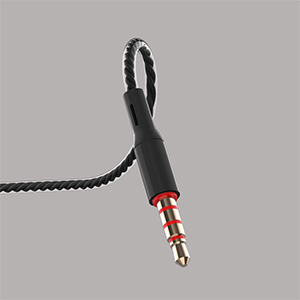
Image 2.1: A close-up of the 3.5mm audio jack, illustrating the connection interface.

Image 2.2: The 3.5mm audio jack of the Kamon K1 earbuds, shown with icons of compatible devices including PCs, Macbooks, iPads, iPhones, Android smartphones, and iPods.
3. ఆపరేటింగ్ సూచనలు
The in-line remote control allows for easy management of calls and music playback without needing to access your connected device directly.
In-line Remote Control Functions:
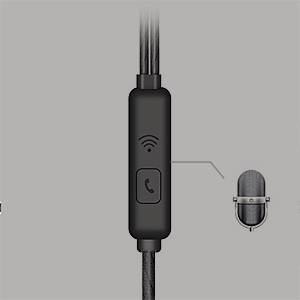
Image 3.1: A detailed image of the in-line remote control for Kamon K1 earbuds, featuring the multi-function button and microphone.
- సమాధానం/ముగింపు కాల్: బటన్ను ఒకసారి నొక్కండి.
- కాల్ తిరస్కరించు: బటన్ను నొక్కి పట్టుకోండి.
- సంగీతాన్ని ప్లే/పాజ్ చేయండి: బటన్ను ఒకసారి నొక్కండి.
- Next Music Track: బటన్ను రెండుసార్లు నొక్కండి.
- Previous Music Track: బటన్ను మూడుసార్లు నొక్కండి.
- Activate Voice Assistant (e.g., Siri): Press and hold the button (functionality may vary by device).
Video 3.1: Official product video demonstrating the features and usage of Kamon K1 wired earbuds, including design, sound quality, and in-line control functions.
4. నిర్వహణ మరియు సంరక్షణ
Proper care helps extend the lifespan and maintain the performance of your Kamon K1 earbuds.
- Handling the Cord: Avoid pulling the earbud cord directly. Always hold the earphone plug part and the earbud housing when disconnecting from devices or removing from ears.
- శుభ్రపరచడం: Regularly clean the ear tips and earbud housing with a soft, dry cloth. Ensure no moisture enters the speaker components.
- నిల్వ: Store earbuds in a clean, dry place. The tangle-free cable design assists in neat storage.
- రక్షణ: The outer layer of the cable is designed for protection against external shocks. However, avoid excessive force or sharp objects.
5. ట్రబుల్షూటింగ్
If you encounter issues with your Kamon K1 earbuds, refer to the following common solutions:
- No Sound or Sound from One Side:
- 3.5mm జాక్ పరికరం యొక్క ఆడియో పోర్ట్లోకి పూర్తిగా చొప్పించబడిందని నిర్ధారించుకోండి.
- Gently rotate the plug within the port to ensure proper contact.
- పరికర-నిర్దిష్ట సమస్యను తోసిపుచ్చడానికి ఇయర్బడ్లను మరొక పరికరంతో పరీక్షించండి.
- మీ పరికరం వాల్యూమ్ సెట్టింగ్లను తనిఖీ చేయండి.
- మైక్రోఫోన్ పనిచేయకపోవడం:
- Ensure the earbuds are fully plugged in.
- Verify that your device's microphone input is set to the connected earbuds.
- మరొక అప్లికేషన్ లేదా పరికరంతో మైక్రోఫోన్ను పరీక్షించండి.
- రిమోట్ కంట్రోల్ స్పందించడం లేదు:
- Confirm the earbuds are securely connected.
- కొన్ని పాత పరికరాలు లేదా నిర్దిష్ట ఆపరేటింగ్ సిస్టమ్లు రిమోట్ ఫంక్షన్లతో పరిమిత అనుకూలతను కలిగి ఉండవచ్చు.
- Poor Sound Quality (Static, Distortion):
- Check the audio source for quality.
- 3.5mm జాక్ శుభ్రంగా మరియు చెత్త లేకుండా ఉందని నిర్ధారించుకోండి.
- Test with another device to isolate the problem.
6. స్పెసిఫికేషన్లు
Detailed technical specifications for the Kamon K1 wired earbuds.
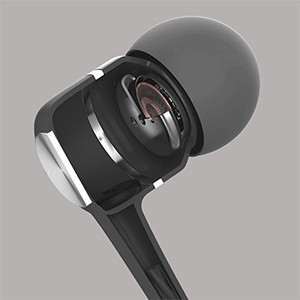
Image 6.1: A cutaway diagram of a Kamon K1 earbud, revealing its internal acoustic components for high-fidelity sound.
| ఫీచర్ | స్పెసిఫికేషన్ |
|---|---|
| మోడల్ పేరు | KE |
| కనెక్టివిటీ టెక్నాలజీ | వైర్డు |
| హెడ్ఫోన్స్ జాక్ | 3.5 మి.మీ జాక్ |
| నాయిస్ కంట్రోల్ | సౌండ్ ఐసోలేషన్ |
| నియంత్రణ రకం | Remote (Button) |
| మైక్రోఫోన్ | ఇంటిగ్రేటెడ్ |
| కేబుల్ ఫీచర్ | చిక్కు లేకుండా |
| ఇంపెడెన్స్ | 32KHz వద్ద 15 ఓం ±1% |
| పవర్ రేటింగ్ | 3మె.వా |
| గరిష్ట ఇన్పుట్ పవర్ | 5మె.వా |
| వక్రీకరణ | 3% గరిష్టం (1KHz/1mW) |
| ఫ్రీక్వెన్సీ రెస్పాన్స్ | 20~20,000Hz |
| త్రాడు పొడవు | 120సెం.మీ |
| వస్తువు బరువు | 0.07 కిలోగ్రాములు (సుమారు 2.39 ఔన్సులు) |
| మెటీరియల్ | Plastic, Rubber, Silicone, Thermoplastic Elastomer (TPE) |
| అనుకూల పరికరాలు | iPhone devices, Android smartphones, iPod, iPad, MP3 players, music speakers |
7. వారంటీ మరియు మద్దతు
For warranty information or technical support regarding your Kamon K1 earbuds, please refer to the product packaging or contact Kamon customer service directly. Details for contacting support are typically provided with your purchase or on the official Kamon webసైట్.


