1. పరిచయం
Thank you for choosing the YABER K2s 4K Smart Projector. This manual provides essential information for setting up, operating, and maintaining your projector to ensure optimal performance and longevity. The YABER K2s combines advanced projection technology with smart features, including Android TV 11, high brightness, superior audio, and intelligent auto-correction, to deliver an immersive entertainment experience.

Figure 1.1: The YABER K2s Projector showcasing its smart entertainment capabilities with popular streaming services.
2 కీ ఫీచర్లు
- Android TV 11 Built-in: Access over 9,000 apps and 1,000,000+ movies from platforms like Netflix, Prime Video, and YouTube directly through the integrated Android TV dongle.
- అద్భుతమైన చిత్ర నాణ్యత: Native 1080p resolution with 4K support and 800 ANSI Lumens brightness for vivid, detailed, and bright images.
- Superior Audio Experience: Co-created with JBL, featuring dual JBL stereo speakers with Dolby Audio support for 360° immersive sound. Can also function as a standalone Bluetooth speaker.
- Advanced Auto Screen Adaptation: Equipped with auto focus and auto keystone correction for instant, perfectly aligned, and sharp visuals.
- NFC Screencast: Effortlessly cast content from your NFC-enabled phone by simply tapping it on the projector.
- అలెక్సా వాయిస్ కంట్రోల్: Seamlessly control your projector, switch signals, open apps, and adjust volume using voice commands when paired with Alexa.
- వైఫై 6 కనెక్టివిటీ: Ensures ultra-high-speed and stable transmission for smooth streaming and gaming, 45% faster than previous generations.
- నిశ్శబ్ద ఆపరేషన్: Designed with a quiet mode, operating at less than 28dB, and an auto-sleep mode for undisturbed viewing.

చిత్రం 2.1: పైగాview of the YABER K2s projector's core features.
3. సెటప్ గైడ్
3.1 అన్ప్యాకింగ్ మరియు ప్లేస్మెంట్
Carefully remove all components from the packaging. Place the projector on a stable, flat surface or mount it on a ceiling or tripod. Ensure adequate ventilation around the projector.
3.2 పవర్ కనెక్షన్
- ప్రొజెక్టర్ యొక్క పవర్ ఇన్పుట్ పోర్ట్కు పవర్ కార్డ్ను కనెక్ట్ చేయండి.
- పవర్ కార్డ్ యొక్క మరొక చివరను పవర్ అవుట్లెట్లోకి ప్లగ్ చేయండి.
- ప్రొజెక్టర్ లేదా రిమోట్ కంట్రోల్ ఆన్ చేయడానికి దానిలోని పవర్ బటన్ను నొక్కండి.
3.3 ప్రారంభ సెటప్ మరియు నెట్వర్క్ కనెక్షన్
Upon first power-on, the projector will guide you through the initial setup process for the Android TV dongle. Follow the on-screen prompts to:
- మీ భాషను ఎంచుకోండి.
- Connect to a Wi-Fi network (WiFi 6 recommended for best performance).
- Sign in with your Google account to access the Google Play Store and its applications.
3.4 Image Adjustment (Auto Focus & Keystone)
The YABER K2s features automatic focus and keystone correction. Once the projector is powered on and positioned, it will automatically adjust the image for clarity and shape. If manual adjustment is needed, navigate to the settings menu using the remote control.

Figure 3.1: The projector's auto focus and keystone correction ensure a perfect view సెకన్లలో.
4. ఆపరేటింగ్ సూచనలు
4.1 ఆండ్రాయిడ్ టీవీని నావిగేట్ చేయడం
Use the provided remote control to navigate the Android TV interface. The home screen provides access to installed apps, recommended content, and settings. You can download additional apps from the Google Play Store.

Figure 4.1: The Android TV interface with access to 9000+ apps.
4.2 బాహ్య పరికరాలను కనెక్ట్ చేయడం
The YABER K2s supports various connectivity options:
- HDMI: Connect laptops, gaming consoles, or other HDMI-enabled devices. The projector supports HDMI ARC and HDMI CEC.
- USB: మీడియాను ప్లే చేయండి files నేరుగా USB డ్రైవ్ నుండి.
- బ్లూటూత్: మెరుగైన ఆడియో కోసం బాహ్య బ్లూటూత్ స్పీకర్లు లేదా హెడ్ఫోన్లను కనెక్ట్ చేయండి.
4.3 NFC Screencast
To use NFC Screencast, ensure your smartphone has NFC enabled. Simply tap your phone to the designated NFC area on the projector to mirror your phone's screen content.
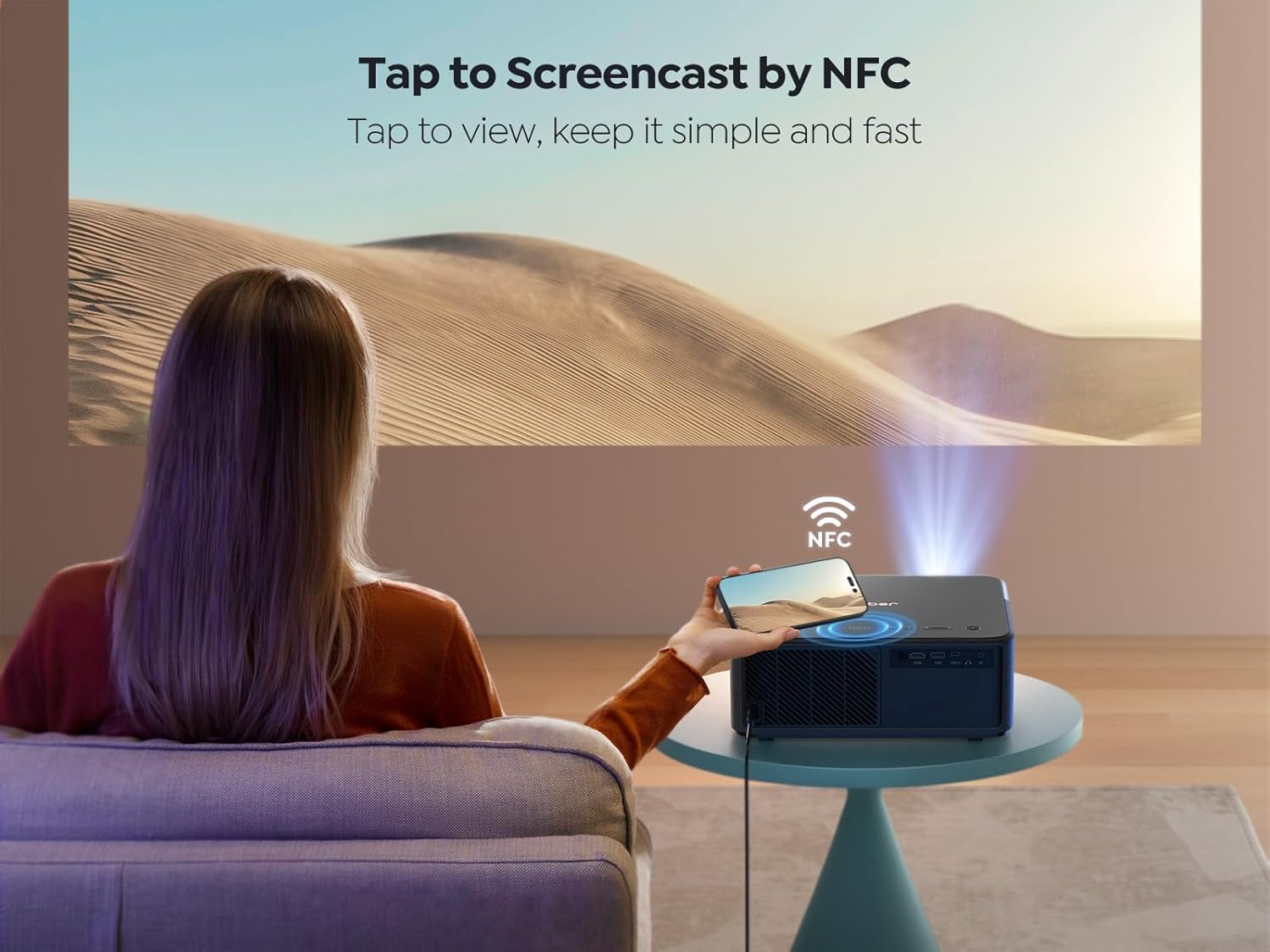
Figure 4.2: Tap to Screencast by NFC for quick content sharing.
4.4 అలెక్సా వాయిస్ కంట్రోల్
Pair your YABER K2s with an Alexa-enabled device to control it using voice commands. For example, say "Alexa, open Netflix on projector" or "Alexa, adjust volume on K2s."

Figure 4.3: Hands-free control with Alexa smart voice control.
4.5 ఆడియో సెట్టింగ్లు
The projector's dual JBL speakers with Dolby Audio provide rich sound. You can adjust audio settings through the Android TV interface. To use the projector as a standalone Bluetooth speaker, simply turn off the projection screen in the settings.

Figure 4.4: Experience 360° immersive audio with JBL and Dolby Audio.
4.6 Quiet Mode and Ambient Mode
The K2s features a quiet mode for reduced fan noise, ideal for undisturbed viewing. Additionally, an ambient mode allows you to project calming visuals like starry skies or bonfires, enhancing your environment.

Figure 4.5: Enjoy lower noise with energy saving in Quiet Mode.
5. నిర్వహణ
5.1 లెన్స్ శుభ్రపరచడం
Use a soft, lint-free cloth specifically designed for optical lenses to gently wipe the projector lens. Avoid using abrasive cleaners or excessive force, as this can scratch the lens.
5.2 సాధారణ సంరక్షణ
- Keep the projector in a clean, dust-free environment.
- వేడెక్కకుండా నిరోధించడానికి సరైన వెంటిలేషన్ ఉండేలా చూసుకోండి. గాలి వెంట్లను మూసివేయవద్దు.
- When not in use, cover the lens with the provided lens cap to protect it from dust and scratches.
- Store the projector in a cool, dry place.
6. ట్రబుల్షూటింగ్
6.1 శక్తి లేదు
- Check if the power cord is securely connected to both the projector and the power outlet.
- పవర్ అవుట్లెట్ పని చేస్తుందని నిర్ధారించుకోండి.
- Try pressing the power button on the projector itself, not just the remote.
6.2 No Image/Poor Image Quality
- లెన్స్ క్యాప్ తీసివేయబడిందని ధృవీకరించండి.
- Check the input source. Ensure the correct HDMI or USB input is selected.
- Perform auto focus and keystone correction again.
- Clean the projector lens if it appears smudged.
- Ensure the room is sufficiently dark for optimal viewing.

Figure 6.1: The 800 ANSI Lumens brightness ensures clear and vibrant images.
6.3 Wi-Fi కనెక్టివిటీ సమస్యలు
- మీ Wi-Fi రూటర్ ఆన్లో ఉందని మరియు సరిగ్గా పనిచేస్తుందని నిర్ధారించుకోండి.
- నమోదు చేసిన Wi-Fi పాస్వర్డ్ సరైనదేనా అని తనిఖీ చేయండి.
- Move the projector closer to the Wi-Fi router to improve signal strength.
- Restart both the projector and your Wi-Fi router.

Figure 6.2: WiFi 6 provides fast, stable, and smooth experience for gaming and streaming.
7. స్పెసిఫికేషన్లు
| బ్రాండ్ | యాబెర్ |
| మోడల్ | K2లు |
| ప్రదర్శన సాంకేతికత | LCD |
| స్థానిక రిజల్యూషన్ | 1920 x 1080 (1080 పి) |
| మద్దతు ఉన్న రిజల్యూషన్ | 4K |
| ప్రకాశం | 800 ANSI లుమెన్స్ |
| శబ్దం స్థాయి | < 28 dB |
| ఆపరేటింగ్ సిస్టమ్ | ఆండ్రాయిడ్ టీవీ 11 |
| ఆడియో | Dual JBL Stereo Speakers, Dolby Audio Support |
| కనెక్టివిటీ | HDMI ARC, HDMI CEC, WiFi 6 (5G+2.4G), Bluetooth, USB |
| ప్రత్యేక లక్షణాలు | Auto Focus, Auto Keystone Correction, NFC Screencast, Alexa Voice Control, Quiet Mode, Auto Sleep Mode |
| ఉత్పత్తి కొలతలు | 29 x 27 x 12.6 సెం.మీ |
| బరువు | 4.45 కిలోలు |
8. వారంటీ మరియు మద్దతు
YABER is committed to providing excellent customer service and support for your K2s projector.
8.1 వారంటీ సమాచారం
- 6-Month Money Back Guarantee: If you are not satisfied with your purchase, you may be eligible for a refund within six months.
- 3-Year Repair Warranty: The projector is covered by a three-year repair warranty from the date of purchase.
- జీవితకాల సాంకేతిక మద్దతు: YABER provides lifetime technical assistance for your product.
8.2 కస్టమర్ మద్దతు
For any questions, technical assistance, or warranty claims, please contact YABER customer support:
- ఇమెయిల్ మద్దతు: service@yaber.com (24/7 అందుబాటులో ఉంటుంది)