పరిచయం
Thank you for choosing the Cosmic Byte ARES Wireless Controller. This manual provides essential information for setting up, operating, maintaining, and troubleshooting your new controller. Please read this manual carefully before use to ensure optimal performance and longevity of your device.
The Cosmic Byte ARES Wireless Controller is designed for PC gaming, offering a reliable wireless connection, ergonomic design, and responsive controls for an enhanced gaming experience. It features pressure-sensitive analog triggers, LED-backlit buttons, and supports both Xinput and D Input modes.
సెటప్ గైడ్
1. ప్యాకేజీ విషయాలు
- Cosmic Byte ARES Wireless Controller
- USB వైర్లెస్ డాంగిల్
- USB ఛార్జింగ్ కేబుల్
- వినియోగదారు మాన్యువల్
2. కంట్రోలర్ను ఛార్జ్ చేయడం
Before initial use, fully charge the controller. Connect the supplied USB charging cable to the USB port on the top of the controller and plug the other end into a powered USB port (e.g., PC, USB wall adapter). The LED indicator on the controller will show charging status and turn off or change color when fully charged.

టాప్ view of the Cosmic Byte ARES Wireless Controller showing the USB port for charging and connection, along with the V LED and ABXY button backlighting.
3. PC కి కనెక్ట్ అవుతోంది
- Insert the USB wireless dongle into an available USB port on your PC.
- Turn on the Cosmic Byte ARES Wireless Controller by pressing the central 'Home' button.
- The controller will automatically pair with the dongle. The LED indicator on the controller will stabilize once connected.
- Your PC should automatically detect and install the necessary drivers. If not, refer to the troubleshooting section.
The controller offers a wireless range of 8-10 meters, providing flexibility during gameplay.

The Cosmic Byte ARES Wireless Controller highlighting its reliable wireless connection and 700mAh battery, providing up to 12 hours of continuous gaming.
ఆపరేటింగ్ సూచనలు
1. ప్రాథమిక నియంత్రణలు
The controller features standard gamepad buttons and joysticks:
- ఎడమ అనలాగ్ స్టిక్: కదలిక మరియు నావిగేషన్.
- కుడి అనలాగ్ స్టిక్: కెమెరా నియంత్రణ మరియు లక్ష్యం.
- డి-ప్యాడ్: దిశాత్మక ఇన్పుట్, మెనూ నావిగేషన్.
- ABXY బటన్లు: Action buttons, typically for jumping, interacting, attacking, etc. These buttons are LED-backlit.
- భుజం బటన్లు (L1/R1): Quick actions.
- ట్రిగ్గర్లు (L2/R2): Pressure-sensitive analog triggers for precise input, such as acceleration or shooting.
- START/BACK Buttons: Menu access, map, inventory, etc.
- హోమ్ బటన్: Powers on/off the controller, accesses system menus.
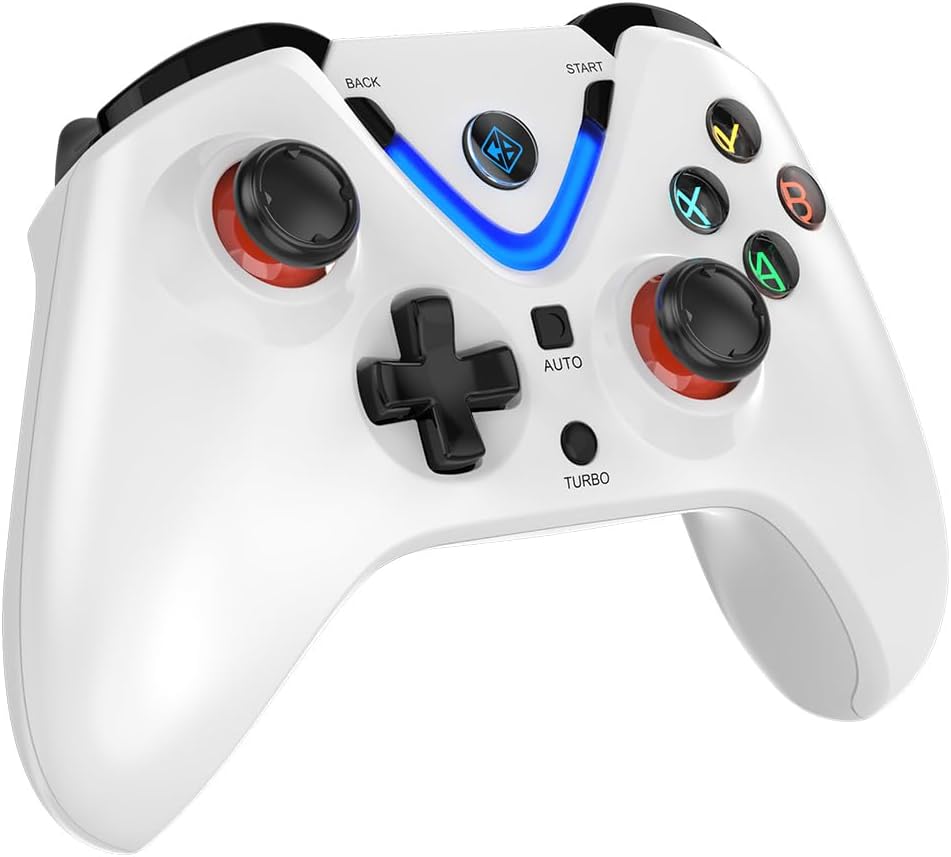
ముందు view of the Cosmic Byte ARES Wireless Controller, showcasing the button layout, joysticks, D-pad, and central LED indicator.
2. ప్రత్యేక లక్షణాలు
- Xinput and D Input Support: The controller automatically detects and supports both Xinput and D Input modes, ensuring compatibility with a wide range of PC games.
- వైబ్రేషన్ ఫీడ్బ్యాక్: Experience immersive gameplay with the built-in vibration feature, providing tactile feedback for in-game events.
- టర్బో ఫంక్షన్: The 'TURBO' button allows for rapid, repeated input of a selected action button. To activate, press and hold the 'TURBO' button, then press the desired action button (e.g., A, B, X, Y). To deactivate, repeat the process.
- ఆటో ఫంక్షన్: The 'AUTO' button enables continuous, automatic input of a selected action button without holding it down. To activate, press and hold the 'AUTO' button, then press the desired action button. To deactivate, repeat the process.
- హాల్ ఎఫెక్ట్ ట్రిగ్గర్లు: The controller is equipped with Hall Effect Triggers, providing precise and durable input for enhanced control.
- ఎర్గోనామిక్ డిజైన్: The controller features ergonomic, rubberized textured sticks for improved grip and comfort during extended gaming sessions.
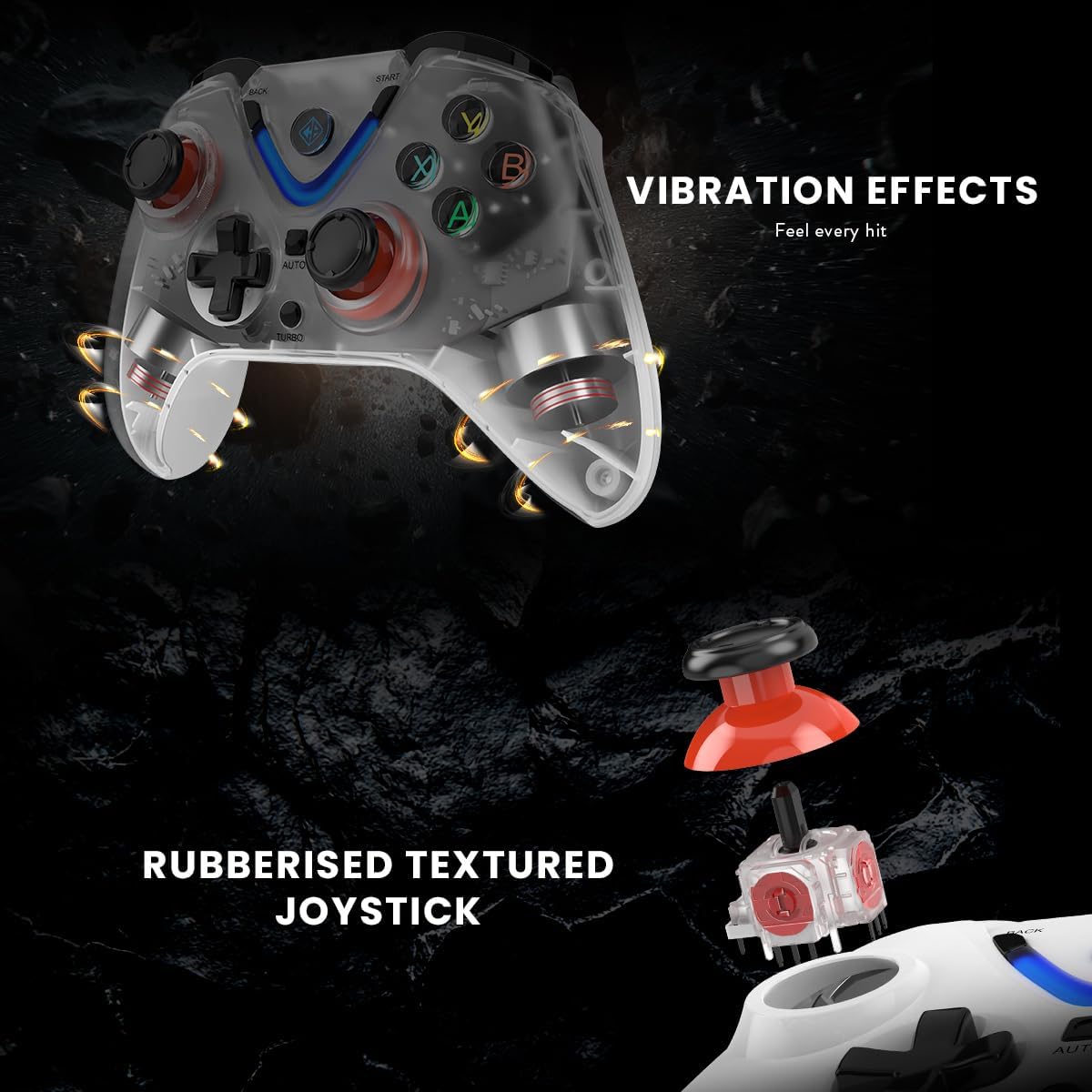
Illustration of the Cosmic Byte ARES Wireless Controller's vibration feedback feature and the design of its rubberized textured joysticks for enhanced grip.

Detail of the Cosmic Byte ARES Wireless Controller's Turbo and Auto function buttons, alongside an illustration of its Hall Effect Triggers for precise input.
నిర్వహణ
1. శుభ్రపరచడం
మీ కంట్రోలర్ను శుభ్రం చేయడానికి, మృదువైన, పొడి వస్త్రాన్ని ఉపయోగించండి. మొండి ధూళి కోసం, కొద్దిగా dampen the cloth with water. Do not use harsh chemicals, solvents, or abrasive cleaners, as these can damage the controller's surface and internal components.
2. బ్యాటరీ సంరక్షణ
- Avoid exposing the controller to extreme temperatures (hot or cold).
- Do not leave the controller uncharged for extended periods. Charge it periodically if not in use.
- Do not attempt to replace the internal battery yourself. Contact support if battery issues arise.
ట్రబుల్షూటింగ్
1. కంట్రోలర్ కనెక్ట్ కావడం లేదు
- Ensure the USB wireless dongle is securely plugged into a working USB port on your PC.
- Make sure the controller is powered on and has sufficient battery charge.
- Try plugging the dongle into a different USB port on your PC.
- Restart your PC and try connecting again.
- If the issue persists, try re-pairing the controller by pressing the reset button (if available, usually a small pinhole on the back) on the controller and then the pairing button on the dongle (if applicable).
2. Buttons/Joysticks Unresponsive
- Check if the controller is properly connected to your PC.
- Ensure the game you are playing supports gamepad input.
- Test the controller with another game or a gamepad testing tool on your PC to rule out game-specific issues.
- Restart the controller and your PC.
3. బ్యాటరీ ఛార్జ్ కావడం లేదు
- Verify that the USB charging cable is correctly connected to both the controller and a powered USB port.
- Try using a different USB charging cable or a different USB port/power adapter.
- కంట్రోలర్లోని ఛార్జింగ్ పోర్ట్ చెత్త లేకుండా ఉందని నిర్ధారించుకోండి.
స్పెసిఫికేషన్లు
| ఫీచర్ | వివరాలు |
|---|---|
| మోడల్ సంఖ్య | ARES Wireless White |
| కనెక్టివిటీ | వైర్లెస్ (USB డాంగిల్) |
| వైర్లెస్ రేంజ్ | 8-10 మీటర్లు |
| బ్యాటరీ | 1 Lithium-polymer (included), 700mAh |
| బ్యాటరీ లైఫ్ | Up to 12 hours of continuous gaming |
| అనుకూలత | PC (Xinput & D Input) |
| ఉత్పత్తి కొలతలు (L x W x H) | 6 x 10 x 4 సెం.మీ |
| బరువు | 200 గ్రాములు |
| బాహ్య పదార్థం | Plastic and paper |
| నీటి నిరోధక స్థాయి | నీటి-నిరోధకత |
| తయారీదారు | కాస్మిక్ బైట్ |
వారంటీ సమాచారం
The Cosmic Byte ARES Wireless Controller comes with a standard manufacturer's warranty. Please refer to the warranty card included in your product packaging or visit the official Cosmic Byte webవివరణాత్మక వారంటీ నిబంధనలు మరియు షరతుల కోసం సైట్. ఏవైనా వారంటీ క్లెయిమ్లకు కొనుగోలు రుజువుగా మీ కొనుగోలు రసీదును ఉంచండి.
కస్టమర్ మద్దతు
For technical assistance, troubleshooting not covered in this manual, or warranty inquiries, please contact Cosmic Byte customer support. Contact details can typically be found on the official Cosmic Byte webసైట్ లేదా ఉత్పత్తి ప్యాకేజింగ్లో.


