1. పరిచయం
The Siglent SDS1104X-U is a 100MHz Super Phosphor Digital Oscilloscope featuring 4 channels, designed for precise signal analysis and measurement. It offers a maximum sample rate of 1 GSa/s and a record length of up to 14 Mpts. Utilizing SPO (Super Phosphor Oscilloscope) technology, this device delivers excellent signal fidelity and performance, making it suitable for a wide range of electronic testing applications. Its user-friendly interface and advanced features, including a digital trigger system and 128k point FFT function, provide comprehensive waveform analysis capabilities.
2. భద్రతా సమాచారం
Please read all safety instructions carefully before operating the oscilloscope to prevent injury and avoid damage to the instrument or any connected products. Keep this manual for future reference.
- శక్తి మూలం: Connect the instrument only to the power source specified in this manual.
- గ్రౌండింగ్: విద్యుత్ షాక్ను నివారించడానికి పరికరం సరిగ్గా గ్రౌండింగ్ చేయబడిందని నిర్ధారించుకోండి.
- వెంటిలేషన్: వెంటిలేషన్ ఓపెనింగ్లను నిరోధించవద్దు. పరికరం చుట్టూ తగినంత గాలి ప్రసరణ ఉండేలా చూసుకోండి.
- పర్యావరణం: Operate the instrument in a dry, well-ventilated area, away from direct sunlight, high temperatures, and excessive dust.
- ప్రోబ్స్: Use only probes supplied or recommended by Siglent. Ensure probes are correctly compensated before use.
- నిర్వహణ: అన్ని సర్వీసింగ్లను అర్హత కలిగిన సేవా సిబ్బందికి సూచించండి. పరికరాన్ని మీరే రిపేర్ చేయడానికి ప్రయత్నించవద్దు.
3. ప్యాకేజీ విషయాలు
క్రింద జాబితా చేయబడిన అన్ని వస్తువులు మీ ప్యాకేజీలో చేర్చబడ్డాయని నిర్ధారించుకోండి. ఏవైనా వస్తువులు తప్పిపోయినా లేదా దెబ్బతిన్నా, దయచేసి మీ సరఫరాదారుని సంప్రదించండి.
- SDS1104X-U Digital Oscilloscope
- USB కేబుల్ (1)
- త్వరిత ప్రారంభ మార్గదర్శి (1)
- Passive Probes (4)
- Certification (1)
- పవర్ కార్డ్ (1)
4. ఉత్పత్తి ముగిసిందిview
4.1 ఫ్రంట్ ప్యానెల్
The front panel of the SDS1104X-U features the main display, control knobs, function buttons, and input connectors for the four channels. The intuitive layout allows for quick access to commonly used functions.

మూర్తి 4.1: ముందు view of the SDS1104X-U Oscilloscope, showing the display, control knobs, and input channels.

మూర్తి 4.2: వివరంగా view of the front panel, highlighting the vertical, horizontal, and trigger control sections.
4.2 వెనుక ప్యానెల్
The rear panel includes the power input, ventilation fan, LAN port, and other auxiliary connectors.

చిత్రం 4.3: వెనుక view of the SDS1104X-U Oscilloscope, showing the power input, LAN port, and ventilation. The serial number is visible as SDSAHBAQ4R0003.
4.3 ప్రదర్శన
The SDS1104X-U features a large 7-inch TFT-LCD display with an 800x480 resolution. It supports a 256-level intensity grading display function and a color temperature display mode for enhanced waveform visualization.
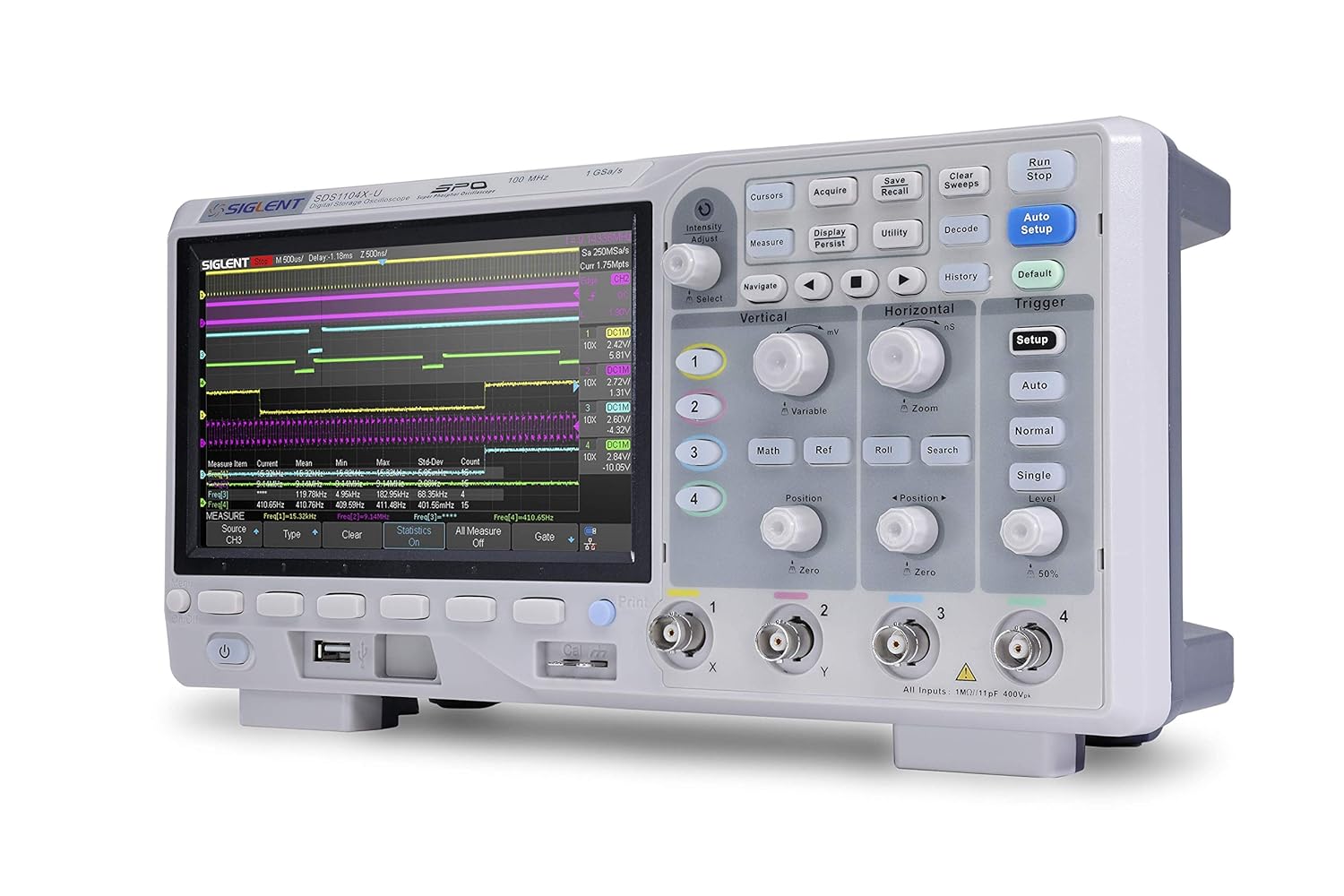
Figure 4.4: Close-up of the oscilloscope display, illustrating waveform capture and measurement readouts.
5. సెటప్
- పవర్ కనెక్షన్: అందించిన పవర్ కార్డ్ను వెనుక ప్యానెల్లోని AC ఇన్పుట్కి కనెక్ట్ చేయండి మరియు తరువాత తగిన పవర్ అవుట్లెట్కి కనెక్ట్ చేయండి.
- పవర్ ఆన్: ఓసిల్లోస్కోప్ను ఆన్ చేయడానికి ముందు ప్యానెల్లోని పవర్ బటన్ను నొక్కండి.
- ప్రోబ్ కనెక్షన్: Connect the passive probes to the desired input channels (CH1, CH2, CH3, CH4) on the front panel.
- ప్రోబ్ పరిహారం:
Before taking measurements, it is crucial to compensate the probes to ensure accurate readings. Connect the probe tip to the probe compensation output (usually a square wave signal) on the front panel and the ground clip to the ground terminal. Adjust the compensation trimmer on the probe until a flat-top square wave is displayed on the screen.
6. ఆపరేటింగ్ సూచనలు
6.1 ప్రాథమిక కొలతలు
To perform basic voltage and time measurements:
- స్వీయ సెటప్: నొక్కండి ఆటో సెటప్ button to automatically adjust the vertical, horizontal, and trigger settings for a stable waveform display.
- Vertical Controls: Use the vertical position and scale knobs for each channel to adjust the waveform's vertical position and ampలిటుడే.
- క్షితిజ సమాంతర నియంత్రణలు: Use the horizontal position and scale knobs to adjust the waveform's horizontal position and time base.
- Measure Function: నొక్కండి కొలత button to access automatic measurement parameters such as Vpp, Vmax, Vmin, Frequency, Period, etc.
6.2 అధునాతన ఫీచర్లు
- SPO Technology: The Super Phosphor Oscilloscope (SPO) technology provides a high waveform capture rate of 400,000 frames/sec (sequence mode), allowing for the capture of infrequent events.
- FFT Function: Utilize the 128k point FFT math function for high-frequency resolution when analyzing signal spectra. Access this via the గణితం మెను.
- Serial Bus Decoding: The SDS1104X-U supports serial bus triggering and decoding for various protocols including IIC, SPI, UART, CAN, and LIN. This feature is standard and can be accessed through the డీకోడ్ చేయండి మెను.
- రికార్డ్ పొడవు: With a record length of up to 14 Mpts, the oscilloscope allows for detailed analysis of long signal acquisitions. Advanced measurements can be performed on the full memory.
6.3 ప్రేరేపించడం
The innovative digital trigger system offers high sensitivity and low jitter. Common trigger types include Edge, Pulse, Video, Slope, and more. Adjust trigger settings using the dedicated ట్రిగ్గర్ section controls.
7. నిర్వహణ
- శుభ్రపరచడం: పరికరం యొక్క బాహ్య భాగాన్ని మృదువైన, d తో శుభ్రం చేయండి.amp cloth. Do not use abrasive cleaners or solvents. Ensure the instrument is powered off and unplugged before cleaning.
- నిల్వ: Store the oscilloscope in a clean, dry environment, away from extreme temperatures and humidity.
- క్రమాంకనం: కొలత ఖచ్చితత్వాన్ని నిర్వహించడానికి అర్హత కలిగిన సిబ్బందిచే క్రమం తప్పకుండా క్రమాంకనం చేయాలని సిఫార్సు చేయబడింది.
8. ట్రబుల్షూటింగ్
| సమస్య | సాధ్యమైన కారణం | పరిష్కారం |
|---|---|---|
| పవర్ ఆన్ చేసిన తర్వాత ప్రదర్శన లేదు | Power cord not connected; Power switch off; Power supply issue. | Check power cord connection; Ensure power switch is on; Verify power outlet functionality. |
| అస్థిర తరంగ రూపం | Incorrect trigger settings; Input signal too low/high; Probe compensation incorrect. | Adjust trigger level/mode; Check input signal amplitude; Perform probe compensation. |
| పెద్ద ఫ్యాన్ శబ్దం | Normal operation; Dust accumulation in fan. | Fan noise is typical for this model. Ensure ventilation is not blocked. Clean vents if necessary. |
| పేలవమైన ప్రదర్శన viewing కోణం | Display settings; Physical viewing స్థానం. | Adjust the "Gratitude" and/or "Intensity" settings in the display menu. Adjust your physical viewing position relative to the screen. |
9. స్పెసిఫికేషన్లు
| ఫీచర్ | వివరాలు |
|---|---|
| బ్యాండ్విడ్త్ | 100 MHz |
| ఛానెల్లు | 4 |
| రియల్ టైమ్ ఎస్ampలింగ్ రేటు | 1 GSa/s వరకు |
| రికార్డ్ పొడవు | 14 మెగా ప్ట్స్ వరకు |
| వేవ్ఫారమ్ క్యాప్చర్ రేట్ | 400,000 frames/sec (sequence mode) |
| ప్రదర్శించు | 7-inch TFT-LCD, 800 x 480 resolution |
| Trigger & Decode | IIC, SPI, UART, CAN, LIN (Standard) |
| FFT Function | 128 k point |
| ఉత్పత్తి కొలతలు | 12.28 x 5.22 x 5.94 అంగుళాలు |
| బరువు | 1 పౌండ్ |
| మోడల్ సంఖ్య | SDS1104X-U |
10. వారంటీ మరియు మద్దతు
Siglent Technologies is committed to providing high-quality electronic test and measurement equipment. For warranty information, technical support, or service inquiries, please refer to the official Siglent webసైట్ లేదా మీ స్థానిక పంపిణీదారుని సంప్రదించండి.
You can also visit the official Siglent store for more information and resources: Siglent Technologies Amazon Store.

Figure 10.1: An engineer utilizing a Siglent oscilloscope for testing, demonstrating typical usage.


