1. పరిచయం
Thank you for choosing the TAB Cordless Spot Cleaner H6-1. This powerful and portable device is designed for efficient spot cleaning on various surfaces, including carpets, upholstery, and car interiors. Its cordless design offers unparalleled convenience, allowing you to tackle spills and stains quickly and effectively. Please read this manual thoroughly before first use to ensure proper operation and maintenance.

Image: The TAB Cordless Spot Cleaner H6-1, showcasing దాని కాంపాక్ట్ మరియు ఎర్గోనామిక్ డిజైన్.
2. పెట్టెలో ఏముంది
మీ ప్యాకేజీలోని అన్ని వస్తువులు ఉన్నాయని నిర్ధారించుకోవడానికి దయచేసి దానిలోని విషయాలను తనిఖీ చేయండి:
- TAB Cordless Spot Cleaner H6-1 Main Unit
- Extended Hose Attachment
- Charging Cable/Adapter
- వినియోగదారు మాన్యువల్
3. సెటప్ మరియు అసెంబ్లీ
Follow these steps to prepare your spot cleaner for first use:
- బ్యాటరీని ఛార్జ్ చేయండి: Before initial use, fully charge the device. Connect the charging cable to the cleaner and plug it into a power outlet. The LED display will indicate charging status. A full charge provides approximately 20 minutes of runtime.
- క్లీన్ వాటర్ ట్యాంక్ నింపండి: Locate the clean water tank (350ml capacity). Remove it from the main unit and fill it with clean water and a suitable cleaning solution (if desired, follow solution manufacturer's instructions). Do not overfill. Reattach the tank securely.
- Attach the Extended Hose (Optional): For hard-to-reach areas or specific cleaning tasks, attach the extended hose to the designated port on the main unit. Ensure it clicks into place firmly.
- Understand the LED Display: Familiarize yourself with the LED display, which shows battery level and other indicators.

Image: The cordless spot cleaner being used, highlighting its rechargeable nature and 20-minute run time.
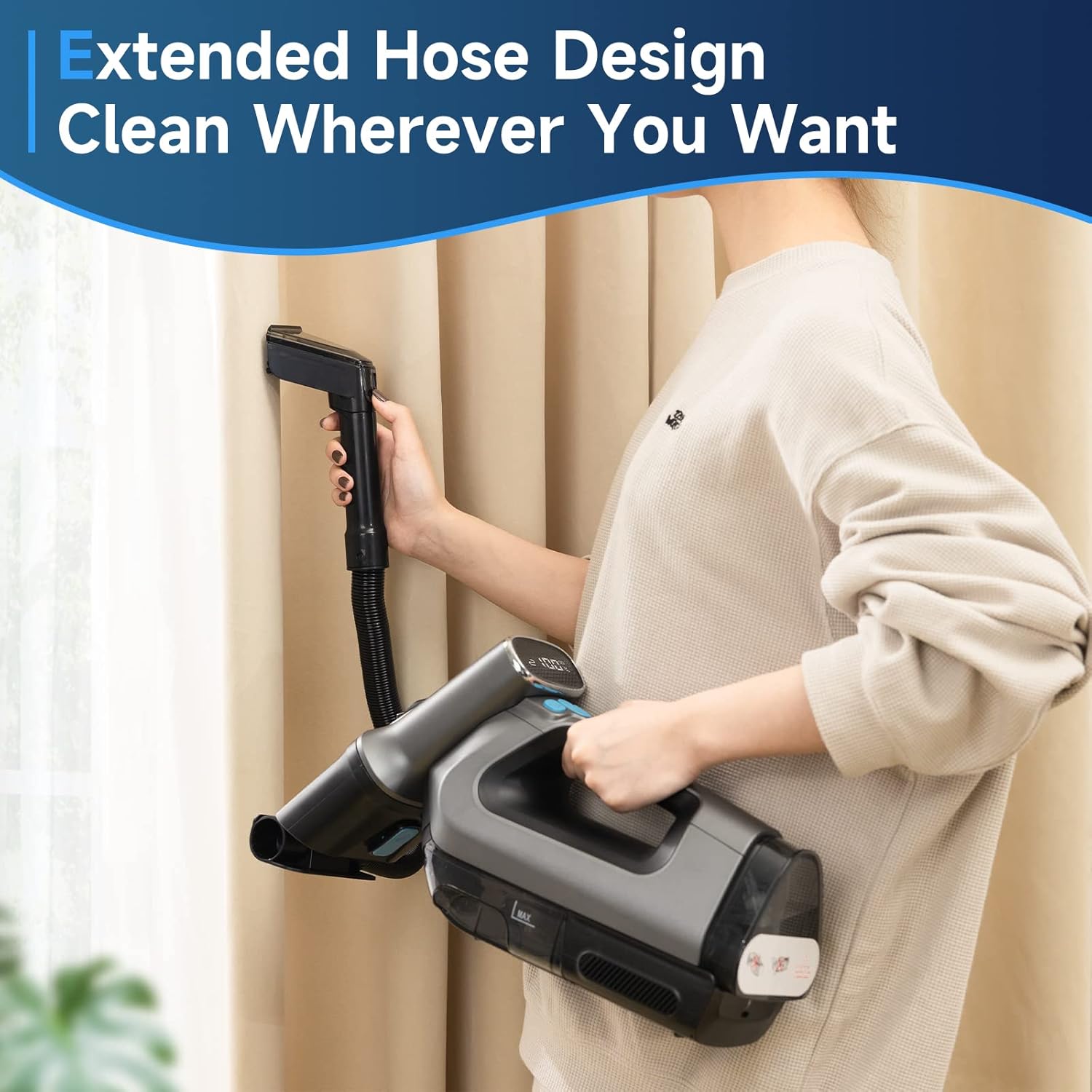
Image: A user demonstrating the extended hose design, allowing for cleaning in various locations like curtains.

Image: Close-up of the LED display on the cleaner, indicating battery percentage and controls like spray and power brush.
4. ఆపరేటింగ్ సూచనలు
Before cleaning, always test the cleaning solution on an inconspicuous area of the surface to be cleaned to ensure colorfastness.
- పవర్ ఆన్: Press the power button to turn on the cleaner. The LED display will illuminate.
- ప్రీ-ట్రీట్ (ఐచ్ఛికం): For tough stains, you may pre-treat the area with a suitable cleaning solution according to the solution's instructions.
- స్ప్రే సొల్యూషన్: Press the spray button to dispense cleaning solution onto the stained area. Allow the solution to penetrate for a few moments.
- Scrub and Suction: Move the cleaning head over the stained area, applying gentle pressure. The integrated power brush will agitate the stain, while the strong suction power will lift the dirty solution and debris into the dirty water tank.
- అవసరమైతే పునరావృతం చేయండి: For stubborn stains, repeat the spray, scrub, and suction process until the stain is removed.
- పవర్ ఆఫ్: Once cleaning is complete, press the power button to turn off the device.

Image: The spot cleaner in action on a carpet, demonstrating its strong suction power to remove liquid and debris.

Image: An illustration of the automatic power brush mechanism, designed for high-speed washing and improved cleaning.

Image: The spot cleaner effectively removing a pet stain from a carpet, illustrating its quick and efficient cleaning capability.
5. నిర్వహణ మరియు శుభ్రపరచడం
Regular maintenance ensures optimal performance and extends the life of your spot cleaner.
- ఖాళీ మరియు శుభ్రమైన మురికి నీటి ట్యాంక్: After each use, or when the dirty water tank (260ml capacity) reaches its maximum fill line, remove it from the unit and empty the contents. Rinse the tank thoroughly with clean water.
- Clean Clean Water Tank: Periodically rinse the clean water tank to prevent residue buildup.
- Clean the Cleaning Head/Brush: Remove any hair, fibers, or debris from the power brush and suction nozzle. You may use a damp యూనిట్ యొక్క వెలుపలి భాగాన్ని తుడిచివేయడానికి వస్త్రం.
- సరిగ్గా నిల్వ చేయండి: Store the cleaner in a cool, dry place away from direct sunlight and extreme temperatures. Ensure both tanks are empty and dry before storage.

Image: Diagram showing the removable dual water tank system, with separate tanks for clean water (350ml) and dirty water (260ml).
6. ట్రబుల్షూటింగ్
If you encounter issues with your TAB Cordless Spot Cleaner, refer to the following common problems and solutions:
| సమస్య | సాధ్యమైన కారణం | పరిష్కారం |
|---|---|---|
| యూనిట్ ఆన్ చేయబడలేదు | బ్యాటరీ అయిపోయింది | యూనిట్ను పూర్తిగా ఛార్జ్ చేయండి. |
| No spray/low spray | Clean water tank is empty or improperly seated | Refill clean water tank; ensure it is securely attached. |
| తక్కువ చూషణ శక్తి | Dirty water tank is full; Suction nozzle is clogged | Empty dirty water tank; Clear any blockages from the nozzle. |
| Cleaner leaves streaks | Dirty water tank is full; Cleaning head is dirty | Empty dirty water tank; Clean the cleaning head and brush. |
ఈ పరిష్కారాలను ప్రయత్నించిన తర్వాత కూడా సమస్య కొనసాగితే, దయచేసి కస్టమర్ మద్దతును సంప్రదించండి.
7. స్పెసిఫికేషన్లు
| ఫీచర్ | వివరాలు |
|---|---|
| బ్రాండ్ | TAB |
| మోడల్ పేరు | RTB-H6 (H6-1) |
| ప్రత్యేక ఫీచర్ | పవర్ బ్రష్ |
| వాల్యూమ్tage | 120 వోల్ట్లు |
| క్లీన్ వాటర్ ట్యాంక్ కెపాసిటీ | 350 మిల్లీలీటర్లు |
| డర్టీ వాటర్ ట్యాంక్ కెపాసిటీ | 260 మిల్లీలీటర్లు |
| రన్టైమ్ | 20 నిమిషాల |
| వస్తువు బరువు | 2 కిలోలు |
| అంశం కొలతలు (LxWxH) | 13 x 41.7 x 21.4 సెంటీమీటర్లు |
| చేర్చబడిన భాగాలు | విస్తరించిన గొట్టం |
8. వారంటీ మరియు మద్దతు
For warranty information and customer support, please refer to the warranty card included with your product or visit the official TAB webసైట్. ఏవైనా వారంటీ క్లెయిమ్లకు కొనుగోలు రుజువుగా మీ కొనుగోలు రసీదును ఉంచండి.
For further assistance, you may also contact the retailer where you purchased the product.


